
If you're sending the same email to your entire contact list, you’re leaving money on the table. The problem isn't the size of your list; it's the lack of a system to turn that raw data into predictable revenue. We see this all the time—a messy database that costs more to maintain than it generates.
This guide provides a practical, engineering-minded framework to fix that. We'll help you diagnose your data's health, build a system for targeted outreach, and show you how to transform your static list into a dynamic sales pipeline that works for you 24/7.
Your Database Is Your Biggest Untapped Asset
Many business owners treat their contact database like a digital filing cabinet—it’s there, but it’s not actively working for them. The real problem is rarely a lack of contacts; it's the absence of a system to leverage the data you already have.
When your contacts are just a jumble of email addresses with no structure or strategy, you can't get a return on your investment. It’s time to stop thinking of it as a "list" and start treating it as a core business system.
This guide is your blueprint. We'll show you how to diagnose what’s broken, build a clean system, and deploy targeted campaigns that actually get results. We're building a machine that nurtures leads, engages customers, and delivers a measurable return.
Shifting From a "List" to a "System"
The game changes when you move from a "mailing list" to a "customer data system." This shift in thinking is what separates businesses getting mediocre results from those generating predictable revenue with email.
When your database is properly managed, you can suddenly:
- Segment with precision: Group contacts by specific actions, like who attended a webinar versus who downloaded a whitepaper on a specific product.
- Personalize at scale: Go beyond a
[First Name]tag. Use job titles, past orders, or industry-specific interests to make your messages hyper-relevant. - Automate intelligently: Trigger campaigns based on user behavior—like an abandoned cart or a visit to a pricing page—ensuring timely communication without manual effort.
The transformation is profound: your static list becomes a dynamic sales pipeline, actively working for you 24/7. It’s the difference between shouting into a crowd and having a direct, valuable conversation with each person in it.
The importance of this channel can't be overstated. The number of email users globally is projected to hit 4.6 billion in 2025. In the U.S. alone, a staggering 99% of email users check their inbox every single day, making it one of the most reliable ways to reach your audience.
For specialized sectors like manufacturing, building that initial list is the first critical step. If you're starting from scratch, our guide on key tactics to grow your industrial email list offers practical strategies perfect for B2B operators. That foundation is essential for implementing the database strategies we'll cover here.
The Core Pillars of Database Email marketing
To build a high-performing system, you need to focus on four essential pillars. Each one builds on the last, creating a solid foundation for growth.
| Pillar | Core Objective | Key Action You Can Take |
|---|---|---|
| Data Health & Hygiene | Ensure your data is clean, accurate, and usable. | Run your list through a validation service to remove invalid or bounced emails. |
| System & Integration | Connect your data sources into a single source of truth. | Sync your CRM (like GoHighLevel) with your website forms and sales tools. |
| Segmentation & Personas | Group contacts into meaningful audiences for targeting. | Create a segment of customers who haven't purchased in the last 90 days. |
| Campaigns & Automation | Deliver the right message to the right person at the right time. | Build a 3-part welcome email series for all new subscribers. |
You can't have effective segmentation without clean data, and you can't run powerful automations without proper segmentation. Getting these fundamentals right is the key to unlocking real growth.
Conducting Your First Data Audit And Cleanup

If your database email marketing campaigns aren't delivering, the root cause is almost always stale or messy data. This isn't a small problem—it directly impacts your sender reputation and revenue.
When you send emails to invalid or outdated addresses, your bounce rates climb. Internet Service Providers (ISPs) see this as a red flag, which can land your future messages in the spam folder. Clean data isn't a "nice-to-have"; it's the foundation of every automated sequence and personalized campaign you launch.
Diagnosing Common Database Problems
Before you can fix the system, you need to diagnose the issues. What should you look for? Here are the most common problems we see:
- Duplicate Contacts: Multiple records for the same person (e.g., "john.smith@email.com" and "jsmith@email.com") create confusion and dilute your data.
- Syntax Errors: Simple typos like "jane.doe@gmal.com" or a missing "@" symbol guarantee that your email will bounce.
- Inconsistent Formats: Variations like "NY" vs. "New York" or inconsistent phone number formats make accurate segmentation impossible.
- Inactive Subscribers: Contacts who haven't opened an email in 90-180 days are dead weight, dragging down your engagement metrics and sender score.
Spotting these flaws is the first step toward turning your list into a high-value asset rather than a liability.
Key Takeaway: Data decay is relentless. Industry reports show B2B contact data erodes by over 20% per year. If you skip regular audits, your database becomes a costly weight.
Your Practical Process For Data Hygiene
Once you’ve diagnosed the problems, it's time to implement a solution. Create a standard operating procedure (SOP) for data hygiene that you run quarterly—or more often if you send high-volume campaigns.
- Back Up Your Entire List: Before you make any changes, export a full copy of your contacts from your CRM or email platform. This is your safety net.
- Run an Email Validation Check: Don't try to clean your list manually. Use a service like NeverBounce or ZeroBounce to automatically flag invalid, risky, or dormant email addresses. This gives you an immediate boost in deliverability.
- Merge Duplicates and Clean Formats: Use your CRM’s built-in tools to merge duplicate records. Standardize fields like states, countries, and job titles using spreadsheet functions to ensure your segmentation is reliable.
- Re-Engage Inactive Contacts: Isolate contacts who haven't engaged in the last 90-180 days. Send them a simple "Are you still interested?" campaign. If they don't respond, it's time to remove them from your active list.
This repeatable process turns a chaotic list into a reliable marketing tool, protecting your sender reputation and setting the stage for more advanced automation.
Designing a Practical Segmentation Strategy
Sending the same generic email to everyone is a surefire way to kill your engagement and land in the spam folder. The real power of database email marketing comes from smart segmentation. This is how you turn clean data into distinct audiences who actually want to hear from you.
The goal is to stop broadcasting and start having relevant conversations with smaller, more focused groups. The most effective segments are built not just on who people are (demographics), but on what they do (their behavior).
For a manufacturer, this could be a list of procurement managers who downloaded a specific spec sheet. For an e-commerce store, it might be customers who bought twice in the last six months but haven't been back since.
Moving Beyond Basic Lists
To build effective segments, start by asking questions that reveal intent and interest. The answers will become the building blocks for your most profitable campaigns.
Questions to ask yourself:
- Who are my best customers? Look for traits like high lifetime value, repeat purchases, or those who subscribe to your premium services.
- What actions signal someone is ready to buy? This could be visiting a pricing page, attending a webinar, or requesting a demo.
- Who is at risk of churning? Find contacts who haven't opened an email or logged into their account in the last 90 days.
- What content are they interested in? Group people based on the blog posts they read, the product categories they browse, or the services they've inquired about.
Answering these questions helps you find the low-hanging fruit and hidden opportunities right inside your database.
By translating raw data into meaningful audience segments, you ensure every email you send has a clear purpose and a much higher likelihood of converting. This isn't just theory; it's a proven system for driving revenue.
This focused approach pays off. We know that email marketing can deliver a staggering $36 for every $1 spent. But marketing emails triggered by specific user actions—the core of good segmentation—can generate 10 times more revenue than standard promotional blasts. You can find more compelling email statistics that prove just how powerful this channel is when you do it right.
Practical Segmentation Examples
So, what does this look like in practice? Once your CRM and email platform are connected, you can create simple rules that automatically move contacts into segments based on their actions. This is a core part of building smarter workflows.
To see how segmentation fits into the bigger picture, check out our guide on powerful marketing automation strategies you can implement.
Here are some practical segmentation examples to get you started:
Segmentation Ideas for Different Business Models
| Segmentation Criteria | Example for a B2B Service | Example for E-Commerce |
|---|---|---|
| Behavioral | Contacts who attended a specific webinar but did not book a follow-up call. | Customers who viewed a product three times in the last week but didn't buy. |
| Transactional | Clients on a recurring monthly retainer versus those who completed a one-off project. | Customers who have made more than three purchases in the last year. |
| Firmographic/Demographic | Decision-makers with "Manager" or "Director" in their job title at companies with 50+ employees. | Subscribers located in a specific geographic region where you're running a local promotion. |
| Engagement Level | Contacts who haven't opened an email in 90 days (for a re-engagement campaign). | Highly engaged subscribers who click on links in nearly every email. |
You don't need to build all of these at once. Start with one high-value segment, launch a targeted campaign, measure the results, and then expand. This methodical approach lets you prove the concept and build a more sophisticated system over time.
Building Your Core Automation Workflows
Once your database is clean and your segments are built, it's time to put your system to work. This is where you create an active, lead-generating machine that operates 24/7. Forget sending manual emails. We're building automated workflows that deliver the right message at exactly the right moment, triggered by your contacts' actions.
Think of these workflows as your digital sales team. They make introductions, educate prospects, and follow up with contacts who've gone quiet—all without you lifting a finger.
The process is a simple, repeatable flow: you collect clean data, sort it into smart segments, and then send targeted, automated messages.
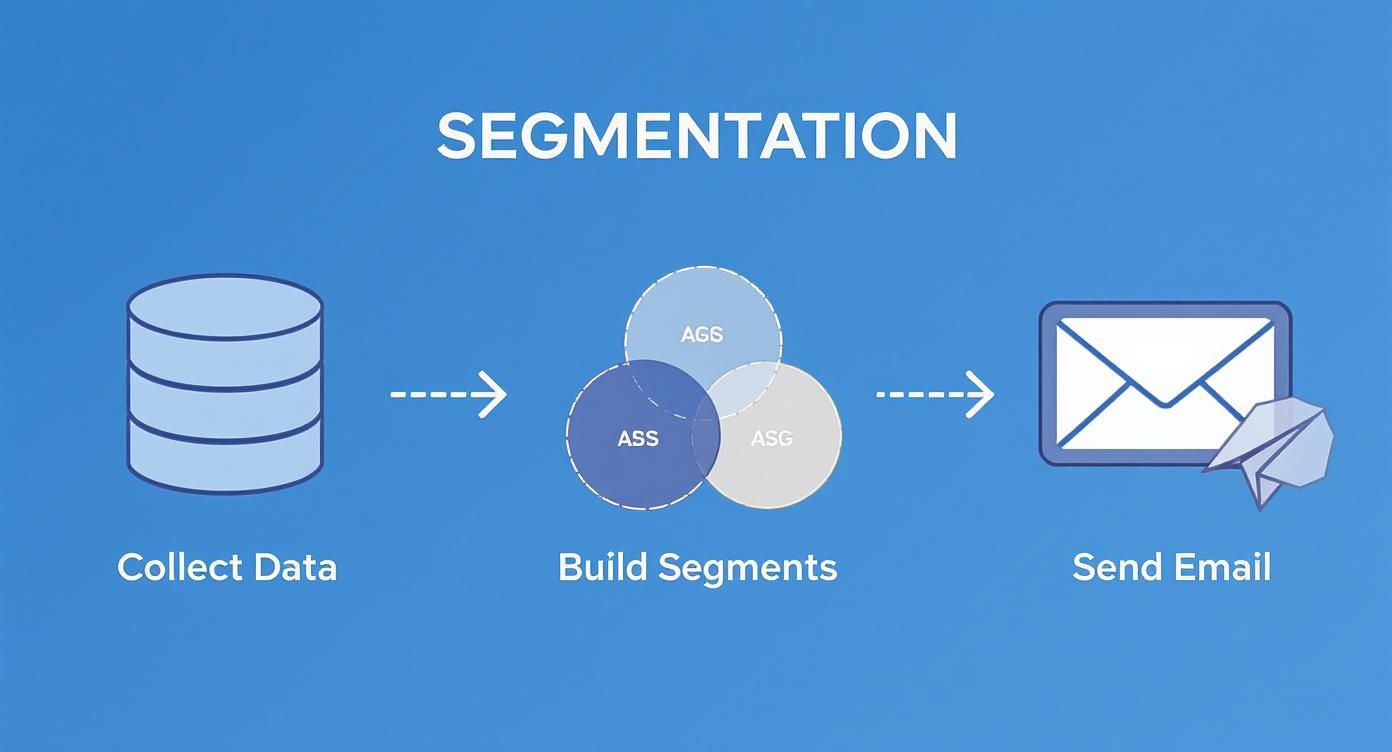
This is the engine that drives every successful automation, making sure every email feels relevant and timely.
The Essential Welcome Sequence
Your welcome sequence is your single best opportunity to make a great first impression. When someone joins your list, their engagement is at its peak. Your job is to capitalize on that interest by delivering value and setting expectations from day one.
A solid welcome series should:
- Deliver the goods: Immediately send the lead magnet or offer they signed up for.
- Introduce your brand: Briefly share what you do and what makes you different.
- Set expectations: Let them know what kind of content they can expect and how often you'll be in touch.
Our Pro Tip: Keep your welcome emails focused. The goal here is to build trust and deliver on your promise. Resist the urge to go for the hard sell right away. This is about starting a relationship, not closing a deal on day one.
Example Welcome Sequence Structure:
- Email 1 (Immediate): Deliver the resource they requested with a warm, brief welcome and a clear link.
- Email 2 (Day 2): Share your most helpful content—a cornerstone blog post, a popular case study, or a video that solves a common problem.
- Email 3 (Day 4): Introduce a soft call-to-action. Invite them to follow you on social media or reply with their biggest challenge.
The Strategic Lead Nurturing Sequence
Most new leads aren't ready to buy immediately. A lead nurturing sequence is designed to educate them, build your credibility, and guide them toward a purchase decision over time. This workflow is typically triggered when a contact shows clear interest, like downloading a buyer's guide or visiting a product page.
The key is to provide genuine value, not just a series of sales pitches. Your content should address your prospect’s pain points and position your solution as the obvious answer. For a deeper dive, our guide on B2B marketing automation covers more advanced workflows.
Sample Lead Nurturing Workflow for a Manufacturer:
- Trigger: A contact downloads your "Buyer's Guide to Industrial Machinery."
- Email 1 (Day 1): Follow up with a related case study showing how a similar company achieved a significant ROI with your equipment.
- Email 2 (Day 3): Send a short video demonstrating a key feature mentioned in the guide.
- Email 3 (Day 5): Address common concerns with an FAQ or a blog post on "5 Questions to Ask Before Buying."
- Email 4 (Day 7): Now, present a direct call-to-action. Offer a no-obligation consultation or a personalized demo.
The Proactive Re-engagement Campaign
It's normal for some subscribers to lose interest over time. A re-engagement (or "win-back") campaign is your final attempt to reconnect before cleaning them from your list. This is critical for maintaining good data hygiene and protecting your sender reputation.
The goal isn't just to get an open or a click; it's to get a clear signal. Do they want to stay, or is it time to part ways?
A Simple Two-Step Re-engagement Flow:
- Email 1: Send a simple email with a subject line like, "Are we still a good fit?" or "Is this goodbye?" Ask if they still want to hear from you and provide a clear link to stay subscribed.
- Email 2 (7 days later, if no response): This is the final notice. Let them know you respect their inbox and will be removing them, but give them one last chance to opt back in.
If they don't engage, you can remove them with confidence. This keeps your database full of people who want to be there, making your database email marketing far more effective.
Measuring What Matters to Optimize Your System
An email system you can't measure is just a guessing game—and a quick way to waste time and money. To get real results, you have to diagnose what’s working and what isn’t.
It’s easy to get lost in data, but most of it is noise. We're going to focus on the key performance indicators (KPIs) that actually tell you about the health of your database email marketing system and point you toward real growth.
Core Metrics That Tell the Real Story
Think of your email metrics as the dashboard of a machine. Each number tells you something specific about its performance.
These are the essential KPIs you should be tracking:
- Open Rate: The percentage of people who opened your email. This tells you if your subject lines are compelling and if your sender reputation is solid. A consistently low open rate often means you’re landing in the spam folder.
- Click-Through Rate (CTR): The percentage of recipients who clicked a link in your email. CTR is the real test of your content—it shows whether your message and call-to-action (CTA) were strong enough to prompt action.
- Conversion Rate: The percentage of people who completed your goal after clicking, like filling out a quote request or making a purchase. This metric connects your email efforts directly to business goals.
- Unsubscribe Rate: The percentage of people who opt out. A sudden spike is a massive red flag that your content isn't relevant or your segmentation is off.
A high open rate with a low CTR is a classic problem. It usually means your subject line wrote a check that your email content couldn't cash. That’s your signal to rethink the offer or the CTA itself.
A Simple Framework for A/B Testing
To truly optimize your system, you have to test. A/B testing is a straightforward way to compare two versions of one element to see which one performs better. The key is to isolate a single variable to see how it impacts behavior.
Before You Test, Ask Yourself These Questions:
- What’s my goal? Am I trying to get more opens, more clicks, or more form submissions? Define success before you start.
- What one thing will I test? Don't change everything at once. Test one variable: the subject line, the CTA button color, the body copy, or the offer.
- How will I measure the winner? Decide on the metric (e.g., higher open rate) and ensure your sample size is large enough for a reliable result.
For example, test a benefit-driven subject line ("Unlock 15% More Efficiency") against a curiosity-driven one ("The One Mistake We Found in Your Production Line"). Send version A to 10% of your list and version B to another 10%. Whichever one gets more opens is the winner, and you send that version to the remaining 80%. This simple process provides data, not guesses, to improve future campaigns.
Creating Your Performance Dashboard
You don’t need a fancy analytics platform to get started. A simple spreadsheet is enough to act as your performance dashboard, letting you track trends over time.
For every campaign, log your core KPIs. Reviewing this weekly or monthly will help you spot patterns. Is your CTR trending down? Maybe it’s time to test new offers. Does a specific type of content—like a case study—always drive conversions? Double down on it. This is how you turn numbers into actionable intelligence.
By 2025, the daily volume of emails sent is projected to hit a staggering 376.4 billion messages. With that much noise, data-driven optimization isn't just a good idea—it's the only way your message will get through. You can discover more insights about email growth on designmodo.com and see why measuring what matters is non-negotiable.
Common Questions About Database Email Marketing
When you shift from generic email blasts to a structured database email marketing system, questions are bound to come up. Here are direct answers to the most common queries we hear.
What Is The Difference Between Database Email Marketing And Regular Email Marketing
Regular email marketing is often a one-size-fits-all "email blast"—a single message sent to an entire list. It’s like shouting with a megaphone in a crowded room; some people might hear you, but most won't be interested.
In contrast, database email marketing uses the rich data in your contact profiles—job titles, purchase history, website activity—to send highly relevant, personalized, and automated messages to specific groups. It’s the difference between a broadcast and a conversation. The result is higher engagement, more conversions, and campaigns that actually drive revenue.
How Often Should I Clean My Email Database
Data cleaning is an ongoing process, not a one-time task. We recommend a full audit of your database at least every six months using a validation service. This helps you catch typos, inactive addresses, and spam traps before they harm your sender reputation.
For day-to-day hygiene, ensure your system automatically removes hard bounces and processes unsubscribes in real-time. If you're adding hundreds of new contacts each week, a quick audit every three months is a smart move to keep your deliverability high.
Pro Tip: Don’t wait for your open rates to plummet before you act. Proactive cleaning is one of the highest-ROI moves in email marketing—it ensures every send lands in a keen inbox.
Can I Start Database Email Marketing With A Small List
Absolutely. In fact, starting small is often an advantage. A list of 200 engaged contacts will always outperform a cold list of 20,000. A smaller list gives you the space to test, learn, and refine your system without a huge budget.
Use your small list as a testing ground to:
- Understand your subscribers’ needs and challenges.
- Refine your messaging based on direct feedback.
- Perfect your core automations, like your welcome and nurture sequences.
By building a proven system with a small, engaged audience, you'll be ready to scale effectively as your list grows.
What Tools Do I Need To Get Started
You don't need a complex tech stack to get started. Focus on the strategy first, then get these essential tools in place:
- A CRM System: This is your single source of truth for all contact data. Platforms like GoHighLevel are great for this.
- An Email Service Provider (ESP): This is the engine that sends emails and runs automations. Many CRMs include an ESP, but standalone tools like ActiveCampaign are also powerful options.
- An Email Validation Tool: For periodic deep cleans, use a service like NeverBounce or ZeroBounce.
Ensure your CRM and ESP are properly integrated. Starting with a simple, scalable setup will save you major headaches down the road.
Ready to stop guessing and start building a marketing system that delivers predictable results? The team at Machine Marketing specializes in diagnosing and solving these exact challenges. We'll help you build a clean, structured database and deploy the automated campaigns that turn your contacts into customers.
Book a discovery call with Karl today to get a clear roadmap for your business growth.
