
Is your Google Business Profile (GBP) collecting dust? If you’re like most business owners, you set it up once and forgot about it. But that "set it and forget it" approach means you're leaving customers—and money—on the table. Your profile isn't just a listing; it's the most powerful local marketing tool you have.
This guide is built to diagnose the common gaps that hold businesses back from ranking locally. We’ll give you a clear, step-by-step system to turn your profile into a machine that generates calls, clicks, and real foot traffic. No fluff, just actionable steps you can take today.
Your Google Business Profile Is a Customer Magnet
We see this all the time—businesses treat their profile like a digital phonebook entry. The reality is, it’s often the very first impression a potential customer has of your business. It's your digital storefront, and it needs to be optimized to attract, engage, and convert.
So, what’s the right way to approach this? We use a simple system.
The GBP Optimization System
Think of optimizing your profile as a three-part system: Attract, Engage, and Convert. Each part builds on the last, creating a powerful flywheel effect that boosts your local visibility and drives real business results.
- Attract: This is where it starts. It’s about making your profile visible and compelling enough to catch the eye of someone searching on Google. A complete and accurate profile is the foundation for attracting the right audience.
- Engage: Once you have their attention, you have to hold it. This means providing useful information, showcasing your work through photos, and building trust with social proof like reviews and Q&A.
- Convert: The final step is turning that interest into action. An optimized profile makes it incredibly easy for customers to call you, visit your website, or get directions to your location with just one click.
This flow shows exactly how each stage works together to turn a casual searcher into a paying customer.
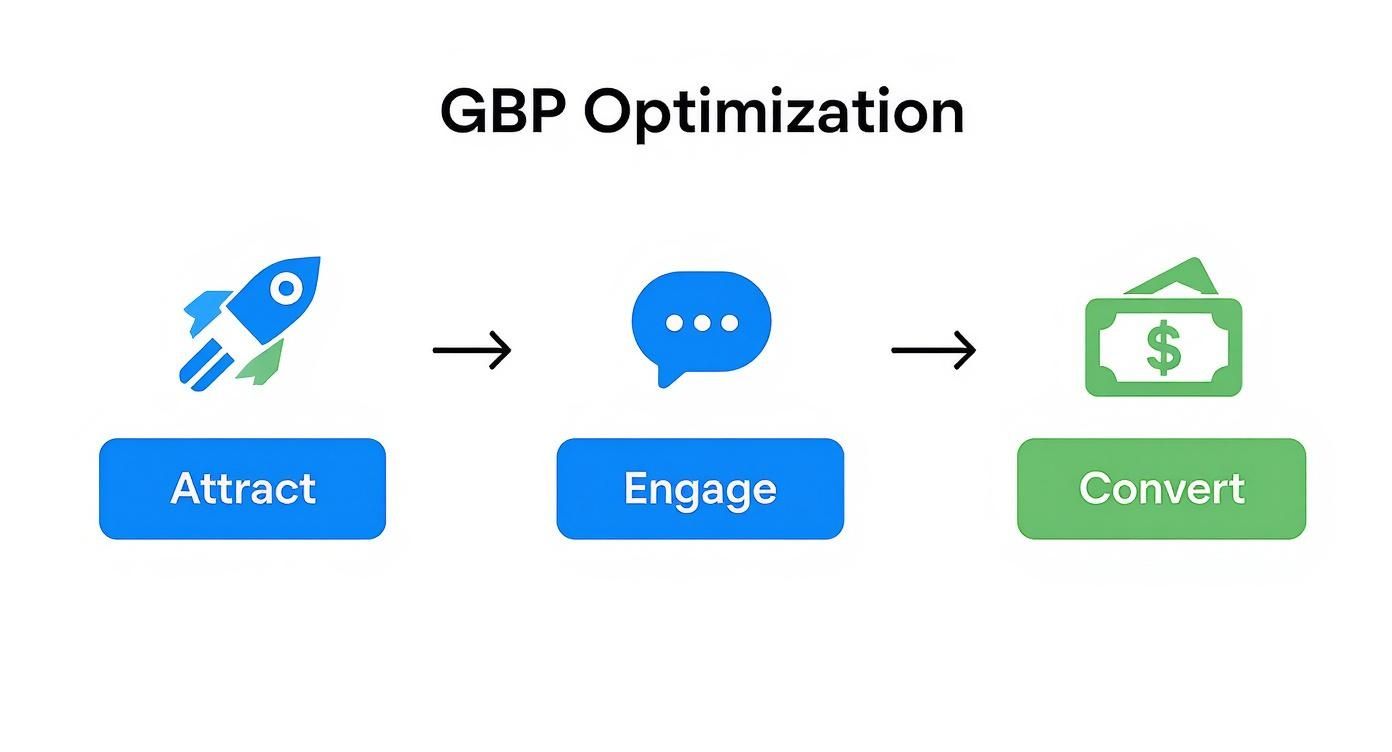
The key takeaway is that optimization isn't a one-and-done task. It's a continuous cycle of attracting new eyes, engaging them with fresh content, and converting them into loyal customers.
Why This Matters More Than Ever
In local search, your Google Business Profile is the main event. Consider this: studies show that 46% of all Google searches are for local information. Many of those searchers interact directly with a profile in the "Map Pack" before they even think about clicking through to a website.
Your Google Business Profile is no longer a passive business listing. It is an active, dynamic digital storefront that requires consistent management to compete effectively. Neglecting it is like locking the front door to your best customers.
This guide moves beyond the basics. We’ll show you how to use every feature to its fullest potential to attract, engage, and convert local customers who are actively looking for exactly what you offer. Let's start the diagnosis.
Building a Foundational Profile for Trust and Relevance
Before you can dominate local search, you have to get the foundation right. Think of your Google Business Profile like building a house—if the foundation is cracked, whatever you build on top of it is doomed to fail. These core components are that foundation, sending clear signals to both Google and your customers that you're a legitimate, trustworthy business.
Getting these details right is often the difference between showing up on page one and getting buried where no one will find you. This isn't about guesswork. It's about a meticulous, engineering-minded approach to giving Google exactly the information it needs to rank you.
Choosing Your Categories Strategically
The first diagnostic question we ask a new client is simple: "Does Google know exactly what you do?" Your business categories are the answer, and your primary category is arguably the single most important ranking factor on your entire profile. It’s your main signal to Google about your core service.
Think of it this way: if you're a plumber who also does HVAC work, choosing "Plumber" as your primary category tells Google to show your business when someone searches "plumber near me." You can add "HVAC contractor" as a secondary category, but that primary choice carries the most weight.
Here’s how to get it right:
- Be Specific. Don't just pick "Contractor" if you're a "Roofing Contractor." The more specific you get, the better Google can match you to high-intent searches.
- Add Secondary Categories. You get up to nine additional slots. Use them to cover everything else you do. For our plumber, this is where you’d add "HVAC Contractor" and "Water Heater Installation & Repair Service."
- Spy on Your Competitors. Look at the top three competitors in your city for your main keyword. What’s their primary category? This gives you real-world data on what Google is already rewarding in your market.
Writing a Business Description That Converts
That 750-character business description is your elevator pitch. It’s shocking how many businesses either leave it blank or fill it with generic fluff. This is a massive missed opportunity to speak directly to your ideal customer.
Your goal here is to be clear, compelling, and keyword-rich—without sounding robotic.
We use a simple framework that works:
- Who you are and what you do: Start with a clear statement about your main services.
- Who you serve: Mention your target audience or the specific problems you solve.
- Where you operate: Name-drop your main city and key service areas.
- What makes you different: Give them a brief, punchy reason to choose you.
Pro Tip: The first 250 characters are the most important, as they often show up in search results before a user has to click "more." Pack your most important keywords and your core message right at the top.
The data doesn't lie. A massive analysis of 2 million profiles found that 75% of businesses in the top local search spots had a completely filled-out description. This isn’t a coincidence. You can see more of those findings over on Birdeye.com.
Nailing Your NAP Consistency
Your Name, Address, and Phone number (NAP) are the three pillars of local SEO trust. Google cross-references this information across the web—your website, social media, local directories—to verify that your business is real.
Even tiny inconsistencies create doubt in the algorithm's mind. Is it "St." or "Street"? "Suite 101" or "#101"? These small details matter. Do a quick audit of your online footprint.
- Your Name: Does it perfectly match your official business name everywhere?
- Your Address: Is it formatted identically down to the comma?
- Your Phone Number: Is the same primary local number used across every platform?
Fixing these inconsistencies is a non-negotiable step for building a profile that Google trusts. If you want to go deeper on this, check out our complete guide on Local SEO strategies.
Fine-Tuning with Services and Attributes
Beyond the basics, your profile has powerful sections for Services and Attributes. Most businesses ignore them, but filling these out gives Google the granular data it needs to rank you for very specific searches like "emergency plumbing with 24-hour service."
Services:
Don't just list your categories again. This is your chance to break them down. If your category is "Roofing Contractor," your services list might include:
- Roof Repair
- Shingle Replacement
- Metal Roof Installation
- Gutter Cleaning
Go the extra mile and add descriptions and even pricing for each service. This gives customers the detailed info they want and feeds the algorithm more relevant keywords.
Attributes:
These are quick-hit tags that highlight key features. Are you "Woman-owned"? Is your location "Wheelchair accessible"? Do you offer "Online appointments"? Selecting every attribute that applies helps you show up in filtered searches and gives potential customers valuable, at-a-glance information.
Using Media and Posts to Engage Local Customers
A static profile quickly becomes an invisible one. We see this all the time: a business owner gets the basics set up and then lets their profile gather digital dust. The solution is a consistent content strategy using photos, videos, and Google Posts to signal that your business is active, relevant, and ready to engage.
This isn't just about looking busy. Each photo you add and every post you create is a fresh signal to Google’s algorithm. You’re continuously telling Google, "Hey, we're here, we're active, and we're serving customers right now."
Fueling Your Profile with High-Quality Media
Potential customers want to see your business before they decide to visit, call, or buy. High-quality, authentic photos and videos build immediate trust. Generic stock photos won't cut it—they do nothing for your credibility.
Your goal is to build a visual portfolio that tells your story. Here’s what to prioritize:
- Essential Photos: Start with a crisp, clear logo and a compelling cover photo.
- Exterior & Interior Shots: Show customers what your building looks like from the street so they can easily find you. Then, share photos of the inside to showcase your atmosphere.
- Team & Action Photos: Pictures of your team at work humanize your brand. For a contractor client of ours, implementing a strategy of posting before-and-after project photos led to a 30% increase in quote requests directly from their profile.
- Product & Service Photos: If you sell physical products, get professional-looking images. If you provide a service, show the results of your work.
Don’t just upload a batch of photos once and call it a day. Aim to add at least one new photo every week. This consistent activity is a powerful signal of relevance to Google's ranking algorithm.
Using Google Posts to Drive Action
Google Posts are like mini-billboards that appear directly on your profile. They're one of the most underused features, yet they offer a direct line of communication to people actively looking at your business.
Think of posts as your chance to share timely info and create urgency. There are a few different types, and each has a specific job.
What to Post and When
A simple content plan keeps you active without it feeling like a chore. For instance, a restaurant client of ours uses weekly "Offer" posts to fill tables on slower weeknights—a strategy that has had a measurable impact on their revenue.
Here’s a simple system you can adopt:
- "Offer" Posts: Announce a sale, a special discount, or a limited-time promotion. These are perfect for driving immediate action (e.g., "This Week Only: 15% Off All HVAC Tune-Ups").
- "What's New" Posts: Share company news, highlight a new product, or link to your latest blog post. This keeps your audience informed.
- "Event" Posts: Promote an upcoming webinar, an in-store event, or a community job fair. This is great for businesses that rely on foot traffic.
Writing these posts is a lot like crafting effective social media updates for lead generation. Keep them short, lead with a strong hook, include a high-quality image, and always end with a clear call to action like "Call Now," "Learn More," or "Book."
Mastering Reviews and Q&A for Social Proof
Think of your Google Business Profile as your digital storefront. Your reviews and Q&A section are the first things people see, and they speak volumes. This isn't just a space for feedback; it's a powerful engine for social proof that directly influences both potential customers and Google’s algorithm.
A steady stream of positive reviews tells Google that you’re a credible business worth showing to more people. You need to stop waiting for reviews and start building a system to generate them.
A System for Generating Consistent Reviews
Waiting for reviews to trickle in is a slow, unreliable game. You need a simple, repeatable process that encourages your happiest customers to share their experiences. The key is making it easy for them without being pushy.
Here are a few methods that work:
- Create a Direct Review Link: Your GBP dashboard has an option to generate a short URL that takes customers straight to the review form. Grab that link and keep it handy.
- Send a Post-Service Email or SMS: After a job is done, follow up. Thank the customer and include your review link with a simple request, like, "Your feedback helps us improve. If you have a moment, we'd appreciate you sharing your experience."
- Use a QR Code In-Store: For any business with a physical location, a small sign at the checkout counter with a QR code linking to your review page is incredibly effective.
This proactive approach fuels a consistent flow of fresh reviews, which signals ongoing, positive business activity to Google.
How to Respond to Every Single Review
Responding to reviews is non-negotiable. It shows you’re listening and actively engaged. Even better, it gives you a platform to reinforce your brand voice and include relevant keywords.
Our Golden Rule: Respond to 100% of reviews within 24-48 hours. This goes for 5-star raves, 1-star complaints, and everything in between. Promptness shows you care.
Responding to Positive Reviews:
Thank the customer by name and call out the specific service they mentioned. This adds valuable context. For example, "Thanks, Sarah! We're so glad you were happy with your new roof installation in Springfield."
Responding to Negative Reviews:
This is your chance to turn a bad situation into a public display of fantastic customer service.
- Acknowledge and Apologize: Start by thanking them for the feedback and apologizing that their experience wasn't up to par.
- Take it Offline: Never get into a public back-and-forth. Provide a direct contact—a name, email, or phone number—to solve the problem privately. "We're sorry to hear this. Please contact our manager, Dave, at [email] so we can make this right."
- Keep it Professional: Remember, your response is for every future customer who reads it, not just the unhappy one.
Activating the Q&A Section
The Questions & Answers feature is probably the most overlooked part of a Google Business Profile. It's your chance to proactively answer common questions, handle objections before they arise, and highlight your best features.
Don't wait for customers to ask. Seed the Q&A section yourself. Get inside your customer's head and ask the questions you know they have.
- What are your hours on holidays?
- Do you offer free estimates?
- Is parking available nearby?
- What is your warranty policy on installations?
Then, log in as the business owner and post clear, helpful answers. This gives customers quick info and creates another spot to strategically place keywords related to your services and location.
Turning GBP Insights Into Actionable Intelligence
If you're not tracking performance, you're flying blind. We see this all the time: business owners put in the work to optimize their profile but have no system to measure if it's actually moving the needle.
Your Google Business Profile Insights dashboard is where you turn raw data into the business intelligence you need to make smarter decisions. This isn't about chasing vanity metrics; it's about drawing a straight line from your optimization efforts to real-world results like more phone calls, website clicks, and customers walking through your door.
This is how you stop guessing what works and start knowing what works.
Diagnosing Your Performance with Key Metrics
Your Insights dashboard tells a story about how customers find and interact with you. To get the most out of it, you need to know which numbers matter and what questions they help you answer.
We focus on three core areas:
-
How Customers Search: This is broken down into Direct searches (people who typed in your business name) and Discovery searches (people who found you by searching for a category, product, or service). A high number of Discovery searches is a huge win—it means your optimization is bringing in brand-new customers.
-
Where Customers View You: This metric shows whether people are finding your profile more on Google Search or Google Maps. Lots of action on Maps usually signals high-intent customers who are actively looking to make a visit.
-
Customer Actions: This is where the rubber meets the road. It tracks the most valuable conversions: website visits, direction requests, and phone calls. Seeing an upward trend here is the clearest sign that your effort is paying off.
Think about it this way: if you see a spike in direction requests after uploading new photos, you've found a cause and effect. If your phone rings more the week you publish a Google Post with a special offer, you know that tactic drives leads. This is how you build a repeatable system for growth.
Turning Data into Decisions
Once you're comfortable with the numbers, you can start asking targeted questions to sharpen your strategy. This cycle of review and refinement is how you get ahead—and stay ahead—of the competition.
Questions to Ask Yourself Monthly:
- Are my new photos getting more engagement than the old ones?
- Are my Google Posts leading to more website clicks?
- What search queries are bringing in the most Discovery traffic, and can I create more content or services around them?
- Is my primary business category attracting the right type of customer?
This data-driven approach has a massive real-world impact. For example, recent reports show how businesses see incredible results from focused optimization. One local bakery saw a 45% increase in website traffic and a 60% jump in direction requests after a profile overhaul. A dental clinic pulled in a 47% boost in direction requests and a 35% surge in calls in just eight weeks.
By checking your Insights regularly, you create a powerful feedback loop. You take an action, measure the result, and then tweak your approach. This consistent process not only optimizes your Google Business Profile but also complements broader strategies that help increase overall organic traffic to your website.
Common Questions About Google Business Profile Optimization
Even with the best plan, questions always come up. Over the years, we've diagnosed where business owners get stuck. Here are the straight-up answers to the questions we get asked all the time.
How Long Does It Take to See Results?
The honest answer is: it depends.
Some changes show up almost immediately—update your hours, and it's live. But seeing a real jump in your local search rankings takes time and consistency. Think of it less like flipping a switch and more like building momentum. Each update, review, and post is another positive signal you’re sending to Google.
If you’re in a less competitive market, you might see movement in a few weeks. But if you're a plumber in a major city, you're looking at a few months of steady effort to climb the ranks.
The timeline really boils down to three things:
- Market Competition: How many other local businesses are actively optimizing their profiles?
- Your Starting Point: Are you starting from scratch or tuning up a neglected profile?
- Consistency: How often are you uploading photos, getting new reviews, and publishing posts?
The key takeaway is that Google rewards consistent, ongoing activity. A huge burst of updates followed by months of silence won't cut it. You need to show you're an active, engaged business.
What’s The Most Common Mistake to Avoid?
Without a doubt, the single biggest mistake we see is treating a Google Business Profile as a one-and-done setup task.
Many business owners get excited, fill out the bare minimum, and then never touch it again. This "set it and forget it" mindset is a surefire way to get buried by your competitors. A dormant profile tells Google that your business might not be relevant anymore.
Remember, Google’s goal is to give searchers the most accurate, current information possible. An active profile is a trusted profile.
This is where most businesses drop the ball:
- Never asking for reviews: They hope reviews will magically appear, which is an unreliable strategy.
- Ignoring the Q&A section: This space is a goldmine for addressing customer questions proactively, but most leave it empty.
- Forgetting to post updates: They don't use Google Posts to share offers, company news, or events.
Optimizing your GBP isn’t a project you finish. It’s an ongoing business process, just like managing inventory or running payroll.
Does My Website's SEO Affect My GBP Ranking?
Yes, absolutely. This is a point that too many people miss.
Google doesn't look at your business in a vacuum. It sees your entire digital footprint, and your website and Google Business Profile have a powerful, symbiotic relationship. Your website acts as the foundation of your authority.
Google crawls your site to verify the information on your GBP and to get a deeper understanding of what you do. A well-optimized website with content that mirrors your GBP categories sends incredibly strong relevance signals to the algorithm.
For instance, if your primary GBP category is "Roofing Contractor," having a dedicated page on your website about "Metal Roof Installation" reinforces your expertise. This helps your GBP show up for more of those specific, high-intent searches. They work together, building a powerful case for why you deserve to be at the top.
At Machine Marketing, we don't just "do" marketing; we build systems that turn your online presence into a predictable engine for new leads. If you're tired of guessing and want to see measurable results from your local SEO, it's time for a diagnosis. Book a discovery call with us today and let's get to work.
