
If your emails feel like they're disappearing into a black hole, you're not just imagining it. We see this constantly—business owners sending out messages and hearing nothing back. The root cause isn't a lack of effort; it's a breakdown in the communication system.
The good news? Sending a professional email that gets a response comes down to three things: a clear subject line, a concise body, and a single, obvious call to action. In this article, we’ll show you how to diagnose the gaps in your email process and share practical steps you can take today to start seeing results.
Diagnosing the Problem: Why Are Your Emails Being Ignored?
Every ignored email is a clue pointing to a deeper problem. If you're sending messages and getting crickets in return, it's time for a diagnosis. The issue is almost always a predictable failure somewhere in the communication pipeline.
Think of it like an engineer figuring out why an engine won't start. You don't just kick the tires; you check the battery, the starter, and the fuel line. You look for specific failure points. The same diagnostic approach works for figuring out why your emails are getting deleted on sight.
The Most Common Failure Points
More often than not, the reason your email was ignored is hiding in plain sight. Before you can build a solution, you have to know what you're looking for. From what we've seen, it's almost always one of these culprits:
- Weak or Misleading Subject Lines: Your subject line is the gatekeeper. If it’s vague, generic, or screams "sales pitch" (think "Quick Question"), it's going straight to the trash.
- No Clear Purpose: The email wanders. It tries to cover three different topics and buries the main point under a mountain of text, leaving the reader wondering what you actually want.
- Vague Calls to Action (CTAs): Ending with "Let me know your thoughts" is asking to be ignored. You're putting all the work on the other person to figure out the next step.
- Poor Formatting: Nothing gets an email deleted faster than a wall of text, especially on a phone. If you're not using short paragraphs and bullet points, you're making your message impossible to read quickly.
Key Takeaway: A proper email is an engineered solution, not just a quick note. It's intentionally designed to be opened, understood, and acted on in less than a minute. Every part of it—from the subject to the signature—has a specific job.
Despite all the chat apps and social platforms, email remains the foundation of professional communication. Projections show the number of global users will hit 5.61 billion by 2030. You can find more of these trends in CloudHQ's report. With that volume, every email you send is a direct reflection of your competence and professionalism.
Shifting from Task to System
To see real improvement, you need a mental shift. Stop thinking of email as a task on your to-do list and start treating it like a critical business system. A well-designed email system ensures your messages don't just get sent—they get received, understood, and valued.
This means creating a repeatable framework for every important message. When you have a solid process, you take out the guesswork and dramatically boost your chances of getting a reply. In the next sections, we'll move from diagnosis to solution, step-by-step.
Crafting an Email That Commands Attention
Before you hit “send,” you need a pre-flight checklist. The best emails aren’t just written; they’re engineered, with every component serving a specific function. A message designed for impact doesn't happen by accident—it’s assembled piece by piece.
Think about it: your email is fighting for survival in an inbox flooded with hundreds of other messages. The first and most important hurdle is getting it opened.
Nail the Subject Line
Your subject line has one job: convince the recipient that your email is worth their time right now. It needs to be a perfect blend of clarity and intrigue, giving just enough information to prove its relevance without revealing the whole story.
Vague, lazy subject lines like "Following Up" or "Quick Question" are begging to be ignored. Instead, be specific and show them what's inside.
-
Weak: Meeting
-
Stronger: Agenda for Thursday's 10 AM Project Kickoff
-
Weak: Your Proposal
-
Stronger: Feedback on the Q3 Marketing Proposal (Draft)
A great subject line makes a promise that the email body keeps. If you use a clickbait-y line that doesn't match the content, you’ve torched any trust before they even read your message. Be accurate and compelling.
To give you a clearer picture, here’s a breakdown of how each part of an email works together.
Key Components of an Effective Professional Email
A breakdown of essential email elements and their primary function in ensuring your message is read and understood.
| Component | Purpose | Best Practice Example |
|---|---|---|
| Subject Line | Earn the open by conveying relevance and urgency. | "Quick Question About Your Recent LinkedIn Post on CNC Machining" |
| Opening Line | Immediately establish context and answer "Why me, why now?" | "I saw your team is hiring a new operations manager and wanted to share a thought." |
| Body | Deliver the core message clearly and concisely. | Use short paragraphs, bold key terms, and bullet points for lists. |
| Call to Action (CTA) | Tell the recipient exactly what you want them to do next. | "Are you free for a 15-minute call next Tuesday at 2 PM EST to discuss?" |
| Signature | Provide essential contact info without clutter. | Name, Title, Company, LinkedIn Profile URL. |
With this framework in mind, let's get into the details of the email itself.
The First Sentence Is Your Hook
Once they open the email, you have about three seconds to prove it's worth reading. Your opening line must immediately connect the dots. Why are you writing to them, and why now?
Generic openers like "I hope this email finds you well" are a complete waste of this prime real estate. Get straight to the point. Give them immediate context by referencing a past conversation, a mutual connection, or a relevant company announcement. It shows you’ve done your homework and you respect their time.
Structure the Body for Skimmability
Let’s be honest: busy professionals don't read emails; they scan them. A huge wall of text is a guaranteed trip to the archive folder. Your job is to make your key information jump off the screen.
Use formatting as a strategic tool to guide their eyes:
- Keep Paragraphs Short: Stick to one main idea per paragraph, and never go over three sentences. White space is your friend.
- Use Bullet Points: When you need to list multiple items, questions, or action steps, lists are non-negotiable. They break up the text and make information easy to digest.
- Be Smart with Bold Text: Use bolding to highlight critical details like deadlines, key numbers, or specific action items. If you bold everything, nothing stands out.
This isn’t just about making things look nice; it’s about engineering your email to deliver its core message as efficiently as possible. For a deeper look at structuring entire campaigns, you can explore our detailed guide on email campaign best practices.
Define One Clear Call to Action
This is the single biggest mistake we see: a weak or nonexistent Call to Action (CTA). An email without a clear next step is just information. Don't make the recipient guess what you want from them.
Vague phrases like "Let me know your thoughts" are too passive. They put the mental work back on the other person. Be direct.
Instead of a wishy-washy question, propose a clear, easy-to-act-on next step.
- Vague: "Let's connect sometime."
- Specific: "Are you available for a 15-minute call next Tuesday or Thursday afternoon?"
Give them one thing to do. If you need three things, you probably need to send three different emails. A powerful email drives one decision, not five.
Finally, make sure your signature is a tool, not a distraction. All you need is your name, title, company, and a link to your website or LinkedIn profile. Ditch the huge logos or inspirational quotes. They add clutter and can even get you flagged by spam filters.
Getting Your Emails Delivered to the Inbox
You can write the most compelling email in the world, but it’s worthless if it lands in the spam folder.
This is a failure point we see all the time, and it’s almost always a technical problem hiding behind a simple symptom. Getting your message delivered isn’t about luck; it’s about proving to servers at Google and Microsoft that you are who you say you are.
Think of it this way: your email server needs a passport to send messages. Without the right credentials, those big email providers will treat your emails as suspicious, routing them straight to spam. This is where a few key technical records become non-negotiable.
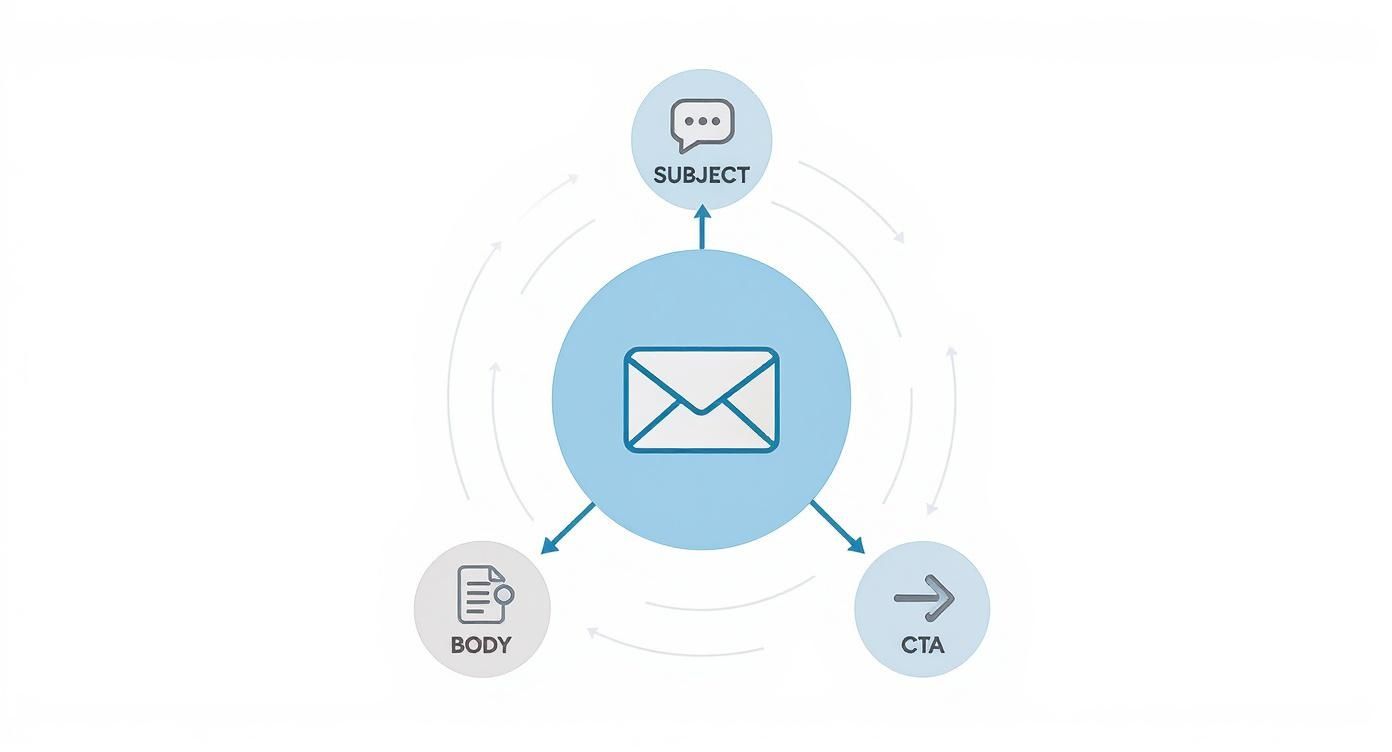
This visual breaks down how all the pieces of a great email—from subject line to CTA—work together to guide a reader from curiosity to action.
Before any of that matters, though, you have to get the email delivered in the first place.
Your Email Authentication Checklist
You don’t need to be a developer to understand email authentication basics. These three records are the trifecta for building a solid sender reputation, which is the single most important factor in deliverability.
-
SPF (Sender Policy Framework): This is a public list of servers authorized to send email on behalf of your domain. It’s like telling the world, "Only emails from these specific locations are actually from me."
-
DKIM (DomainKeys Identified Mail): Think of DKIM as a digital signature attached to your emails. When the message arrives, the receiving server checks the signature to confirm it hasn't been faked or tampered with.
-
DMARC (Domain-based Message Authentication, Reporting & Conformance): This record gives final instructions. It tells servers what to do if an email fails the SPF or DKIM checks: "If an email claiming to be from me doesn't have the right credentials, either quarantine it or reject it outright."
Setting these up is a one-time task that pays off forever. It’s the foundation of a trustworthy email system and a critical step in improving your email open rates.
Staying Compliant Is Not Optional
Beyond the technical setup, your emails must meet legal standards. Regulations like the CAN-SPAM Act in the U.S. set clear rules for commercial messages, and the penalties for ignoring them are severe—up to $53,088 per email.
This isn't just for massive email blasts. The law applies to all commercial messages, including your B2B communications. The rules aren't complicated, but they are mandatory.
Question to Ask Yourself: Are you making it painfully easy for recipients to opt out? If the unsubscribe process requires more than two clicks, you're creating friction and violating both the law and user trust. A difficult opt-out often leads people to mark your email as spam, which is far more damaging to your sender reputation.
To stay on the right side of the law, ensure you’re doing the following:
- Provide a Clear Unsubscribe Link: Every marketing email must have an obvious, easy-to-use way for people to opt out.
- Honor Opt-Outs Promptly: You have 10 business days to process unsubscribe requests. Do it faster.
- Include a Physical Address: Your message must contain your valid physical postal address.
- Don’t Use Deceptive Headers: Your "From" name and subject line must accurately reflect who you are and what the email is about.
Building these practices into your system isn’t just about avoiding fines. It’s about respecting your audience’s inbox, which is the only way to build a responsive and engaged email list.
Turning Silence into a Conversation with Follow-Ups
One of the biggest mistakes you can make in B2B communication is sending one email and walking away. Hitting send and then giving up is a massive missed opportunity.
The truth is, your first email often lands when your recipient is in the middle of a dozen other things. Silence rarely means "no." More often, it means "not right now."
Real progress comes from a smart, persistent, and respectful follow-up strategy. That second or third message cuts through the noise and shows you mean business. This isn't about spamming someone's inbox; it's about being professionally persistent.
The Psychology of the Non-Response
Why do people ignore emails? It’s almost never personal. It’s usually a matter of priority and timing.
- They opened it on their phone, meant to reply from their desktop, and it got buried.
- Your email arrived right as they walked into a meeting.
- Your request wasn't urgent enough to bump their current task.
- They weren't the right contact and didn't know who to forward it to.
Your follow-up isn't a passive-aggressive poke; it’s a helpful nudge that brings your message back to the top of their to-do list. The data backs this up. Research shows that nearly 99% of people check their email daily, with many checking constantly. You can dig into more of these email engagement statistics and trends to see for yourself. Your message was seen; it just wasn't acted on yet.
A Framework for Effective Follow-Ups
Following up without becoming a pest requires a system. Firing off random "just checking in" emails feels desperate and adds zero value. A better approach is structured around timing, frequency, and adding something new to the conversation each time.
A good starting point is the 2-3-5 Day Rule. Send your first follow-up two or three business days after the initial email. Still nothing? Wait another five business days before sending a third. Pushing past three or four follow-ups in a short span crosses the line from persistent to annoying.
Key Takeaway: The point of a follow-up is to make it dead simple for the other person to reply. Keep it short, reference the original message, and clearly restate what you need. Each message should offer a new angle or added value.
For instance, instead of just forwarding the old email with a question mark, try adding a new piece of information.
- Follow-Up 1: "Hi [Name], just wanted to bring this back to the top of your inbox. Did you have a chance to look over the proposal I sent on Tuesday?"
- Follow-Up 2: "Hi [Name], following up on my last email. We just published a case study on how we helped a similar company achieve [Result]. Thought you might find it interesting."
This reframes the interaction. You're no longer just asking for a favor; you're providing helpful resources. Trying to track these sequences in your head is a recipe for disaster, which is why having a solid system is non-negotiable. You can see how we manage this in our guide on using a CRM for lead generation.
The Breakup Email: A Powerful Final Tool
If you've sent three or four messages and only heard crickets, it’s time for the "breakup" email. This is one last, polite message designed to get a response by closing the loop. You respectfully acknowledge that they're busy and let them know you won't be following up again.
Here's a simple template:
"Hi [Name],
I've reached out a few times about [Topic] but haven't heard back, so I'll assume it's not a priority for you right now.
No problem at all. If anything changes on your end, you know where to find me.
Best,
[Your Name]"
This technique works surprisingly well. It’s not confrontational, it's professional, and it often triggers a reply because it takes the pressure off. It gives your contact an easy out or finally prompts them to respond.
Building an Efficient Email Workflow with Systems
If you want to communicate effectively at scale, you can't rely on manual effort and memory. Using your inbox as a to-do list is a surefire way to let opportunities slip through the cracks. It's time to stop reacting and start building an operational system for your email.
This isn't about buying more software. It’s about creating a repeatable process that claws back your time, keeps your messaging consistent, and makes every follow-up count. A solid system turns your email from a chaotic, reactive chore into a proactive tool for building your business.
Using a CRM to Systematize Communication
A Customer Relationship Management (CRM) platform is the engine that drives an efficient email system. We often set up our clients with GoHighLevel because it pulls all your conversations into one place and automates the most tedious parts of managing relationships.
Think of a CRM as your business's central memory. Instead of digging through sent folders to piece together a conversation history, every interaction—every email, call, and text—is logged in one spot.
This gives you a single source of truth for every contact. Anyone on your team can jump in and instantly understand the full context of a relationship. You can set reminders for follow-ups, track deals as they move through your pipeline, and see exactly when a contact last engaged with you.
Creating a Library of Reusable Templates
Think about the emails you send every day. How many of them are just slight variations of the same core message? You’re probably sending similar introductions, meeting requests, and proposal follow-ups over and over.
Building a library of reusable email templates is one of the biggest efficiency boosts you can make. This isn't about sending generic messages. It's about systemizing the 80% of your email that's repetitive so you can pour your creative energy into personalizing the critical 20%.
Start by mapping out your most common email scenarios. For each one, draft a clear, concise, and effective template. A few to start with include:
- The Initial Introduction: A brief, value-focused message for a new contact.
- The Meeting Request: A direct ask with a few proposed times.
- The Post-Meeting Recap: A quick summary of what you discussed and the agreed-upon next steps.
- The Gentle Nudge Follow-Up: A polite reminder after a period of silence.
Our Process: We build these templates directly into our clients' CRM. When it's time to send an email, they pick the right template and it populates the message instantly. They then spend two minutes adding a personalized opening line or a relevant P.S. note. This simple system saves them hours every week.
By creating a standardized set of proven templates, you guarantee that every communication leaving your business is professional, on-brand, and structured to get a response.
The Power of Automation and Segmentation
Once you have a CRM and a template library, you can put parts of your workflow on autopilot. For instance, you could set up an automated sequence that kicks off whenever a new contact fills out a form on your website.
That system could send an initial confirmation email, follow up with a helpful resource three days later, and then create a task for a team member to make a personal call five days after that.
You can also use your CRM to create segments—groups of contacts based on shared characteristics. You might create a segment for "Prospects in the Manufacturing Sector" or "Past Clients Not Contacted in 6 Months." This lets you send highly relevant, targeted messages instead of one-size-fits-all blasts that get ignored.
Putting this kind of system together is a foundational step in scaling your business. It allows you to manage more relationships more effectively without just hiring more people.
Tracking the Metrics That Actually Matter
Sending the perfect email is a great start, but you can't improve what you don't measure. If you’re not tracking performance, you’re just guessing. This is where we shift from the art of writing a great message to the science of understanding its impact.
It’s easy to get fixated on vanity metrics like open rates. While an open is a decent first step, it doesn't tell you if your message actually drove someone to act. To truly see what's working, you need to look deeper at the numbers that show real engagement.
Moving Beyond Vanity Metrics
An open rate just tells you if your subject line worked. It's a useful signal, but it’s not the main event. The real work begins after the open. We recommend you focus on metrics that measure action and intent.
These are the core metrics you should be watching to get a clear picture of your email's real-world performance.
- Click-Through Rate (CTR): This is the percentage of people who clicked on a link in your email. It’s a direct measure of how compelling your message and call to action are.
- Reply Rate: For B2B, this is often the golden metric. A reply is the start of a real conversation. It means someone was engaged enough to hit "reply."
- Conversion Rate: This tracks how many people completed the goal after clicking—they filled out a form, booked a call, or downloaded a resource. This is where you connect email activity directly to business results.
A low CTR, for example, is a dead giveaway that your CTA is weak or your offer isn't hitting the mark. This insight lets you stop guessing and start making targeted tweaks.
Using Diagnostic Metrics to Maintain List Health
Not all metrics are about success; some are critical for spotting problems before they get out of hand. Think of bounce rates and unsubscribe rates as the warning lights on your dashboard. Ignoring them can wreck your sender reputation.
A bounce rate tells you how many of your emails never made it to the inbox. A "hard bounce" means the address is bad and should be removed immediately. A "soft bounce" is a temporary issue, like a full inbox. Consistently high bounce rates are a sign your contact list is getting stale.
The unsubscribe rate shows how many people opted out. A few unsubscribes are normal, but a sudden spike is a major red flag. It’s telling you there's a mismatch between what your audience expected and what you sent.
The question isn't "How do I stop people from unsubscribing?" The real question to ask is, "What made this person decide this message wasn't valuable?" This mindset shift turns a negative metric into a powerful feedback tool.
Putting It All Together for Continuous Improvement
By tracking these key metrics, you create a feedback loop. You send, measure, find the weak spots, and refine your approach for the next round. This is how you stop shouting into the void and start building a communication engine that delivers real, measurable results.
Here’s a simple diagnostic framework to get you started:
- Low Open Rate? Your subject lines need work. Start testing new angles and maybe even different sender names.
- Low CTR? Your CTA isn't clear or compelling enough. Make it stronger, more obvious, and more relevant.
- Low Reply Rate? The message might be too long, the "ask" could be confusing, or you might be talking to the wrong person.
- High Unsubscribe Rate? Take a hard look at your content's relevance and how often you're sending emails.
This data-driven approach takes the emotion and guesswork out of email. It transforms it from a daily chore into a predictable system for starting conversations and driving growth.
At Machine Marketing, we build these performance-driven systems for businesses every day. If you're tired of guessing and ready to build an email and marketing machine that delivers measurable ROI, let's talk. Book a discovery call with us to get a clear roadmap for your business.
