
Feeling like you're constantly chasing leads, manually following up, and losing track of potential customers? We see this all the time. It’s the breaking point where small businesses realize their current system just can't keep up.
That frustration is a clear signal you're ready to build a more efficient, scalable engine for growth. Marketing automation is the system that breaks you free from the repetitive tasks that drain your time and let opportunities slip through the cracks. It handles follow-ups, nurtures relationships, and organizes customer data so you can focus on strategy, not spreadsheets.
In this guide, we’ll diagnose the common friction points that hold businesses back and show you the exact steps to build a system that drives predictable growth.
Is Your Business Ready for Marketing Automation?
Before you can build a solution, you need a precise diagnosis of the problem. Many business owners know something is wrong—sales are flat, leads go cold—but can’t pinpoint the exact friction points. Marketing automation is designed to solve specific operational bottlenecks, not just add another piece of software to your plate.
Identifying the Bottlenecks in Your Business
Let's get specific. Do any of these pain points sound painfully familiar?
- Inconsistent Lead Follow-Up: Do new leads from your website or social media sometimes wait days for a response? Speed-to-lead is critical, and inconsistent follow-up is one of the fastest ways to lose a potential customer to a competitor.
- A Disjointed Customer Experience: Does your sales team have to ask customers for the same information the marketing team already collected? When your data lives in separate spreadsheets and inboxes, the customer journey feels broken and unprofessional.
- No Clear Picture of What’s Working: Can you confidently say which marketing efforts are generating actual revenue? Without a connected system, it's nearly impossible to track a customer from their first click to their final purchase.
If you nodded along to any of those, you're experiencing symptoms of a systemic problem. This isn't just about software; it's about systemizing your growth. You can explore the core benefits of marketing automation in our detailed guide to see just how deep the impact can be.
The need for these systems is growing fast. The number of small and medium-sized enterprises (SMEs) is expected to jump to 400 million globally in 2025—a huge leap from 358 million in 2023. This growth is fueling the demand for scalable solutions.
To see what this looks like in practice, let's compare the old way with the new way.
Diagnosing Your Marketing Bottlenecks
| Marketing Task | The Manual Way (The Problem) | The Automated Way (The Solution) |
|---|---|---|
| New Lead Follow-Up | A salesperson manually sends an email hours or days later. It's inconsistent and slow. | An instant, personalized welcome email and text message are sent the moment a form is submitted. |
| Long-Term Nurturing | You try to remember to check in every few months. Many cold leads are forgotten completely. | A sequence of helpful emails and content is sent over weeks, keeping your brand top-of-mind. |
| Appointment Scheduling | Back-and-forth emails trying to find a time that works. "Are you free Tuesday at 2?" | A link to your calendar is automatically sent, letting leads book a time that works for them instantly. |
| Data Management | Customer info is scattered across spreadsheets, email contacts, and sticky notes. No single view. | Every interaction—email open, link click, form fill—is tracked in a single contact record. |
This table isn't just a comparison; it’s a picture of the transformation that's possible when you install a proper system.
The Engine for Your Automation Strategy
To fix these issues, you need a central hub—a single platform to manage contacts, communications, and campaigns. Throughout this guide, we'll use a powerful, all-in-one tool called GoHighLevel as our primary example.
It's the engine that connects everything.

A platform like this acts as the command center, connecting your website forms, email campaigns, SMS messages, and sales pipeline in one place. By adopting a unified system, you create a single source of truth for every customer interaction. This sets the foundation for the powerful workflows we’ll build next.
Building Your Automation Foundation: The CRM Setup
Your marketing automation is only as good as the data you feed it. Think of your CRM as the central nervous system for your entire business—if that information is a mess, every automated message you send will fall flat. A clean, organized CRM isn't just a "nice-to-have"; it's the absolute bedrock of any successful automation strategy.
Many businesses get this backward. They dive headfirst into building complicated workflows without first figuring out what information they actually need to collect or how to organize it. The result? Generic, impersonal automation that doesn't connect with anyone.
Before you touch a single workflow, you must architect the data structure inside your CRM. When you're using a platform like GoHighLevel, this process is straightforward, but it requires strategic thinking upfront.
Map Your Real-World Customer Journey
How does someone go from being a stranger to a happy, paying customer in your business? Don't just grab a generic template. Map out the actual, real-life stages your customers move through. This is the first, and most important, step in setting up your CRM correctly.
Your journey might look something like this:
- New Lead: Just filled out a form on your website.
- Contacted: Your team made the first call or sent the initial email.
- Discovery Call Scheduled: They've booked a meeting to learn more.
- Proposal Sent: A formal quote is in their hands.
- Won/New Customer: They signed the contract or clicked "buy."
- Lost: They went with a competitor or the timing wasn't right.
Defining these stages as a pipeline in your CRM gives you an instant dashboard of your entire sales process. It also lets you trigger automations as a lead moves from one stage to the next. For example, dragging a contact into the "Proposal Sent" stage could instantly kick off a follow-up email sequence.
Create Custom Fields to Capture What Really Matters
Every business has unique details that are gold for sales and marketing. The standard stuff—name, email, phone number—is just the starting point. The real magic happens when you create custom fields to capture the information that gives you a competitive edge.
Ask yourself this question: What piece of information, if I knew it, would let me serve this customer on a whole new level?
For a local HVAC company, that could be:
- System Age: How old is their current furnace or AC unit?
- Last Service Date: When was their last tune-up?
- Property Type: Is it a residential home or a commercial building?
For a B2B manufacturer, you might want to know:
- Equipment Type: What machinery are they using right now?
- Company Size: How many employees are on their team?
- Primary Challenge: What specific problem are they trying to solve?
Capturing this kind of data in custom fields allows you to create marketing that feels incredibly relevant. Imagine sending a targeted email about AC replacement only to customers whose systems are over 15 years old. That's the power of structured, meaningful data.
Use Tags and Segmentation for Hyper-Personalization
If pipelines show you the stages of the journey, then tags are the labels that tell you who your contacts are and what they care about. Tagging is the key to smart segmentation, which is what makes your automation feel personal instead of robotic.
Key Takeaway: Segmentation isn't just about sending the right message. It's about not sending the wrong one. A well-tagged list ensures you don't accidentally send an introductory special to one of your most loyal, long-term customers.
You can start with simple, clear tags based on where a lead came from and what they've shown interest in:
- Source Tags:
Website Form,Trade Show Lead,Google Ads,Referral - Interest Tags:
Service A Inquiry,Product B Demo,Downloaded Ebook X - Status Tags:
Current Customer,Past Customer,Hot Lead
This simple habit unlocks powerful possibilities. You can build an automation that sends a unique follow-up sequence to everyone you met at a trade show or retarget high-intent leads from Google Ads with a specific offer.
Keeping this database organized is fundamental to effective communication. In fact, our guide on database email marketing dives deep into how a clean, segmented list can completely change your campaign results. By investing the time upfront to build this foundation—mapping your journey, defining your custom fields, and implementing a smart tagging system—you're setting your business up for truly intelligent marketing automation.
3 Essential Automation Workflows for Immediate Impact
With your CRM organized, it’s time to build the engine. This is where marketing automation starts working for you, creating systems that run 24/7 so no lead gets ignored and no opportunity falls through the cracks.
We're going to focus on three foundational workflows. These aren't "nice-to-have" automations; they are the must-haves that deliver an immediate, measurable impact on your sales process. Think of them as the core programming for your new growth machine.
This simple diagram shows the logic behind building any effective automation. It's all about understanding the path they take, collecting the right data, and then grouping them for targeted follow-up.
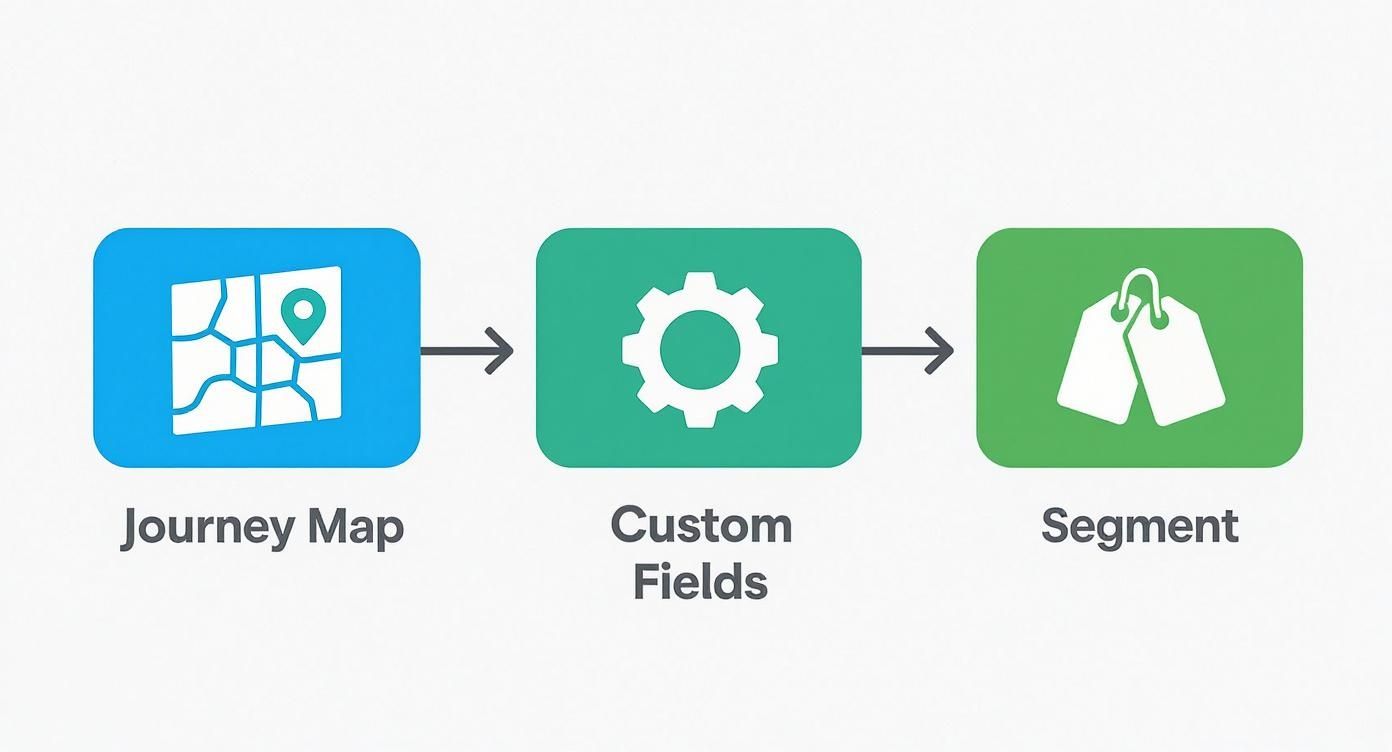
This process—mapping the journey, defining your data points, and segmenting with tags—is the blueprint for the powerful workflows we’re about to build.
1. Instant Lead Response and Nurture
What happens in the first five minutes after someone fills out a form on your website? For most businesses, the answer is silence. That silence is where deals go to die. An instant lead response workflow closes this critical gap.
The goal is simple: engage the lead immediately, give them something valuable, and kick off a real conversation.
Here's how this plays out inside a tool like GoHighLevel:
- Trigger: A visitor submits your main "Contact Us" form.
- Immediate Action 1 (SMS): The system instantly sends a text message.
- Example SMS: "Hi [Contact First Name], thanks for reaching out to [Your Company Name]. Karl will review your message and get back to you shortly. In the meantime, here's a link to our case studies: [link]. Text STOP to unsubscribe."
- Immediate Action 2 (Internal Alert): A notification is pushed to your sales team—an email, text, or app ping—so a real person knows to follow up fast.
- Action 3 (Wait 2 Minutes): An automated, personalized email follows.
- Example Email:
- Subject: Thanks for contacting [Your Company Name]
- Body: "Hi [Contact First Name], We've received your inquiry and will be in touch within one business day. We know you're busy, so we wanted to share a resource that might be helpful right away: [Link to helpful blog post or guide]. Best, The Team at [Your Company Name]"
- Example Email:
This one-two punch of hitting their phone and inbox almost instantly confirms you got their message and positions you as a responsive, helpful expert from the very first touchpoint.
2. Appointment Booking and Reminders
How much time does your team burn on the endless email back-and-forth just to schedule one meeting? An appointment booking workflow eliminates that administrative headache and dramatically cuts down on no-shows.
Our Experience: We've seen clients slash their appointment no-show rate by over 40% just by adding a simple, automated reminder sequence. This single workflow can directly recover thousands in lost revenue and wasted time.
This workflow kicks in the moment someone is ready for a call.
- Trigger: A contact books a meeting on your integrated calendar (whether it’s Calendly or GoHighLevel’s built-in tool).
- Action 1 (Immediate): A confirmation email goes out with all the meeting details and easy links to add the event to their calendar.
- Action 2 (24 Hours Before): An automated reminder email is sent.
- Example Copy: "Just a friendly reminder about our meeting tomorrow at [Meeting Time] to discuss [Meeting Topic]. Looking forward to it! You can reschedule here if needed: [Reschedule Link]."
- Action 3 (1 Hour Before): An automated SMS reminder is sent.
- Example Copy: "Hi [Contact First Name], looking forward to our call in one hour. Talk soon! – Karl @ [Your Company Name]"
The entire confirmation process is now automated, making your business look professional, reliable, and incredibly efficient.
3. Long-Term Nurture for Cold Leads
Fact: Most of your leads are not ready to buy today. A long-term nurture workflow is your system for staying top-of-mind with valuable, non-salesy content until the timing is right for them. This is how you turn a "not right now" into a "you're the first person I thought of" six months down the road.
This is the perfect home for leads that went cold, prospects you met at a trade show, or anyone who downloaded a guide but never took the next step.
- Trigger: A contact gets tagged as
Cold Leador is manually added to the "Long-Term Nurture" workflow. - Email 1 (Day 1): Share a high-value blog post or a helpful guide. The goal here is purely to be useful.
- Wait 14 Days
- Email 2 (Day 15): Send a short case study or customer success story that highlights a specific problem you solve.
- Wait 21 Days
- Email 3 (Day 36): Offer a free tool, a checklist, or a webinar recording. Keep giving value without asking for anything in return.
You can string this sequence out indefinitely, dripping helpful content every few weeks. This automation ensures you’re constantly building brand equity with your entire audience, not just the people ready to buy this week.
Real-World Automation Blueprints That Work
Theory is great, but seeing automation solve real business problems is what makes it click. We're going to break down two different business scenarios and walk through the exact automation systems we’d build to get results.
Think of these less as generic examples and more as blueprints you can adapt. They show how a smart workflow can take a simple action—like scanning a badge or closing a service ticket—and turn it into an engine for revenue and relationships.
For the B2B Manufacturer Nurturing High-Value Leads
Picture this: you just got back from a huge industry trade show with a spreadsheet of scanned badges. In the past, this meant weeks of painful, manual data entry followed by a few sporadic emails from the sales team.
It’s a classic story. Most of those expensive leads would inevitably go cold.
Let’s build a system to fix that. The goal is to instantly engage these warm leads, figure out what they care about, and only involve the sales team when someone shows clear buying signals.
Here’s the automation blueprint:
-
The Trigger: You upload the trade show contact list into your CRM and apply a single tag:
Trade Show X 2024. This one action kicks off the entire sequence. -
Immediate Engagement: Within an hour, every person on that list gets a personalized "Great to meet you" email. It's a simple thank-you note that references the show and offers something of value, like a link to a new industry report.
-
Smart Segmentation: In that first email, we add a simple question: "Which of our product lines were you most interested in exploring? Click here for [Product Line A] or here for [Product Line B]." When a contact clicks a link, the system automatically applies another tag, like
Interest AorInterest B. -
Targeted Nurturing: Anyone tagged with
Interest Anow gets a 3-part email series about the specific benefits and case studies for Product A. TheInterest Bfolks get a completely different, relevant series of emails. No more generic blasts. -
The Sales Alert: Finally, we set up a rule: if anyone from this workflow visits the pricing page on your website, the system instantly shoots an alert to the sales team. It's a high-intent signal that tells your team exactly who to call, right now.
This system turns a chaotic pile of leads into an organized, intelligent pipeline that warms up prospects and surfaces the hottest opportunities on its own.
For the Local HVAC Company Driving Repeat Business
Now, let's switch gears to a local service business—an HVAC company. Their biggest challenges are getting online reviews and ensuring customers call them back for seasonal maintenance instead of a competitor.
Their old process was non-existent. Once a job was done and the invoice paid, the relationship went dormant. We can build a workflow that turns every happy customer into a source of social proof and future business.
Pro Tip: The best time to ask for a review is immediately after a positive service experience. Automating this request ensures you never miss that golden window of opportunity.
Here’s a look at how that system can work for a local service business.
Local Service Business Automation Blueprint
| Trigger | Step 1 Action | Step 2 Action (Wait 3 Days) | Step 3 Action (If No Review) | Step 4 Action (Add to List) |
|---|---|---|---|---|
| Job marked "Complete" in field service app | Next morning, send an email & SMS asking for a review with a direct link to Google. | System checks if the customer has left a review. | If no review is detected, send one final, gentle reminder text. | Add the customer to a "Seasonal Maintenance" nurture list. |
Let's break that down. The workflow is triggered the second a technician marks a job as "Complete" in their service app, which is synced to the CRM. The next morning, an automated email and text message go out: "Hi [First Name], thanks for choosing us for your AC repair! Would you mind taking 30 seconds to share your experience? [Link to Google Review Page]"
After a few days, the system checks if they’ve left a review. If not, it sends one final, polite reminder.
The real long-term value comes last. Regardless of whether they left a review, the customer is automatically added to a "Seasonal Maintenance" list. Six months later, as seasons change, they’ll get an automated email and SMS reminding them it's time for a furnace tune-up, maybe with a small "loyal customer" discount.
This simple automation directly improves their online reputation and builds a reliable stream of repeat business—all running silently in the background. If you want to dive deeper, check out our guide on powerful marketing automation strategies.
How to Measure Your Automation ROI
Using marketing automation without a plan to measure it is like buying a race car with no speedometer. It feels fast, but you have no idea if you're actually winning. You've just moved from manual work to automated guessing.
The goal isn't just to think your campaigns are working. It's to know, without a doubt, that a specific campaign generated a specific amount of revenue. To get there, we need to ditch vanity metrics—like email opens and clicks—and zero in on the numbers that actually move the needle for your business. When you set it up right, a CRM like GoHighLevel becomes your financial dashboard.
Moving Beyond Vanity Metrics
First, take a hard look at what you're tracking right now. Clicks and open rates are fine for a quick pulse check on engagement, but they don’t pay the bills. The real ROI lives in the metrics that connect your marketing activities directly to your bottom line.
These are the core numbers that matter:
- Lead-to-Customer Conversion Rate: What percentage of the leads you generate actually turn into paying customers? If your automation is nurturing leads effectively, this number should be climbing.
- Sales Cycle Velocity: How long does it take for a new lead to sign a contract? Good automation shrinks this timeline by serving up the right information at the right moment.
- Customer Lifetime Value (LTV): How much is a customer worth to you over the entire relationship? Smart automation—like seasonal reminders for a roofer or tune-up emails for an HVAC company—builds loyalty and drives repeat business, directly boosting your LTV.
The Key Insight: Your CRM needs to be your single source of truth. When a lead becomes a customer and you mark that deal as "Won," you should be able to trace their entire journey back to the Facebook ad or website form that first brought them in. That's how you draw a straight line from a marketing action to a dollar amount.
Seeing the Financial Impact Clearly
This isn't just theory; it’s delivering real results for small businesses that get it right. The data shows that businesses putting marketing automation to work are seeing serious gains. On average, companies report an 18% increase in lead generation and a 12% jump in conversion rates after implementing these systems.
More importantly, the financial payoff is undeniable, with businesses seeing an average 34% increase in total revenues. It's a powerful testament to the return you can get when you stop guessing and start measuring. You can dig deeper into how small businesses are getting these results over at 310creative.com.
How Your CRM Delivers the Data
You don’t need a Ph.D. in data science to get these numbers. A properly set up CRM does all the heavy lifting for you by connecting the dots behind the scenes.
Here’s a quick look at how it all comes together:
- Source Tracking: A new lead fills out a form on your "Commercial HVAC Repair" page after clicking a Google Ad. Your CRM automatically tags them with that exact source.
- Pipeline Stages: The system tracks the lead's progress as they move from "New Lead" to "Quote Sent" to "Deal Won," stamping the date on each stage change.
- Deal Value: When the deal closes, you enter the final revenue amount.
With just those three pieces of information, your CRM’s reporting dashboard can instantly tell you your sales velocity, which marketing channels bring in the most profitable customers, and your overall conversion rate. This is how you stop throwing your marketing budget at the wall and start making intelligent, data-backed decisions.
Your 90-Day Marketing Automation Roadmap
Jumping into marketing automation can feel like a massive project. We've seen plenty of owners get bogged down trying to build everything at once. The key isn't to boil the ocean; it's to get a few critical systems working, prove the concept, and build from there.
That’s why we always recommend a focused 90-day roadmap. We'll break it down into manageable phases, so you can build real momentum and see tangible results without the overwhelm.
Month 1: The Foundation (Days 1-30)
The first 30 days are all about laying the groundwork. Do not rush this part. A solid foundation makes everything that comes next ten times easier. Your entire focus here is on setup and data hygiene.
This is the time to choose your platform—something like GoHighLevel is a great all-in-one choice—and get your digital house in order.
Your key actions for this month are simple but critical:
- Clean and import your contact list. Get every customer and prospect out of random spreadsheets and into one central CRM.
- Set up your core lead capture forms. Ensure your website's contact forms and lead magnets feed directly into your new system.
- Define your pipeline stages. Map out your customer journey inside the CRM.
Month 2: Activation (Days 31-60)
With the foundation solid, it’s time to flip the switch on your first automations. The goal here is not to build a complex web of interconnected workflows.
Instead, we're focusing on just two high-impact sequences that solve immediate problems and deliver quick wins. These are the ones that give you the most bang for your buck right out of the gate.
- Build Your Instant Lead Response: This is non-negotiable. When a new lead comes in, they should immediately get a confirmation email and a text message.
- Build Your Appointment Reminders: If you book calls or meetings, this one automation can drastically reduce your no-show rate. It’s pure ROI.
Month 3: Optimization (Days 61-90)
With a functioning system now in place, your final 30 days are all about analysis and expansion. You finally have real data flowing in, which means you can stop guessing. Use it to see what's working and where you can make improvements.
This is your chance to tweak email copy based on open rates and click-throughs. It’s also the time to start building out your third essential workflow: a simple, long-term nurturing sequence for leads that aren't ready to buy yet.
This systematic approach isn't just theory. The data shows SMBs using automation see a 14.5% increase in sales productivity and a 12.2% reduction in marketing overhead. You can find more great insights like this in Campaign Monitor's 2025 guide on small business marketing automation.
Questions to Ask Before You Start
Even with a clear plan, we get it—jumping into marketing automation brings up questions. We hear the same handful of concerns from almost every small business owner before they get started.
Let's tackle them head-on. Our goal is to give you the clarity you need to make the right call for your business.
How much does marketing automation cost?
The honest answer is: it depends, but it's more accessible than you think. You can find basic email tools for as little as $15-$50 a month.
But the real game-changer is an all-in-one platform like GoHighLevel that combines your CRM, email, SMS, and sales pipelines. These typically run between $97 and $497 per month. While that seems like a serious investment, think about what it replaces. You're often canceling subscriptions for your email marketing tool, a separate CRM, and a scheduling app. Suddenly, the net cost looks much more reasonable.
A better question to ask: Instead of "What does it cost?" ask, "What is the cost of not doing this?" Think about the revenue you're losing from leads that go cold. What's your team's time worth when they're stuck doing manual follow-ups?
How do I choose the right software?
It’s easy to get lost in a sea of options and end up with analysis paralysis. Our advice? Stop focusing on which platform has the most features. The real question is, which one is the right fit for your business today and has room to grow with you tomorrow?
Here’s a simple checklist to cut through the noise:
- Does it solve your biggest headache first? If your number one problem is inconsistent lead follow-up, you need a platform that nails email and SMS workflows. Start there.
- Is it an all-in-one system? Juggling five different tools is a nightmare. For almost every small business, a single platform for your CRM, emails, and funnels is the smartest move.
- Does it integrate with what you already use? Make sure it can easily connect to your website, your calendar, and any other software critical to your operations.
How much time does this really take to set up?
Let us be transparent: there’s an upfront time commitment. There's no way around it. If you follow our 90-day roadmap, plan to carve out a few hours each week for the first month. That's for the foundational work of cleaning your contact list and configuring the system correctly.
But here's the payoff. Once those core workflows are built (usually in month two), the system runs on its own. Your time shifts from building to monitoring and tweaking, which might only be an hour or two a week. The point is to invest time now to save hundreds of hours down the road.
Ready to stop chasing leads and start building a system that grows your business? At Machine Marketing, we specialize in implementing marketing automation that gets real, measurable results. We’ll help you diagnose the bottlenecks in your process and build a proof-of-concept system in just 90 days.
Book a discovery call with Karl today and let's build a marketing engine that works for you.
