
If you've ever tried to force a generic CRM to work in a manufacturing environment, you know the frustration. It feels like hammering a square peg into a round hole. These off-the-shelf platforms are built for simple sales cycles, not the complex world of multi-level Bills of Materials (BOMs), custom quotes, and long-term OEM partnerships.
The result? Your team gets a system that stores names and numbers but has no idea how your business actually runs. In this guide, we'll diagnose why standard CRMs fail manufacturers and show you how to choose and implement a system that connects your front office to your shop floor.
Why Standard CRMs Fail on the Manufacturing Floor
The problem is a fundamental mismatch between the tool and the job. Generic CRMs see the world in simple terms: contacts and deals. But your business operates on a much deeper level. Your relationships are tied to part numbers, engineering specs, and production schedules.
When your CRM doesn't understand this, sales teams spend more time creating clumsy workarounds than selling. Crucial operational data stays locked in your ERP, completely disconnected from customer interactions. This isn't a minor headache; it's a direct threat to efficiency and growth.
Diagnosis: The Disconnect Between Sales and Operations
In manufacturing, the sales cycle is anything but a straight line. It's a winding path of detailed quoting, engineering revisions, and constant back-and-forth on material availability. A standard CRM just can't keep up with this reality.
What happens when a customer quote has 50 line items, each with its own part number, lead time, and cost? What if they request a small revision to just three of those items? The standard CRM quickly becomes a glorified spreadsheet, forcing your team to manage the critical details somewhere else.
This creates dangerous data silos. Your sales team operates in one reality, while your production planners use another. In this gap, opportunities are lost, orders get delayed, and customers get frustrated.
Generic CRM vs. Manufacturing CRM: A Feature Comparison
So, what should you look for? A purpose-built CRM for manufacturing companies must handle data and workflows that are completely foreign to standard software. This table breaks down the core differences.
| Feature Area | Generic CRM Capability | Manufacturing CRM Requirement |
|---|---|---|
| Quoting & Estimating | Basic price and quantity fields; simple deal stages. | Handles complex multi-level assemblies, material cost roll-ups, labor calculations, and quote versioning. |
| Product Data | Simple product catalog (SKU, name, price). | Manages complex part numbers, Bills of Materials (BOMs), and engineering revisions. |
| System Integration | Limited, often requiring expensive custom APIs. | Native or deep integration with ERP and MES for real-time inventory, production status, and financial data. |
| Aftermarket Services | No concept of post-sale asset tracking. | Manages Maintenance, Repair, and Operations (MRO) schedules, warranties, and service contracts tied to specific assets. |
| Sales Workflow | Linear sales pipeline (Lead > Opportunity > Closed). | Supports non-linear cycles involving engineering, procurement, and production planning in the sales process. |
The differences aren't minor tweaks; they represent a completely different understanding of what a "customer relationship" means in your world.
The goal isn't just to store customer information. It's to create a single source of truth that connects the front office directly to the shop floor. When sales, engineering, and production are all looking at the same data, you eliminate costly errors and radically accelerate the entire quote-to-cash cycle.
Getting this right transforms your operations. Globally, companies using a CRM that fits their business see a 29% increase in sales and a 34% boost in productivity. You can dig into more data on CRM effectiveness and find insights on how these platforms drive growth.
Building the business case for a specialized system starts here—by diagnosing these operational gaps and putting a dollar amount on the friction they cause.
How to Map Your Processes Before Choosing a CRM
Jumping into CRM demos without a clear map of your internal processes is a recipe for an expensive mistake. Before you even think about looking at software, you have to diagnose your own operations. This isn't about finding the "best" CRM; it's about finding the right one for your specific manufacturing workflows.
Think of it like this: you wouldn't build a custom machine without a detailed schematic. Your CRM is a critical business machine, and your process map is its schematic. Without it, you’re just guessing.
Start with the Customer Journey, Not the Software
First, trace the complete path a customer takes with your company, from first contact to final delivery and beyond. Get your sales, engineering, and production leads in a room and walk through every single touchpoint. The goal is to document reality, not an idealized version.
This audit will immediately highlight the handoffs, bottlenecks, and information gaps that a generic system would completely miss. This map becomes the foundation of your requirements, ensuring the CRM adapts to your business—not the other way around.
The most successful CRM implementations we've seen begin with a simple flowchart on a whiteboard. It’s a low-tech exercise that prevents a high-tech disaster by forcing you to define exactly how work gets done and where the real friction points are.
This diagnostic work is crucial. The global CRM software market is valued at $101.4 billion and growing as more manufacturers adopt these tools. Jumping in without a plan is how you become another failed implementation statistic. Explore more data on the expanding CRM market and its drivers on hginsights.com.
Questions to Ask Yourself to Uncover Real Needs
To build an accurate map, ask your teams the right questions. These aren't about software features; they're about operational realities. The answers become your non-negotiable requirements for any potential CRM.
For Your Quoting and Estimating Process:
- How many revisions does a typical quote go through before becoming an order?
- Where do you currently store information on material costs, labor rates, and machine time? Is it in a spreadsheet? Someone's head?
- How do you track different versions of a quote, especially for complex assemblies?
For Your Order Management and Production Handoff:
- What specific information does the production team need from sales to schedule a job correctly the first time?
- How does sales get updates on production status or delays? Are they walking out to the shop floor?
- When a customer calls for an update, who has the answer and how quickly can they find it?
For Customer and Part-Specific Data:
- How do you track unique part numbers or revisions for a specific customer?
- Where is information on a customer’s required quality specs or shipping preferences stored?
- How do you manage post-sale service requests, warranties, or MRO schedules?
The answers will likely reveal a messy combination of spreadsheets, email chains, and sticky notes. That’s your opportunity. Each manual workaround is a process your new CRM for manufacturing companies should automate and centralize. You can find more guidance on structuring your selection process in our detailed post on how to choose a CRM system.
By mapping these workflows first, you move from a vague desire for a "better system" to a concrete blueprint for evaluating vendors and achieving a successful implementation.
Connecting Your CRM and ERP: A Strategic Blueprint
Your new CRM can't be a data silo. For manufacturers, the real transformation happens when your CRM and Enterprise Resource Planning (ERP) system are in constant communication. This creates a single, unified brain for your entire operation.
When it's done right, sales data from the CRM instantly refines demand forecasts in the ERP. A production update from the shop floor is immediately visible to a rep talking to a client. That’s the goal: one source of truth from the first sales call to the final shipment.
Who Owns What? Defining Your Single Source of Truth
The first step is deciding which system "owns" each piece of data. This simple decision prevents data conflicts, overwritten records, and a total breakdown of trust in your systems.
Here’s a proven approach:
- The CRM owns all customer-facing info: This includes leads, contacts, accounts, opportunities, quotes, and all communication history. It's the system of record for everything before the sale closes.
- The ERP owns all operational data: Think sales orders, inventory levels, production schedules, shipping details, and invoicing. This is your system of record for everything after the sale.
The integration is the bridge. When a quote is accepted in the CRM, it gets pushed to the ERP as a sales order. The ERP then takes over, managing production while feeding key status updates back to the CRM. This gives your sales team real-time visibility without ever leaving their primary tool.
Navigating the Inevitable Hurdles
Let’s be transparent: integrating a CRM and an ERP is rarely a simple plug-and-play affair. You will run into challenges. Knowing what to expect is half the battle.
The most common snag is mismatched data. Your ERP might use an account number to identify a customer, while your CRM uses the company name. You have to build a clear map that tells the systems how Account #12345 in the ERP translates to "Global Tech Industries" in the CRM. This requires meticulous attention to detail.
A phased rollout is almost always the smarter play than a "big bang" launch. Start by syncing just a few critical data sets, like customer accounts and your product catalog. Once that link is stable, move on to more complex workflows like quotes and orders. This iterative approach minimizes risk and lets you build on small wins.
Another challenge is API (Application Programming Interface) limitations. An API is the messenger that lets software systems talk to each other. Some older ERPs have clunky or poorly documented APIs, making real-time syncs difficult. A key question for any vendor is: "Can you show me a live, successful integration with our specific ERP system?"
The Transformation: A Truly Connected Operation
Pushing through these challenges is worth the effort. Manufacturing firms that integrate their systems see massive gains. With an 86% adoption rate, these companies report an average of 29% revenue growth and 34% productivity surges. Those aren't vanity metrics; they represent faster quote-to-cash cycles and fewer production mistakes. You can learn more about how CRM drives these metrics.
A solid integration strategy for your CRM for manufacturing companies tears down the wall between sales and the shop floor. It creates a powerful feedback loop where customer demand directly informs production, and production reality informs what you can promise your customers.
A 90-Day CRM Implementation Roadmap for Manufacturers
A successful CRM rollout doesn't happen by accident. It’s a disciplined project that needs a clear plan, especially for a busy manufacturer who can't afford operational disruptions. Rushing an implementation is the fastest way to get poor user adoption and a tool that becomes expensive shelfware.
This 90-day roadmap breaks a daunting project into manageable sprints. By splitting the process into distinct phases, you can build momentum, troubleshoot issues early, and ensure a smooth transition that delivers immediate value.
Days 1-30: Discovery and Configuration
The first 30 days are for laying the foundation. This isn't the time for moving data or training users; it's for deep diagnosis and system setup. The goal is to translate your process maps into a functioning, configured CRM environment.
Your project team—a project manager, a key sales leader, an IT rep, and a super-user from operations—will work with your CRM vendor. The focus is sharp: configuring custom fields, building quote templates, and defining the automation rules that will power your workflows.
Critical Milestones for This Phase:
- Finalize Custom Fields: Define and create all fields needed for part numbers, BOMs, material specs, and other unique requirements.
- Build Quoting Workflow: Set up the quoting module to handle your specific needs, like multi-level assemblies and version control.
- Establish ERP Integration Points: Pinpoint the exact data to sync between the CRM and ERP (customer records, product catalogs, sales orders).
- Define User Roles and Permissions: Lock down security settings to ensure team members only see data relevant to their jobs.
By the end of this phase, you should have a "sandbox" version of your CRM that mirrors your unique manufacturing processes.
Days 31-60: Data Migration and Pilot Testing
With the system configured, the next 30 days are for bringing it to life with real data and real users. This is where theory meets reality. The goal is to validate your setup and find friction points before a full company-wide launch.
Data migration is your first big hurdle. This means exporting data from old systems, cleaning it to remove duplicates and errors, and importing it into the new CRM. Do not underestimate this task. Dirty data will kill user adoption faster than anything.
The best way forward is to pick a small, cross-functional pilot group to test the system. Grab one sales engineer, one customer service rep, and one production planner. Their mission? Run their daily tasks entirely within the new CRM and give you brutally honest feedback.
This pilot group becomes your "canary in the coal mine." They'll help you find and fix workflow issues, confusing interfaces, and automation bugs before they impact the entire organization. Their feedback is pure gold.
This timeline shows how a properly implemented CRM syncs with other systems, creating a seamless flow of information from the sales team right to the shop floor.
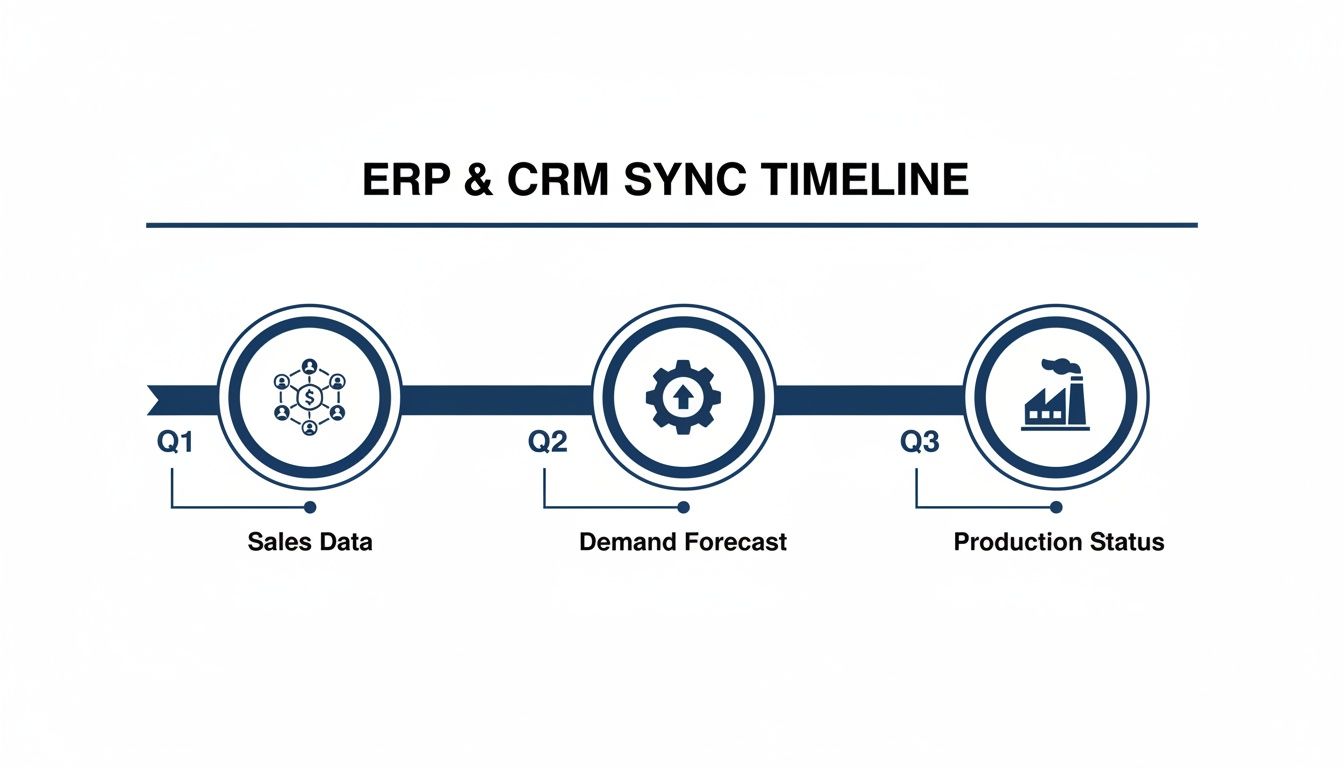
As you can see, the CRM isn't an island; it’s the engine that feeds critical sales and forecast data directly into your operational systems.
Days 61-90: Team Training and Go-Live
The final 30 days are all about people. A perfect system with untrained users is a failed project. The goal here is to make sure every team member is confident, capable, and clear on how the new CRM for manufacturing companies will make their job easier.
Training must be role-specific. Your sales team doesn’t need to know the fine details of the service module. Tailor your training sessions to cover the "what's in it for me" for each department.
A Proven Training and Launch Sequence:
- Develop Training Materials: Create simple, one-page cheat sheets and short video tutorials for core tasks (e.g., "How to Create a Quote").
- Conduct Role-Based Training: Hold separate, hands-on training sessions for sales, customer service, and other key teams.
- Set the Go-Live Date: Announce a clear cut-off date when old systems will be retired and the new CRM becomes the single source of truth.
- Provide Post-Launch Support: For the first two weeks after go-live, offer daily "office hours" where users can get immediate help.
Here’s a breakdown of the 90-day plan. Think of it as your project blueprint.
90-Day CRM Implementation Plan
| Phase | Timeline | Key Actions and Milestones | Primary Goal |
|---|---|---|---|
| Foundation | Days 1-30 | Process mapping, system configuration, custom field setup, workflow automation rules, and defining ERP integration points. | Translate business processes into a configured, functional CRM "sandbox" environment. |
| Validation | Days 31-60 | Data scrubbing and migration, pilot group selection and testing, bug identification, and gathering user feedback. | Validate the system's configuration with real data and users to identify and fix issues before full rollout. |
| Launch | Days 61-90 | Develop role-specific training materials, conduct team training sessions, set a firm go-live date, and provide post-launch support. | Ensure all users are trained, confident, and have fully adopted the new CRM as the single source of truth. |
This structured approach turns a complex technical project into a manageable business transformation. For a more detailed breakdown, check our complete guide on how to implement a CRM system. It ensures you launch a system your team will actually use—and that will deliver a tangible return on your investment.
Measuring KPIs That Actually Matter to Your Operations
How do you know if your new CRM is working? The answer isn't just about counting new leads. A successful CRM for manufacturing companies should create tangible improvements in efficiency and profitability across your entire operation.
To prove the system's value, you have to move beyond generic sales metrics and focus on KPIs that directly reflect operational health. This is how you demonstrate real, measurable improvements to the C-suite and the production floor.
From Quote to Order Velocity
One of the most critical metrics for any manufacturer is the time it takes to turn a request for a quote (RFQ) into a firm, production-ready order. This KPI, Quote-to-Order Time, is a direct measure of your sales and engineering efficiency. A long cycle means you’re slow and likely losing to more agile competitors.
Before you go live, establish a baseline. How many days does it take on average right now? Once the CRM is running, build a report that calculates the average time between the "Quote Created" date and the "Order Confirmed" date. Your goal is a steady downward trend.
On-Time Delivery and Customer Satisfaction
On-time delivery (OTD) is the bedrock of your reputation. While your ERP manages shipping data, your CRM is crucial for tracking the customer-facing side of this KPI. It provides context on why deliveries are late and how that impacts relationships.
You can set up your CRM to track:
- Promised Delivery Date vs. Actual Ship Date: Sync this data from your ERP to display your OTD percentage in real-time.
- Customer Complaints Related to Delays: Tagging these issues allows you to see if late deliveries are causing an uptick in support costs or customer churn.
Improving OTD is a direct reflection of how well your sales, planning, and production teams are communicating—a process your CRM should be right in the middle of.
Demand Forecast Accuracy
Poor demand forecasting leads to chaos: either too much capital is tied up in inventory or you're scrambling to fulfill orders, leading to delays. While your ERP does the heavy lifting, the CRM provides the high-quality sales data needed for an accurate forecast.
Your CRM’s sales pipeline is a goldmine for forecasting. The total value of opportunities in the "Proposal Sent" or "Verbal Commitment" stages, weighted by their probability of closing, gives your production planners a much clearer view of what’s coming.
Set up a report that compares the CRM-based sales forecast for a given month against the actual orders that came in. Tracking Forecast Accuracy helps you fine-tune your sales stages and probability ratings, leading to more reliable production planning. For a deeper dive, our guide on what is marketing analytics can provide a solid foundation.
Aftermarket Service Revenue
For many manufacturers, the initial sale is just the beginning. Aftermarket services—spare parts, maintenance contracts, and repairs—are a huge source of high-margin revenue. Your CRM is the perfect tool to manage and grow this side of the business.
Create a specific pipeline in your CRM just for aftermarket opportunities. Start tracking KPIs like:
- Increase in Service Contract Renewals: Are you proactively reaching out before contracts expire?
- Revenue from Spare Parts per Customer: Identify opportunities to upsell parts to existing customers.
- Average Time to Resolve a Service Ticket: Faster resolution leads to happier customers who are more likely to buy from you again.
Focusing on these operational KPIs shifts the conversation from "How many leads did we get?" to "How much more efficient and profitable are we?" This is how you prove the true value of your investment.
Answering Your Top Manufacturing CRM Questions
As you get closer to a decision on a CRM for manufacturing companies, practical questions start to surface about implementation, security, and user adoption. We’ve heard these questions dozens of times from manufacturing leaders. Let's tackle them head-on so you can move forward with confidence.
How secure is our data on the shop floor?
This is non-negotiable. Putting new, cloud-based software on the shop floor raises immediate concerns about protecting your intellectual property. You have to know your designs, customer lists, and production data are locked down.
Any credible CRM vendor will have robust security features. Here’s what to ask for:
- Role-Based Permissions: This is your first line of defense. It means a machine operator can’t see financial forecasts, and a sales rep can’t accidentally change a production schedule.
- Data Encryption: Ensure all data—whether stored (at rest) or being sent over a network (in transit)—is encrypted using modern standards.
- Compliance Certifications: Look for proof. Certifications like SOC 2 or ISO 27001 are independent audits that confirm a vendor meets tough security standards.
A properly configured CRM actually makes you more secure by pulling critical information out of random spreadsheets and into a controlled, auditable system.
Can our non-technical teams actually use this?
Let's be blunt: a powerful CRM that nobody uses is a very expensive paperweight. User adoption is the single biggest make-or-break factor, especially when you have teams who aren't used to living in software all day.
The secret is to choose a system that’s simple to use and train people only on their specific, role-based tasks.
The goal isn't to make your production planner a CRM power user. It's to give them a tool that makes checking an order's status or updating a job's progress faster and easier than how they do it now. If it's not easier, they won't use it. Period.
Look for a system with a clean, intuitive mobile app. A shop floor supervisor is far more likely to tap an update on a tablet than walk back to a desktop. The easier you make it to capture data where the action happens, the better your adoption will be.
How much customization is too much?
It's tempting to bend a new CRM to perfectly mimic every old manual process. Don’t fall into this trap. While a CRM for manufacturing companies needs to be flexible, over-customization creates a monster that’s complex, expensive to maintain, and a nightmare to upgrade.
A better approach is the 80/20 rule:
- Pinpoint the 20% of your processes that are genuinely unique to your business. These are the areas where thoughtful customization is worth the investment.
- For the other 80% of standard workflows (like basic lead management), be ready to adopt the CRM's built-in best practices.
A good implementation partner will challenge you on this. They’ll ask why you do things a certain way, helping you separate a critical process from an old habit. This prevents you from simply "paving the cow path" and instead helps you build a more efficient road for the future.
You've diagnosed the problem, mapped your processes, and planned the implementation. Now it's time to build a system that drives real growth. At Machine Marketing, we specialize in implementing marketing and sales systems that are built for the unique demands of the manufacturing industry.
The next step is to diagnose your current system. Book a discovery call with Karl to see how we can build a scalable system for your sustainable growth.
