
Is your marketing system leaving money on the table? If you're manually tracking leads in spreadsheets, struggling with follow-ups, and unsure of your true marketing ROI, the problem isn't a lack of effort—it's a lack of an engineered system.
A marketing automation strategy is your playbook for using software to manage leads and nurture relationships without you lifting a finger. It’s a system built to deliver the right message to the right person at the right time. This guide gives you the exact steps to diagnose your current process, build a strategy around your customer, and implement a system that drives consistent growth.
Diagnosing Your Need for a Marketing Automation Strategy
If you're juggling spreadsheets, sending one-off emails, and losing track of solid leads, you're not alone. We see this constantly. It’s flat-out exhausting, and more importantly, it's costing you real opportunities.
Without a strategy, marketing feels like putting out fires. A marketing automation strategy, however, turns that chaos into a predictable growth engine.

Shifting from Manual Labor to an Engineered System
It’s time to adopt an engineering mindset. Stop seeing marketing as disconnected campaigns and start treating it like a single, integrated system that can be diagnosed, tweaked, and optimized. The goal isn't just to buy software; it's to build a predictable engine for growth that works for you 24/7.
The market for this is exploding for a reason. Valued at USD 6.65 billion in 2024, it’s projected to hit USD 15.58 billion by 2030. Why? Because it works. Data shows that 72% of the most successful companies use marketing automation, compared to just 18% of unsuccessful ones. It is a critical piece of the growth puzzle.
Key Takeaway: Your marketing probably isn't failing because of poor execution. It's failing because you have a systems problem. Automation is the framework you need to fix it.
This shift changes the conversation from, "What should we post today?" to, "What system can we build to nurture every new lead automatically?" This approach lets you pinpoint the real issues holding you back. You can explore more about the specific benefits of marketing automation in our detailed guide.
Sometimes it's tough to connect the daily frustrations with the underlying cause. This table should help you diagnose what's really going on.
Symptoms vs. Root Cause: Your Marketing Diagnosis
| Common Symptom (What You're Experiencing) | Underlying Problem (The Real Cause) | How Automation Provides the Solution |
|---|---|---|
| "Leads are falling through the cracks." | Lack of a standardized, immediate follow-up process. | Automatically triggers welcome emails and nurturing sequences the moment a lead enters your system. |
| "Our sales team wastes time on tire-kickers." | No reliable system to qualify leads before a sales call. | Implements lead scoring based on behavior (e.g., page visits, email opens) to identify sales-ready prospects. |
| "We have no idea which campaigns are working." | Disconnected data sources and an inability to track the full customer journey. | Creates a single source of truth, connecting every touchpoint from the first click to the final sale. |
| "Our messaging feels generic and impersonal." | Sending the same message to everyone, regardless of their needs or stage in the buying cycle. | Segments your audience and delivers personalized content based on their specific interests and actions. |
If you recognize the symptoms in that first column, you're not just patching leaks—you're dealing with a foundational problem a proper system can solve for good.
Questions to Ask Yourself
Before you jump into solutions, let's get a clear diagnosis. If any of these questions hit close to home, it’s a strong signal that you’re ready for an automation strategy:
- Are leads falling through the cracks? If a contact form submission doesn't get an immediate and consistent response every single time, you're losing business. Period.
- Is your sales team wasting time on unqualified prospects? Automation can score and qualify leads for you, so your team only spends time talking to people who are actually ready for a conversation.
- Can you track a customer's entire journey? Without a connected system, it’s nearly impossible to know which marketing efforts are actually bringing in the revenue.
Auditing Your Current System to Define Clear Goals
Before an engineer builds anything new, they map the existing landscape. The same holds true for your marketing automation strategy. Jumping straight to picking software is a classic mistake. First, you need to get under the hood of your current processes to figure out what problems you’re actually trying to solve.
This audit isn't about complex spreadsheets or week-long meetings. It's about asking direct, honest questions to find the friction points that are costing you time and money. Think of it as a diagnostic check-up for your company's growth engine.

Uncovering Bottlenecks with a Practical Audit
Your mission here is to spot the gaps and hidden opportunities. Grab a notepad and walk through these questions with your team. Be brutally honest.
- Lead Generation & Capture: Where do your best leads really come from? What happens the second someone fills out a form on your site? Is that process different for a lead you met at a trade show?
- Initial Follow-Up: What’s your current speed-to-lead? Are we talking five minutes, five hours, or five days? Who’s responsible for that first touchpoint, and is it a consistent experience every single time?
- Lead Nurturing: What happens to the lead who says, "Not right now"? Do they fall into a black hole, or is there a system to keep the conversation going?
- Sales Handoff: When exactly does marketing pass a lead to sales? Is that trigger crystal clear? How does the sales team see the history of that lead's interactions?
- Manual Task Analysis: Which marketing or sales tasks feel like a grind? List out everything that’s repetitive and time-consuming, like data entry or sending the same follow-up emails.
Answering these questions will shine a light on your system's weakest links. These are the exact problems automation was born to fix. For a deeper look at your data system, our guide on how to choose a CRM system is a great place to start.
Moving from Vague Objectives to Measurable Targets
Once you've diagnosed the issues, you can set clear, measurable goals. This critical step turns problems into an actionable plan. Vague goals like "get more leads" are useless because you can’t measure them.
Key Takeaway: A successful marketing automation strategy isn't measured by how many emails you send. It's measured by its direct impact on specific, pre-defined business goals.
Your audit findings should directly feed into your goals. It’s about connecting the problem you found to a quantifiable outcome you want to achieve.
Real-World Goal Setting Examples
Here’s how to translate audit findings into strong, actionable goals that actually mean something.
| Audit Finding (The Problem) | Vague Objective | Specific, Measurable Goal (The Solution) |
|---|---|---|
| "Our lead response time is over 24 hours, and we know we're losing prospects." | "Improve follow-up." | "Reduce new lead response time to under 5 minutes by implementing an instant, automated email and SMS notification to the assigned sales rep." |
| "Leads who aren't ready to buy are forgotten and never contacted again." | "Nurture more leads." | "Increase marketing-sourced sales appointments by 15% in the next six months by creating a 6-month, long-term nurture sequence for all 'cold' leads." |
| "Our sales team spends hours manually entering lead data into the CRM." | "Be more efficient." | "Save 10 hours of manual data entry per week for the sales team by automating the transfer of lead data from website forms directly into the CRM." |
See the difference? Specific goals are tangible, time-bound, and directly attack a bottleneck you found. They give you a clear destination and ensure your strategy is built to solve your company's specific problems.
Figure Out the Journey Before You Buy the Tools
Here’s where many companies go wrong. They buy a shiny new automation tool and then try to force their processes into it. That’s backward.
Your marketing automation strategy shouldn't be built around your company. It needs to be engineered around your customer's experience. If you don't understand that path—every step, question, and hesitation—you're just buying expensive software that will likely gather digital dust.
The first step is to create a customer journey map, a blueprint that shows exactly how prospects find you, learn about you, and decide to trust you. Once you have this map, picking the right tools becomes simple.
From First Click to Final Quote: A B2B Example
Let's make this real. Imagine you run a custom CNC machining shop. Your sales cycle isn't a five-minute online checkout; it's a considered process that might involve an engineering team and a purchasing department. Mapping this out shows you precisely where automation can make the process smoother.
The Awareness Stage
It starts when a potential client—an engineer at a large manufacturing firm—hits a wall. Their current supplier can't handle the tight tolerances for a new part.
- Their Action: They search Google for "high-precision CNC machining services."
- Key Touchpoint: They find and read your blog post, "5 Common Mistakes in Prototyping Complex Industrial Parts."
- Automation Opportunity: At the end of the article, you offer a downloadable guide. The moment they enter their email, a trigger fires, instantly adding them to your CRM and tagging them as an "Engineer-Prospect."
The Consideration Stage
Now the real evaluation begins. The engineer is digging deeper, looking for proof of your expertise.
- Their Action: They click through your case studies and look for projects similar to their own.
- Key Touchpoint: They watch a video testimonial from another manufacturer in their industry.
- Automation Opportunity: Your system sees this high-level engagement and automatically sends a follow-up email. Not a sales pitch, but a value-add: "Saw you were interested in our work with [Client Type]. Here's a detailed breakdown of how we achieved a 30% reduction in production time for them."
The Big Idea: During the consideration phase, automation isn't for closing. It's for building confidence. The goal is to proactively give the prospect the exact information they need.
The Decision Stage
They're sold on your capabilities. Now it's about the practical stuff—pricing, lead times, and getting a formal quote.
- Their Action: They navigate to your "Request a Quote" page and upload their technical drawings.
- Key Touchpoint: Getting a fast, professional response that confirms you've received their request.
- Automation Opportunity: The form submission kicks off two things. First, an automated email and text message go to the prospect, confirming their files and setting expectations ("Our team will review your specs and be in touch within 24 hours"). Second, it creates a priority task in your CRM and notifies the head of sales with the prospect's full engagement history.
You’re no longer just "doing marketing." You're building a system that methodically guides a potential customer from one stage to the next.
Let Your Blueprint Guide Your Tool Selection
With this journey map, you can now build a practical checklist of what you need from an automation platform. No more getting distracted by flashy features you'll never use.
What to look for in your automation platform:
- Integrated CRM: Your customer data must have a built-in Customer Relationship Management (CRM) or a seamless, native integration with the one you already use.
- Visual Workflow Builder: You need the ability to visually map out your automation sequences with "if this, then that" logic, without needing a developer.
- Multi-Channel Communication: The right platform consolidates your outreach, letting you build workflows that include email, SMS, and even automated voice drops.
- Robust Tagging and Segmentation: This is non-negotiable. You must be able to automatically tag contacts based on their actions (e.g., "downloaded_guide," "visited_pricing_page"). This drives personalization at scale.
This is where all-in-one platforms like GoHighLevel prove their worth for SMBs. It's an operating system built to run the exact journey we just mapped out, combining a CRM, email and SMS automation, and sales pipeline management into one system. Instead of duct-taping tools together, a unified platform lets you build truly seamless workflows.
Building Your Three Foundational Workflows
With your strategy mapped out, it’s time to build the automated workflows that will do the work. The key is to start small and targeted. Trying to automate everything at once is a rookie mistake. Instead, focus on three foundational workflows that solve immediate problems and deliver quick wins.
Workflow 1: The Instant Lead Follow-Up
What's the single biggest fumble most businesses make? Letting new leads go stale. Data shows that contacting a new lead within five minutes can skyrocket conversion rates. This first workflow ensures no lead ever falls through the cracks again.
- The Goal: Engage every prospect the moment they reach out, confirm their inquiry, and get them to the right person or next step instantly.
- The Trigger: A ‘Form Submitted’ on your website’s contact page or a ‘Tag Added’ in your CRM.
- The Actions: Once triggered, the system runs a pre-set sequence. A prospect fills out your "Request a Quote" form. Instantly, the system should:
- Fire off an automated email and SMS: "Thanks for your request, [First Name]! We've got your details and will be in touch within the next business day."
- Pop a new opportunity into the right stage of your sales pipeline inside your CRM.
- Assign a task to the right sales rep, complete with all the lead's information.
- Shoot an internal notification (email or a Slack message) to the rep, letting them know a hot lead just landed.
Just like that, you’ve gone from a slow, inconsistent response to an instant, professional one—every single time.
Workflow 2: The Long-Term Nurture
What happens to leads who are interested but not ready to buy? Too often, they end up in a CRM black hole. This is a massive missed opportunity. The long-term nurture sequence is how you stay top-of-mind without being annoying.
Your automation strategy has to account for the 95% of potential buyers who are in the market but not ready to buy today. A nurture workflow is your system for building trust until their timing is right.
This workflow is about building a relationship by consistently delivering value, not just sales pitches.
- The Goal: Educate and engage prospects over weeks or months, positioning your company as the go-to expert.
- The Trigger: Manually adding a ‘Tag: Nurture’ after a sales call, or if a contact doesn’t reply after three follow-up emails.
- The Actions: This is your classic "drip" campaign—a series of pre-written, helpful emails sent on a schedule. A typical B2B nurture sequence might look like this:
- Day 1: Send a helpful article: "The Top 3 Mistakes to Avoid When Choosing a [Your Service] Provider."
- Day 14: Share a compelling case study about how you solved a similar problem for another client.
- Day 30: Invite them to a free webinar or send over a link to a recorded demo.
- Day 60: Send a personal-feeling email from a sales rep: "Just checking in, have you had a chance to think more about [Their Problem]?"
This patient approach keeps slow-burning leads warm, dramatically increasing their chances of converting when the time is right.
This diagram shows exactly how these first two workflows fit into the buyer's journey.
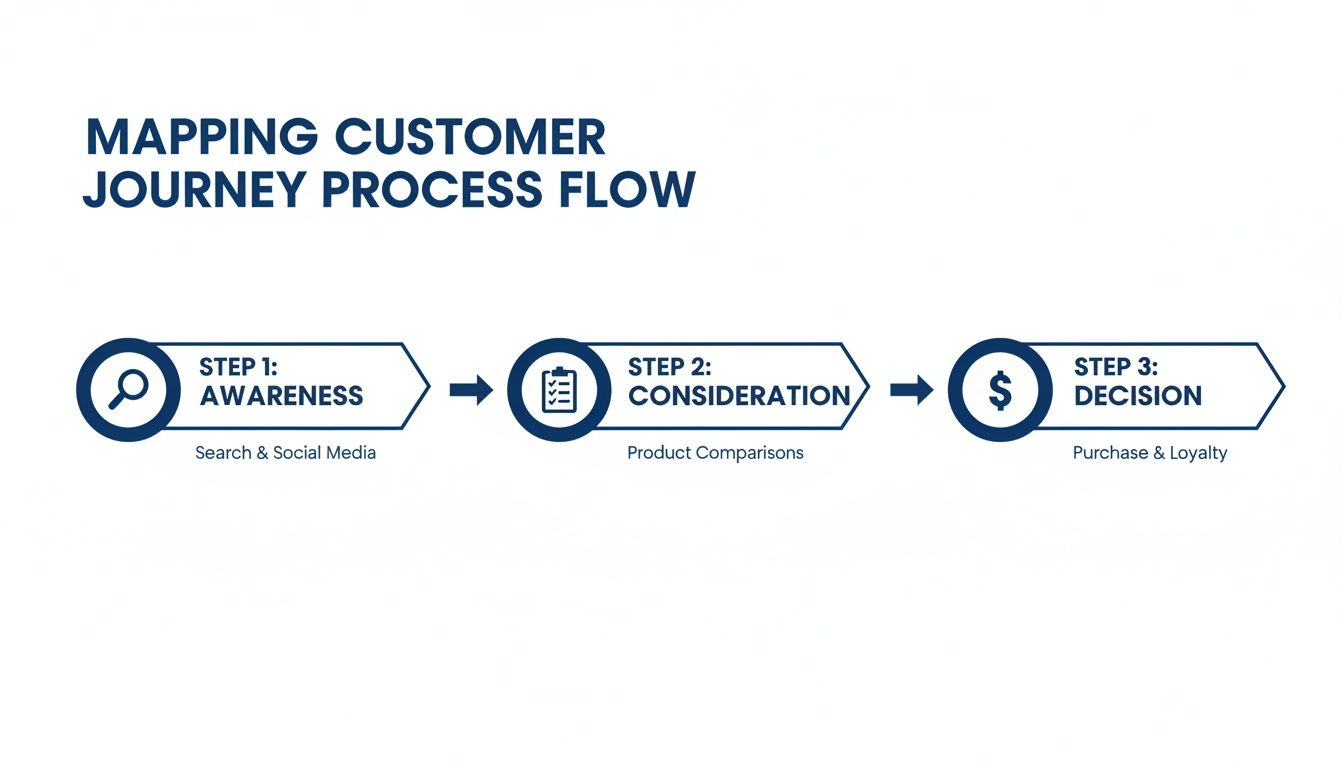
The instant follow-up is critical for the Awareness stage, while the long-term nurture does the heavy lifting during the Consideration phase.
Workflow 3: The Client Onboarding Sequence
Automation doesn't stop once the deal is signed. The first few weeks are critical for setting the right tone. A clunky, manual onboarding process is a recipe for buyer's remorse.
- The Goal: Welcome new clients, give them everything they need, set clear expectations, and kick off the project without a hitch.
- The Trigger: When an opportunity is moved to ‘Closed/Won’ in your CRM.
- The Actions: This sequence is a mix of client-facing communication and internal task management. A new client signs on. The system can instantly:
- Send a "Welcome Aboard!" email with a link to a welcome packet, an FAQ page, or a kickoff form.
- Automatically schedule internal tasks for your project manager, like "Schedule Kickoff Call" or "Set Up Client in Project Management Software."
- Drip out emails over the first two weeks, introducing their main point of contact and sharing helpful resources.
These three workflows are the bedrock of a solid automation strategy.
Essential Automation Workflow Blueprint
This table breaks down the three foundational workflows, giving you a tangible starting point.
| Workflow Name | Primary Goal | Example Trigger | Sample Action Sequence |
|---|---|---|---|
| Instant Lead Follow-Up | Engage new leads within 5 minutes to maximize connection rates and make a professional first impression. | "Form Submitted" on website; "Tag Added" in CRM. | 1. Send immediate Email/SMS confirmation. 2. Create Opportunity in pipeline. 3. Assign Task to sales rep. 4. Send internal notification (Slack/Email). |
| Long-Term Nurture | Build trust and stay top-of-mind with leads who aren't ready to buy yet, positioning your brand as the expert. | "Tag Added: Nurture"; No response after 3 follow-up emails. | 1. Day 1: Send educational blog post. 2. Day 14: Share a case study. 3. Day 30: Invite to webinar. 4. Day 60: Personal check-in from sales rep. |
| New Client Onboarding | Create a smooth, welcoming experience for new clients, reduce manual admin work, and prevent buyer's remorse. | Opportunity status changed to "Closed/Won" in CRM. | 1. Send "Welcome" email with next steps. 2. Create internal tasks for project setup. 3. Drip helpful resources over the first two weeks. |
By automating these foundational workflows, you're building a reliable, scalable system that delivers a better, more consistent experience for every prospect and client.
Measuring Performance and Iterating for Scalable Growth
Your automation system isn't a "set it and forget it" tool. Think of it like a high-performance engine. It needs regular monitoring and tuning to keep it running at its best. This final step is what turns a basic setup into a true marketing automation strategy that scales with your business.
The good news? You don’t need a degree in data science. It’s about knowing which numbers actually matter.
Moving Beyond Vanity Metrics
Many business owners get hung up on vanity metrics like email open rates or social media likes. While they feel good, they don't tell you if your system is actually making you money. An open rate doesn’t pay the bills. A new client does.
We need to focus on key performance indicators (KPIs) that connect directly to business growth.
KPIs That Actually Matter:
- Lead-to-Customer Conversion Rate: What percentage of leads become paying customers? This is the ultimate health check for your entire marketing and sales engine.
- Sales Cycle Length: How long does it take for a new lead to sign a contract? If your automation is working, this timeline should shrink as your nurturing gets smarter.
- Customer Lifetime Value (CLV): Are your automated onboarding sequences creating happier clients who stick around longer? A rising CLV is a powerful signal that your system is creating real value.
Tracking these metrics gives you a clear, honest picture of your ROI. For a deeper dive, learn more about what marketing analytics are and how to use them in our complete guide.
Your Monthly Performance Review Framework
Block out an hour each month to diagnose your automation workflows. The goal is to ask the right questions to figure out what's working and what isn't.
Key Takeaway: Consistent, data-driven iteration is what separates a basic automation setup from a scalable growth machine. Small monthly adjustments compound into massive improvements over time.
Zero in on one workflow at a time and ask diagnostic questions that point to clear, actionable next steps.
Questions to Ask During Your Review
These questions will help you spot opportunities for improvement.
- Where are leads dropping off?
- Look at your long-term nurture sequence. Is there one email where a huge chunk of contacts unsubscribe? That email is a weak link. It needs to be rewritten or replaced.
- Which touchpoints are driving the most conversions?
- Dig into your analytics. Does the case study on day 14 or the webinar invite on day 30 consistently generate sales calls? Double down on what works and cut what doesn't.
- Are we making the sales team's life easier?
- Talk to your sales reps. Are the leads coming out of the automation system well-informed and ready for a real conversation? If not, you may need to add more educational content to your nurture sequence.
This cycle of measuring, analyzing, and adjusting is where the magic happens. Every time you tweak a subject line or swap in new content based on real data, you're making your growth engine smarter and more effective.
Still Have Questions About Marketing Automation?
Even the best-laid plans come with questions. Here are a few of the most common ones we hear, with straight answers to give you clarity.
How Much Does a Marketing Automation Strategy Actually Cost?
The honest answer is: it depends. The cost breaks down into two parts: the software and the implementation time.
All-in-one platforms like GoHighLevel can start around $97 per month, putting serious power within reach for most SMBs. Enterprise systems like HubSpot or Marketo can run from a few hundred to thousands of dollars a month.
But remember, the software is just one piece. You also have to factor in the time—either your team's or the cost of bringing in an agency to engineer and run the system for you.
Our take: The goal isn't to find the cheapest option. It’s to find the one where the gains in efficiency and sales deliver a return that blows the total cost out of the water.
Can This Feel Too Robotic or Impersonal?
It absolutely can… if done badly. A poorly planned strategy feels spammy. But a well-designed one does the exact opposite. The point isn’t to replace human connection but to handle the repetitive grunt work so your team has more time for meaningful conversations.
Good automation feels personal because it uses:
- Personalization tokens to drop in a contact’s name or company.
- Smart segmentation to send only relevant messages.
- Behavioral triggers that make your communication feel like a natural response.
The best strategies use machines for what they do best (speed and consistency) to free up humans for what we do best (building relationships).
How Long Until I Actually See Results?
You’ll see a mix of quick wins and long-term shifts. Some results show up almost immediately.
For example, an "Instant Lead Follow-Up" workflow can start paying for itself within days. You'll immediately stop letting hot leads go cold. That’s a quick win.
But measuring a real lift in bigger KPIs—like shortening your sales cycle or increasing customer lifetime value—usually takes about 3-6 months. That gives the system enough time to work across enough customer journeys to show a clear trend.
What's the Single Biggest Mistake People Make With Automation?
Easy. The most common and costly mistake is focusing on the tool before the strategy. We see it all the time. A company gets excited, buys a powerful piece of software, and then tries to figure out what to do with it.
This backwards approach always leads to the same place: overwhelm, frustration, and a tool that never gets used to its full potential.
The fix is to do exactly what we’ve laid out in this guide. Start by diagnosing your current systems and defining a clear strategy. Then, and only then, do you choose the tool that’s built to execute that specific plan.
Ready to build a marketing system that delivers predictable growth? At Machine Marketing, we specialize in diagnosing business challenges and engineering the right automation strategies to solve them. We handle everything from CRM setup in GoHighLevel to building the workflows that turn leads into loyal customers.
Book a discovery call with us today to get a clear, actionable roadmap for your business. Learn more at https://machine-marketing.com.
