
If you find yourself posting to social media only "whenever you have time," you’re not just being inefficient—you're leaving leads on the table. A scattered approach leads to a stalled audience and almost zero ROI. The fix isn't just more ideas; it's a better system, and that system starts with a social media posting schedule template. In this guide, we'll diagnose why random posting fails and give you a clear framework to build a predictable growth engine.
Why Random Social Media Posting Is Costing You Leads
We see this all the time with busy B2B owners and manufacturers. You know social media is important, but it constantly gets shoved to the back burner. Maybe a post goes up on Monday, then… radio silence until the following Thursday. This “post-when-you-can” method feels productive, but it’s quietly sabotaging your growth.
The root problem lies in how social media algorithms work. Platforms like LinkedIn and Facebook are engineered to reward consistency. When you post sporadically, their systems learn that your account isn't a reliable source of fresh content, which means they're less likely to show your future posts to people. You're effectively training the algorithm to ignore you.
Missing Your Prime Engagement Windows
Beyond algorithms, random posting means you’re probably missing your audience's peak activity times. Your ideal customer—say, an engineer or a plant manager—is likely most active on LinkedIn on a Wednesday morning at 10 AM. If you post on a Friday afternoon, your message gets lost in the weekend void. A structured schedule ensures you show up when your audience is actually listening.
This chaotic approach also creates significant operational drag. Without a plan, your team wastes time every day wondering what to post, scrambling for images, and rushing copy. That inefficiency doesn't just burn hours; it leads to lower-quality content that fails to connect. The whole process becomes a frustrating chore instead of a streamlined, lead-generating system.

The True Cost of Inconsistency
The consequences of a disorganized social strategy hit your bottom line directly.
- Weakened Brand Authority: Inconsistent messaging makes your brand seem less professional and unreliable.
- Stagnant Audience Growth: Without a steady stream of valuable content, you give potential followers no reason to connect.
- Missed Lead Opportunities: Every missed post is a potential conversation—and a potential lead—lost. To see how a systematic approach works, see our insights on using social media for lead generation.
The core issue isn't a lack of effort; it's the absence of an engineered system. By implementing a social media posting schedule, you transform a reactive, time-consuming task into a proactive, predictable engine for business growth.
Making the Posting Schedule Template Your Own
A template is a great starting point, but its real power is unlocked when you shape it to fit your business. We've put together a practical, battle-tested social media posting schedule template specifically for B2B growth. You can grab it as a Google Sheet or CSV—no strings attached.
Now, let's walk through how to customize it. This isn't about filling in boxes; it's about building a reliable system that maps to your goals and your team's real-world capacity.
Start by Defining Your Core Content Pillars
Before you can schedule a single post, you need to know what you're going to talk about. Random posts about products one day and the company cookout the next don't build a cohesive brand. You need content pillars—the 3-5 core themes that your content will consistently address.
For a B2B manufacturer, your pillars could be:
- Educational Content: Break down a complex process, answer a common customer question, or share an industry insight.
- Behind-the-Scenes: Show your machinery running, follow a key team member, or document a product's journey from raw material to finished good.
- Problem/Solution: Frame a specific customer pain point and show exactly how your product or service solves it. These are mini case studies.
- Company Culture: Celebrate an employee anniversary, showcase your company values in action, or highlight community involvement.
These pillars create a balanced mix that educates your audience, builds trust, and puts a human face on your brand. Assign each pillar to a specific day in your template—for example, Mondays for education, Wednesdays for behind-the-scenes, and Fridays for culture.
Find a Posting Cadence You Can Actually Stick To
One of the biggest mistakes we see is getting too ambitious with a posting schedule. It's better to post three high-value updates per week consistently than to post ten times one week and disappear for a month. Consistency signals to social media algorithms that your account is reliable.
Ask yourself these questions:
- How many hours can the team realistically commit to creating content each week?
- Do we have a bank of photos, videos, or case studies we can use?
- Who is responsible for the copy, visuals, and scheduling?
Be honest. If you're a one-person marketing department, two solid posts a week on LinkedIn may be perfect. The goal is to pick a pace you can maintain for at least 90 days. You can always ramp up later.
Customize the Template Columns to Fit Your Workflow
Our template provides essential columns, but you should tweak it to match how your team operates. A good schedule tracks much more than just the date and copy. If you want a broader strategic view, our guide on how to create a content calendar is a great resource.
Each column should have a distinct purpose, making it easy for anyone on the team to see what's happening.
Key Columns in Your Posting Schedule Template
A breakdown of the essential components every effective social media schedule needs for clarity and consistency.
| Column Name | Purpose | Example |
|---|---|---|
| Date | The specific day the post will be published. | 10/28/2024 |
| Platform | The social network where the content is headed. | |
| Content Pillar | The core theme this post aligns with. | Educational |
| Copy | The exact text, including any @mentions or hashtags. | "Did you know proper CNC machine maintenance can reduce downtime by 20%? Here are 3 tips…" |
| Visual Asset | A link to the final image, video, or graphic. | [Link to Google Drive folder] |
| CTA (Call to Action) | What you want the reader to do next. | "Download our free maintenance checklist." |
| Status | The current stage of the post (workflow tracking). | Draft, Needs Approval, Scheduled |
This structured format eliminates guesswork and makes collaboration simple. If you're focusing heavily on LinkedIn, you might also find this guide on how to create a LinkedIn content calendar helpful for platform-specific tips.
A customized template becomes your single source of truth. It transforms social media from a chaotic, reactive chore into a managed, proactive system.
Finding Your Best B2B Posting Times
You've got a structured social media posting schedule template. That's a huge step. But the magic happens when you know when to post. Posting at the right time is often the difference between shouting into the void and starting real business conversations.
For B2B businesses, it’s not about chasing viral trends. It’s about aligning your activity with the daily rhythm of the decision-makers you need to reach. This isn't about following a generic guide; it's about building a strategy informed by your own data.
Starting with Data-Backed Benchmarks
While every audience is different, we don't have to start from scratch. General data gives us a solid hypothesis to test. We know B2B professionals are most active on platforms like LinkedIn and Facebook during the workweek. You’re probably scrolling during a morning coffee break, right before lunch, or as you wrap up your day.
Data from social media analyses consistently shows that mid-week mornings deliver peak engagement. Wednesdays between 9 AM and noon are often a sweet spot when B2B professionals are taking a break or scrolling before a meeting. If you want to dive deeper into platform-specific data, you can learn more about the research on ideal posting times.
These benchmarks give you a great starting point:
- Best Days: Tuesday, Wednesday, and Thursday.
- Best Times: 9 AM – 12 PM in your target audience's local time.
- Times to Avoid: Late evenings and weekends, when B2B decision-makers have likely logged off.
Digging into Your Own Analytics
Benchmarks are theory, but your data is proof. Every social media platform has an analytics section that shows you exactly when your followers are most active. This is gold because it reflects the real-world behavior of people already interested in your brand.
Here’s a simple process to find this intel:
- Navigate to Your Analytics: On your LinkedIn Company Page, click "Analytics." For a Facebook Business Page, look for "Insights."
- Find Audience Data: Look for a section related to followers or audience activity. Most platforms show a chart or heat map of the days and hours your followers were online.
- Identify Your Peak Times: Look for the darkest-colored blocks or the highest points on the graph. Does your data align with the Wednesday morning benchmark, or is your audience more active later in the day?
Make checking this a monthly task. As your audience grows, these patterns can and will shift.
Building a Simple Testing Framework
Now you have a hypothesis (benchmarks) and your own data. The last step is to run simple tests to confirm the best times for your business. Think like an engineer: test, measure, and iterate.
Use your social media posting schedule template to document everything.
- Week 1: Schedule important posts during benchmark times (e.g., Wednesday at 10 AM).
- Week 2: Shift those posts to the peak times you found in your analytics.
- Week 3: Try a "control" time outside those windows (like Monday at 2 PM) to see what happens.
After a few weeks, review the results. Add a column in your template for "Engagement Rate" or "Clicks" and record the numbers. The data will quickly show you which time slots are hitting the mark, turning your schedule from a good guess into a data-driven system.
Putting Your Schedule On Autopilot With GoHighLevel
A perfect social media schedule is a huge step, but the plan means nothing without consistent execution. For any busy business owner, manually uploading every post is an unsustainable time-suck. This is where automation turns your daily chore into a hands-off system that works for you.
We'll walk through how to take your finished template and bring it to life with an all-in-one platform like GoHighLevel. The goal is simple: get your content scheduled in batches so you can get back to running your business.
Connecting and Loading Your Content
First, connect your social media accounts inside GoHighLevel. You can link your Facebook, Instagram, LinkedIn, and Google Business Profile pages in just a few clicks, creating a central command center.
Next, use the platform’s social media planner. This is where your template comes alive. All the copy, visuals, and times you've planned can be loaded directly into the system. Instead of posting one by one, you can schedule weeks—or a full month—of content in a single session.
If you want to go deeper, exploring how to automate social media posts can give you even more strategies.
This infographic breaks down the process for dialing in your posting times.
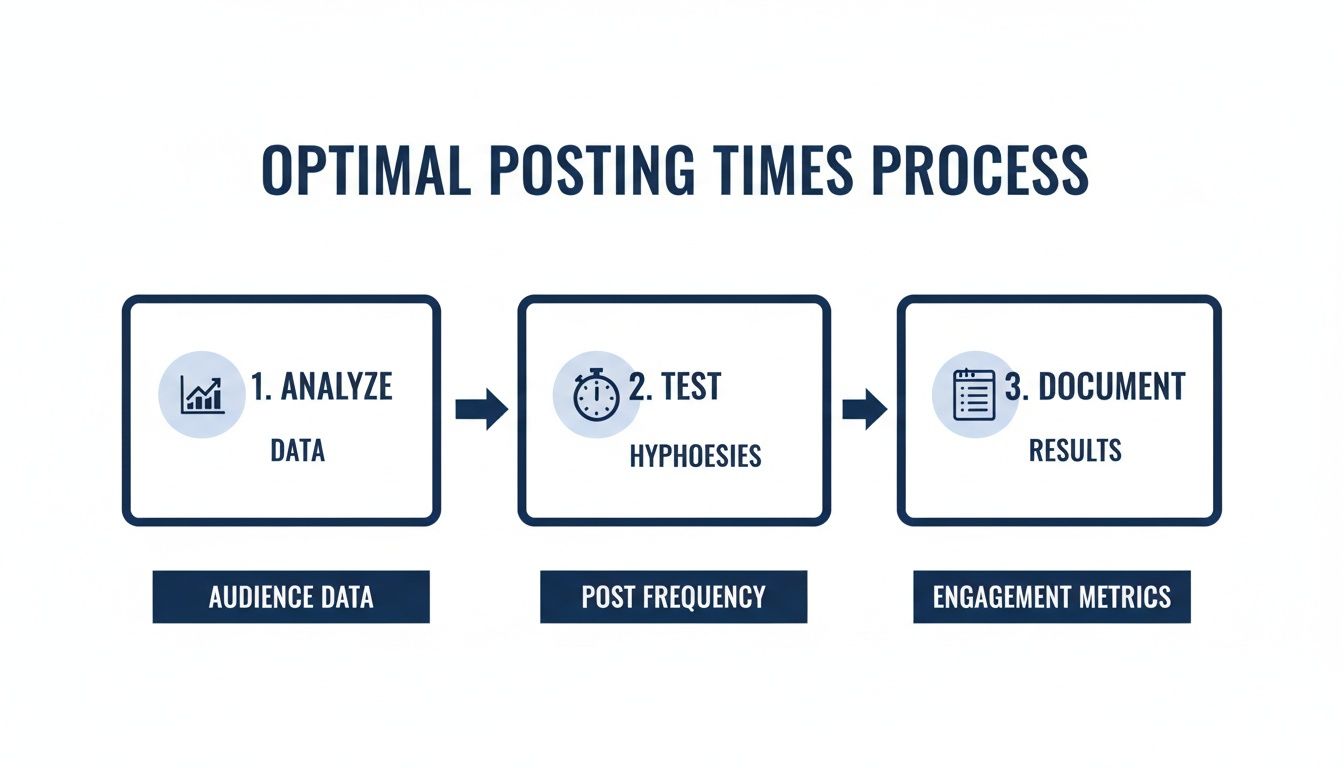
This isn't a one-and-done task. It's a continuous loop: analyze your data, test new times, document what works, and keep refining your schedule for maximum impact.
Turning Engagement Into Measurable Opportunities
Here's where a tool like GoHighLevel shows its real power. Because it’s also your CRM, every interaction on your social posts is tied directly to a contact record. When someone engages with your content, you can see their entire history with your business and even trigger automated follow-up campaigns.
A 'like' is no longer just a vanity metric—it's the first step in a measurable sales conversation.
This integration lets you see precisely which social posts are driving real actions, like demo requests or contact form submissions. You can finally attribute revenue back to your social media efforts, justifying the resources you put in.
This approach elevates your social strategy from a simple brand-building exercise to a vital piece of your inbound marketing funnel. You build a predictable engine that works for you 24/7, turning social media chatter into tangible business growth.
How To Measure And Improve Your Social Media ROI
A social media posting schedule isn't a "set it and forget it" plan. Think of it as a living document—your starting hypothesis that must be tested and refined. To ensure your schedule is actually driving growth, you need to track what's working and make adjustments based on data. This is where an engineering mindset pays off: measure, analyze, and iterate.
For B2B companies, this means we stop chasing vanity metrics like 'likes' and follower counts. Instead, we focus on the key performance indicators (KPIs) that signal a real return on your effort.

KPIs That Actually Matter for B2B
Your time is your most valuable asset, so let's focus on the data that connects social media activity to business outcomes.
Here’s what you should be tracking:
- Engagement Rate: This includes comments, shares, and saves—actions that show your content resonated. A high engagement rate is a clear sign your content pillars are on the right track.
- Click-Through Rate (CTR): This is the percentage of people who saw your post and clicked a link. A strong CTR means your calls to action (CTAs) are working and pulling people deeper into your sales funnel.
- Lead Conversions: This is the big one. How many people who came from a social post filled out a contact form or requested a quote? Tools like GoHighLevel can connect social activity directly to your CRM, making this tracking nearly automatic.
Setting Up Your Monthly Review Process
Collecting data is pointless if you don't use it. We recommend a simple, repeatable review at the end of each month. This isn't about creating a massive report; it's a quick diagnostic to see what worked so you can do more of it.
Add a "Monthly Performance" tab to your social media posting schedule template. At the end of the month, pull the numbers for your best-performing posts and look for patterns. Ask yourself these questions:
- Which content pillar drove the most engagement?
- What topics generated the most website traffic?
- Did any specific posts lead directly to sales inquiries?
- Which days and times consistently got the best results?
If you see that your "Behind-the-Scenes" factory tour videos are outperforming everything else, that's your signal to schedule more of them next month.
The impact of consistent analysis can be huge. Research shows B2B firms that use a systematic approach with templates see 31% higher engagement and a 19% lift in lead growth. If you want to dig deeper, you can find more on the best times to post on social media and the data behind it. This continuous loop—post, measure, refine—is what turns your social media from a branding exercise into a predictable engine for new business.
Common Questions About Social Media Scheduling
Even with the best template, putting a new social media system into practice always brings up questions. We've fielded these same questions from countless business owners, so let's tackle them head-on.
How often should a B2B company post?
The short answer: consistency beats frequency every time. It is far more effective to publish two high-value posts every week like clockwork than to post ten times one week and then disappear. The algorithms on these platforms reward reliability.
Here's a realistic starting point that works for most B2B companies:
- LinkedIn: Aim for 2-3 posts per week. Use it to share industry insights, celebrate company wins, and post detailed case studies.
- Facebook/Instagram: 3-5 posts per week is a solid goal. These platforms are perfect for showing the human side of your operation—think behind-the-scenes shop tours or team culture highlights.
Pick a pace you can genuinely stick to without letting quality slip. Your social media posting schedule template is the tool that keeps you on track.
What kind of content does a B2B manufacturer post?
This is a common challenge. Your audience—engineers, plant managers, and procurement specialists—wants to see your expertise and reliability in action.
Your content pillars should create a valuable and interesting mix. Focus on these areas:
- Educational Posts: Break down a complex technical process, explain the science behind a material, or offer a quick checklist for machine maintenance.
- Behind-the-Scenes: Show your machinery running a complex part, highlight a rigorous quality control check, or film a short video of your team solving a customer's problem. This builds incredible trust.
- Company Culture: Celebrate an employee's 20-year work anniversary, show your team volunteering, or share a story that illustrates your core values.
- Problem/Solution Posts: Frame a specific customer challenge and walk through exactly how your product or service solved it. These are powerful mini-case studies.
This balanced approach shows not just what you make, but who you are and why you're the best at what you do.
Can I just "set it and forget it" with automation?
Yes and no. You absolutely should automate the logistics. Scheduling planned content with a tool like GoHighLevel is a huge time-saver. It frees you from the daily grind of logging in to manually post.
However, the most successful social media strategies always have a human in the loop for engagement.
Automation should handle the logistics, not the conversation. The point of these tools is to buy back your time so you can focus on high-value interactions that build real business relationships.
This means you still need to block out time each week to:
- Respond to comments on your posts.
- Answer direct messages promptly.
- Comment on and share posts from others in your industry.
This mix of smart automation and authentic engagement is what drives results.
What if I don't see results right away?
This is the most important question. Building momentum on social media is a marathon, not a sprint. It's easy to get discouraged if you don’t see a flood of leads in the first 30 days. Don’t fall into that trap.
The goal of starting this system is to establish consistency and gather data. Think of your first 90 days as a data collection phase.
Stick to your template for one full quarter. Use the KPIs we discussed to track what's happening. After 90 days, you'll have hard data showing which content pillars get the most engagement, what time of day gets the most clicks, and which topics your audience cares about. That's when you can start making smart, confident tweaks to build a predictable growth engine, one consistent post at a time.
Ready to stop guessing and start building a marketing system that works? The team at Machine Marketing can help you implement tools like GoHighLevel and turn random acts of marketing into a predictable engine for growth.
