
Your team sends a monthly email. Sales posts a few updates on LinkedIn. Someone boosted a trade show ad. The website gets visits, but the form fills are thin and the good opportunities still come through referrals.
We see this pattern in manufacturing and B2B service firms. The message is not always the problem. The delivery is. You are talking to a market like it is one audience, when your buyers behave like individuals with different machines, buying windows, approval processes, and technical concerns.
That mismatch is expensive. A plant manager does not need the same follow-up as a distributor. A past customer looking for replacement parts should not get the same message as a cold prospect comparing vendors. When every contact gets the same campaign, your marketing starts to sound generic, even when your offer is strong.
One to one marketing fixes that. It replaces broad messaging with relevant communication based on who the contact is, what they have done, and what they are likely to need next. For manufacturers, that means fewer wasted touches and more useful conversations across long sales cycles.
Introduction Is Your Marketing Talking to Everyone and No One
A common scenario looks like this. A manufacturer invests in a site refresh, runs some Google Ads, sends a batch email to the full database, and waits for traction. The traffic report looks decent. The response does not.

The issue shows up in the handoff points.
Where generic marketing breaks down
Your website treats every visitor the same. Your CRM has contact records, but not a usable history. Sales knows key accounts from memory, not from systemized notes. Marketing sends one newsletter because segmenting feels messy and time-consuming.
That creates three problems:
- Weak relevance: Buyers see content that does not match their role, application, or urgency.
- Poor timing: Follow-up happens when someone remembers, not when a useful signal appears.
- Lost context: Sales and marketing cannot see the full interaction trail in one place.
In B2C, this is annoying. In manufacturing, it can stall revenue. Your buyers need multiple touches before they request a quote or book a call. If each touch feels generic, trust builds slowly or not at all.
What one to one marketing changes
One to one marketing treats each contact like a live account, not a line item in a bulk send. The system looks for signals, then responds with the next most relevant message. That could be a follow-up email tied to a spec sheet download, an SMS reminder after a missed appointment, or a reactivation campaign built around past purchase history.
Key takeaway: If your marketing sounds acceptable to everyone, it usually feels important to no one.
For manufacturers and SMBs, this approach is practical because the contact volumes are manageable and the account values are high enough to justify customized follow-up. You do not need enterprise complexity to do this well. You need a working system.
Deconstructing One to One Marketing
One to one marketing is simple. It is the digital version of the shop owner who remembers your name, what you bought last time, and what you will probably need next.
The difference today is scale. Software does the remembering.
From mass messaging to a segment of one
Most firms move through three levels:
| Approach | How it works | Typical result |
|---|---|---|
| Mass marketing | One message to the full audience | Fast to launch, weak relevance |
| Segmented marketing | Different messages for broad groups | Better targeting, still generalized |
| One to one marketing | Message, timing, and offer adapt to the individual | More relevant interactions and better use of sales attention |
This is not a branding exercise. It is an operating model. You collect data, detect behavior, and trigger a response.
Companies that do this well outperform peers. Companies that excel at personalization generate 40% more revenue from these activities than their average competitors according to Segmentation Study Guide on one-to-one marketing.
The three-part system
A practical one to one marketing system rests on three pillars.
Data
You need useful information, not a contact list. For a manufacturer, that includes:
- Firmographic data: Industry, company size, region, distributor or end-user status
- Behavioral data: Pages viewed, forms submitted, emails opened, links clicked
- Transactional data: Quotes requested, products purchased, service history
- Sales context: Notes from calls, objections, budget timing, next step
Bad data breaks personalization fast. If job titles are inconsistent or contacts are duplicated, your automations will misfire.
Triggers
A trigger is the event that tells your system to act. Good triggers are specific and tied to buyer intent.
Examples include:
- A repeat visit to a product page
- A quote request for a specific machine category
- A download of a technical document
- A period of inactivity from an existing account
- A service reminder window based on purchase history
The trigger matters because it changes the tone. A first-time visitor needs education. A repeat buyer may need a fast path back to sales.
Response
This is the output. The action should match the signal.
A useful response might be a role-specific email, an internal task for sales, a landing page variation, or a short SMS confirming next steps. A weak response is a generic “just checking in” email that ignores the trigger entirely.
Practical rule: Personalization is not inserting a first name into a subject line. It is changing the message because the context changed.
What works and what does not
What works:
- Tight data fields
- Simple trigger logic
- Messages tied to real buying behavior
- Sales visibility into every automated touch
What fails:
- Huge automation maps with no ownership
- Personalization based on guesses
- One CRM for sales and separate spreadsheets for marketing
- Trying to automate every journey before proving one
This is why one to one marketing is less about clever copy and more about system design. When the data, trigger, and response line up, your marketing starts acting like a competent sales engineer instead of a broadcast channel.
Why This Approach Is Highly Effective for Manufacturers
Manufacturers rarely lose deals because they sent too few generic messages. They lose deals because follow-up lacked relevance, timing, or continuity.
A buyer asks for a quote on one machine line. Marketing sends a newsletter about company culture. A past customer browses spare parts. Sales never hears about it. An engineer reads a technical page twice. Nobody responds with a useful next step.
That is why one to one marketing fits this sector so well. Your sales cycles are long, your accounts are valuable, and the path to purchase is rarely linear.

It supports long sales cycles without going silent
Many B2B buyers are not ready when they first engage. They may be researching a replacement cycle, comparing specs, or waiting on budget approval. Generic campaigns either over-message them or disappear after the first touch.
One to one marketing handles the middle. It keeps the conversation active with content and follow-up tied to actual buyer behavior. That is how you stay useful without becoming noise.
It improves economics, not just engagement
This approach is not only about making communication feel better. It changes the numbers that matter.
Advanced personalization strategies can lift revenues by 5-15%, increase marketing spend efficiency by 10-30%, and reduce customer acquisition costs by as much as 50%, according to McKinsey data cited by Braze.
For a manufacturer, those gains matter because lead generation is expensive. Trade shows, paid search, outbound sales effort, and proposal time all add up. If better relevance helps you convert the right opportunities faster and stop wasting spend on poor-fit traffic, your margin improves from both sides.
It strengthens existing customer revenue
Many firms obsess over net-new leads while underusing the customer base they already have.
Existing accounts need:
- Consumables or replacement parts
- Service reminders
- Accessory or add-on recommendations
- Cross-sell offers into adjacent product lines
- Educational content for better utilization
A one to one system recognizes those patterns and follows up accordingly. That is far more useful than sending existing customers the same introductory content you send cold leads.
A real example of what good personalization can do
The case for personalization is not theoretical. In a real example shared by Braze, Foxtel Group achieved a 14% increase in customer reactivation within 12 months of churn, an 8% increase in average annual occupancy, and a 105% increase in cross-selling to BINGE, even as subscription prices rose by 20% in the Braze one-to-one marketing article.
The business model is different from manufacturing, but the lesson carries over. Relevant messaging can increase reactivation, retention, and expansion even when the offer is not the cheapest option.
What to ask yourself: Are you treating past customers like your warmest opportunity pool, or are you forcing the team to restart from cold outreach every month?
Why manufacturers have an advantage
This strategy is explained with B2C examples, but manufacturers have strong conditions for success. You have clearer product categories, smaller contact pools, known buying roles, and higher account value. That makes it easier to define trigger points and build practical follow-up.
The challenge is not whether one to one marketing works here. The challenge is building it in a way your team can maintain.
Actionable Personalization Strategies and Workflows
Most one to one marketing advice stays abstract. Manufacturers need workflows. If this happens, check this data, then do that.
That is the level where results start.
Workflow one for quote request follow-up
Start with a high-intent event. A contact requests a quote or submits a product inquiry.
Trigger
Quote request arrives through the website form.
Data check
Review product category, industry, location, and whether the contact already exists in the CRM.
Action
Send an immediate confirmation email that references the requested product category, route the lead to the right salesperson, and create a follow-up task with notes pulled from the form.
A strong version also changes the follow-up asset. If the request is for a specific machine line, the next email should point to the correct spec sheet, application page, or installation overview. It should not send a broad “about us” deck.
Workflow two for content-based nurturing
This works well when buyers research before speaking with sales.
Trigger
A prospect downloads a technical guide, comparison sheet, or application resource.
Data check
Identify whether the contact is new or known, what pages they viewed before the download, and whether they belong to a target industry.
Action
Place them into a short email sequence tied to that topic. Keep it narrow. Send supporting material that helps them evaluate fit, not a stream of unrelated promotions.
If your database is thin, improved segmentation work becomes important. A cleaner database makes personalized email possible. If you need to tighten list quality and structure first, a focused guide on database email marketing is a useful place to start.
Workflow three for dormant opportunity reactivation
Stalled deals are common in manufacturing. Silence does not always mean rejection.
Try a reactivation flow for opportunities that went quiet after a proposal, discovery call, or sample request.
| Stage | Trigger | Response |
|—|—|
| Early stall | No reply after a recent quote or call | Send a plain follow-up that answers likely objections |
| Mid stall | Continued inactivity with repeat website visits | Notify sales and send a role-relevant case asset |
| Late stall | Long inactivity but matching product interest returns | Reopen the opportunity and offer a focused next step |
The point is not to chase harder. It is to respond when interest reappears.
Workflow four for existing customer expansion
This is the easiest place to start because the data is stronger.
Trigger
A current account visits product pages related to accessories, service, or adjacent equipment.
Data check
Match visit behavior against purchase history and account status.
Action
Send a customized email or assign a sales task that references the likely use case. If the behavior suggests service interest, route to service. If it suggests expansion, route to the account manager.
This keeps upsell and cross-sell aligned with behavior instead of calendar-based guesswork.
Where AI helps and where it does not
AI and machine learning are useful when your team needs to process more signals than a human can handle consistently. Gartner found that 84% of digital marketing leaders believe AI and machine learning are essential for real-time personalization efforts, as cited by GrowthLoop on one-to-one personalization.
That does not mean you need to hand strategy over to AI.
Use AI for:
- Pattern detection across contact behavior
- Lead routing support
- Content recommendations
- Timing optimization
- Sequence branching
Do not use AI as a substitute for buyer knowledge, product expertise, or message discipline. If your positioning is vague, AI will help you scale vague messaging faster.
Tip: Build one workflow per buying situation. New inquiry, dormant quote, repeat customer, service reminder. Keep each path simple enough that sales can explain it without opening a flowchart.
What to look for in your first wins
The first signs of progress are operational before they are dramatic. Faster response. Better handoffs. Fewer irrelevant sends. More informed sales conversations.
Those small changes matter because they are evidence that the system is learning to treat contacts as people with context, not names in a batch list.
Building Your Tech Stack with CRM and Automation
One to one marketing falls apart when your data lives in five places and none of them agree. The fix is not more software. It is a tighter stack with one system acting as the operational center.
For most SMBs and manufacturers, that center is the CRM.

The CRM is the control room
If sales tracks activity in one place, marketing uses another, and service relies on inboxes, nobody has a complete picture of the account. That is how duplicate outreach, missed follow-up, and weak reporting creep in.
A practical CRM setup for one to one marketing should do four jobs well:
- Store contact and company records
- Track behavior and sales activity
- Run or trigger email and SMS automation
- Support pipeline visibility for the team
This is why platforms like GoHighLevel are useful for smaller teams. They combine CRM records, forms, automation, email, SMS, and pipeline management in one environment. That reduces handoff gaps.
Why the Unified Customer Profile matters
A Unified Customer Profile, or UCP, brings together interaction data from all touchpoints into one usable record. That includes website visits, form fills, email engagement, purchase history, call notes, and lifecycle status.
That matters because one to one marketing depends on context. If your email tool knows one thing, your CRM knows another, and your sales rep knows a third, your personalization will be inconsistent.
According to ClearLine on Unified Customer Profiles, a UCP is the foundation of effective personalization, and platforms that enable UCPs can drive a 10-30% marketing ROI gain.
A lean stack beats a bloated stack
You do not need a giant martech catalog. You need a few connected pieces that your team will use.
A sensible stack looks like this:
| Layer | Purpose | Example tools |
|—|—|
| CRM and automation | Contact records, pipelines, workflows | GoHighLevel |
| Website and forms | Capture intent and trigger actions | Your CMS plus integrated forms |
| Email and SMS | Delivery channels for follow-up | Native CRM tools or connected send tools |
| Reporting | Basic KPI tracking and pipeline visibility | CRM dashboards |
If you want a broader view of how these layers should fit together, this overview of a marketing technology stack is a useful reference.
What good implementation looks like
A strong setup follows this sequence:
Standardize fields first
Define industry, product interest, lifecycle stage, owner, and source fields clearly.Map your trigger events
Decide which form fills, page visits, and pipeline changes should create actions.Build core automations
Start with confirmation emails, lead routing, no-response follow-up, and reactivation.Give sales full visibility
Reps should see every important automated touch inside the contact record.
A short walkthrough helps if your team is evaluating how an all-in-one setup can support this kind of workflow:
Practical rule: If your sales team cannot tell why a contact received a message, the system is too complex.
Trade-offs to accept
All-in-one platforms are not perfect. They can require discipline around field naming, permissions, and process design. Specialized tools may have deeper features in single categories.
For most SMBs, though, the larger risk is fragmentation, not missing edge-case functionality. A simpler stack with consistent use will outperform a complex stack that nobody trusts.
Your 90-Day Implementation Roadmap and KPIs
Many teams do not fail at one to one marketing because the idea is wrong. They fail because they try to build the final version first.
A better approach is a short implementation cycle with one pilot journey, a small set of core fields, and clear KPIs.
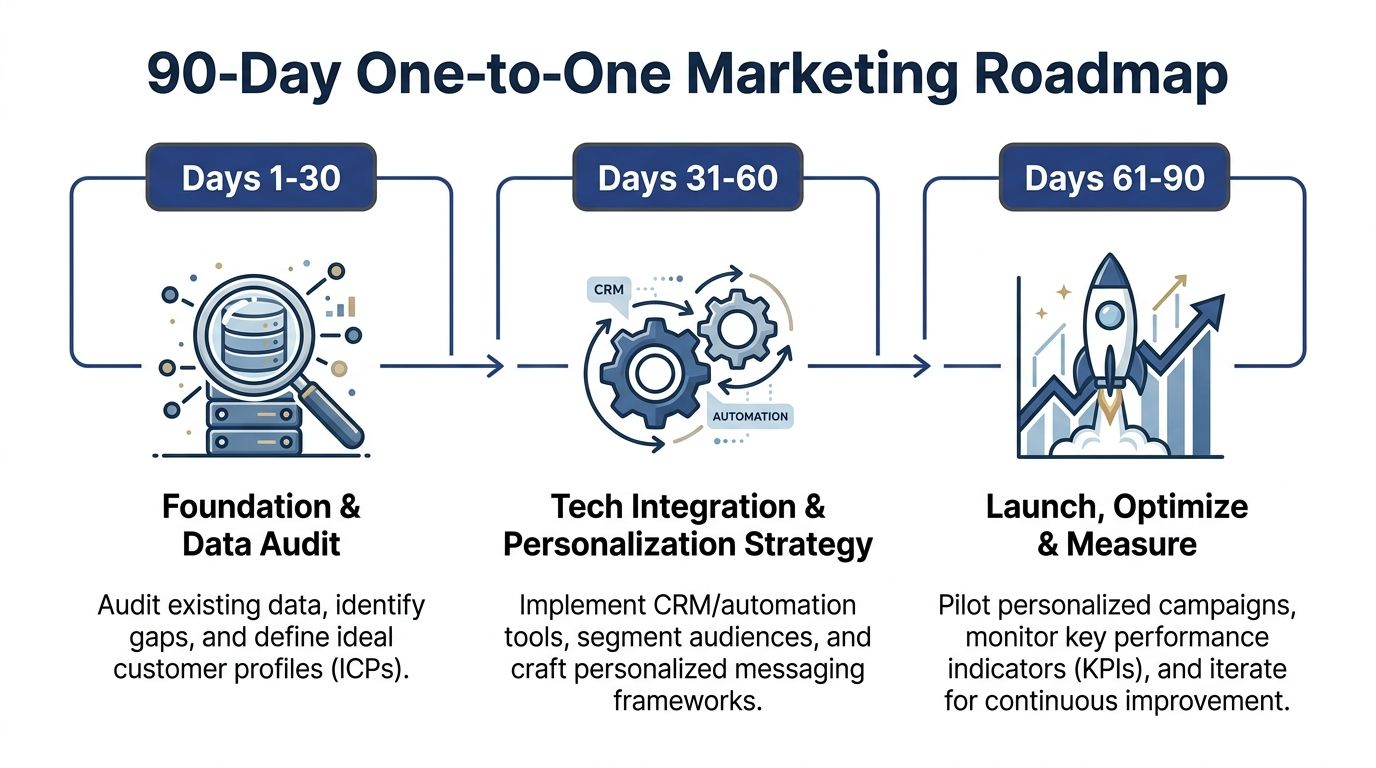
Days 1 to 30 Foundation and data audit
The first month is for diagnosis. Before you automate anything, find out what data you have and whether it is usable.
Focus on these jobs:
Audit your current systems
Review CRM records, contact fields, forms, inbox workflows, and spreadsheet dependencies.Define your core contact structure
Set required fields for company, role, industry, lifecycle stage, owner, and source.Choose one pilot journey
Good starting points include quote request follow-up, dormant lead reactivation, or past customer cross-sell.Get alignment from sales
Confirm what counts as a qualified lead, what timing matters, and what handoff should happen after each trigger.
This is also the right point to document your roadmap in a working plan. A simple marketing roadmap template can keep the build practical and visible.
Days 31 to 60 Build and launch the first workflow
The second month is execution. Build one flow all the way through.
A strong pilot usually includes:
| Component | What to build |
|---|---|
| Trigger | Form submission, content download, or return visit |
| Data logic | Industry, product interest, customer status |
| Response | Immediate email, internal task, short nurture sequence |
| Handoff | Owner assignment and follow-up deadline |
Keep the messaging narrow. If the workflow starts with a quote request for a specific category, every follow-up should stay tied to that category unless behavior changes.
Questions to ask during build
- Can sales see every automated action in the contact record?
- Does the workflow change based on meaningful data, not vanity fields?
- Would the buyer find the message useful if they read it in isolation?
- Can someone on your team troubleshoot this flow in a few minutes?
If the answer to the last question is no, simplify it.
Days 61 to 90 Measure and improve
The third month is where most of the learning happens. Not every condition will fire correctly. Some contacts will get stuck. Some messages will be too broad.
That is normal. The goal is not perfection. It is system feedback.
Use the final month to review:
- Lead routing accuracy
- Follow-up speed
- Message relevance
- Sales acceptance of the workflow
- Points where contacts drop off
Then tighten the parts that matter. Rewrite weak messages. Merge duplicate fields. Remove conditions that do not add value.
Tip: If a workflow needs a meeting every week just to explain how it works, the workflow is overbuilt.
Key KPIs for One-to-One Marketing
Track KPIs that reflect movement through the system, not vanity reporting.
| KPI Category | Metric to Track | Why It Matters |
|---|---|---|
| Response management | Time from inquiry to first follow-up | Shows whether automation is closing speed gaps |
| Database quality | Percentage of contacts with complete core fields | Determines whether personalization can function reliably |
| Sales handoff | Leads assigned with clear owner and next step | Prevents automation from stopping at the inbox |
| Engagement quality | Replies, meaningful clicks, and form continuations | Indicates whether the message matches buyer intent |
| Pipeline progress | Movement from inquiry to qualified opportunity | Connects personalization to real sales progression |
| Customer expansion | Reactivation, repeat inquiry, and cross-sell activity | Measures value beyond net-new lead capture |
| Operational health | Workflow errors, duplicates, and failed triggers | Reveals system problems before they affect buyers |
A good 90-day outcome is not “we built an advanced personalization engine.” It is simpler than that. Your data is cleaner, your first workflow is live, sales trusts the process more, and your next iteration has a clear target.
Common Pitfalls and How to Avoid Them
The biggest mistake in one to one marketing is assuming the hard part is writing personalized copy. The hard part is building a system your team can trust.
The next mistake is trying to appear complex before your basics work.
Pitfall one treating personalization like surveillance
Buyers want relevance, not creepiness. While 80% of B2B buyers seek personalized experiences, many businesses struggle to deliver because of fragmented data and unclear industry-specific strategy, according to Nudge on one-to-one marketing benefits and strategies.
The fix is straightforward. Use data the buyer would reasonably expect you to use. Form submissions, product interest, email engagement, previous purchases, service history. Avoid messaging that feels invasive or overly specific when trust is still low.
A simple test helps. If the buyer replied, “How do they know that?” your message probably crossed the line.
Pitfall two buying tools before fixing the process
A new platform will not repair a messy lead handoff or unclear ownership. If your team does not know who follows up, when they follow up, and what qualifies as a next step, automation just scales confusion.
Start with process design:
- Define owner rules
- Define lifecycle stages
- Define trigger events
- Define what sales should do after each alert
Then configure the software.
Pitfall three building too many workflows too early
This is common. The team sees what is possible and starts mapping every customer path at once. The result is half-finished automations, duplicate logic, and nobody sure which message fired.
Build one core workflow first. Prove it. Then expand.
Pitfall four letting data silos survive
If marketing, sales, and service all keep their own records, your buyer experience will stay fragmented. One contact record must act as the source of truth, even if some specialist tools still exist around it.
Pitfall five measuring activity instead of usefulness
More emails sent does not mean better marketing. More automation does not mean a better system. Track whether the workflow helped the right person get the right next step.
Final guardrail: Keep your one to one marketing human. Automation should improve judgment, not replace it.
Done well, one to one marketing makes your business easier to buy from. Done poorly, it creates noise at scale. The difference is not budget. It is discipline.
If your lead generation feels scattered, Machine Marketing can help you diagnose the gaps, structure your CRM and automation, and build a practical one to one marketing system that fits how manufacturers and SMBs sell.
