
Your team is juggling spreadsheets. Quotes live in inboxes. Follow-ups depend on whoever remembered to set a reminder. Marketing generates leads, but sales can't always tell which ones are active, qualified, or already contacted.
That usually gets blamed on people. It’s rarely a people problem first. It’s a system problem.
CRM implementation services fix that system problem. They turn scattered customer information, manual handoffs, and inconsistent follow-up into a working operating system for growth. For manufacturers and B2B SMBs, that matters even more because sales cycles are longer, buying groups are larger, and your customer data often needs to connect with quoting, ERP, service, and production workflows.
What Are CRM Implementation Services Really
Buying CRM software is the easy part. Building a CRM your team will use is the hard part.
A lot of businesses think implementation means creating user accounts, importing a contact list, and calling it done. That’s not implementation. That’s software activation.

The difference between a tool and a system
A good way to think about it is a workshop.
You can buy expensive tools, stack them in a garage, and still lose time every day because nothing is laid out properly. Power isn't where you need it. Parts aren't labeled. The workflow forces people to walk back and forth to finish one job.
A CRM works the same way. The software is the toolset. CRM implementation services design the layout, wire the stations, label the bins, and make sure the work can flow.
That usually includes:
- Business process diagnosis: How leads enter the business, how they get qualified, who owns the next action, and where deals stall.
- System design: Pipeline stages, lifecycle definitions, fields, permissions, dashboards, automations, and reporting logic.
- Data migration: Moving legacy contacts, opportunities, notes, and activity history into the new structure without carrying over avoidable mess.
- Integrations: Connecting the CRM to quoting systems, ERP, accounting tools, forms, calendars, inboxes, and marketing platforms.
- Training and adoption support: Showing sales, management, and admin users how the system fits their daily work.
If you need a basic refresher on the core concept itself, F1 Group’s explanation of What is customer relationship management is a useful primer before you get into implementation decisions.
What implementation should change in day-to-day operations
A proper implementation changes behavior because it changes the default workflow.
Instead of asking sales reps to remember everything, the system should prompt the next task. Instead of manually building weekly reports, leadership should open a dashboard. Instead of marketing handing over leads by email, the CRM should assign and track ownership automatically.
Practical rule: If your CRM depends on heroics, it wasn’t implemented well.
For many SMBs, especially ones evaluating platforms like GoHighLevel, the goal isn't just contact storage. The goal is to create one place where inquiries, follow-up, pipeline movement, email, SMS, and reporting connect cleanly. We break down that broader evaluation process in this CRM review: https://machine-marketing.com/customer-relationship-management-review/
What CRM implementation services are not
They’re not magic, and they’re not purely technical.
They won’t fix a broken sales process by hiding it inside software. They also won’t work if leadership says the CRM matters but keeps approving side workflows in spreadsheets and inboxes.
What works is a practical build tied to real operating habits. Shorter forms. Fewer mandatory fields. Clear ownership. Reports that answer questions managers already ask. Training based on each role, not a generic software demo.
That’s why the actual purchase isn’t software. It’s a working business system.
The Real ROI of Getting CRM Implementation Right
Most CRM pitches talk about “better visibility” and “stronger relationships.” Those are fine outcomes, but business owners need a clearer answer than that. They need to know whether implementation changes revenue operations in a measurable way.
The short answer is yes, if the system is implemented properly.
According to SellersCommerce, businesses that invest in proper CRM implementation see an average return of $8.71 for every $1 spent, along with a 29% increase in sales, a 34% boost in productivity, and 94% of companies reporting improved sales productivity after adoption (SellersCommerce CRM statistics).
Why the return shows up
A CRM doesn’t create value because it stores contact records. It creates value because it removes friction from revenue work.
That usually happens in a few places:
- Follow-up discipline improves: Leads stop sitting idle because next actions are visible and assigned.
- Managers get cleaner pipeline visibility: Coaching gets more specific when opportunity stages and activity history are reliable.
- Marketing and sales stop operating blind: Campaign responses, form submissions, and conversations sit closer to the deal record.
- Admin work drops: Reps spend less time chasing notes, rebuilding lists, and updating disconnected systems.
Those gains compound. A missed follow-up is rarely just one missed call. It’s a quote that never got reviewed, a buyer who chose a faster vendor, or a stalled opportunity that distorted the forecast for weeks.
Where companies get confused about ROI
The software subscription is usually not the expensive mistake. The expensive mistake is under-implementation.
Teams often try to save money by skipping process design, reducing data cleanup, or treating training as optional. Then they wonder why adoption is weak and reporting can’t be trusted.
A CRM pays back when it becomes the default place work happens. It doesn't pay back when it becomes a second place people update after the real work is already done somewhere else.
There’s also a timing issue. Some returns appear quickly, like cleaner handoffs and faster follow-up. Others take longer, especially improvements tied to forecasting, management visibility, and reactivation of older leads.
What to measure after launch
You don’t need a complicated scorecard at first. Track the basics that reveal whether the system is changing behavior:
| Measure | What it tells you |
|---|---|
| User activity inside the CRM | Whether the team is actually working in the system |
| Follow-up completion | Whether lead handling is improving |
| Pipeline stage movement | Whether opportunities are progressing cleanly |
| Reporting confidence | Whether managers trust what they’re seeing |
If those start improving, the revenue impact usually follows.
A Realistic CRM Implementation Roadmap
The cleanest CRM projects don’t start with features. They start with decisions.
If you skip those decisions, the build gets bloated fast. Teams ask for every field, every automation, and every exception. Then go-live slips, users get confused, and the system launches half-finished.
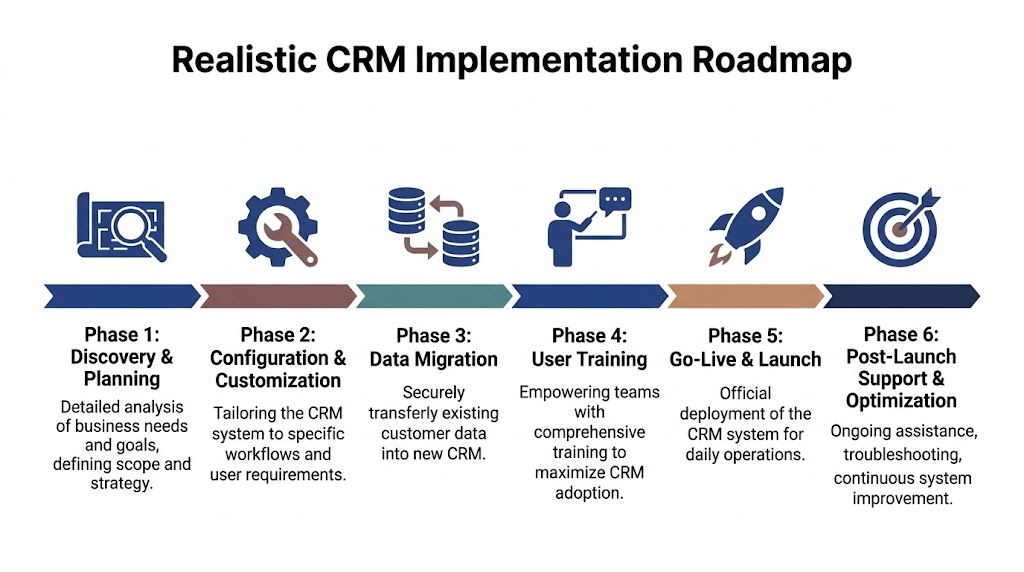
A more reliable approach is phased. Faye Digital describes a common rollout structure where teams deploy core sales features in Months 1-2, add intermediate marketing automation in Months 3-4, and roll out advanced analytics and service features in Months 5-6, while watching early indicators such as user login frequency and data quality before scaling further (Faye Digital CRM implementation strategy).
Phase 1 discovery and planning
Weeks 1 and 2 should answer operational questions, not just software questions.
Map how leads arrive. Define what counts as a qualified opportunity. Decide who owns records at each stage. Identify where reps rely on inboxes, spreadsheets, or tribal knowledge. If you’re in manufacturing, this is also where you identify which ERP, quoting, or production touchpoints matter.
Questions worth asking your partner:
- Which workflows are standard, and which are exceptions
- What needs to be live on day one
- Which reports does leadership already depend on
- Where does customer data currently break down
The main output here should be a documented scope. Not a vague promise of “full setup.”
To make the rollout easier to visualize, this overview video is useful:
Phase 2 configuration and customization
At this point, the CRM becomes specific to your business.
Pipeline stages get defined. Required fields are trimmed to what people will realistically maintain. Dashboards are built for sales reps, managers, and leadership. Automations are added for routing, reminders, and status changes.
What works here is restraint.
A first release should focus on the workflows people use constantly. New lead intake, qualification, opportunity progression, tasking, and visibility. Fancy automation can wait if the foundation isn’t stable.
The fastest way to slow a CRM project is to design for every edge case before users have touched the core workflow.
Phase 3 data migration
At this stage, many teams realize how inconsistent their records really are.
Contact owners may be missing. Company names may be duplicated. Pipeline stages from the old system may not map cleanly to the new one. Notes may be buried in exports that nobody cleaned.
A good migration process usually includes:
- Data audit: Find duplicates, empty fields, stale records, and mismatched labels.
- Field mapping: Decide exactly where each legacy field belongs in the new CRM.
- Test imports: Load a subset first and verify records, ownership, and history.
- Validation: Have actual users review migrated records before full cutover.
Phase 4 user training
Training fails when it’s generic.
Sales reps need to know how to run their day from the CRM. Managers need to know how to inspect pipeline quality and activity. Admin users need to know what they can safely change without breaking reporting or automation.
Short, role-based sessions work better than one long platform walkthrough. So do job aids that show your workflow, not the vendor’s sample data.
Phase 5 go-live and launch
Go-live should feel controlled, not dramatic.
That means final data checks, support coverage, issue logging, and clear rules about where the team should work from day one. If inboxes and spreadsheets remain unofficial backups, adoption gets muddy immediately.
Phase 6 post-launch support and optimization
The first launch is a baseline, not the finish line.
After users spend time in the system, you’ll usually find friction points fast. Fields people ignore. automations that need tighter logic. Reports that answer the wrong question. That’s normal.
What matters is having a short optimization cycle while usage is still fresh and fixable.
Key Deliverables and System Integrations
A CRM project should produce assets you can point to. If the deliverables are fuzzy, the scope is fuzzy.
That matters because businesses often buy “implementation” and receive little more than setup screens, a contact import, and a handoff call. Real crm implementation services create an operating layer your team can use every day.

Deliverables you should expect
At minimum, a practical implementation should leave you with:
- A process map: How leads enter, move, convert, and get handed off.
- Configured pipelines: Stages that reflect your real sales motion, not generic defaults.
- Role-based dashboards: Views for reps, managers, and leadership.
- Automated workflows: Assignment rules, reminders, task creation, follow-up triggers, and status updates.
- A migrated and reviewed database: Not just imported data, but data that’s been checked for fit.
- Documentation: Naming conventions, ownership rules, automation logic, and admin notes.
- Training assets: Short guides or recordings tied to the live system.
If those aren't part of the outcome, ask what exactly the service is delivering.
Why integrations are where projects get serious
The technical difficulty usually rises when the CRM has to talk to everything else.
Nimble notes that CRM implementation requires careful mapping of legacy data to the new schema, and that integrating with ERP, marketing automation, accounting software, or eCommerce platforms determines whether real-time synchronization works or whether staff fall back to manual reconciliation. If that’s configured poorly, manual overhead can increase by 20-30% (Nimble CRM implementation checklist).
For B2B manufacturers, this is a big deal.
If your CRM doesn’t sync properly with ERP or quoting data, sales may see one version of the customer while operations sees another. Territory logic gets messy. Product line ownership gets fuzzy. Forecasts stop matching fulfillment reality.
A good integration plan should answer:
| Integration area | What should be defined |
|---|---|
| ERP | Which customer, quote, territory, or product data moves both ways |
| Accounting | Which account and invoice data sales needs visibility into |
| Marketing tools | Which forms, campaigns, and attribution events should create or update records |
| Communication tools | Whether email, call, and SMS activity should be logged automatically |
GoHighLevel as a practical example
GoHighLevel is useful for SMBs that want marketing and sales activity in one environment instead of stitching together too many small tools.
A provider can configure it to capture leads from forms, route them into a pipeline, trigger email and SMS follow-up, manage appointment workflows, and support review generation. It can also serve as part of a broader stack rather than the only platform in use. If you're planning the broader architecture around systems and handoffs, this guide on marketing stack decisions is relevant: https://machine-marketing.com/marketing-technology-stack/
One practical example is a business that wants inbound leads to trigger a sequence automatically while also assigning a salesperson and surfacing the contact in a manager dashboard. That’s not just “CRM setup.” That’s process engineering.
For businesses where support operations also matter, this guide to customer support CRM integration is worth reviewing because service data often gets separated from sales data when it shouldn’t.
Build integrations around decisions, not around data for its own sake. If a synced field never changes who acts next, it may not belong in phase one.
Machine Marketing is one option in this space for businesses that need GoHighLevel setup, customization, and workflow automation tied to actual sales and marketing processes rather than a generic install.
How to Choose Your Implementation Partner
Vendor selection isn’t a purchasing exercise first. It’s risk control.
That’s because a CRM partner can create clarity fast, or they can lock your team into a half-built system that nobody trusts. Kixie reports that 30-70% of CRM projects fail to meet expectations, 47% of failures are tied to poor user adoption, and 63% of projects run over budget or timeline (Kixie CRM statistics and market insights).
What a strong partner does differently
A strong partner doesn’t start by showing every feature in the platform.
They ask how your business operates. They pressure-test your pipeline stages. They identify where data will break. They push back when you request complexity that users won’t maintain.
Weak partners usually sound accommodating early. Then the project drifts because nobody defined scope tightly enough.
Look for signs of operational discipline:
- They document before they configure
- They discuss adoption as much as automation
- They can explain integrations in plain English
- They distinguish phase one from later phases
- They talk about support after launch, not just before it
Questions to ask before you sign
These questions expose a lot quickly:
How do you handle requirements gathering
If the answer is loose, expect scope creep.
What does your data migration process look like
You want to hear about field mapping, cleanup, test imports, and validation.
How do you train different user roles
One demo for everyone usually means shallow adoption.
What happens after go-live
Hypercare, optimization, and issue handling should already be part of the plan.
Have you implemented for manufacturers or technical B2B teams
Industry fit matters when sales cycles, product complexity, and ERP dependencies are real.
If a partner can't explain what your reps will do differently on a Tuesday morning after launch, they probably don't understand implementation deeply enough.
Vendor selection checklist
| Evaluation Criteria | What to Look For | Why It Matters |
|---|---|---|
| Industry expertise | Experience with B2B sales processes, technical buyers, and manufacturer workflows | Generic CRM builds often miss operational realities |
| Discovery process | Structured interviews, process mapping, and documented scope | Reduces rework and keeps the project grounded |
| Data migration capability | Clear method for cleanup, mapping, testing, and validation | Bad data poisons adoption fast |
| Integration capability | Ability to connect CRM with ERP, accounting, forms, and communication tools | Prevents duplicate entry and fragmented records |
| Adoption plan | Role-based training, manager buy-in, and post-launch reinforcement | Usage determines whether the system sticks |
| Reporting design | Dashboards tied to management decisions, not vanity metrics | Leadership needs a system they can trust |
| Change management | Willingness to simplify workflows and challenge bad habits | A CRM often fails because old behaviors stay in place |
| Post-launch support | Defined support window, optimization cycle, and admin guidance | Launch is when real friction becomes visible |
Red flags worth taking seriously
Some warning signs show up early:
- Everything is “easy”. Complex integrations and migrations are not easy. Good partners are clear about trade-offs.
- No one asks about adoption. If training and behavior change are ignored, the risk is obvious.
- They promise every feature in phase one. That usually means your team becomes the test environment.
- Documentation is treated as optional. That creates admin dependency and long-term fragility.
The right partner should feel methodical, not flashy.
Special Considerations for Manufacturers and SMBs
Generic CRM advice breaks down fast in manufacturing and technical B2B environments.
A lot of published guidance assumes short sales cycles, simple handoffs, and teams that already accept CRM as part of the job. That isn't the reality for many manufacturers, rep groups, industrial service firms, and technical SMBs.
Anneomaly highlights a real gap here. CRM guidance rarely addresses the specific needs of manufacturers and technical firms, even though 50-75% of CRM projects fail, and those businesses face distinct issues such as production software integration and resistance from technical staff who see CRM as administrative overhead (Anneomaly on why CRM implementations fail).
Manufacturers need operational fit, not generic sales software
For a manufacturer, the CRM often has to reflect a more complicated buying process.
You may have engineering contacts, procurement contacts, plant stakeholders, channel partners, and rep activity tied to one account. Opportunities can sit open for a long time while specifications, approvals, and budgets move. If the CRM treats that like a simple one-contact, one-deal sale, the pipeline becomes misleading.
A few design choices matter more here:
- Account structure should support multiple decision-makers
- Opportunity stages should reflect technical and commercial milestones
- ERP and quoting visibility should align with sales ownership
- Sales reps should see next actions without digging through notes
A CRM for this audience should feel like a coordination tool, not a surveillance tool.
Adoption resistance is different in technical teams
In this regard, many projects miss the mark.
Technical staff often won’t respond to abstract language about “relationship management.” They respond when the system removes friction. Fewer status emails. Cleaner handoff to quoting. Better account history before a customer call. Less re-entry of information.
If you're building for that environment, frame the CRM around operational value. Not around software enthusiasm.
SMBs need consolidation and restraint
SMBs usually don’t have a dedicated CRM admin, internal rev ops team, or large IT bench. That means platform sprawl hurts faster.
A consolidated system like GoHighLevel can make sense when you need lead capture, basic automation, communication, and pipeline management in one place. But even then, simplicity matters. If the build gets too clever, the business becomes dependent on one outside specialist for routine changes.
For manufacturers specifically, this resource on CRM considerations is a strong next read: https://machine-marketing.com/crm-for-manufacturing-companies/
What works best for SMBs is usually:
- Fewer custom objects
- Clear ownership rules
- Simple automation with obvious business purpose
- A support plan that matches limited internal capacity
One-size-fits-all implementation rarely survives contact with these businesses.
Your Plan for Long-Term CRM Success
Most CRM failures don’t happen on launch day. They happen later, when nobody owns system health.
Fields stop getting filled in. Duplicate accounts creep back in. Automations no longer match the business process. Sales works around the system instead of through it. Then leadership loses trust in the reports.
Clients First Consulting notes that CRM data quality can degrade by over 30% annually after implementation, and many SMBs let the system drift until it becomes unreliable or abandoned within 18-24 months (Clients First Consulting on CRM implementation challenges).
A practical stewardship routine
You don’t need a large ops team to prevent decay. You need ownership and cadence.
Use a simple maintenance rhythm:
- Monthly user review: Check who’s active, who isn’t, and where people are slipping back to side systems.
- Quarterly data cleanup: Merge duplicates, archive junk records, and review field consistency.
- Workflow audit: Make sure automations still match your current process.
- Management review: Ask whether dashboards still answer the decisions leaders need to make.
- Feedback loop: Let users report friction before they resort to uncommunicated workarounds.
A CRM stays healthy when someone owns the boring parts. Cleanup, naming discipline, permission reviews, and workflow checks are what keep the system trustworthy.
What to do next
If your CRM feels messy, don’t start by shopping for more features.
Start by diagnosing the system. Where does data break? Where do reps leave the CRM? Which handoffs still happen by email or spreadsheet? Which reports does leadership not trust?
That diagnosis will tell you whether you need reconfiguration, integration work, cleanup, training, or a fresh implementation approach.
If you want help diagnosing your current CRM setup or planning a practical rollout, contact Machine Marketing. We work with businesses that need a CRM system tied to real sales, marketing, and operational workflows, especially manufacturers and B2B teams that have outgrown patchwork processes.
