
If your sales team says the leads are bad while your marketing team says volume is up, you don’t have a lead problem. You have a qualification problem.
We see this often in B2B and manufacturing companies. Forms are coming in. Content is getting downloads. Someone is attending webinars. But reps still say, “These people aren’t ready,” or worse, “These aren’t even the right companies.” That friction usually comes from one missing operational definition: what is a marketing qualified lead in your business, not in theory.
A marketing qualified lead, or MQL, is a contact who has shown enough real interest, and enough fit with your ideal customer, to earn structured marketing follow-up and possible sales review. The key phrase is “enough.” Not every lead deserves rep time. Not every download deserves a call. A good MQL system decides where that line sits and automates what happens next.
Your Funnel Is Full But Sales Are Empty What's Wrong
A full funnel can hide a broken system.
Many companies generate a healthy stream of contacts but still struggle to create pipeline. The visible activity looks promising. Website forms get filled out. Campaign dashboards show engagement. CRM records pile up. Then sales reviews the list and rejects most of it.
That isn’t usually a talent issue on either side. It’s a handoff design issue.
A business can generate a large number of leads and still fail to produce revenue if the qualification rules are vague. According to Salesgenie’s MQL statistics roundup, 79% of MQLs never convert to sales, often because of weak nurturing or poor initial qualification. The same source notes that companies that excel at nurturing generate 50% more sales-ready leads at a 33% lower cost.
The real problem is usually upstream
When marketing says, “They engaged,” and sales says, “They aren’t buyers,” both teams can be technically correct.
Marketing is often measuring activity. Sales is measuring readiness. If nobody has agreed on the threshold between those two states, the CRM becomes a storage bin for unresolved arguments.
Here’s what that looks like in practice:
- Marketing celebrates volume: More form fills, more contacts, more campaign responses.
- Sales sees noise: Students, vendors, competitors, wrong industries, or people doing casual research.
- Leadership gets mixed signals: Reports look good, revenue doesn’t.
Practical rule: If your team can’t explain why one lead gets routed to sales and another stays in nurture, your MQL definition isn’t operational yet.
Where the MQL fits
An MQL is the bridge between marketing output and sales input. It’s the checkpoint where you stop asking, “Did someone engage?” and start asking, “Did the right person engage in the right way?”
That’s why the term matters. It forces a business to define quality before handoff.
Without that definition, a few predictable things happen:
- Sales loses trust in marketing data
- Marketing optimizes for the wrong conversions
- High-intent prospects get buried among low-value contacts
- Follow-up becomes inconsistent
For manufacturers, this gets even more expensive. A plant engineer downloading a technical document may be highly relevant. A general browser downloading a top-of-funnel guide may not be. If both are treated the same way, the pipeline fills but doesn’t move.
An MQL system fixes that by setting criteria, assigning ownership, and creating a repeatable path from inquiry to real opportunity.
Decoding the Lead Lifecycle MQL vs SQL vs The Rest
A lot of confusion comes from treating every lead stage as if it means the same thing. It doesn’t.
The cleanest way to understand the lifecycle is to think like a manufacturer. Raw material enters the plant first. It doesn’t go straight to final assembly. It passes through inspection, approval, and processing. Leads work the same way.
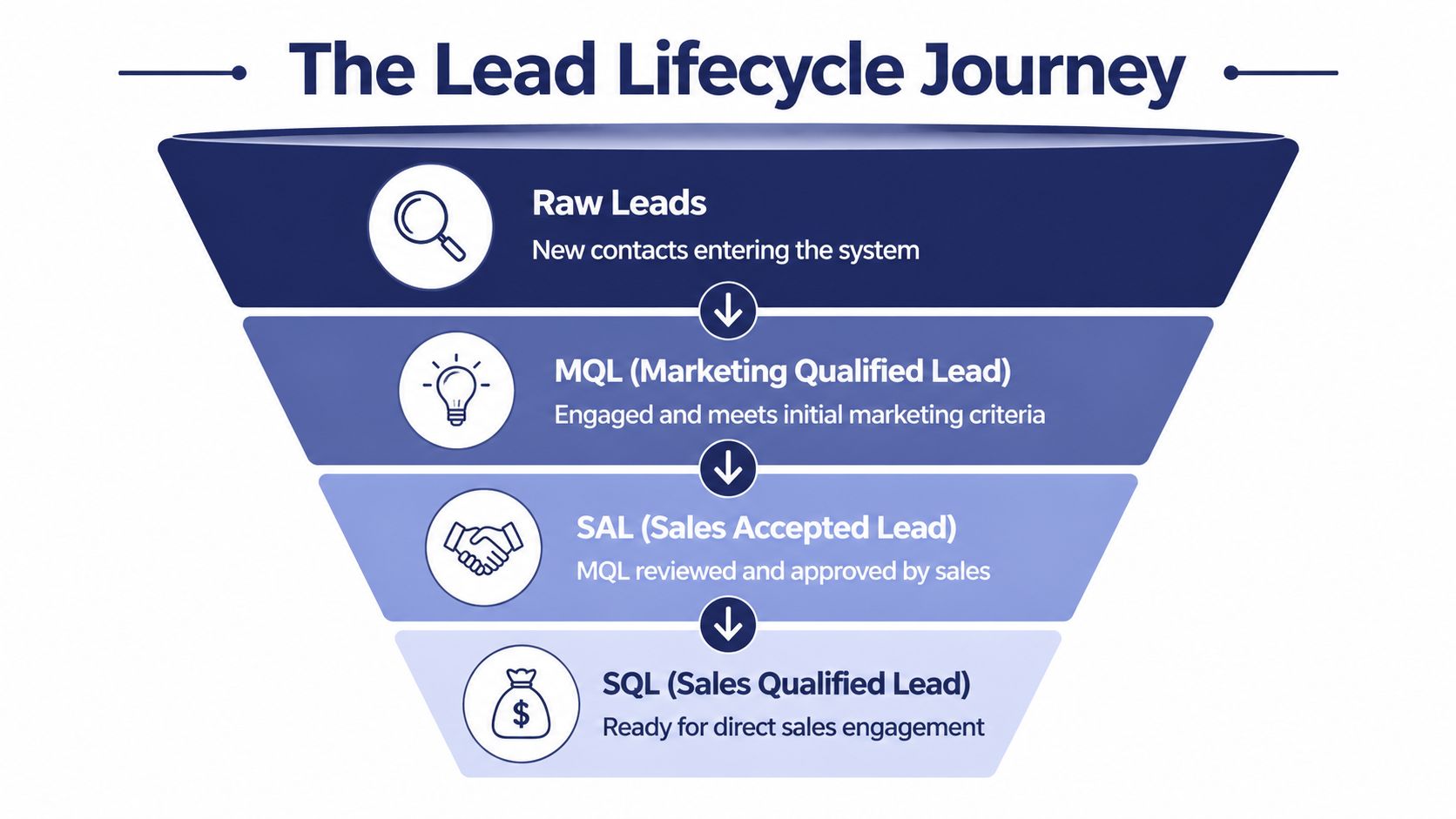
Raw lead
A raw lead is just a new contact in the system.
Maybe they filled out a form. Maybe they subscribed to email. Maybe they downloaded a guide. At this stage, you know very little. They’ve raised a hand, but you don’t yet know if they match your market or if they’re serious.
If your team needs a broader primer on how those contacts enter the funnel in the first place, What is Lead Generation Marketing? is a useful companion read.
MQL
An MQL is a lead that has passed initial quality control. They’ve shown meaningful engagement and enough alignment with your target profile to justify focused nurture and possible sales review.
Many businesses get sloppy, calling anyone who converts a form an MQL. That creates pipeline inflation. A form completion is an action. It is not a qualification model.
An MQL should answer two questions:
- Does this lead fit the kind of company and contact you want?
- Has this lead shown enough intent to deserve escalation?
SAL
A Sales Accepted Lead, or SAL, is the checkpoint many teams skip and later regret skipping.
This is the moment sales reviews the MQL and says, “Yes, this belongs with us.” Not every company uses SAL as a formal stage, but when it’s present, it creates accountability. Marketing has to pass leads with clear evidence. Sales has to review them instead of letting them sit untouched.
SQL
A Sales Qualified Lead, or SQL, has moved beyond marketing qualification and into direct sales work. Sales has reviewed the lead, accepted it, and sees enough buying potential to begin active outreach and discovery.
If you want a deeper breakdown of the sales-side threshold, this guide on what is a sales qualified lead is worth reading alongside your MQL framework.
A practical comparison
| Stage | What it means | Primary owner | Typical next move |
|---|---|---|---|
| Raw Lead | New contact entered the system | Marketing | Track and begin nurture |
| MQL | Contact meets agreed fit and engagement criteria | Marketing | Route for review or targeted nurture |
| SAL | Sales confirms the MQL is worth pursuit | Sales | Accept and assign follow-up |
| SQL | Lead is ready for direct sales engagement | Sales | Discovery, outreach, qualification |
Treating MQL and SQL as the same thing usually creates two bad outcomes. Sales gets leads too early, and marketing loses the ability to nurture leads that need more time.
In B2B manufacturing, those distinctions matter because buying cycles are rarely instant. One stakeholder may download a technical asset while another evaluates commercial fit later. The MQL stage gives your business a place to hold and score that activity without forcing a rep to chase every signal.
Building Your MQL Blueprint What to Measure
An MQL isn’t a feeling. It’s a scoring model.
Many organizations already know this in principle, but they stop short of building one. They keep qualification in someone’s head, or they rely on loose rules like “if the lead seems engaged” or “if they visited the site a few times.” That doesn’t scale. It also doesn’t survive staff changes, channel changes, or growth.
A stronger approach is to score leads on two dimensions: fit and intent.
Fit tells you who they are
Fit is about whether the contact and the company match the type of customer you want.
For a manufacturer, fit usually includes factors like industry, company size, geography, and role. An engineer, operations leader, plant manager, procurement contact, or technical buyer may matter more than a student, consultant, or unrelated vendor. Good fit criteria stop your team from overvaluing interest from the wrong audience.
Useful fit signals often include:
- Industry relevance: Does the company operate in a target vertical?
- Company profile: Is the business the right size or complexity for your offer?
- Contact role: Is the person involved in technical evaluation, operations, purchasing, or leadership?
- Location: Can your team serve this account?
Intent tells you what they’ve done
Intent measures behavior. It shows how seriously the lead is engaging.
According to Thomasnet’s guide to marketing qualified leads, a lead scoring model typically qualifies an MQL when a lead reaches 60 to 80 points on a 100-point scale. The same source notes that actions like downloading an eBook can be worth 20 to 30 points, while visiting a pricing page might add 15 to 25 points. It also states that this kind of scoring can improve sales efficiency by 30 to 50% by focusing reps on prospects with stronger intent.
That gives you a practical frame. Not a universal template, but a range you can use to design your own system.
A simple scoring model for B2B manufacturers
The point values below are an example. The exact weights should reflect your own sales process, close history, and buying journey.
| Category | Attribute / Action | Score | Rationale |
|---|---|---|---|
| Fit | Target industry match | +15 | Keeps scoring anchored to your ICP |
| Fit | Company size aligns with your sweet spot | +15 | Filters out accounts too small or too large |
| Fit | Contact is engineer, operations leader, procurement, or owner | +15 | Prioritizes roles with influence |
| Fit | Serviceable geography | +10 | Avoids routing leads your team can’t support |
| Intent | Downloaded a gated technical asset or eBook | +25 | Strong sign of problem awareness |
| Intent | Visited pricing or quote-related page | +20 | Higher commercial intent |
| Intent | Registered for or attended a webinar | +25 | More commitment than a casual browse |
| Intent | Repeated website visits | +10 per meaningful return visit | Repeated engagement often signals active evaluation |
| Intent | Engaged with LinkedIn content or campaign | +15 | Useful supporting signal, not usually decisive by itself |
| Negative fit | Student, competitor, vendor, or non-target segment | Negative score or exclusion rule | Prevents false positives |
How to decide your threshold
Don’t copy another company’s number and call it done. Start with the point range above, then pressure test it with real lead history.
Look at leads that became real opportunities. Ask:
- What actions did they take before sales engaged?
- Which job titles appeared most often?
- Which industries progressed cleanly?
- Which leads looked active but never belonged in pipeline?
You’re looking for patterns, not perfection.
The best scoring model is the one sales will actually trust enough to work.
What works and what doesn’t
Here’s the trade-off commonly encountered.
What works
- Combining fit and intent
- Giving more weight to high-value pages and technical content
- Excluding obvious poor-fit contacts
- Reviewing scores with sales regularly
What doesn’t
- Scoring based only on email opens
- Calling every form fill an MQL
- Ignoring job title and company type
- Building a scoring system nobody updates
Questions to ask before you lock the model
Use these in your next sales and marketing review:
- Which lead behaviors precede good sales conversations?
- Which titles usually move deals forward?
- What signals should disqualify a lead immediately?
- Which content assets produce curiosity, and which produce real buying intent?
- At what score should automation notify sales, and at what score should marketing keep nurturing?
If your answers are vague, your MQL definition is still too loose. Tighten it before you automate it.
The MQL Handoff Process An Automated Workflow in GoHighLevel
A strong definition matters. A strong workflow is what keeps it from breaking under daily pressure.
Once a lead reaches your MQL threshold, nobody should need to manually notice it, remember it, assign it, and follow up. That chain fails too often. In B2B, especially with long sales cycles, missed handoffs create expensive delays.

According to Act-On’s overview of the MQL handoff, aligning sales and marketing with a formal SLA for MQL handoff can produce 35% higher lead progression rates. The same source notes that, for B2B manufacturers, MQLs that match the ideal customer profile convert to SQL at 22%, compared with 8% for unmatched leads. That gap is why your workflow can’t rely on gut feel.
The minimum viable handoff
In GoHighLevel, the handoff should trigger automatically when a lead crosses the score threshold you defined.
A practical workflow often looks like this:
Score threshold is reached
The lead accumulates enough points through fit and intent signals to qualify as an MQL.Tag is applied automatically
Add a tag such as “MQL” or “Marketing Qualified.” This sounds basic, but it becomes critical for filtering, reporting, and workflow logic.Pipeline stage changes
Move the contact from a nurture stage into a stage like “New MQL” or “Awaiting Sales Review.”Internal alert is sent
Notify the assigned rep or manager by email or SMS. Include the lead’s company, role, last meaningful action, and lead source.Follow-up task is created
A task in GoHighLevel prevents the lead from disappearing into a busy rep’s day.Nurture logic changes
Pause generic nurture if needed and trigger a more specific sequence tied to the lead’s industry or product interest.
What the SLA should define
Software won’t fix a human disagreement. Your Service Level Agreement has to settle the handoff rules first.
The SLA should answer:
- What score makes a lead an MQL
- Which fit rules are mandatory
- Who reviews MQLs
- How quickly sales must respond
- What happens if sales rejects the lead
- How rejection feedback gets logged
If you work with field sales, distributors, or rep groups, this becomes even more important. Different people interpret “qualified” differently unless the rule is written down.
Sales should never ask, “Why did I get this lead?” The CRM should already answer that.
A GoHighLevel workflow example
Here’s a clean implementation pattern for a manufacturing client using GoHighLevel:
| Trigger | Automation action | Why it matters |
|---|---|---|
| Lead score reaches threshold | Apply MQL tag | Standardizes classification |
| MQL tag applied | Move opportunity to New MQL stage | Gives sales a visible queue |
| Stage changes to New MQL | Send internal notification | Speeds reaction time |
| Notification sent | Create call or review task | Adds accountability |
| Sales accepts lead | Change stage to SAL or SQL | Tracks handoff quality |
| Sales rejects lead | Apply rejection reason and return to nurture | Improves scoring model over time |
That logic also helps if you manage multiple business units or territories. The tag and stage changes become routing triggers, not just labels.
A lot of contractors and field-service companies use GoHighLevel in similar ways, and this collection of examples around GoHighLevel for contractors can spark ideas if your process includes local sales coverage, appointment workflows, or mixed inbound channels.
Keep your automation visible
Automation isn’t useful if nobody trusts it. Build dashboards and pipeline views that let sales see why a lead moved.
If your team is building a larger system around nurture, routing, and follow-up, this guide to marketing automation for B 2 B is a solid next read.
A short walkthrough makes the workflow easier to picture in practice:
Common setup mistakes
Three mistakes cause most handoff failures:
- No rejection reason field: Sales declines leads, but marketing never learns why.
- Too many stages: The pipeline becomes hard to manage, so reps stop updating it.
- Automation without ownership: Tasks are created, but no individual is accountable for action.
Good automation doesn’t create complexity. It removes ambiguity.
Are Your MQLs Working KPIs and Reporting to Watch
Once the system is live, you need instruments. Otherwise you’re just hoping the new process is better.
A useful MQL dashboard doesn’t focus on vanity metrics. It focuses on whether the leads are accepted, progressed, and acted on. If the numbers look busy but the handoff is weak, your definition still needs work.

The four metrics that matter most
Start with these:
MQL to SQL conversion rate
This is the strongest quality check. If too few MQLs become SQLs, the threshold may be too loose, or your fit criteria may be weak.Sales acceptance rate
How often does sales agree the MQL belongs with them? If sales keeps rejecting MQLs, the problem is usually definition, not rep behavior.Lead velocity
How quickly do leads move from new inquiry to MQL, then to SQL? Slow movement can signal weak nurture, slow review, or unclear ownership.Sales cycle impact
Track whether better qualification is reducing wasted effort and helping reps spend more time on the right accounts.
What to diagnose when the numbers look off
These metrics only matter if you use them diagnostically.
| KPI | If it looks weak | Likely issue |
|---|---|---|
| MQL to SQL conversion | Many MQLs stall | Threshold is too low or fit rules are weak |
| Sales acceptance rate | Sales rejects frequent handoffs | Marketing and sales are using different definitions |
| Lead velocity | Leads sit too long in MQL stage | No SLA, slow response, or poor routing |
| Sales cycle impact | Deals still take too long | MQL criteria may not reflect real buying intent |
Don’t ask whether marketing generated enough leads. Ask whether the leads created useful work for sales.
Questions to ask your team each month
Use a short operating review instead of a broad debate.
- Which MQLs converted cleanly, and what did they have in common?
- Which MQLs sales rejected, and why?
- Which content or channels produce leads that progress?
- Are reps following up on MQLs fast enough to preserve momentum?
- Are certain industries, titles, or product interests consistently stronger than others?
These questions force both teams to work from evidence instead of opinion.
Keep reporting close to the workflow
Your KPI dashboard should sit close to the CRM pipeline, not in a disconnected report no one checks. If sales can’t see status and history in the same place they work, reporting becomes a post-mortem instead of a management tool.
If you’re revisiting the reporting side of your stack, this explainer on what is marketing analytics is helpful for framing how campaign data should support operational decisions, not just produce charts.
One more warning. Don’t grade the MQL system on a single month of data if your sales cycle is long. For manufacturers, movement often appears in stages. Look for directional improvement, cleaner acceptance, and better handoff discipline before you expect a neat dashboard story.
Fixing the Leaks Common MQL Pitfalls and Next Steps
A manufacturing client once showed me a familiar pattern. Marketing was proud of lead volume. Sales had a queue full of “qualified” leads they had already stopped trusting. GoHighLevel was sending alerts on time, tags were firing, and dashboards looked busy. The problem sat in the rules underneath the workflow.
That is usually where this breaks. The automation works exactly as configured, but the score, routing logic, or stage rules reflect old assumptions. You do not fix that by adding one more field or one more notification. You fix it by tightening the operating model inside the system your team already uses.
The leaks that quietly wreck MQL performance
Four problems show up repeatedly in B2B and manufacturing environments.
The score rewards activity that looks busy but means little
A lead visits a few pages, downloads a spec sheet, and crosses the threshold. Sales calls, finds an early-stage researcher, and starts ignoring future alerts.
The bar is set so high that response comes late
Teams wait for perfect behavior before creating an MQL. By then, the buyer has often spoken with a competitor or gone cold.
Good-fit accounts and bad-fit accounts earn the same points
This is common when campaigns pull in students, suppliers, job seekers, or small firms outside your target account range. Engagement rises, pipeline quality does not.
Rejections disappear into notes instead of structured fields
If reps can reject an MQL without choosing a reason code, you lose the one input that helps improve scoring. Free-text comments are useful for anecdotes. They are weak as a system for tuning rules.
Put enforcement inside GoHighLevel
Many teams already have a written definition somewhere. The issue is that the CRM does not require people to follow it.
In GoHighLevel, add friction where discipline matters. Require a rejection reason before a rep can move an MQL to disqualified. Trigger an internal task if first contact is missed past the agreed response window. Create separate tags for “bad fit,” “bad timing,” and “no active project” so operations can review patterns by source, campaign, and rep. That turns your MQL model from a policy document into a managed process.
This approach also makes coaching easier. Sales managers can see whether poor conversion is coming from weak lead criteria, slow follow-up, or inconsistent disposition habits.
Check the front end before you keep tuning the score
I have seen teams spend weeks adjusting point values when the underlying issue started on the website. If your forms, offers, and landing pages attract low-fit inquiries, GoHighLevel just processes noise faster.
If that front-end path needs work, this guide on how to improve your website conversion rate pairs well with MQL optimization. Better conversion structure usually improves fit before scoring even starts.
Use AI carefully
AI can help spot patterns in accepted versus rejected leads. It can suggest weighting changes based on historical outcomes, campaign source, and firmographic traits.
It cannot decide what your sales team should treat as a legitimate buying signal. It also cannot resolve ownership problems. If reps do not disposition leads consistently, the model learns from bad inputs.
Next steps for this quarter
Audit 25 to 50 recent MQLs
Review accepted, rejected, and stalled records side by side. Look for patterns in company type, inquiry source, product interest, and sales response speed.Add required reason codes in GoHighLevel
Do not rely on open text alone. Standard fields make reporting and rule changes possible.Separate fit from intent in your scoring logic
A high-interest lead from the wrong account type should not rank like a target account showing the same behavior.Set exception alerts, not just lead alerts
Notify managers when MQLs sit untouched, get recycled too often, or pile up under one rejection reason.Review the model monthly for one quarter
Short review cycles help teams correct scoring mistakes before they become pipeline folklore.
A working MQL process is less about definition and more about control. Clear criteria matter, but enforcement inside GoHighLevel is what keeps the system honest.
If your team needs help diagnosing why leads stall between marketing and sales, Machine Marketing can help you map the breakdown, define a practical MQL model, and implement the GoHighLevel workflows that turn lead flow into a usable revenue system.
