
If you're running a manufacturing company, your sales process probably works well enough to keep orders moving, but not well enough to scale cleanly. RFQs arrive through a website form, a rep's inbox, a forwarded email from inside sales, or a phone call someone forgot to log. Quotes go out. Samples get requested. Engineers ask technical questions. Then the whole opportunity disappears into spreadsheets, inbox threads, and memory.
That's where GoHighLevel for manufacturers gets interesting. Not because it replaces your ERP or quoting software, and not because it's a magic fix. It matters because it can become the front-end operating layer for lead capture, follow-up, pipeline visibility, and reporting across a long B2B sales cycle. Used correctly, it gives your team one place to track what entered the system, what needs action, and what's stuck.
Table of Contents
- Why Your Current Sales System Is Leaking Revenue
- Laying the Foundation for a Growth Machine
- Designing Your Manufacturing Sales Pipeline
- Automating RFQs and Nurturing High-Value Leads
- Connecting the Shop Floor with Advanced Automation
- Measuring What Matters and Your 90-Day Plan
Why Your Current Sales System Is Leaking Revenue
Most manufacturing sales problems aren't people problems. They're system problems.
A prospect submits an RFQ for a complex part. The form goes to a general inbox. A rep forwards it to estimating. Estimating asks for missing specs. Someone remembers to reply two days later. A sample request gets logged in a spreadsheet, but the quote status lives in a different place. When management asks where the deal stands, everyone has part of the answer and nobody has the full picture.
That's the leak. Not one dramatic failure. A hundred small handoff failures.
Long sales cycles break generic CRMs
Manufacturing sales doesn't move in a straight line. A buyer may request a quote, send revised drawings, ask for alternate materials, request samples, pause for internal approval, then come back weeks later with purchasing involved. A generic pipeline like Lead, Contacted, Proposal, Won doesn't reflect any of that. So reps stop trusting the CRM, and when they stop trusting it, they stop using it.
Practical rule: If your pipeline stages don't match the real milestones in your quoting and approval process, your CRM becomes a reporting illusion.
GoHighLevel works best here when you treat it as a process layer, not just a marketing app. It can capture inquiries, create opportunities, trigger follow-ups, assign tasks, and centralize communication history. For manufacturers trying to standardize automating technical operations and workflows, that matters because marketing and sales can't be isolated from operations forever.
Why GoHighLevel is a credible option
There's a fair question behind any platform change. Is this stable enough to build around?
GoHighLevel's growth suggests that it is. According to Technology Checker's HighLevel profile, GHL grew from 6 active domains in early 2020 to 72,458 active domains by April 2025, a 12,000x increase. The same source reports 4.63% market share and a #5 overall rank in marketing automation. That doesn't prove it was built specifically for manufacturers, but it does show it's no fringe tool.
What a better system looks like
A working setup for a manufacturer should do four things reliably:
- Capture every inquiry so RFQs, contact forms, and callbacks don't disappear.
- Route work clearly so estimating, sales, and management know who owns the next action.
- Track deal state visibly so everyone sees whether a quote is pending, revised, sampled, or waiting on a PO.
- Measure throughput so you can identify where opportunities stall.
If your current process can't do those four things without manual detective work, revenue is leaking already.
Laying the Foundation for a Growth Machine
A sloppy CRM rollout creates a second problem on top of the first one. The team already doesn't trust the old process, and then the new one arrives half-configured. That's how systems die.
The right way to set up GoHighLevel for manufacturers is boring at first. That's good. Foundations should be boring.

Start with account structure and access
Before importing anything, decide who needs access and what they need to do inside the system.
Sales reps need to update opportunities, log conversations, and manage follow-up. Estimators may need access to contact records and quote-related fields without touching campaign settings. Management needs visibility into pipeline movement and reporting. If everyone gets admin rights, someone will eventually break a workflow or change a field that downstream automation depends on.
A useful way to think about this is the same way plant teams think about controls. Permissions should follow role responsibility. If your team needs a broader framework for connected systems, this guide to system integration for plant engineers is a practical companion read.
Import contacts without contaminating the system
Most manufacturers have years of contact data. Some of it is valuable. Some of it is garbage. Don't dump all of it into GoHighLevel and hope to clean it up later.
Start by separating contacts into groups such as:
- Current customers
- Open opportunities
- Dormant leads
- Distributors or channel partners
- Vendors and non-sales records
Then standardize the core fields before import. Company name format, contact owner, lead source, and industry tags should be consistent. If one record says “AISI 304” in notes and another says “stainless request” in a custom field, your automation will be weak from day one.
Clean data is more valuable than more data. A smaller database with usable tags and ownership rules will outperform a large messy import every time.
If you're still evaluating platforms, this piece on how to choose a CRM that actually works for manufacturing is worth reviewing before you lock in field structure.
Connect your website and phone workflows carefully
Manufacturers often underestimate the setup around lead entry. The website form, tracking number, calendars, and inbox all shape what happens after a prospect raises a hand.
Your first-pass setup should include:
- Company sending domain for branded email communication.
- Phone numbers for SMS and call routing so inquiries stay attached to contact records.
- User calendars for sales calls, plant tours, or qualification calls.
- A unified inbox process so reps can see message history without hunting through personal email.
What doesn't work is connecting everything at once and testing nothing. Submit forms yourself. Trigger internal alerts. Confirm that assigned users receive notifications. Book test appointments and verify they land in the right place.
A short setup checklist
| Area | What to confirm |
|---|---|
| Users | Role-based access is assigned correctly |
| Contacts | Imports are segmented and deduplicated |
| Forms | Every submission creates or updates the right record |
| Phones | Messages and calls attach to the correct contact |
| Calendars | Bookings route to the intended rep or team |
When this layer is stable, the rest of the system becomes much easier to trust.
Designing Your Manufacturing Sales Pipeline
A manufacturing CRM pipeline should mirror the way your plant wins work. If it doesn't, your reporting will lie to you.
Generic stages hide real bottlenecks. They don't tell you whether a quote is waiting on engineering review, whether a sample is in transit, or whether purchasing verbally approved the job but hasn't sent the PO yet. Those details matter because that's where the delay usually lives.
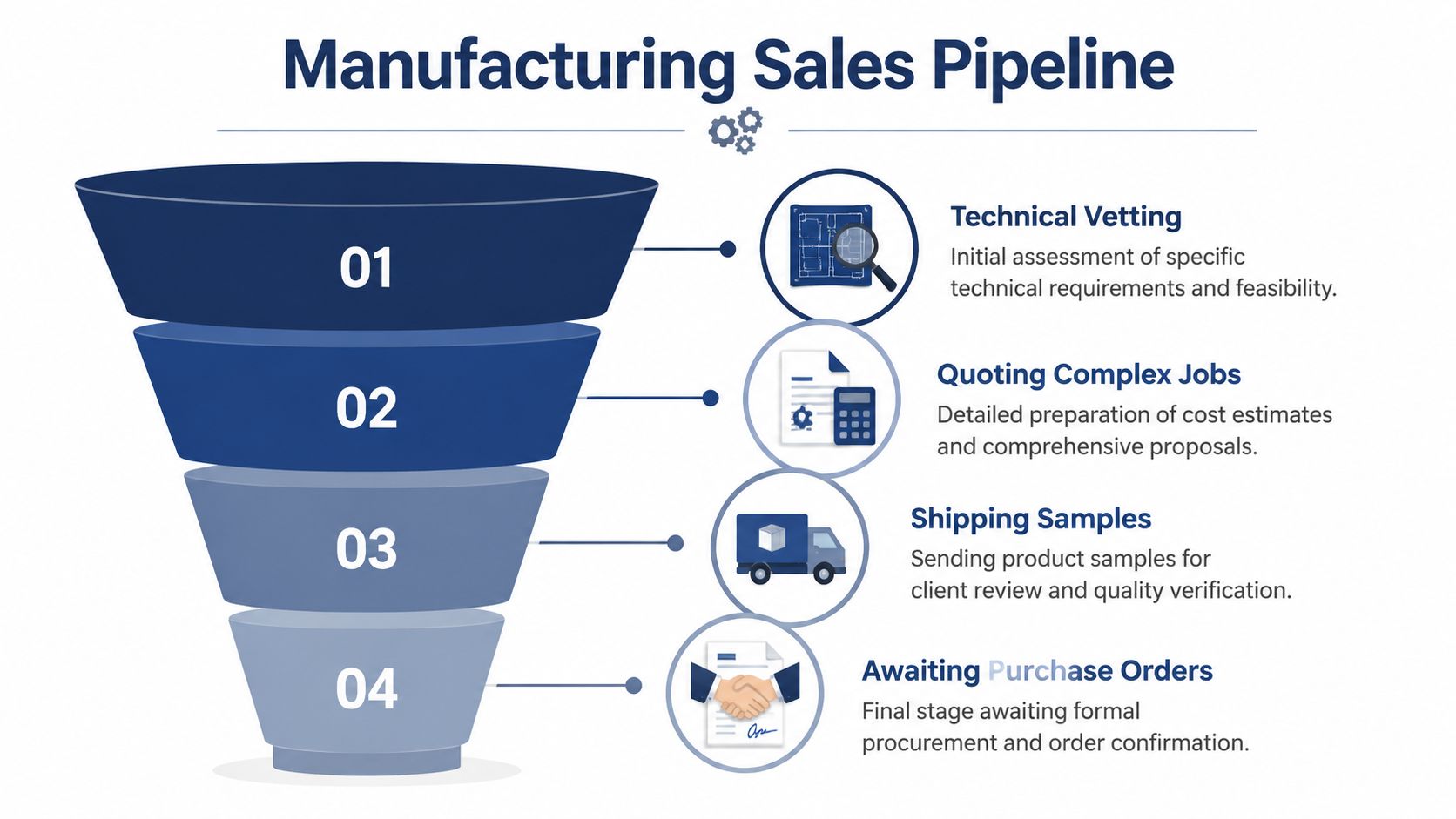
Use stages that match how manufacturers actually sell
Agency implementation benchmarks reported by ALM Corp's GoHighLevel guide show that pipeline customization can yield 35-50% higher conversion rates from inquiry to qualified opportunity than generic setups. The same source notes a 40% drop-off in generic manufacturing pipelines when stages are mismatched.
That tracks with what we see in practice. When stage names are too broad, reps either skip updates or force-fit deals into the wrong bucket. Then management reviews bad data and makes bad decisions.
A useful manufacturing pipeline usually needs more operational granularity than a standard service business pipeline.
Build custom fields before you build automation
Pipelines alone aren't enough. Each opportunity needs the right information attached to it.
GoHighLevel allows custom CRM fields, and manufacturers should use them aggressively but selectively. The point isn't to recreate the ERP. The point is to expose the minimum critical data the sales team needs to qualify, route, and follow up correctly.
Include fields such as:
- Part number or project name
- Material specification
- Process type
- Annual volume estimate
- Required tolerance or critical spec note
- Quoted due date
- Sample required
- Target production start
- Lead source
- Assigned estimator or rep
If a rep has to open three systems to understand one opportunity, the opportunity record is incomplete.
What a practical pipeline can look like
Here's a structure that fits many industrial sales cycles better than a generic funnel:
| Stage | What belongs here | Common trigger to move forward |
|---|---|---|
| New RFQ | Initial inbound inquiry with enough data to review | Rep confirms receipt and ownership |
| Qualification | Basic fit, volume, process, geography, and customer type | Team confirms job is worth quoting |
| Technical Review | Drawings, tolerances, materials, manufacturability review | Engineering or estimating signs off |
| Quote in Progress | Costing, supplier checks, lead time review | Quote package is being prepared |
| Quote Sent | Formal quote delivered | Prospect acknowledges receipt or asks follow-up |
| Sample Requested | Prospect needs a sample, prototype, or first article | Sample is approved or feedback returned |
| Awaiting PO | Verbal or soft approval given, purchasing pending | Purchase order received |
| Job in Production | Work is active internally | Handoff to operations complete |
| Closed Won or Closed Lost | Outcome recorded with reason | Deal archived for reporting |
Not every manufacturer needs every stage. A job shop producing simple repeat work might collapse Technical Review and Quote in Progress. A contract manufacturer handling complex assemblies might need additional stages for compliance documents or supplier qualification.
What does not work
Avoid these common design mistakes:
- Too few stages. You lose visibility into where work stalls.
- Too many stages. Reps stop updating because movement feels administrative.
- No exit criteria. If nobody knows what qualifies a deal to move, stage data becomes subjective.
- No lost reasons. You'll keep guessing why quotes don't convert.
The best pipeline is the one your team will maintain. That means it has to match reality, not software defaults.
Automating RFQs and Nurturing High-Value Leads
Once the pipeline is built, the next job is making sure new opportunities enter it cleanly and get followed up without delay. This is where GoHighLevel starts earning its keep.
A basic “Contact Us” form is too vague for most manufacturers. It collects low-value inquiries, misses key quote data, and forces your team to chase missing details. A dedicated RFQ workflow works better because it creates structure at the moment the lead enters.
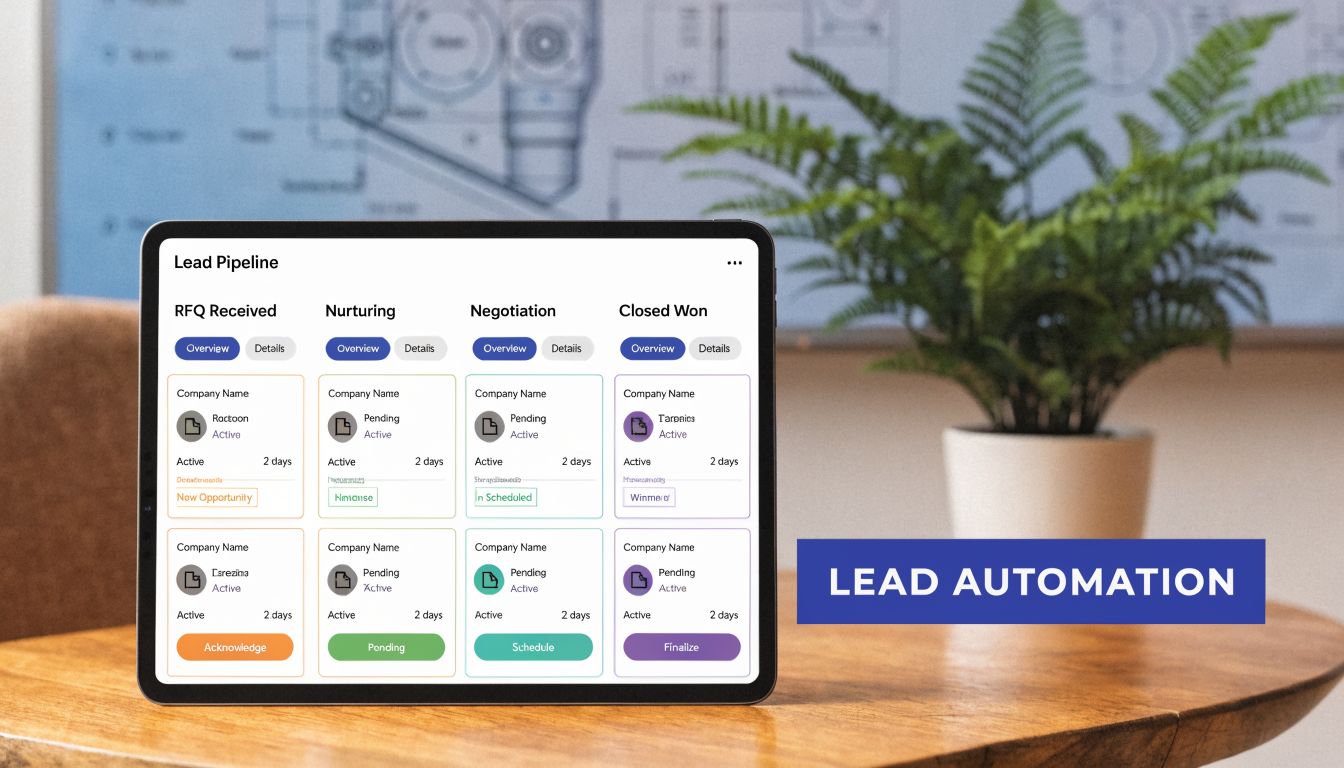
What should happen the moment an RFQ arrives
A strong manufacturing RFQ automation usually follows this sequence.
First, the prospect submits a form that asks for useful qualification data. Company, part type, material, quantity range, timing, and drawing upload are far more useful than a single message box.
Second, GoHighLevel creates a contact and a new opportunity in the New RFQ stage.
Third, the system sends an immediate confirmation by email or SMS so the buyer knows the request was received. That message should confirm receipt, set expectations, and name the next step. It should not pretend a quote is already in progress if nobody has reviewed feasibility.
Fourth, the correct internal owner gets notified. That might be a territory rep, inside sales, or an estimator depending on how your plant handles new work.
Fifth, the lead enters a short nurture sequence if there's a delay before the quote is ready. That sequence can include a confirmation email, a reminder that technical files can be attached if missing, and a follow-up asking whether timeline or application details have changed.
If your team needs a primer on structured follow-up, this overview of what a drip email campaign is is a good baseline.
Keep the nurture sequence useful
Most industrial buyers don't need “marketing content” right after an RFQ. They need confidence that your team is responsive and competent.
Use automation for practical communication like:
- Receipt confirmation with clear next steps
- Missing information requests for drawings, material specs, or quantities
- Quote status updates when review takes longer than expected
- Post-quote follow-up asking if technical questions need review
- Re-engagement messages when the opportunity goes quiet
Buyers don't mind automation. They mind automation that ignores the context of the job they asked about.
For manufacturers exploring AI-assisted front-end communication, this GoHighLevel Conversation AI guide is useful for understanding where conversational automation can help and where a rep still needs to step in.
A walkthrough like this can help your team visualize how an automated lead flow should behave in practice:
How to reactivate dormant manufacturing leads
Most manufacturers are sitting on old leads that were real opportunities at one point. Maybe timing was wrong. Maybe budget froze. Maybe purchasing changed hands. Those contacts are often more valuable than a brand-new cold list.
According to the cited case-study roundup in this YouTube source on GHL reactivation workflows, GoHighLevel reactivation workflows deliver 25-40% re-engagement rates on dormant leads inactive for 6-18 months, and they outperform email-only campaigns by 3x. The same source reports that a multi-channel workflow using SMS, email with video, and ringless voicemail can fill a machine shop's pipeline at 32% from reactivations versus 8% from cold leads.
A practical reactivation sequence looks like this:
- Filter contacts by inactivity and relevant tags.
- Send a short message tied to a specific capability or job type.
- If there's no response, follow up with an email that includes useful proof, such as process capability, application examples, or a short video.
- Notify a rep when someone clicks, replies, or reopens the conversation.
This works because you're restarting a known conversation, not forcing a brand-new one.
Connecting the Shop Floor with Advanced Automation
At some point, basic lead capture stops being the main issue. Inefficiency moves to handoffs between quoting, sales, and operations.
Manufacturers feel this harder than most businesses because commercial data rarely lives in one place. The lead may start in the CRM, the quote may live in a spreadsheet or quoting tool, production data lives in the ERP, and customer communication sits in inboxes. That fragmentation is where avoidable errors creep in.

Why ERP integration matters more than another campaign
For many manufacturers, the biggest missed opportunity isn't another email automation. It's connecting GoHighLevel to systems like SAP or Epicor so quote and order status can move without manual re-entry.
That need is still under-served in most generic GHL content. According to GHL Savvy's feature discussion, agencies that bundle GoHighLevel with ERP automations see 40% higher client retention, and those integrations can reduce manual data entry errors by as much as 70%.
That matters because manual re-entry creates three predictable problems:
- Sales sees outdated opportunity status.
- Operations receives incomplete commercial context.
- Management can't trust reporting across the full customer journey.
High-value workflows worth building
You don't need a giant integration project to get value. Start with a few workflows that remove friction between front-end sales and back-end execution.
Quote expiry reminders help reps follow up before a quoted opportunity goes stale. If a quote has a validity window, create an internal reminder sequence and a customer-facing follow-up before the expiry date hits.
Order-triggered stage updates are another strong use case. If your ERP or accounting stack creates a sales order or invoice, use a connector such as Zapier or webhooks to push that event back into GoHighLevel and move the opportunity to the correct stage.
Sample tracking notifications can keep the commercial team informed when a sample has shipped, been delivered, or needs follow-up. Even if the shipment data originates elsewhere, reflecting that milestone in the CRM keeps everyone aligned.
Post-sale handoff workflows can assign internal tasks once a PO is received. That may include notifying operations, confirming first article requirements, or prompting account management for onboarding communication.
The goal isn't to make GoHighLevel your ERP. The goal is to stop forcing your team to manually stitch together the customer story from disconnected systems.
The trade-off you should acknowledge
There's a limit to what GoHighLevel should own in a manufacturing environment.
It's strong at lead management, communications, pipeline control, and automation. It is not a replacement for inventory, MRP, production scheduling, or financial control. If you expect it to run the shop floor by itself, you'll be disappointed. If you use it to connect marketing, quoting, and customer communication to your operational systems, it becomes much more valuable.
That distinction matters. GoHighLevel for manufacturers works best as the commercial command layer in front of existing operational software.
Measuring What Matters and Your 90-Day Plan
A system isn't useful because it's automated. It's useful because you can see what's happening and improve it.
Manufacturers often get buried in low-value CRM metrics. Opens, clicks, and page views can be useful, but they aren't the main question. The essential question is whether the system is turning inquiries into quotes, quotes into active jobs, and dormant contacts into live conversations again.
Use GoHighLevel as a sales scoreboard
GoHighLevel's analytics are useful when tied to operational outcomes. As documented in GoHighLevel's Funnel Statistics help article, the platform tracks manufacturer-relevant KPIs such as show rates, close rates, and ROI from long-cycle leads. The same source notes that Funnel Statistics capture total product value sold, opt-ins such as RFQs, and step-by-step conversions, which makes the system act like a real-time scoreboard for the sales team.
For manufacturers, the most useful dashboard questions are usually:
- How many RFQs became qualified opportunities
- How many qualified opportunities received quotes
- How many quotes became won business
- Where deals are stalling
- Which lead sources are producing real commercial activity
If you need a broader framework for reading these numbers correctly, this primer on what marketing analytics is helps tie campaign metrics back to business decisions.
What to review every week
Use a short standing review with sales and management. Keep it operational.
- Stage movement: Which opportunities advanced, stalled, or went cold?
- RFQ intake quality: Are forms collecting enough data to quote efficiently?
- Follow-up compliance: Did reps act on quote reminders and reactivation alerts?
- Source quality: Which channels are generating serious buyers versus noise?
A dashboard only helps if someone uses it to make decisions.
A CRM becomes valuable the moment your team uses it to change behavior, not the moment it starts collecting data.
A practical 90-day rollout
A phased rollout works better than trying to configure every feature at once.
| Timeframe | Primary focus | What done looks like |
|---|---|---|
| First 30 days | Foundation and pipeline design | Users, permissions, contacts, forms, and a manufacturing-specific pipeline are live |
| Days 31 to 60 | Lead capture and nurturing | RFQ workflows, notifications, and post-inquiry follow-up are running consistently |
| Days 61 to 90 | Advanced workflows and optimization | Quote reminders, reactivation sequences, reporting review, and selected integrations are active |
A few implementation rules matter during that first quarter:
- Keep one owner accountable. Someone has to own field structure, workflow logic, and testing.
- Document stage definitions. Reps need to know exactly when an opportunity moves.
- Test every automation with real scenarios. Inbound RFQ, missing drawing, quote sent, no response, PO received.
- Adjust after usage, not before it. You'll learn more from real user behavior than from planning sessions.
The result isn't just a cleaner CRM. It's a more reliable commercial system from first inquiry to closed-loop reporting.
If your sales process still depends on inboxes, spreadsheets, and memory, it's time for a proper diagnosis. Machine Marketing helps manufacturers connect CRM, automation, industrial SEO, and lead generation into one measurable growth system. If you want help mapping your pipeline, fixing your RFQ workflow, or deciding whether GoHighLevel fits your operation, reach out for a practical assessment.
