
If your sales team is still building quotes by pulling part numbers from one spreadsheet, pricing from another, and availability from someone's memory, you don't have a quoting problem. You have a systems problem.
We see this pattern constantly in industrial companies. A buyer asks for a custom quote. Sales sends emails to engineering. Engineering checks with production. Production checks material status in the ERP. Then someone discovers the last quoted price was based on an outdated assumption. The quote goes out late, the margin is thin, or the customer loses confidence before you ever get to negotiations.
That's where CRM for manufacturing companies needs to be understood correctly. It isn't just a sales database. It's the operating layer that connects demand, quoting, order flow, service history, and production reality so your team can make commitments it can keep.
Table of Contents
- Is Your Quoting Process Costing You Customers
- Why Generic CRMs Fail in Manufacturing
- The Core Features of a True Manufacturing CRM
- A Diagnostic Checklist for Choosing Your CRM
- Your 5-Phase Implementation Roadmap
- Common Pitfalls That Derail CRM Projects
- Next Steps to Build Your Growth Engine
Is Your Quoting Process Costing You Customers
A slow quote rarely looks dramatic from inside the business. It feels like a few emails, a pricing check, a production question, and a delayed follow-up. From the buyer's side, it looks like uncertainty.
That's the true cost. When your team can't quickly answer basic commercial questions like lead time, previous order history, service issues, distributor involvement, or likely production constraints, customers assume the rest of the relationship will be just as hard.
The problem usually isn't your people
Most manufacturers don't have lazy sales reps or careless estimators. They have fragmented systems. Customer data lives in email. Product knowledge lives with one veteran employee. Order history sits in the ERP. Service notes sit nowhere useful. Quoting becomes a scavenger hunt.
A good CRM for manufacturing companies fixes that by creating one commercial record that can connect to operations. Instead of asking, “Who has the latest spreadsheet?” the team asks, “What does the system show?”
Practical rule: If a rep has to leave the CRM to build a reliable quote, the CRM isn't connected deeply enough to your operation.
That shift matters because CRM use is already standard in the market. 91% of companies with 10 or more employees use a CRM system, manufacturing has an 86% CRM adoption rate, businesses see an average return of $8.71 for every $1 spent on CRM software, and CRM use can boost customer retention by 27%, according to SellersCommerce's CRM statistics roundup.
What this looks like on the floor
When the system is weak, you get:
- Late quotes: Sales waits on internal approvals and manual data checks.
- Bad pricing decisions: Teams quote from stale assumptions instead of current operational reality.
- Missed handoffs: Production inherits promises it never agreed to.
- Poor follow-up: Nobody sees where the quote stalled or why it was lost.
When the system is designed well, quoting becomes part of a controlled workflow. Sales can move faster because operations data is easier to trust. If you're also looking at broader workflow design, this guide on how to automate sales process steps is a useful companion.
Questions to ask yourself
- Can your team see quote status without sending emails?
- Can sales check past orders, open issues, and account history in one place?
- Can production see what was promised before the order hits the floor?
- Do you know whether quote delays come from pricing, engineering review, or internal approvals?
If the answer is “not consistently,” your quoting process is probably costing more than you think.
Why Generic CRMs Fail in Manufacturing
A generic CRM can track contacts, log calls, and move deals through a simple pipeline. That's useful. It just isn't enough for a manufacturer with custom quoting, distributor channels, service obligations, and production constraints.
Using a generic CRM in a manufacturing environment is like using a light-duty machine for heavy stock. It can run, but it won't hold tolerance under real load.
What a generic CRM does well
Most standard CRM platforms are built for straightforward commercial teams. They help with:
- Contact management: Names, companies, activity history
- Basic pipeline tracking: Deal stage, expected close date, next step
- Task reminders: Calls, follow-ups, emails
- Simple reporting: Rep activity and deal volume
That's fine if your sales process ends with a signed agreement and fulfillment happens somewhere else with minimal coordination.
What manufacturing changes
Manufacturing sales doesn't end at “closed won.” It starts a chain of operational commitments.
According to NetSuite's overview of manufacturing CRM, a manufacturing CRM centralizes data across sales, service, and production, integrates with ERP systems to align commercial demand with shop-floor execution, and increasingly uses AI for predictive analytics and demand forecasting based on unified data.
That changes the job description of the CRM. Now it has to support:
- Complex buying groups: Engineers, purchasing, operations, finance
- Long deal cycles: With revisions, approvals, and changing scope
- Distributor and dealer relationships: Not just direct accounts
- Post-sale service: Warranty, field support, replacement parts, claims
- Production-aware forecasting: So demand signals don't stay trapped in sales
A CRM that ignores production reality trains your sales team to make promises your plant has to absorb.
Generic CRM vs. Manufacturing CRM
| Capability | Generic CRM (e.g., Basic HubSpot/Zoho) | Manufacturing CRM |
|---|---|---|
| Quote workflow | Tracks deal stages | Supports quoting tied to order and operational data |
| Production visibility | Usually limited | Connects customer-facing work with production context |
| ERP integration | Often optional or shallow | Core requirement for aligned execution |
| Channel partners | Basic account records | Structured distributor and partner management |
| Service history | Often separate or light | Connected to the full customer record |
| Forecasting use | Sales-focused | Informs demand planning and operational coordination |
| Data model | Built for generic sales teams | Built around cross-functional workflows |
A generic CRM often fails because it treats manufacturing as a sales department. A true manufacturing CRM treats it as a system of connected functions.
The Core Features of a True Manufacturing CRM
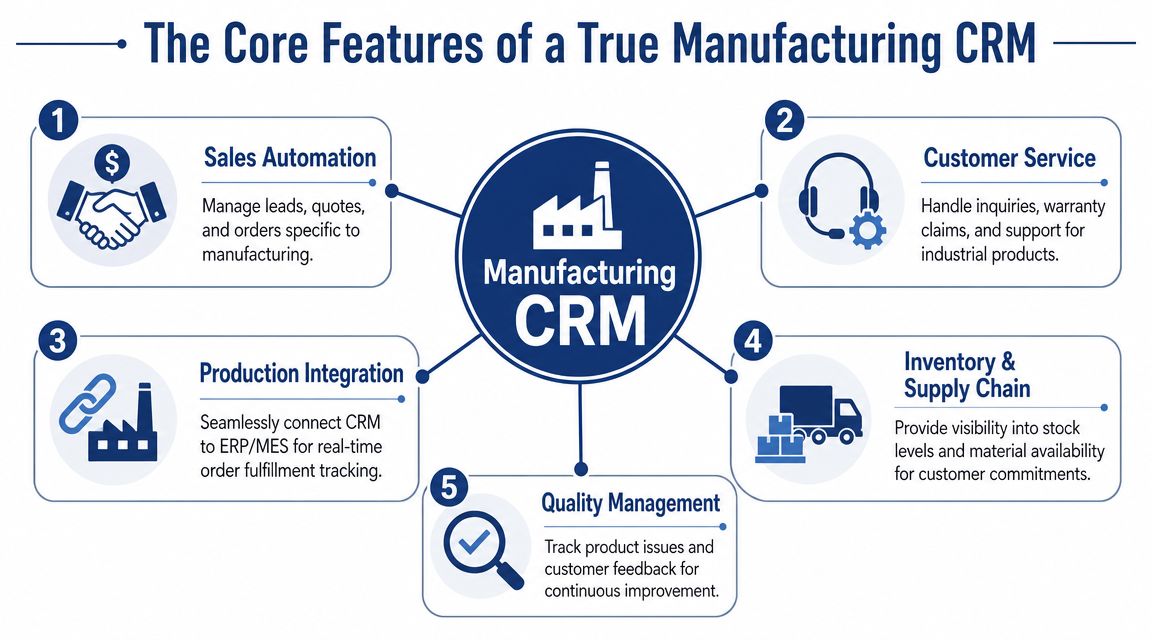
The right feature set isn't about having the most buttons. It's about whether the system supports the way your business sells, builds, ships, and services products.
Quoting and order control
Insightly notes that effective manufacturing CRMs are built around role-specific workflows, with key modules including order management for automating sales orders and shipping, channel-partner management for tracking distributor performance, and service management for post-sale support, all contributing to a single source of truth across the organization, as described in Insightly's manufacturing CRM feature guide.
That starts with order management. In practice, you want the CRM to do more than store quote PDFs.
You want it to help control:
- Sales-order entry: So reps aren't retyping the same information across systems
- Invoice and shipping workflow: So finance and logistics aren't working from disconnected records
- Delivery schedule visibility: So customers get realistic commitments
- Revision control: So old quote assumptions don't leak into live orders
If you build custom, configured, or made-to-order products, this matters even more. Small quoting errors become expensive once material is ordered or capacity is allocated.
Partner and account management
Many manufacturers don't sell through one direct sales team. They sell through dealers, reps, distributors, integrators, or regional partners. A generic account list won't manage that complexity very well.
A strong manufacturing CRM should let you segment by:
- Region
- Product line
- Channel type
- Partner tier
- Reorder and renewal patterns
That gives management a cleaner view of who is creating pipeline, who is sitting on it, and where channel conflict is likely to appear.
What works: One shared account structure with partner-level visibility.
What fails: Separate spreadsheets for distributor activity, rep notes, and order follow-up.
Service and operational visibility
After the sale, the CRM should still matter. If a customer calls with a warranty issue, late shipment complaint, installation question, or repeat order request, the team should see the account history without chasing three departments for answers.
The most useful setups connect:
- Sales history
- Open service cases
- Order status
- Delivery expectations
- Account communication records
That's where CRM for manufacturing companies stops being “sales software” and becomes part of the operating system. It reduces duplicate entry, shortens internal back-and-forth, and makes customer communication more credible because the person responding has context.
A Diagnostic Checklist for Choosing Your CRM
Most CRM buying processes go wrong before the contract is signed. Teams compare feature lists, sit through polished demos, and ask whether the system can “handle manufacturing.” That question is too soft to be useful.
A better approach is to diagnose your process first, then force the vendor to show how the system supports it.
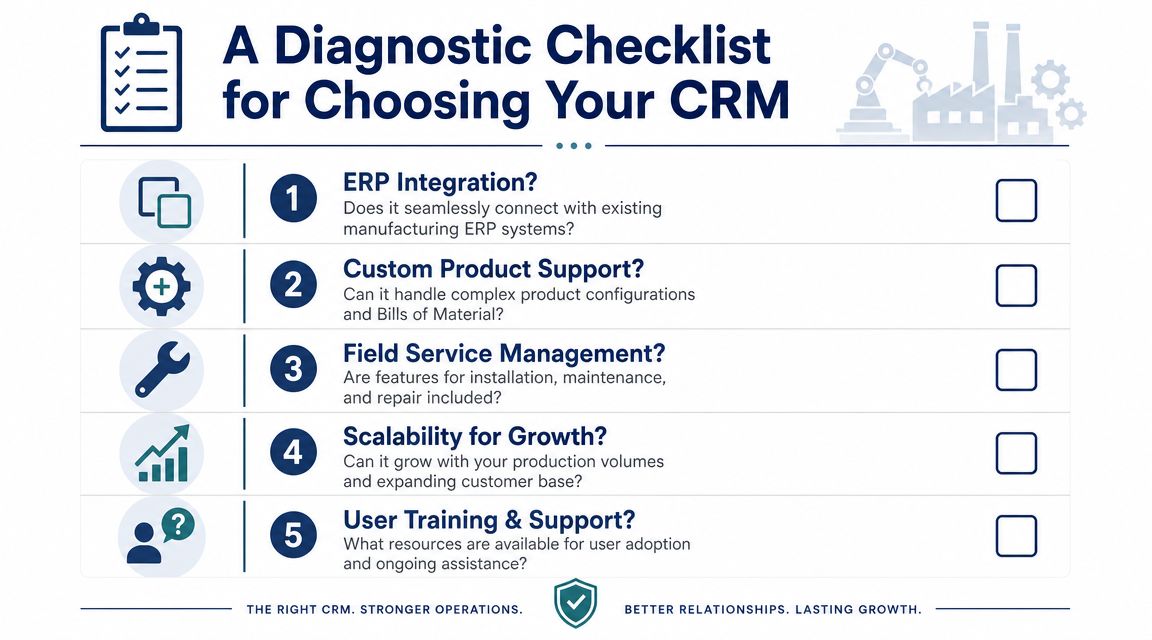
Questions to ask your own team first
Before you evaluate platforms, get clear on the operational failures you need to fix.
Ask these questions internally:
- Where do quotes stall? Pricing, approvals, engineering review, or missing customer data?
- Who owns the handoff from quote to order? If ownership is fuzzy now, software won't fix it.
- What information does sales need before promising lead time? If the answer depends on tribal knowledge, write that down.
- How do service issues flow back into account management? If they don't, your CRM design is incomplete.
- Which teams must use the system every day? Sales alone is not enough in most manufacturing environments.
If you want a broader buying framework, this article on how to choose a CRM system gives a useful baseline before you start vendor demos.
Questions to ask CRM vendors
Now test the vendors with operational questions, not marketing questions.
Show us how quoting pulls from live operational data.
Don't ask whether the platform “integrates with ERP.” Ask what data syncs, how often, and what the sales rep can see while building a quote.Show us how you handle distributor and channel workflows.
Can you segment partner accounts cleanly? Can you track opportunities by territory, product line, and partner relationship without custom reporting gymnastics?Show us the service record attached to the customer account.
If support and service data sit outside the CRM in a way your sales team never sees, you're still running blind.Show us what the user sees each day.
This is the adoption test. If a sales rep or service coordinator needs five tabs and ten clicks to do common work, usage will collapse.Show us how changes are governed.
Who controls fields, workflows, approvals, and data standards after go-live? A CRM with no governance model turns messy fast.
What to look for during evaluation
| Area | Strong signal | Warning sign |
|---|---|---|
| Integration | Vendor can map exact workflows across systems | Vendor speaks in broad promises |
| Usability | Role-specific screens and simple daily tasks | Heavy customization for basic actions |
| Manufacturing fit | Understands quoting, service, and partner models | Talks only about generic pipeline stages |
| Scalability | Clear path for added teams and workflows | System works only for a narrow use case |
| Support | Practical implementation guidance | Hands off after software sale |
The right CRM is the one your operation can effectively run, maintain, and trust.
Your 5-Phase Implementation Roadmap
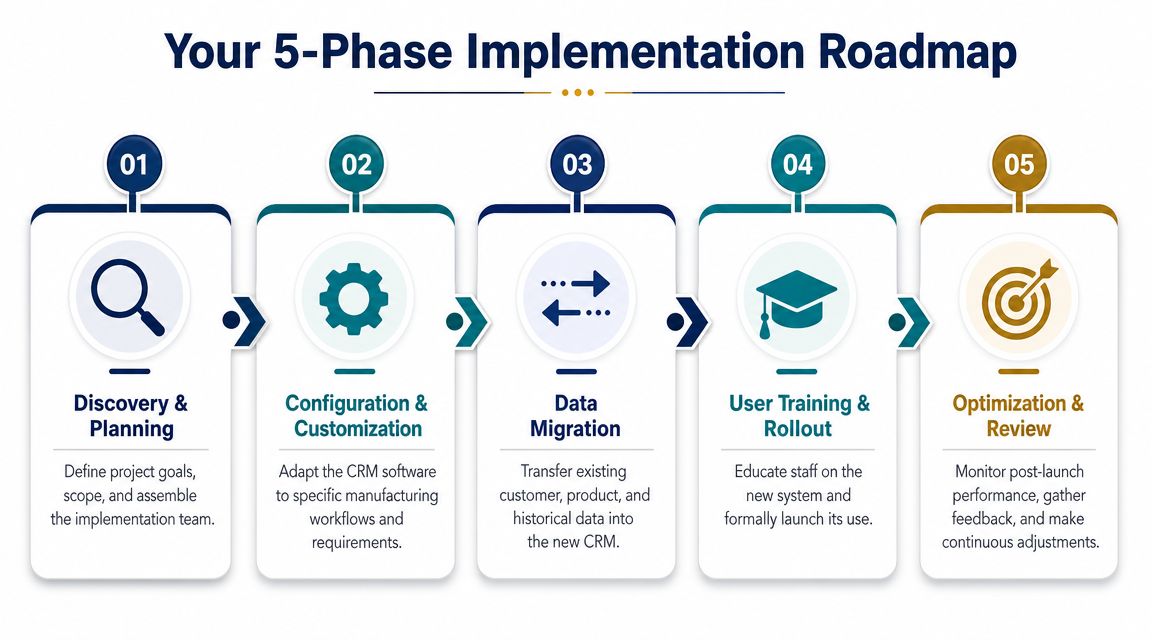
A CRM rollout should be treated like an operations project with commercial consequences. If you handle it like an IT install, you'll get a working system that nobody uses properly.
Start with process, then data, then software.
Phase 1 and Phase 2
Phase 1 is diagnosis and process mapping.
Map the workflow from inquiry to quote, quote to order, order to service, and service back to account management. Don't map the official SOP if people stopped following it years ago. Map what happens.
Phase 2 is configuration and data cleanup. Many projects cut corners during this phase. They import bad account records, inconsistent product naming, duplicate contacts, and vague stage definitions. Then they wonder why reporting is unreliable.
Use this phase to define:
- Required fields: What must be entered every time
- Stage definitions: What each pipeline status means
- Ownership rules: Who updates what
- Account structure: Direct customer, distributor, OEM, end user, or service contact
Clean data is not an admin detail. It's the foundation that determines whether forecasting, automation, and reporting mean anything.
A practical implementation checklist can help here. This overview of CRM implementation steps is worth using alongside your internal SOPs.
For a visual walkthrough of rollout planning, this short video is useful:
Phase 3 through Phase 5
Phase 3 is integration and testing.
Connect the CRM to ERP and any service or marketing systems that matter. Then test real scenarios, not sandbox theory. Build a quote. Update an order. Open a service issue. See what breaks.
Phase 4 is training and go-live.
Train by role. Sales needs different workflows than customer service, inside sales, or management. Keep training tied to daily tasks, not abstract software tours.
Phase 5 is performance monitoring and optimization.
Once live, review what people are doing in the system. Look for skipped fields, stalled workflows, duplicate records, and manual workarounds. Those are process signals.
A simple roadmap looks like this:
- Discovery: Define business goals and map current state
- Build: Configure workflows around real operating needs
- Connect: Sync CRM with ERP and adjacent systems
- Adopt: Train users by role and make usage mandatory
- Improve: Review friction points and tighten standards
If you're managing lead capture and early-stage nurture at the top of the funnel, platforms like HubSpot or GoHighLevel may feed qualified opportunities into the broader CRM and ERP stack. In some cases, firms also work with providers such as Machine Marketing to align the marketing automation layer with the downstream sales and operations workflow.
Common Pitfalls That Derail CRM Projects
The software usually gets blamed first. That's often the wrong diagnosis.
Most failed CRM projects in manufacturing come down to process discipline, data quality, and adoption. Stoneridge makes this point directly in its guidance for manufacturers: the critical question isn't which CRM has the most features, but how to ensure clean data and high user adoption. It also notes that AI and automation depend on structured data and clear workflows, and that a simpler CRM with strict data standards and high team compliance will outperform a feature-rich platform that nobody uses correctly, as discussed in Stoneridge's manufacturing CRM strategy article.
The three failure patterns we see most often
Bad data from day one
If customer names are inconsistent, product references are sloppy, and opportunity stages mean different things to different reps, the CRM becomes a reporting theater. It looks organized from a dashboard view but fails under scrutiny.
Low frontline adoption
When reps, estimators, or service coordinators feel the system adds work without helping them do their jobs faster, they stop using it properly. Then management adds more rules, which makes adoption worse.
Isolation from operations
A CRM that sits apart from production and service becomes another commercial silo. Sales likes it. The plant ignores it. Customer promises drift away from execution.
What prevents these issues?
- Tight field standards: Decide what “complete” means for every record type.
- Role-based workflows: Don't make every team use the same screens and steps.
- Visible accountability: Managers should review usage quality, not just pipeline totals.
- Operational integration: The CRM has to reflect how work moves through the business.
The best CRM for manufacturing companies is often the one your team will use consistently, because it matches the process instead of fighting it.
Next Steps to Build Your Growth Engine
If your team is quoting from scattered files, chasing internal answers by email, and handing orders to production with missing context, you don't need more activity. You need a better system.
A strong CRM for manufacturing companies gives you that system. It connects sales activity to production reality, makes customer communication more reliable, and gives leadership a cleaner view of demand, service load, and account health. That's the difference between reactive selling and controlled growth.
The key trade-off is simple. A feature-heavy platform with weak process design usually underperforms. A well-scoped system with clean data, clear ownership, and solid integration usually creates much better operational advantage.
Here's the next move we'd recommend:
- Map your current quote-to-order workflow
- Identify where data is duplicated or lost
- List the teams that must share one customer record
- Define what your CRM must connect to operationally
- Evaluate platforms against real workflows, not polished demos
If your top-of-funnel process also needs work, don't treat that separately. Lead capture, follow-up, nurturing, quoting, order flow, and post-sale service are one system. For many industrial companies, that means combining marketing automation with CRM and ERP integration so qualified opportunities enter the pipeline with context instead of chaos.
If you want help diagnosing the gaps before you shop for software, Machine Marketing can help you map the sales, marketing, and operations workflows a CRM should support, then identify where automation, integration, or better process design will have the most practical impact.
