
If you're running a machine shop, service operation, distributor, or manufacturer with more than one facility, Google Business Profile usually gets messy fast. One plant has a profile someone claimed years ago. Another branch was added by a former employee. Your service department wants its own visibility. Your sales office doesn't. And you're trying to figure out whether Google will treat those as legitimate business entities or as duplicate spam.
That's the challenge with multiple locations on Google My Business. It's not just setup. It's eligibility, verification, governance, and local optimization at scale. When you approach it like an operational system instead of a one-time marketing task, you avoid suspensions, reduce admin drag, and give each location a fair shot at generating qualified local demand.
Table of Contents
- Is Your Business Eligible for Multiple Locations
- Choosing Your Verification Path Individual vs Bulk
- The Bulk Upload Workflow a Step-by-Step System
- Optimizing Each Profile for Maximum Local Impact
- Diagnosing and Fixing Common Management Pitfalls
- Your Next Steps for Multi-Location Dominance
Is Your Business Eligible for Multiple Locations
A plant manager opens a new Google Business Profile for the same facility three times. One for the company, one for service, one for parts. Six weeks later, one listing is live, one is suspended, and one is merged into the wrong profile by Google. That is a common multi-location mess in industrial marketing, and it usually starts with the wrong eligibility call.
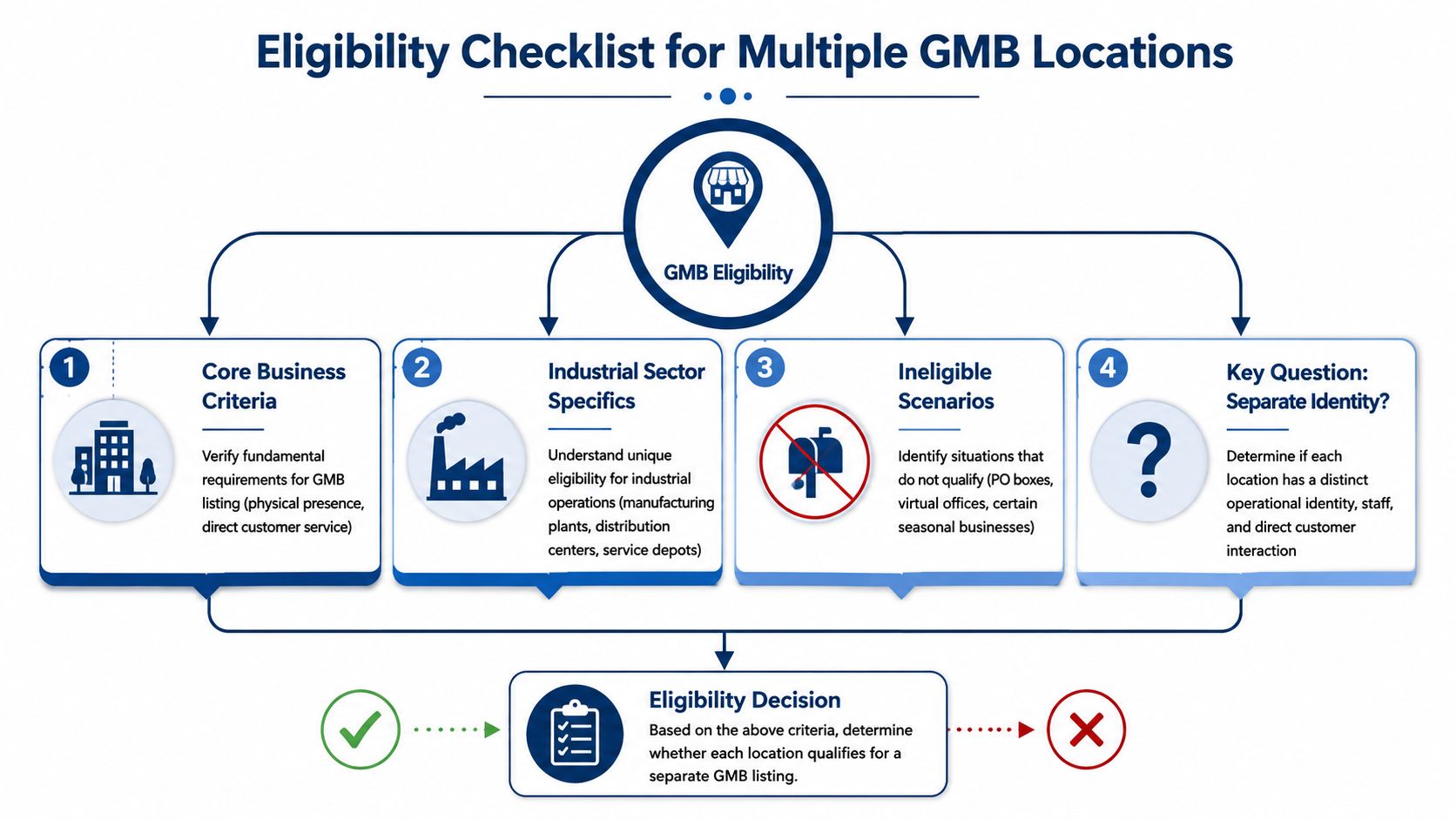
Google only wants listings for real, customer-facing business entities or clearly defined departments that meet its rules. Internal reporting lines do not count. A sales territory does not count. A rented mailbox definitely does not count.
Start with the physical reality of the business
For manufacturers, distributors, and industrial service companies, eligibility usually comes down to operating proof. Can Google see that this location or department exists as a distinct business presence, staffed during stated hours, and able to serve customers as listed?
Use these checks before you create anything:
- Real location: The address must be a legitimate business site, not a virtual office, mailbox, or borrowed address.
- Staffed operation: The location needs staff present during listed hours, especially if Google reviews it manually.
- Customer-facing function: Customers either visit there, contact that department directly, or receive service from a properly set up service-area business.
- Clear distinction from other listings: If the new profile looks like a copy of an existing one with a slightly different name, Google may treat it as a duplicate.
- Proof on request: Signage, utility records, business registration, photos, and department-specific phone lines should be easy to produce.
The failure point is usually weak operational separation. Companies try to force extra listings out of sales coverage areas, temporary project offices, or shared front desks. Those setups are hard to defend and expensive to recover once a suspension hits.
Practical rule: If an auditor showed up at the address tomorrow, the listing should make immediate sense from signage, staffing, and day-to-day operations.
Where industrial businesses have an advantage
Industrial companies have one option that generic retail-focused guides often miss. Departmental listings inside a single facility.
Google allows distinct departments for eligible businesses when those departments are publicly facing and separate in how they operate. Google's guidance on departments within other businesses is the standard to follow here. In practice, that means a manufacturer may be able to support separate listings for sales, service, or parts at one address if each department has its own direct contact path and clear customer purpose.
The buyer intent is often different. A maintenance manager searching for emergency repair support is not looking for the same information as a procurement team evaluating a new equipment supplier. If the business structure supports that split, the GBP structure often should too.
Industrial firms can gain an edge over competitors with a single, catch-all profile. A well-built departmental setup can capture more specific local searches without creating duplicate-listing risk. The trade-off is management discipline. Separate profiles need separate ownership, category choices, phone numbers, content, reviews monitoring, and update routines.
For a broader system view, use this guide on how to align Google Business Profile with the rest of your lead generation efforts.
Questions to ask before you create another profile
Run this test before adding any location or department listing:
- Does it have its own direct phone line?
- Can your team explain the operational difference in one sentence?
- Would a customer immediately understand why this is a separate profile?
- Is the address staffed and compliant with Google's rules?
- Can you maintain unique photos, services, posts, and review responses over time?
A "no" on one question is a warning. A "no" on three usually means the listing should not be created yet.
In multi-location GBP, restraint is cheaper than cleanup.
Choosing Your Verification Path Individual vs Bulk
After eligibility, the next operational decision is verification. With verification, the admin burden either stays manageable or becomes a time sink.
What individual verification looks like in practice
If you have fewer locations, Google generally pushes you into location-by-location verification. That usually means email, phone, or mail depending on what Google offers for that specific profile.
This route isn't impossible. It's just manual. Every listing becomes its own little project, with its own delays, approval steps, and follow-up. For a small company with a couple of sites, that's workable. For a growing industrial business opening branches, depots, or service points, it starts pulling staff into avoidable administrative work.
| Attribute | Individual Verification | Bulk Verification |
|---|---|---|
| Eligibility | Used when you don't qualify for bulk management | Available only to qualifying same-brand multi-location businesses |
| Workflow | Each location is handled one at a time | One spreadsheet upload supports a grouped workflow |
| Verification method | Typically email, mail, or phone for each listing | Bulk request through a location group |
| Admin effort | Higher, especially as locations increase | Lower once the system is built |
| Best fit | Small location count or early-stage expansion | Established multi-site operations with standardized data |
When bulk verification becomes the right system
There is a clear threshold here. According to BrightLocal's explanation of bulk verification for Google Business Profile, a business qualifies for bulk location management only if it has 10 or more locations of the same brand. That allows you to create a location group, upload a single spreadsheet, and submit a bulk verification request instead of handling each location one by one.
That same guidance matters for process discipline too. Google requires that all brand locations be included in the bulk account, whether published or unpublished, and duplicate listings must be cleared up before submission. The verification form also asks for operational details such as business name, countries or regions served, contact name, phone number, business manager email, and Google account manager email. Using a business-domain email can speed the process. Generic email addresses can slow it down.
Bulk verification isn't just a convenience feature. It's an operational milestone. Once you cross the threshold, the spreadsheet becomes part of your marketing infrastructure.
The practical trade-off is simple. If you're below the threshold, build a repeatable checklist for one-by-one verification. If you're at or above it, stop improvising and move to a centralized system immediately.
The Bulk Upload Workflow a Step-by-Step System
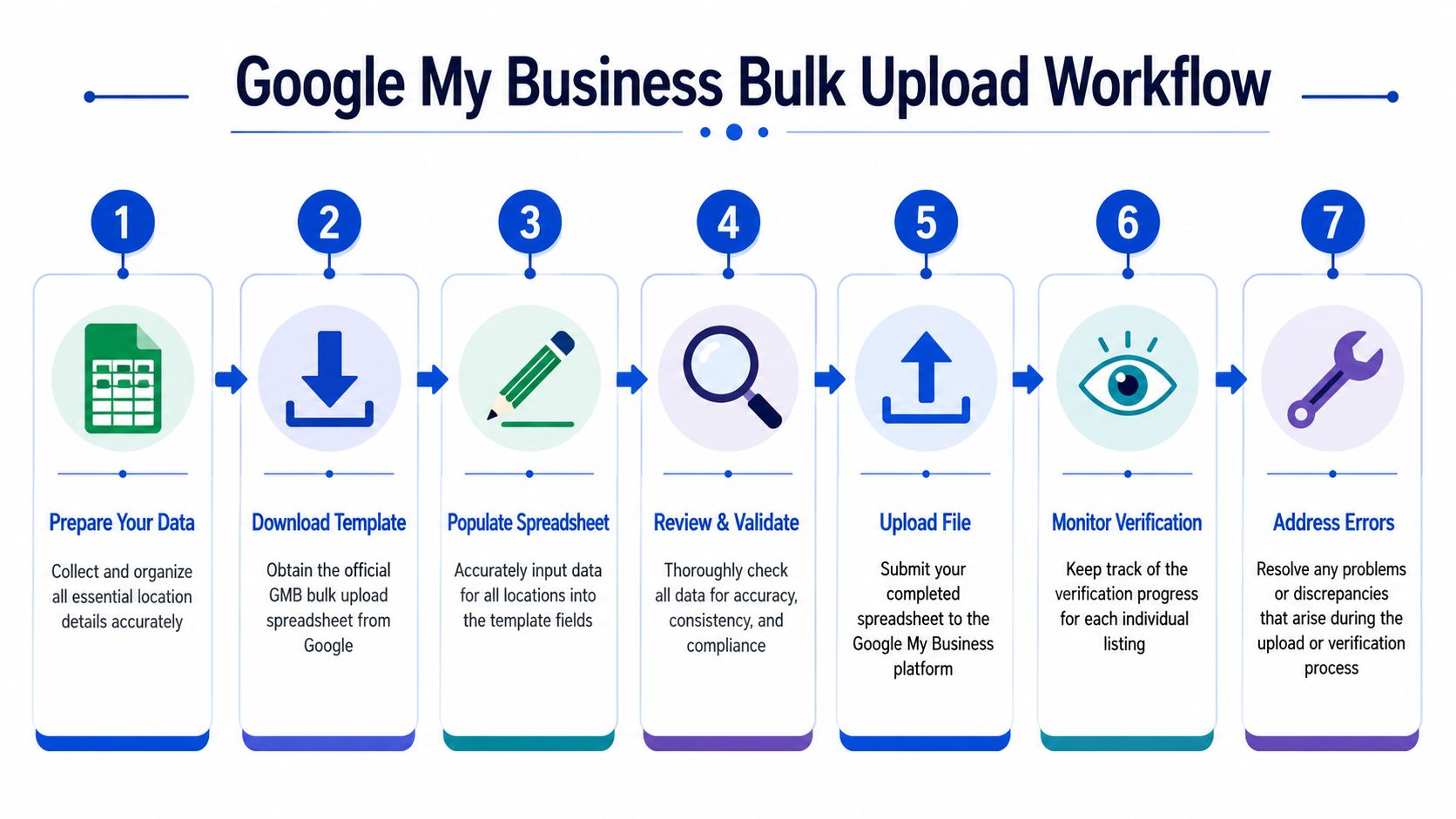
If you qualify for bulk management, the spreadsheet becomes the control center. Good teams treat it like a master data document, not a form they rush through on Friday afternoon.
Build the spreadsheet like an operations document
Start with a master sheet that includes every eligible location. For an industrial business, that may include plants, service branches, parts counters, and qualified departments if they meet the earlier criteria.
Your sheet should stay standardized across entries. Keep these fields tightly controlled:
- Business name: Match brand naming conventions exactly where required.
- Address data: Use the actual physical address for the specific site.
- Primary phone: Assign the correct phone number for that location or department.
- Primary category and services: Keep them accurate, but specific to the actual operation.
- Hours: Reflect reality, not a copied template.
- Store code or internal ID: Give each listing a stable internal reference so your team can track ownership and changes.
According to NiceJob's guide to managing multiple Google Business Profile locations, NAP consistency is critical in the spreadsheet. They report that Google rejects submissions with residential addresses or duplicate phone numbers up to 85% of the time, while clean, standardized submissions see near-100% approval rates.
That tracks with what we see in practice. Most bulk upload failures aren't complicated. They're data hygiene failures.
A practical SOP for submitting the file
A simple workflow works best:
Create one source of truth
Keep the spreadsheet in one controlled location. Limit editing rights. If three people are “fixing” addresses at once, errors creep in fast.Normalize the data before upload
Standardize abbreviations, suite formatting, hours, and naming conventions. If one row says “Rd” and another says “Road,” decide on a format and clean the whole file.Check for disallowed entries
Residential addresses, vague locations, and duplicated phone numbers should be caught before Google catches them.
Before you upload, review the process visually here:
Submit through the bulk upload tool
Use the official template and load the full file into your location group.Monitor errors immediately
Don't let rejected rows sit. Fix them while the context is fresh and your operations team is available to confirm details.Document every correction
Track what changed and why. That matters later when another team member asks why one service depot has a unique category or phone structure.
What usually breaks the workflow
A machine shop with multiple departments is a good example. The company may want one listing for the main business, one for repair service, and one for parts support. The strategy can work, but only if the supporting data is real and distinct. Shared numbers, copy-pasted descriptions, and vague department labels are where things start to fall apart.
Clean data gets approved. Messy data creates manual work, delays, and compliance risk.
The easiest way to keep the system healthy is to assign ownership. One person should own the spreadsheet. Another can review it. Nobody else should be making casual changes in the live file.
Optimizing Each Profile for Maximum Local Impact
Verification gets you onto the field. Optimization is what makes the listing produce leads.
Treat each listing like its own market
Many multi-location strategies often fail. Teams assume one strong location will lift the rest. It won't.
According to this analysis of multi-location Google Business Profiles, each Google Business Profile is a separate entity. Reviews, authority, and ranking power do not transfer between locations. A new site starts with zero reviews and has to build its own local reputation.

That changes the way you manage multiple locations on Google My Business. Each profile needs its own local signals:
- Location-specific photos: Show the actual facility, team, vehicles, equipment, signage, and customer-facing areas.
- Distinct service descriptions: Don't paste the same boilerplate into every listing.
- Review generation by location: Ask customers who worked with that branch or department to review that exact profile.
- Localized updates: Posts and offers should reflect what that specific location does.
If you want a practical outside perspective on how local ranking factors show up on the map, this resource on how to rank higher on Google Maps is worth reviewing alongside your GBP work.
A monthly maintenance rhythm that works
The easiest way to lose momentum is to treat optimization as a launch task. It works better as a recurring operating rhythm.
Use a monthly checklist:
- Review photo freshness: Add recent images from each branch, department, or field team.
- Audit core info: Confirm hours, phone numbers, categories, and service lists are still accurate.
- Respond to reviews: Assign ownership so no location goes quiet.
- Check conversion paths: Test calls, website links, appointment links, and direction requests.
- Look for weak profiles: Some locations need more support than others. Spot them early.
For a more detailed operating process, this guide on how to optimize Google Business Profile is a solid companion resource.
A multi-location profile set only performs well when someone manages it like a portfolio, not like a directory listing.
Diagnosing and Fixing Common Management Pitfalls
A manufacturer with one main plant, a service division, and a separate will-call counter can end up with a mess fast. One department gets verified at the wrong address. Another inherits the plant's main phone line. A third profile exists because a former agency created it years ago and nobody documented it. By the time rankings slip or a listing gets suspended, the issue is rarely isolated.
The failure patterns we see most often
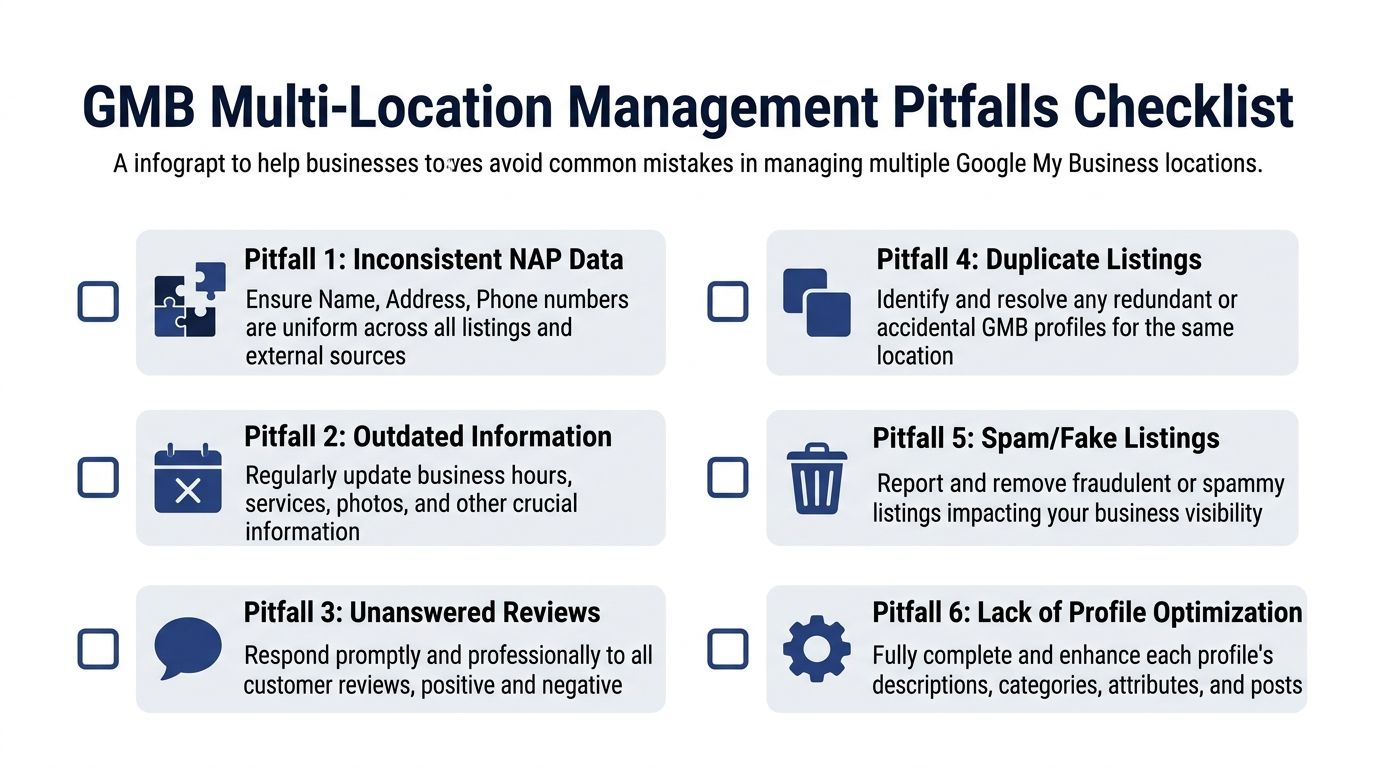
Start with the structure, not the symptoms. For industrial and B2B companies, the biggest mistakes usually come from unclear listing logic. Teams create profiles based on internal org charts instead of customer-facing reality. Google only cares whether that location or department is legitimate, staffed, reachable, and distinct in practice.
Check these four areas first:
- Duplicate listings: Two profiles for the same location split reviews, citations, and user signals. They also create cleanup work later if one starts ranking and the other collects customer activity.
- Address eligibility problems: Virtual offices, shared spaces, and loosely defined suite numbers cause repeated verification and suspension issues. Departmental listings inside one facility can work, but only if the department has real public-facing operations and consistent identifying details.
- Operational drift: Hours, direct phone lines, temporary closures, and department name changes often fall out of sync after internal changes.
- Low-trust profiles: Thin descriptions, poor photos, missing attributes, and unanswered reviews make the listing look neglected and reduce conversion confidence.
Manufacturers run into one overlooked problem more than retail chains do. They try to force every customer-facing function into a single profile, even when separate departments serve different intents. If your parts counter, field service team, and showroom operate differently, the right answer may be tighter profile separation. If they do not, separate listings create more risk than value.
A helpful place to start your review is this Google Business Profile Audit Tool. It gives you a clear framework for checking completeness, consistency, and obvious weak points before they turn into suspensions or duplicate cleanup projects.
Most GBP problems start as operating problems. The profile just shows where the system broke.
Reviews are another giveaway. If one branch has a steady review flow and the rest are flat, the issue is usually process consistency, not customer satisfaction. Build a branch-level follow-up system and create a repeatable request process by location so each team asks for feedback on the correct profile.
A simple control system for teams and agencies
Access problems cause more damage than many teams expect. I see this constantly in multi-location accounts. A plant manager has owner access, an old vendor still controls a few listings, and someone in sales creates a new profile because they want faster visibility for a department page. That creates duplicate ownership, duplicate listings, and no clean audit trail.
Use a basic governance model:
Keep primary ownership centralized
Assign top-level control to a senior internal stakeholder using a company-domain account.Limit local permissions
Give branch or department managers access only for the actions they handle, such as hours, photos, and review responses.Track access in one place
Maintain a permissions log with user name, role level, assigned listings, and approval date.Review permissions on a schedule
Remove former employees, inactive agencies, and duplicate user records every quarter.
This is not admin busywork. It prevents unauthorized edits, protects verified listings, and makes troubleshooting much faster when something changes without warning.
Your Next Steps for Multi-Location Dominance
The companies that win with multiple locations on Google My Business don't treat GBP as a side task. They treat it like a managed system. First, they confirm which locations or departments qualify. Then they choose the right verification path, clean up the data, and keep each profile active with local content, reviews, and oversight.
If you want a strong outside framework for scaling local visibility across branches, this guide on how to attract more local customers with proven tactics is a useful next read.
Your immediate move is simple. Audit every live listing you already have. Check whether the address is compliant, whether the phone number is unique where it needs to be, whether duplicates exist, and whether each profile still reflects real operations. That diagnosis will tell you whether you need cleanup, consolidation, or expansion.
If you want help diagnosing your Google Business Profile structure, cleaning up duplicate or weak listings, or building a multi-location local SEO system that fits an industrial business, contact Machine Marketing. We help manufacturers and B2B companies turn scattered marketing activity into a clear operating system for growth.
