
A manufacturing marketer can spend a morning exporting contacts from a CRM, checking a spreadsheet for industry and job role, copying names into an email platform, and sending a lead notification to sales manually. By afternoon, one prospect has received two unrelated nurture emails, another has no recorded consent, and a high-intent buyer is still waiting for a response.
That isn't a copywriting problem. It's a workflow architecture problem. Effective marketing automation workflows connect clean data, clear triggers, relevant messaging, consent rules, and accountable sales handoffs. This guide shows you how to diagnose the system, design practical workflows for manufacturing, and improve them without giving up control.
Table of Contents
- Introduction to Workflow Challenges
- Diagnosing Your Workflow Requirements
- Designing Triggers and Segments
- Crafting Messaging and Templates
- Implementing Workflows in Your Platform
- Testing and Optimizing Workflows
- Measuring KPIs and Next Steps
Introduction to Workflow Challenges
Manufacturing demand generation rarely follows a neat, short buying journey. A prospect may download a capabilities document, return to a tolerances page, forward a technical article to an engineer, and contact sales weeks later. If those actions live in separate systems, your team sees fragments rather than intent.
The typical result is familiar:
- Spreadsheets hold context: Industry, machine type, territory, and account status may sit outside the CRM.
- Email sequences operate alone: A marketing platform may continue sending nurture messages after a salesperson has opened an opportunity.
- Sales handoffs depend on memory: Someone notices a form submission, forwards it, and hopes the right person follows up.
- Consent records lack precision: The system knows a contact opted in, but not always what topic, channel, or purpose that consent covered.
Marketing automation workflows solve these problems only when they're designed as an operating system, not a collection of email drips. Each workflow needs a trigger, a set of conditions, an action, and a defined owner. The trigger might be a form submission or a meaningful page visit. The conditions determine whether the contact belongs to a target segment and whether the message is permitted. The action could be an email, a CRM update, a sales task, or a suppression rule.
Practical rule: Automate a process only after you can explain who owns each decision, which data field supports it, and what should happen when the data is missing.
The adoption trend makes this discipline more important. By 2026, 78% of mid-market B2B organizations ran at least one automation platform and managed an average of 24 active workflows, up from 61% adoption in 2023, according to Digital Applied's 2026 marketing automation benchmark. More workflows don't automatically create better growth. They create more opportunities for inconsistent data and incorrect routing unless governance comes first.
Diagnosing Your Workflow Requirements
Before building anything, audit the system as an engineer would. Trace a lead from first interaction to sales disposition and record every place where data is created, transformed, delayed, or lost.
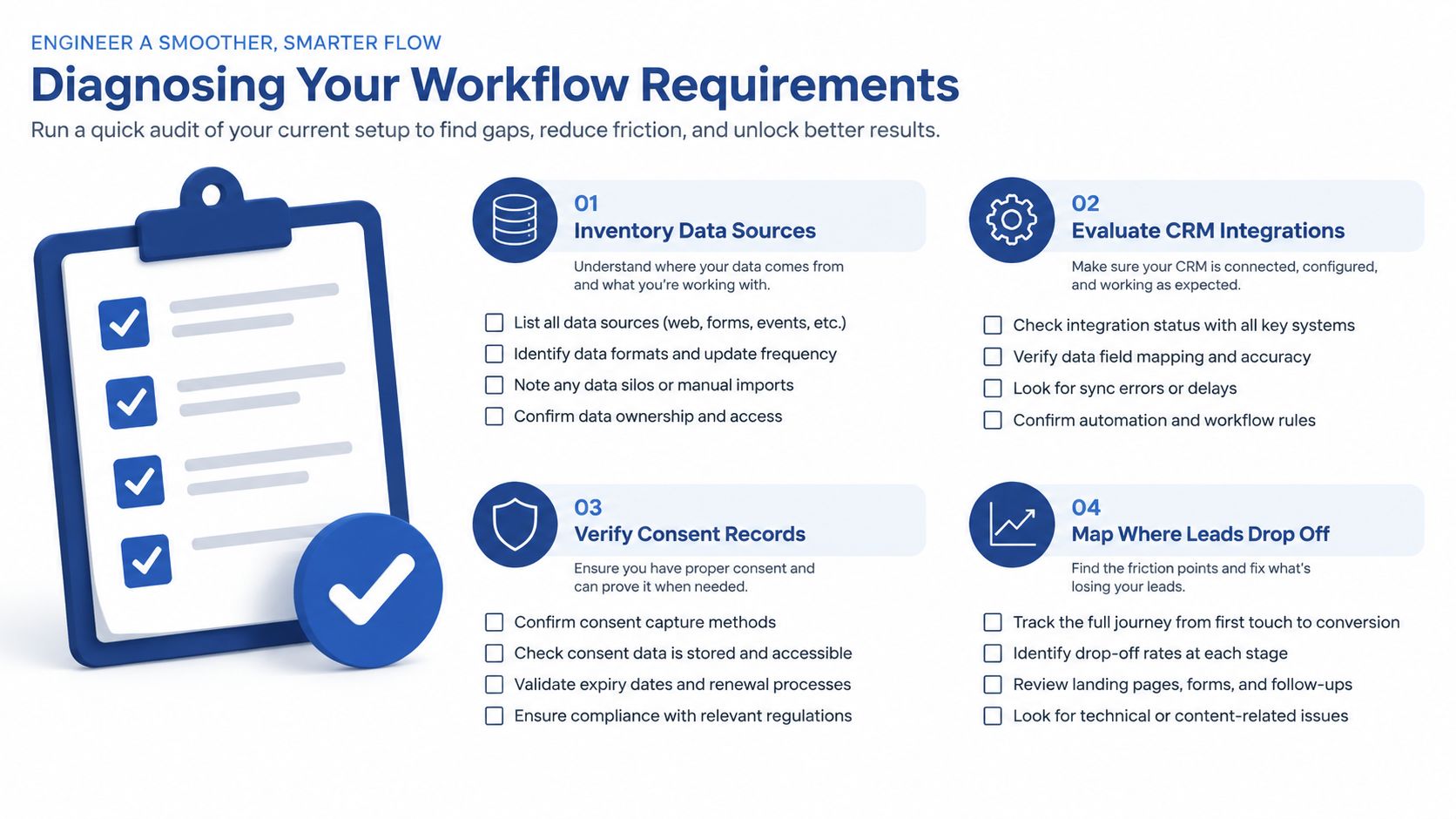
Inventory the data path
List every source that contributes to lead qualification:
- Forms: Identify which fields capture company, role, application, project timing, and consent.
- CRM records: Check whether contact, account, opportunity, owner, and lifecycle fields are complete.
- Website behavior: Separate useful intent signals, such as pricing or capability-page visits, from low-value activity.
- Sales notes: Determine whether objections, qualification status, and follow-up outcomes return to the CRM.
- Operational systems: Note where quoting, service, territory, or product data could affect routing.
Manufacturers often collect useful information but store it under inconsistent field names. “Industry,” “vertical,” and “market” may describe the same thing in different systems. Fix that mapping before you build branches.
Test the handoff
Ask sales to show what happens after a qualified form submission. Is an owner assigned automatically? Does the task include the page viewed, content downloaded, and stated application? Can sales mark a lead as accepted, recycled, disqualified, or already in progress?
A handoff without a feedback path creates a one-way system. Marketing sends contacts to sales, but the workflow never learns whether the lead was relevant.
Verify consent governance
Consent must be connected to the action it permits. Under GDPR, an automated sequence must stay within the scope of the subscriber's consent or another lawful basis. A GDPR-focused automation compliance guide specifically distinguishes between signup-related welcome messages, topic-specific nurture, and re-permission for stale consent.
Check whether your records contain:
- Consent status and timestamp
- Source form and stated purpose
- Permitted topic or communication type
- Channel preference
- Unsubscribe and suppression history
Finish the audit by marking every drop-off. If you can't identify where a lead waits, duplicates, changes ownership, or exits the workflow, you aren't ready to automate it.
Designing Triggers and Segments
A trigger should represent a meaningful change in buyer context, not merely an available software event. A form submission usually deserves an immediate response. A single blog visit usually doesn't justify a sales alert.
A trigger-based workflow fires when an event occurs, such as a form submission or a lead score crossing 50 points, enabling precise routing of MQLs and hot leads, as described in this lead-scoring workflow guide.
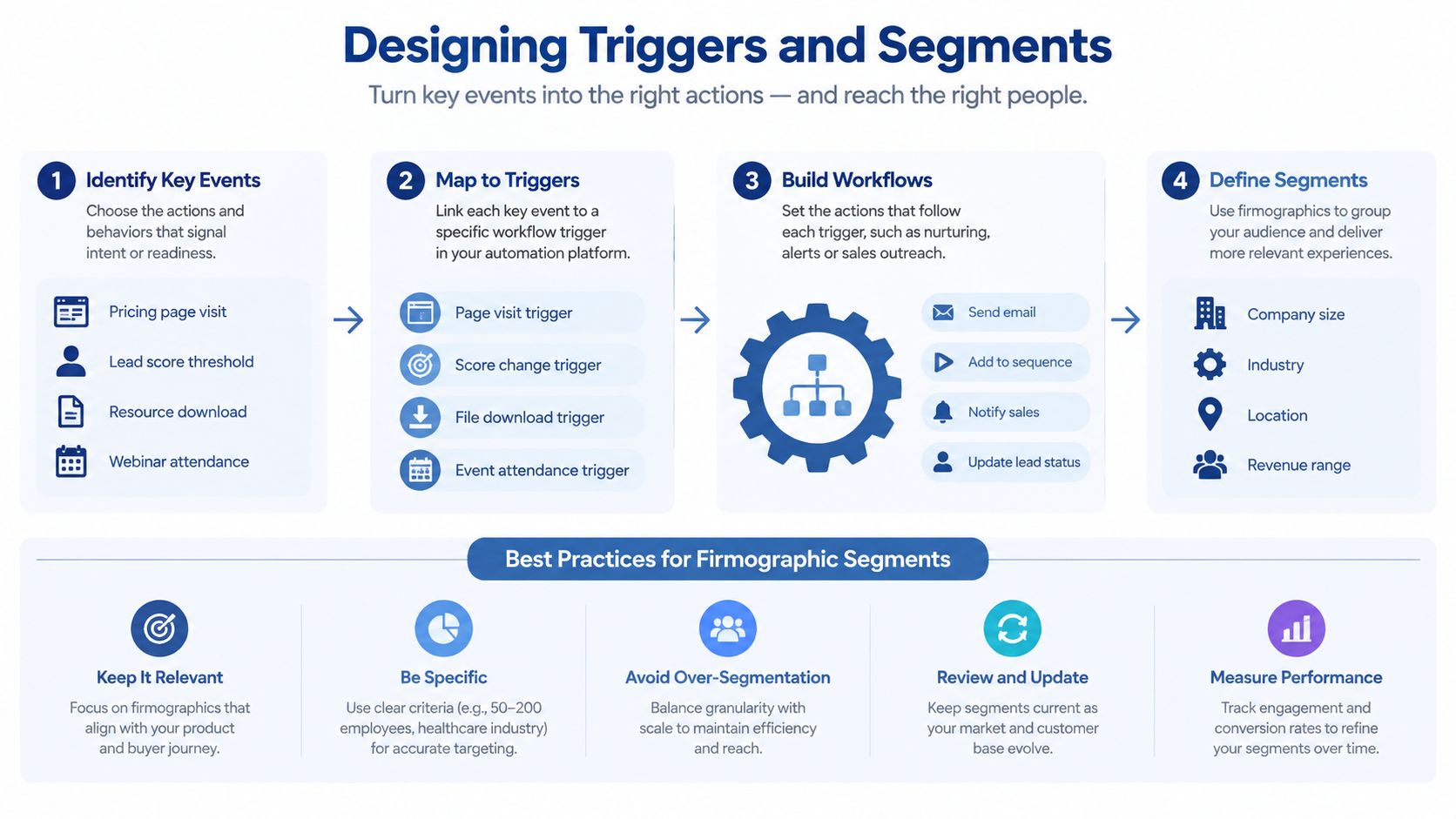
Start with intent
For an industrial workflow, prioritize events that indicate a project or evaluation:
- A pricing or quote-page visit
- A capabilities document download
- A technical inquiry
- A form submission with an application or equipment requirement
- A return visit from an identified target account
- A score crossing a qualification threshold
Then define the response. A pricing-page visit might add a review task or place the contact in a high-intent branch. A technical download might begin a technical nurture sequence. The correct action depends on sales capacity and the quality of the signal.
Watch this short visual explanation before building complex logic:
Build segments that explain why a person belongs
Use three layers:
- Firmographics: Industry, company size, geography, job function, and account type.
- Fit: Whether the company matches your ideal customer profile, including relevant equipment, materials, or production needs.
- Behavior: Recent actions, content interests, page visits, and response to previous messages.
A practical scoring model can assign +2 for an email open, +5 for a click, +15 for a case study download, +20 for a pricing-page visit, and +25 for an ICP job title. At 50 points, the contact becomes an engaged lead. At 75 points, the system marks the contact as an MQL and notifies sales. At 100 points, it creates a sales task and sends a high-priority alert, based on this B2B workflow scoring model.
Treat those values as a starting model, not universal truth. A frequent email opener may be less valuable than a verified application requirement. Review score outcomes with sales and adjust the model based on accepted and rejected leads.
For more detail on building practical audience groups, use this guide to segment email lists. If your forms collect sensitive information, evaluate the data path carefully. A HIPAA-compliant form solution may be useful where healthcare-related manufacturing or regulated inquiries require stronger handling controls.
Crafting Messaging and Templates
Industrial buyers don't need louder marketing. They need evidence that you understand the specification, constraint, risk, or production problem they're trying to solve.
A strong workflow email answers one practical question at a time. It may explain whether your team handles a material, clarify a tolerance capability, show how a project moved from prototype to production, or tell the reader what information to provide for a useful quote.
Use a modular message system
Create reusable blocks for:
- Subject line: Mention the application, material, or operational issue when the data is reliable.
- Opening: Reflect the action that triggered the message, without sounding like surveillance.
- Proof: Add a relevant capability, process explanation, or customer evidence.
- Next step: Ask for one action, such as sharing drawings, booking a technical call, or replying with a target volume.
- Footer controls: Include identity, consent context, unsubscribe handling, and contact information.
Personalization should come from fields you trust. A company name inserted incorrectly damages credibility. If the application field is blank, use a general but useful message instead of displaying broken personalization.
A machine-shop nurture sequence
A three-email case study series for a machine shop can follow this structure:
Email one, diagnose the challenge. Describe a common issue, such as inconsistent part quality, limited capacity, or difficult quoting. Keep the focus on the buyer's situation.
Email two, show the engineering approach. Explain how the shop evaluates material, tolerances, inspection, production volume, and delivery requirements. Avoid unsupported claims about savings or performance.
Email three, make the handoff easy. Invite the reader to send a drawing, schedule a technical conversation, or request a quote. State exactly what the sales or engineering team needs to respond well.
Triggered messages outperform batch campaigns in large-scale benchmark data. Across more than 20 billion campaign emails and 470 million automated sends from over 27,000 brands, automated emails converted at 1.49% versus 0.08% for campaign emails, with 52% higher open rates and 332% higher click rates, according to Stripo's 2026 email automation benchmarks. The result comes from relevance and timing, not from adding more email.
For practical language patterns, adapt these sales follow-up email templates to your workflow's trigger and buyer context. Keep the scalable framework, but let high-value accounts receive human review before a message is sent.
Implementing Workflows in Your Platform
Platform implementation should begin with a controlled workflow, not a sprawling automation map. Choose one path with a clear trigger, a defined audience, a measurable handoff, and an owner who can monitor it.
Configure the core logic
Set up the workflow in this order:
- Define entry conditions: Specify the form, page event, score change, or CRM status that starts the process.
- Apply eligibility filters: Check lifecycle stage, account ownership, consent scope, suppression status, and existing opportunity status.
- Select the message: Attach the approved template and confirm that required CRM fields have fallback content.
- Create branches: Route by application, geography, product interest, or sales ownership only when those fields are dependable.
- Write back to the CRM: Record enrollment, message activity, score changes, handoff status, and outcome.
- Add exit rules: Remove contacts after a reply, opportunity creation, unsubscribe, disqualification, or a defined sales decision.
Field mapping deserves more attention than the visual workflow builder. If a form writes “equipment interest” to a field the CRM reads as “product category,” your conditions may fail unnoticed. Test records with complete, partial, conflicting, and missing values.
Verify the controls before activation
Use a pre-launch checklist:
- Consent: Confirm every message is permitted for the contact's recorded purpose.
- Suppression: Test unsubscribe and global suppression behavior.
- Ownership: Confirm the correct territory or representative receives the task.
- Duplicates: Verify that an existing contact or opportunity won't create a competing record.
- Timing: Check delays, business-hour rules, and timezone behavior.
- Alerts: Make sure sales notifications contain enough context to act.
- Recovery: Define what happens when an integration fails or a required field is blank.
Teams new to implementation may find this overview of marketing automation for founders useful for connecting strategy to platform setup. For platform selection and comparison, review top marketing automation platforms against your data model, CRM, consent requirements, and team capability rather than choosing based on feature count.
Testing and Optimizing Workflows
A workflow that sends messages is not necessarily a workflow that works. Manufacturing teams should test the complete path, from form capture to CRM record, message eligibility, sales notification, and final disposition.
The first follow-up deserves special attention. One workflow guide recommends sending it within 5 minutes of form submission and cites research that response rates drop 80% after one hour, as reported in this timing guide. Treat that as a testing priority, not a promise that every business will see the same outcome.
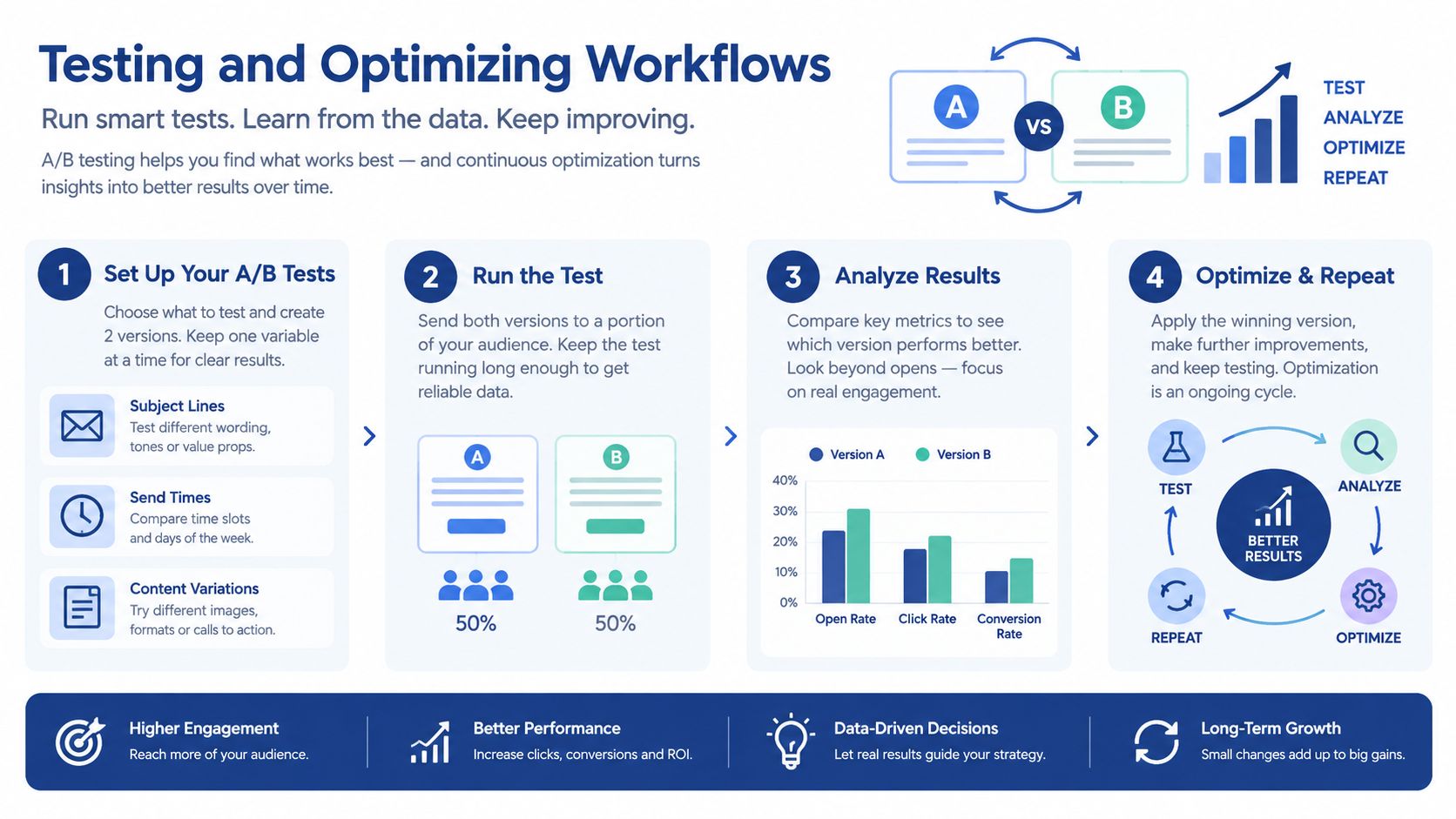
Test one decision at a time
A useful optimization loop looks like this:
- Choose a bottleneck: Low form completion, weak replies, poor MQL acceptance, or stalled opportunities.
- Form a specific hypothesis: For example, a drawing-upload CTA may create more qualified conversations than a generic consultation CTA.
- Change one variable: Test subject line, send timing, CTA, message order, or branch criteria, not everything together.
- Set a decision rule: Decide which outcome matters before reviewing results. A click is not always better if it produces unqualified inquiries.
- Document the result: Record the audience, version, date, and downstream sales outcome.
- Deploy carefully: Update the workflow only after checking that the change won't affect consent, routing, or exit logic.
Avoid optimizing for opens alone. A technical audience may open an email but never respond, while a smaller number of replies may create genuine opportunities. Connect engagement to sales acceptance and revenue attribution where possible.
Keep human review in the loop
Adaptive tools and agentic AI can help adjust timing, content, or channel, but manufacturers still need boundaries. Let automation handle predictable decisions, such as assigning a known territory. Require human review when the system would change claims, interpret technical requirements, contact a strategic account, or alter a compliance-sensitive message.
The strongest optimization process combines machine speed with human judgment. Your team should know which decisions are deterministic, which are experimental, and which require approval before activation.
Measuring KPIs and Next Steps
A dashboard should show whether the workflow creates useful conversations, not merely whether it sends emails. Track the path from engagement to business outcome.
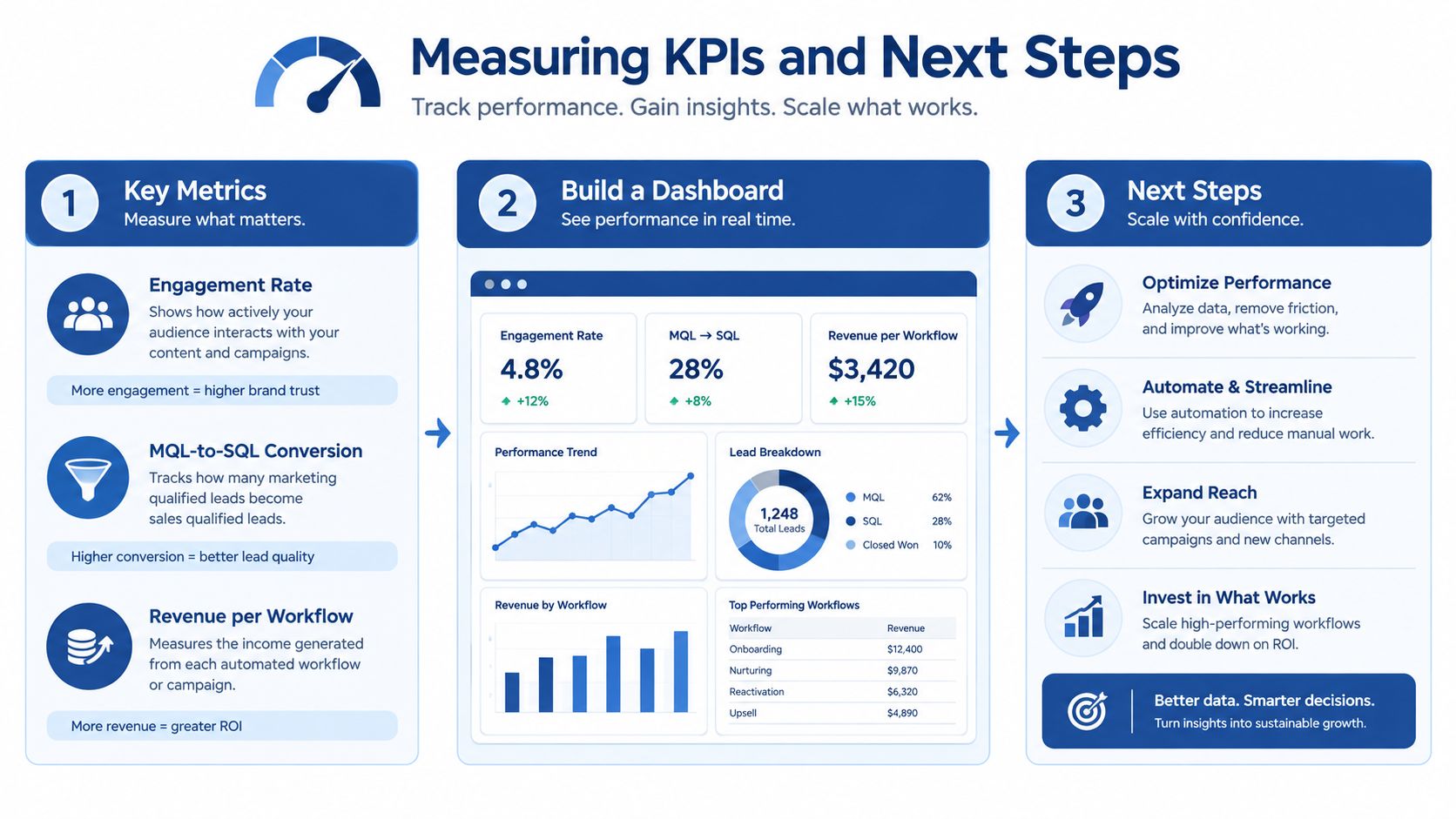
Use a compact scorecard:
- Engagement rate: Monitor replies, meaningful clicks, and content interaction by segment.
- MQL-to-SQL conversion: Check whether sales accepts the leads your scoring model sends.
- Revenue per workflow: Connect opportunities and closed business to the originating workflow where attribution is practical.
- Handoff speed: Measure how quickly an assigned lead receives human attention.
- Data quality: Watch missing fields, duplicate records, invalid routing, and consent conflicts.
- Exit performance: Confirm contacts leave nurture when they reply, enter an opportunity, unsubscribe, or become irrelevant.
CRM integration gives you the measurement layer. One benchmark reports that 76% of marketers integrate automation tools with CRM systems, and cites an average return of $5.44 for every $1 invested in marketing automation. It also reports that top-performing email workflows generate $16.96 per recipient, compared with $1.94 on average, as detailed in Dataopedia's marketing automation statistics. Those figures are benchmarks, not a forecast for your company, so use your own baseline and sales outcomes to judge performance.
Scale only after the first workflow is stable. Add branching logic when the data supports it, introduce personalization where fields are accurate, and consider AI-assisted orchestration only with approval rules and auditability.
The operating sequence is straightforward: audit, design, build, test, measure, and iterate. Start with one industrial use case, document the SOP, and make the sales handoff visible.
Machine Marketing helps manufacturers connect their website, CRM, content, sales process, and automation workflows into a clearer lead-generation system. Visit Machine Marketing to discuss a practical diagnosis of your data architecture, consent governance, and sales handoff, then identify the workflow worth fixing first.
