
You're probably in a familiar spot. Sales has one spreadsheet, customer service has another, quotes live in email, and your ERP knows part history but not why a deal stalled. Someone says, “We need a CRM,” and within weeks the conversation jumps to demos, pricing tiers, and AI features.
That's backward.
A solid CRM implementation strategy for a manufacturer starts with behavior, process, and data discipline. Software comes later. CRM is mainstream now, but the gap between buying it and operationalizing it is still wide. U.S. CRM usage sits around 73% to 74% overall, and 91% of companies with 10 or more employees use CRM software, compared with only around 50% of businesses with fewer than 10 employees. Europe is at roughly 85.6% to 85.7% adoption and Asia-Pacific around 75.9%. That tells us CRM isn't experimental anymore. It's standard infrastructure, and the question is whether your team can make it usable across sales, marketing, and service workflows (CRM adoption reference data).
If you run a machine shop, industrial distributor, or mid-size manufacturer, skip the hype. Treat implementation as a 90-day behavior-change program with hard adoption thresholds. Treat data readiness as the gate for automation and AI. Everything else is noise.
Table of Contents
- Why Most CRM Rollouts Stall Inside the First Six Months
- Run a Four-Stage Assessment Before You Pick a Platform
- Choosing a CRM That Fits Manufacturing Workflows
- Holding the AI Gate Until Your Data Is Actually Ready
- A Phased Rollout That Builds Real Adoption
- Measuring Success With Adoption Metrics, Not Vanity Numbers
- Your 90-Day CRM Implementation Checklist
Why Most CRM Rollouts Stall Inside the First Six Months
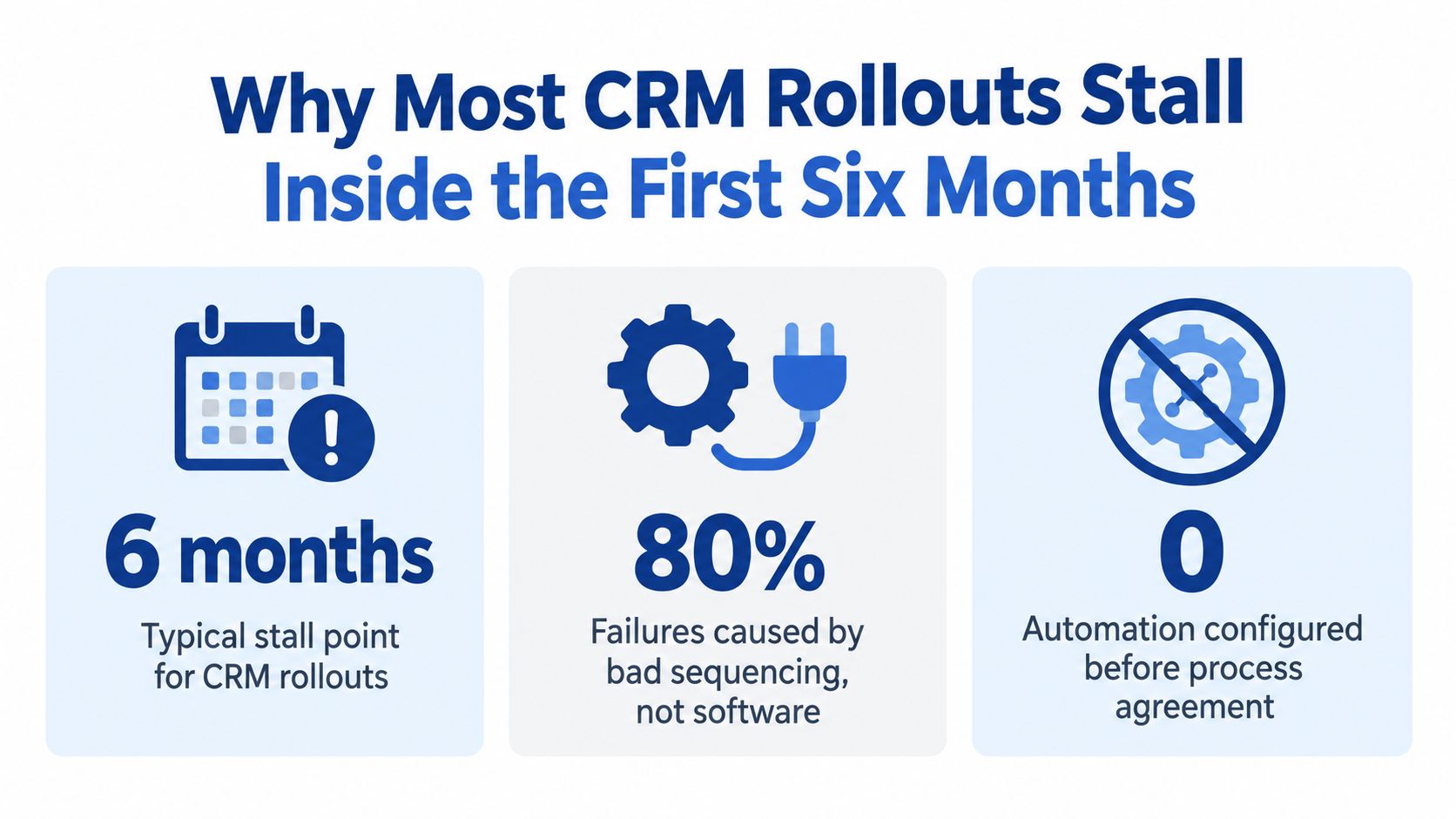
Most CRM rollouts fail because teams sequence the work badly.
They buy software first, configure fields second, import junk data third, and only then ask how quoting, engineering review, follow-up, and service handoff are supposed to work. That's how you end up with five salespeople using five versions of the same pipeline stage.
CRM failure usually isn't a software problem. It's an adoption problem. Harvard Business Review summarized analyst reports showing CRM failure rates ranging from 18% to 69%, with later syntheses often placing failures near 50% to 55% when systems miss planned objectives (Harvard Business Review on CRM project failure rates).
The bad sequencing pattern
Inside manufacturers, we see the same breakdown again and again:
- Fields before process: Teams argue about dropdowns before they've defined how an RFQ becomes a quote.
- Automation before agreement: Someone turns on reminders, routing, or lead scoring before sales and operations agree on ownership.
- Migration before cleanup: Old contacts, duplicate accounts, dead distributors, and stale opportunities get imported as if history deserves preservation.
- Training without accountability: Users attend a session, nod, and go back to Outlook and spreadsheets.
Practical rule: If your current process isn't written down, your CRM will just digitize confusion.
What to do instead
Treat the first 90 days as a behavior program, not a software launch. Every workflow change needs three things attached to it:
- A named owner
- A measurable threshold
- A training moment tied to a real task
The CRM should record decisions your team already makes in quoting, forecasting, and service. It shouldn't be the place where people invent different versions of your process.
That's why we tell clients to skip vendor demos until current-state process mapping is done. If you need a practical reference for the sequencing, start with these CRM implementation steps for manufacturers and B2B teams.
Run a Four-Stage Assessment Before You Pick a Platform
If you choose a platform before you diagnose the process, you're guessing. The assessment comes first. Always.
A structured CRM roadmap should move through assess, architect, migrate, and adopt, with each stage finished before the next begins (enterprise CRM strategy roadmap). I'd tighten that for manufacturers into a four-stage pre-purchase assessment.
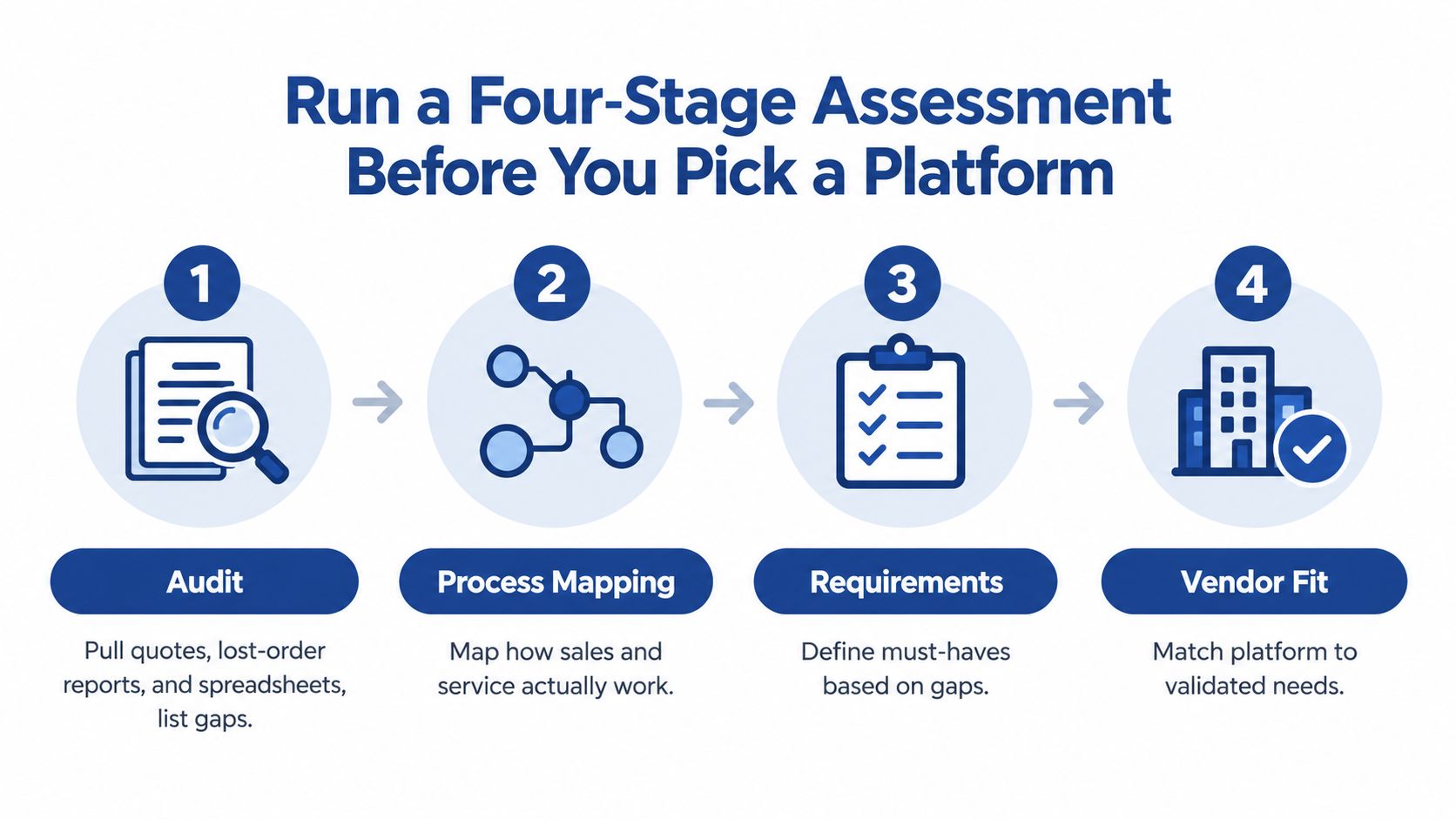
Stage one is the audit
Pull the last quarter of real operating artifacts, not management assumptions.
Look at:
- Recent quotes
- Lost-order reports
- Sales rep spreadsheets
- Service logs
- ERP exports
- Inbox follow-up patterns
You're looking for mismatch. Where does quote status live? Who tracks next steps? Which records are complete in one system and missing in another?
Stage two is process mapping
Map the current path of an opportunity from inbound RFQ through engineering review, quoting, negotiation, purchase order, production handoff, and post-sale support.
Use a whiteboard, Miro, Lucidchart, or paper. The tool doesn't matter. The output does.
Mark:
- Every handoff
- Every approval
- Every system touched
- Every delay point
- Every place where someone retypes data
This quick overview helps frame what “fit” means before you start evaluating software:
Stage three defines business outcomes
Don't write vague goals like “better visibility.”
Write outcomes an owner will defend:
- Quote turnaround under a defined operating target
- One source of truth for account and ship-to structure
- Better visibility into distributor reorder behavior
- Cleaner handoff between sales and service
- More reliable forecasting on open deals
A CRM that can't support one or two business outcomes you'd fight for in a leadership meeting isn't the right project yet.
Stage four sets adoption thresholds
This is the step companies skip, and it's the step that keeps everyone honest.
Before any configuration begins, define what successful use looks like in the first weeks after go-live. For example:
- Sales logs every active opportunity in CRM
- Quotes get entered within a set window
- Required fields are completed before stage advancement
- Service teams close work in the same system
If your buying committee needs help with the actual selection criteria after this assessment, use a framework like this guide on how to choose a CRM system for your business.
Choosing a CRM That Fits Manufacturing Workflows
Most vendors sell features. You need workflow fit.
That means you evaluate platforms against the process you mapped, not against a glossy checklist. A job shop with a light quoting process doesn't need the same architecture as a multi-plant manufacturer with complex account hierarchies, distributors, field service, and ERP dependencies.
Start with platform categories, not brand loyalty
Here's the simplest way to structure the decision.
| CRM Platform Categories for Manufacturers | Strengths | Weaknesses | Best Fit |
|---|---|---|---|
| General-purpose CRM with integrations | Faster deployment, broad ecosystem, familiar UX | More custom work around part structures, quoting complexity, and hierarchy | SMB manufacturers that need speed and can connect CRM to ERP cleanly |
| Mid-market suite with stronger quoting and configuration depth | Better support for layered processes and broader commercial operations | Higher implementation burden and higher switching cost | Growing manufacturers with multiple sales motions and more formal forecasting |
| Manufacturing-focused CRM | Better alignment to parts, equipment, service history, and industrial account structure | Smaller ecosystem in some cases, narrower talent pool | Firms with service-heavy installed base or deep product complexity |
| Lightweight industry-specific tool | Simpler rollout, lower overhead for small teams | Limited extensibility and reporting depth | Small job shops or rep teams with narrow process needs |
Useful product examples usually land in these buckets:
- General-purpose: HubSpot, Zoho, or similar, often paired with ERP connectors
- Mid-market suite: Salesforce Sales Cloud and related configurations
- Manufacturing-oriented: Infor CRM, Epicor-connected environments, or similar tools
- Lightweight tools: Smaller vertical CRMs for rep groups or niche industrial teams
If you need a manufacturer-specific short list, this overview of CRM options for manufacturing companies is a solid starting point.
Score the platforms on manufacturing-specific criteria
Don't let the buying committee drift into feature tourism. Score every option against the same operating needs.
Use criteria like:
- Part-number handling
- Quote configurator support
- Distributor and dealer account structure
- ERP integration depth
- Mobile usability on the plant floor or in the field
- Service and warranty visibility
- Total cost, including implementation services and admin burden
One more practical point. Machine Marketing is one option if you need a partner to handle custom CRM implementation and ongoing management alongside broader automation and marketing workflows. That matters if your CRM can't live as an isolated sales tool.
If the platform handles demos well but can't handle your actual quote-to-cash flow, reject it.
Be honest about the trade-offs
A broad suite gives you room to grow, but you'll pay for complexity. More objects, more permissions, more workflow logic, more governance.
A general CRM can be easier to roll out, but you may end up building workarounds for product hierarchies, dealer structures, equipment history, and account relationships. That's fine if you know the trade. It's a bad surprise if you don't.
Treat migration as cleanup, not transport
Migration is where a lot of CRM projects poison themselves.
A sound migration process should audit each source for duplicates, outdated records, and incomplete fields; standardize names, dates, phone numbers, and tags; define a single golden record; test in a sandbox; and then spot-check at least 50 records after go-live (CRM migration process guidance).
Here's the sequence we recommend.
First, audit every source
List every source that feeds customer or quote data:
- ERP exports
- Sales spreadsheets
- Outlook contact stores
- Legacy CRM records
- Shared folders
- Service lists
Score each source by volume, recency, and reliability. Some shouldn't be migrated at all.
Then, deduplicate at the account level
Manufacturers often carry duplicates for:
- legal entity vs. ship-to
- branch vs. parent account
- distributor-managed account vs. direct account
- slight variations in part or company naming
Write matching rules before you merge anything.
Define the golden record
Your core record should include required fields such as:
- legal name
- ship-to
- parent account
- primary contact
- last meaningful activity date
If records fail validation, reject the import. Don't “fix it later.” Later rarely comes.
Test in a sandbox
Load a sandbox first. Then run the 50-record spot check across sales, service, and operations. Confirm that stage mapping works before you touch production.
One more opinionated recommendation. Don't backfill everything. Carry forward active deals and recent won-lost history needed for forecasting baseline. Old clutter creates new distrust.
Holding the AI Gate Until Your Data Is Actually Ready
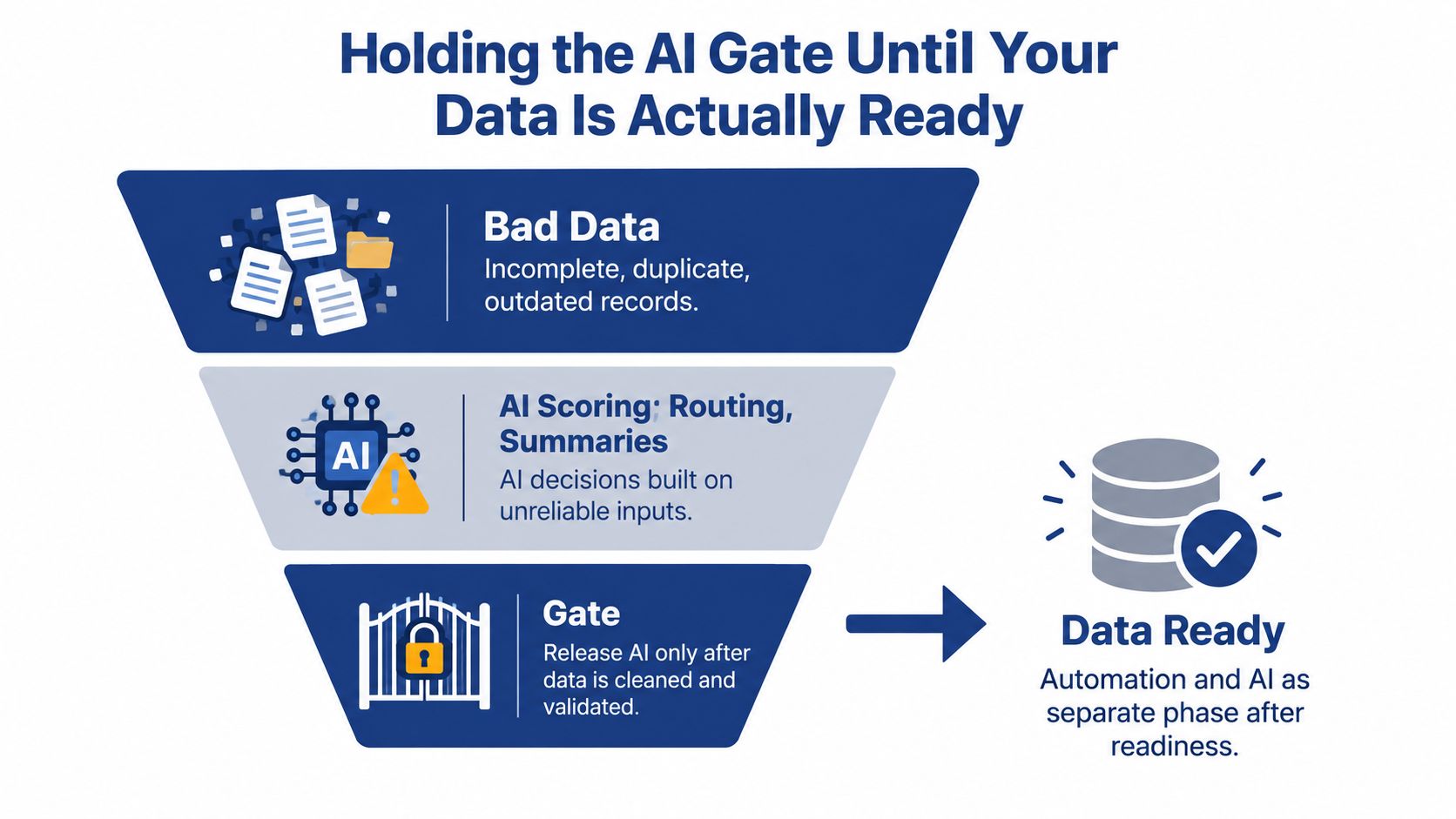
AI inside CRM is easy to activate and hard to trust.
That's the problem. Modern platforms will score, route, summarize, and recommend actions on top of bad records without warning you that the underlying inputs are broken.
Recent reporting shows the disconnect clearly. 90% of organizations say CRM data is foundational, yet 76% report that less than half of their CRM data is accurate and complete (CRM data quality and AI readiness report).
Use a gate, not a wishlist
Don't treat AI as phase one. Treat it as a gate that opens only after your team proves three things:
- Records are consistent: industry codes, account structures, and ownership logic are applied the same way
- Stages reflect reality: opportunity stages mirror how quoting and approvals move
- Activity is current: reps and coordinators are logging meaningful actions, not just creating records
Start with rule-based automation first:
- lead routing
- task creation
- quote approval notifications
- service escalations
Those workflows are easier to test. They also reveal where your data model is weak.
Protect credibility early
If AI recommends the wrong next step because the opportunity stage is stale, users won't blame the data model. They'll blame the CRM. Then they'll stop trusting every output after that.
Hold AI until the records deserve it. Bad inputs don't become smarter because a vendor added a Copilot tab.
A Phased Rollout That Builds Real Adoption
Go-live is not success. It's the start of exposure.
Many CRM projects break after launch because nobody owns the behavior changes required to keep the system alive. Research summaries continue to point to adoption, bad data quality, and weak training as the dominant failure patterns. One enterprise study also found that even a feature-rich CRM can miss impact because of employee engagement problems and lack of on-the-job support, with months 3 to 6 after go-live flagged as the highest-risk period for adoption drift (post-go-live CRM adoption durability research).
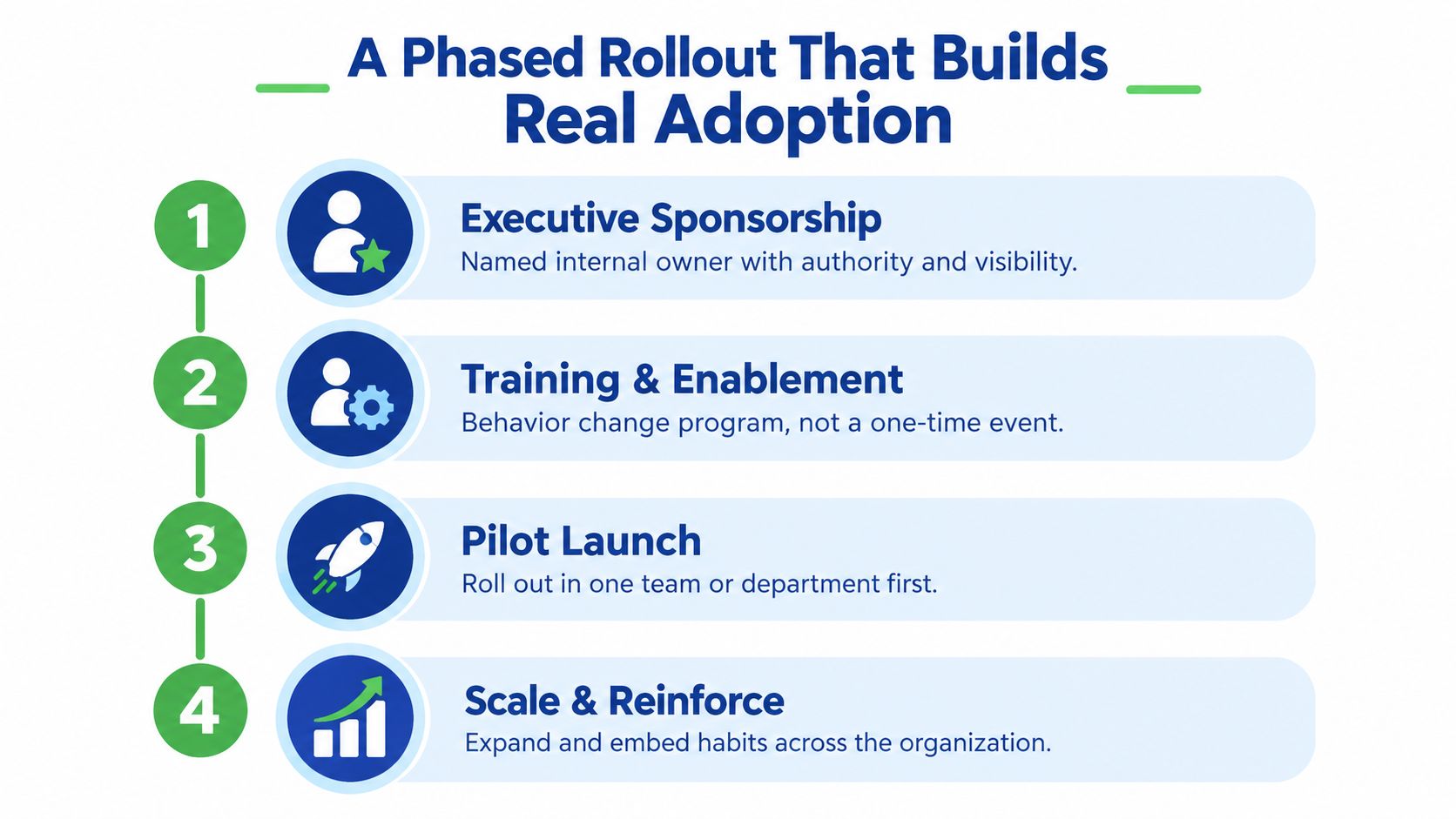
Phase one needs real sponsorship
Pick one internal owner with authority. Not a committee. Not an IT contact with no pull.
That owner needs the power to enforce CRM use in:
- forecasting
- quote review
- service handoffs
- account ownership discussions
Write a usage policy. Tie it to management review.
Phase two is role-based training
Generic demos waste time. Inside sales, outside reps, customer service, and production-facing coordinators use CRM differently.
Train them in the context of daily tasks:
- entering a new RFQ
- advancing a quote
- assigning follow-up
- updating contact roles
- closing a service issue
Use sandbox environments so people can practice without fear.
Training works when users can complete Tuesday's real tasks in the system. Feature tours don't change behavior.
Phase three is the pilot
Launch with one region, plant, product line, or team first. Keep the pilot narrow enough that you can hear the friction clearly.
Collect:
- missing fields
- confusing stage names
- duplicate account issues
- mobile usability complaints
- approval bottlenecks
Then fix them before expanding.
Phase four is reinforcement
Run 30/60/90-day checks and publish the numbers internally. The habit of visible review matters as much as the metrics.
A useful parallel is this phased OKR implementation playbook, which makes the same core point. Rollouts stick when teams learn in phases, test behavior early, and reinforce accountability before scaling.
Measuring Success With Adoption Metrics, Not Vanity Numbers
Most CRM dashboards lie.
Pipeline value, total contacts, and record counts look impressive, but they're easy to manipulate and nearly useless if your sales cycle involves long quote review, engineering input, and layered buying committees. Manufacturers need a dashboard that tracks behavior first.
Build a weekly adoption dashboard
Independent summaries report that about 42% of implementations fail to achieve meaningful user adoption within the first year, and they point to poor usability, lack of integration, and unclear ROI as common contributors (CRM adoption failure overview).
That means your steering committee should review leading indicators every week, not admire lagging ones at quarter end.
| Adoption Metrics Dashboard: Leading vs. Lagging Indicators | Leading Indicator (Track Weekly) | Lagging Indicator (De-emphasize) | 90-Day Threshold |
|---|---|---|---|
| Participation | Weekly active users by role, time-to-first-log-in | Total licenses purchased | 60% weekly active users by day 90 |
| Hygiene | Open opportunities with next step, close date, and primary contact | Raw count of opportunity records | 80% hygiene compliance on open deals |
| Velocity | Median days between stage transitions, quote logging speed | Total pipeline dollar value | Documented stage-duration baseline by day 90 |
Define true use, not fake activity
A login is not adoption. Someone can open the system, stare at the homepage, and close it.
Count behavior that supports operations:
- quote log entries
- task completions
- contact-role updates
- opportunity progression with required fields
- service records closed inside CRM
Tie metrics to ownership
One reported breakdown of failed implementations attributes 71% of failures to adoption failure, 58% to poor data migration, and 47% to unclear ownership (CRM failure breakdown by cause). That's why every dashboard metric needs an owner.
Examples:
- sales manager owns opportunity hygiene
- service lead owns closure compliance
- CRM admin owns duplicate monitoring
- executive sponsor owns weekly review cadence
If nobody owns the number, the number won't move.
Your 90-Day CRM Implementation Checklist
Most companies should run the first quarter as three hard sprints with a go or no-go review at the end of each one. That keeps the project grounded in evidence instead of enthusiasm.
Days 1 to 30 build the foundation
Complete the four-stage assessment. Choose the platform only after the process, outcomes, and adoption thresholds are documented.
Use this first sprint to:
- Appoint the executive sponsor and power users
- Select the platform against a weighted decision matrix
- Audit and cleanse accounts and contacts
- Document required fields and stage definitions
- Block any mid-sprint legacy imports
If your team is still arguing about what counts as an active opportunity, you're not ready to configure anything.
Days 31 to 60 build operating muscle
Now configure the system around real workflow.
Focus on:
- Sales stages that mirror actual quote-to-cash flow
- Three high-value automations only, typically routing, follow-up task creation, and approval notifications
- Role-based training in short sessions
- Sandbox practice tied to daily work
Don't turn this into a feature parade. Keep the scope tight enough that users can learn the system before they start resenting it.
Days 61 to 90 prove adoption
The CRM either becomes part of the job or starts sliding toward shelfware.
Use the last sprint to:
- Launch to the full sales team
- Turn on the Monday adoption dashboard
- Run the 30/60/90-day reviews
- Enforce required fields and stage discipline
- Evaluate AI only after the data gate is passed
A CRM rollout is successful when people change behavior under normal operating pressure, not when the software technically goes live.
Close day 90 with a formal retro. What got adopted? What got ignored? What slowed the team down? What should wait until phase two? Those answers matter more than how many workflows you built.
If you follow this checklist with discipline, day 91 looks different. Reps open the system because they need it. Managers trust the pipeline enough to coach from it. Service and sales stop fighting over whose spreadsheet is right.
If your CRM rollout feels stuck between tool selection, bad data, and weak adoption, we can help you diagnose the system before you spend more money configuring the wrong thing. Machine shops and manufacturers usually don't need more features. They need a cleaner process, a tighter rollout plan, and accountability after go-live. Visit Machine Marketing if you want help building a CRM implementation strategy your team will use.
