
53% of mobile visitors leave when a page takes more than three seconds to load. Slow pages directly cost quote requests because buyers abandon product research before they reach a form, specification sheet, or phone number.
That's why the popular advice is incomplete. Compressing a few homepage images and celebrating a better PageSpeed score won't fix an industrial website if the product selector freezes, the technical library takes too long to respond, or the quote form is buried beneath scripts that don't help anyone buy.
We approach website speed as a commercial prioritization problem. You need to find the pages and interactions connected to pipeline, diagnose what slows them down, fix the highest-value bottlenecks first, and measure whether more qualified visitors complete the next step.
Table of Contents
- Stop Optimizing for the Homepage
- The Diagnosis Workflow for Industrial Sites
- Understanding the Modern Speed Bottleneck
- Prioritizing Quick Wins and Deep Fixes
- Implementation Roadmap and Measuring Success
Stop Optimizing for the Homepage
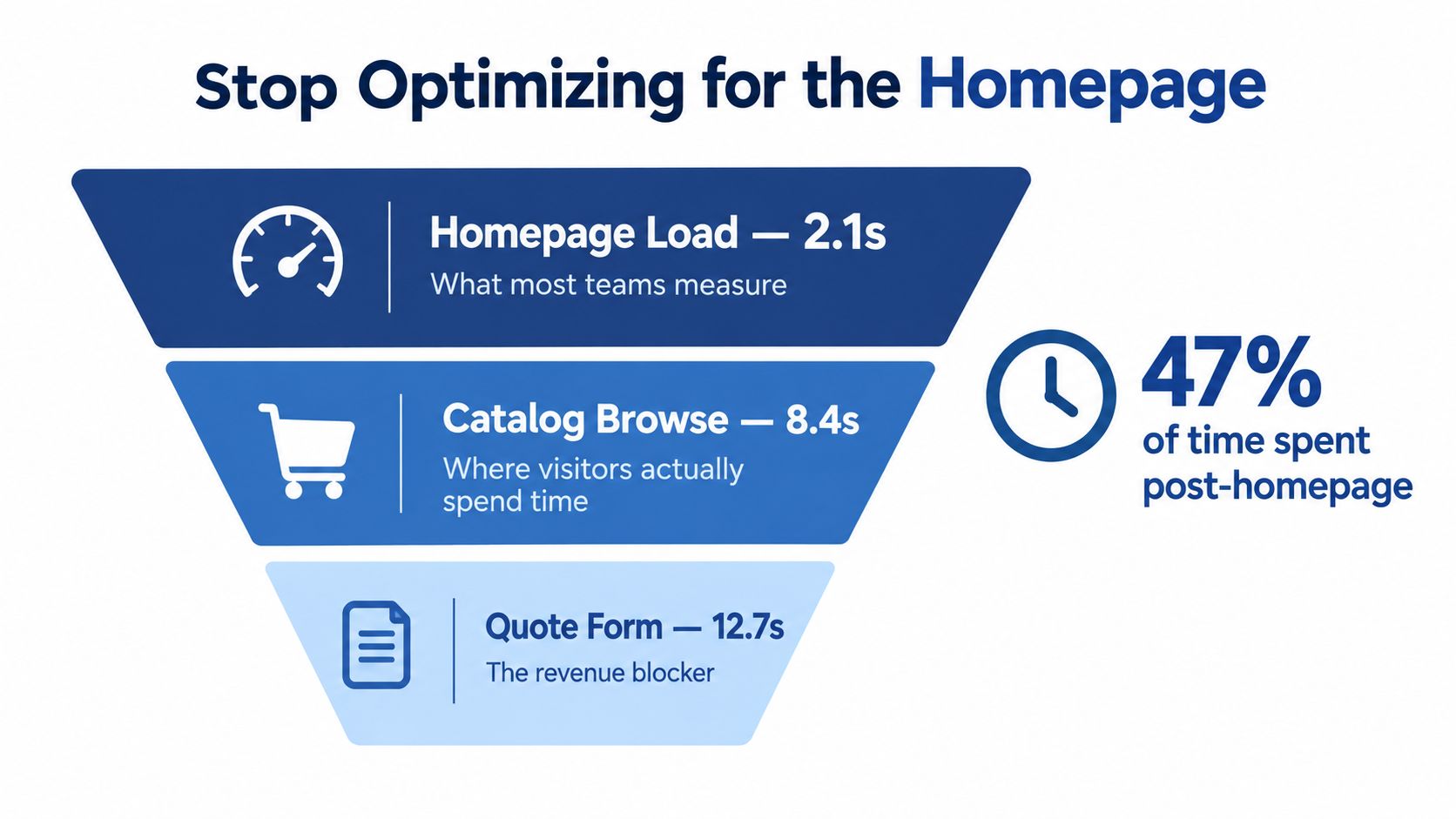
Stop treating the homepage as the final exam for your website. It's often the least useful page to optimize because industrial buyers may arrive directly on a product page, a technical article, a location page, or a PDF download page from search, a distributor, an email, or a sales representative.
A homepage that loads quickly can create a false sense of success. The catalog may still be heavy, the quote form may still be unresponsive, and the specification tabs may still depend on too much JavaScript. If those journeys fail, the homepage score has little commercial meaning.
Google's mobile-performance research found that 53% of mobile visitors leave a webpage when it takes more than three seconds to load, while bounce rates averaged about 13% for pages loading in under three seconds and approached 60% when load time exceeded nine seconds. Google reached those findings by analyzing 316 travel, retail, and finance websites across seven European countries, so the evidence isn't limited to one website or market. Google's mobile site speed research supports a clear priority, display the primary content quickly, especially on mobile devices and connections.
Audit commercial journeys, not just entry pages
Start by listing the actions that create or influence a sales opportunity:
- Request a quote: Can a buyer open, understand, and submit the form without delays or errors?
- Find a product: Can an engineer filter products, compare specifications, and open the right detail page?
- Access technical documents: Do CAD files, drawings, manuals, and spec sheets open without unnecessary interface friction?
- Contact sales: Can a visitor find a phone number, email address, or contact form from a mobile device?
- Use a product selector: Does the configurator respond immediately when a buyer changes a parameter?
- Evaluate a location: Do maps, service-area pages, and local contact details appear without blocking the primary content?
Assign each journey a business value. A product page that receives qualified organic traffic deserves more attention than a polished campaign page that rarely contributes to an opportunity.
Our industrial website design service treats responsiveness as part of the commercial system, not a decorative technical feature. That distinction matters because a slow page can interrupt research at the exact moment a buyer is deciding whether your company is capable of handling the job.
Use the right page-level questions
Ask yourself:
- Which pages receive traffic from engineers, purchasing teams, distributors, or sales representatives?
- Which pages contain the forms, documents, selectors, and phone links that influence a lead?
- Which templates are shared across many products or locations?
- Where do users stop before completing a quote request or downloading a document?
- Does the page look loaded while the browser is still processing scripts?
You can also use tools that encourage broader page inspection rather than a homepage-only review. For example, the AI Website Detector changelog provides useful context around scanning individual pages, which aligns with the way we recommend auditing a site. The important point isn't the tool itself. It's the habit of checking the pages buyers really use.
Commercial rule: A speed improvement matters most when it helps a qualified visitor complete a valuable action.
A three-second target is a risk threshold, not a guarantee of strong performance. Pages approaching nine seconds represent a severe engagement problem, but a page that loads below that level can still lose leads if its form, navigation, or selector doesn't respond promptly.
The Diagnosis Workflow for Industrial Sites
Don't change images, hosting, or scripts until you have a baseline. Without one, you can't tell whether a fix improved the buyer experience, only the lab score, or nothing at all.
The first baseline should use real-user data. Core Web Vitals are evaluated at the 75th percentile, which means you're looking at the experience delivered to most measured visits rather than an unusually fast test device. Track the metrics over a rolling 28-day period so short-lived conditions don't dominate your decision-making.
The three measurements are straightforward:
- Largest Contentful Paint, or LCP: How quickly the primary content becomes visible. The good threshold is 2.5 seconds or less.
- Interaction to Next Paint, or INP: How quickly the page responds after a user interacts. The good threshold is 200 milliseconds or less.
- Cumulative Layout Shift, or CLS: How much content moves unexpectedly while the page renders. The good threshold is 0.1 or less.
The HTTP Archive 2025 Web Almanac performance data used millions of websites and July 2025 real-user data. It reported that only about 48% of desktop origins and roughly 40% of mobile origins achieved good results across all three metrics. That gap shows why a site can look acceptable in a controlled test and still underperform for real buyers.
Build a representative test set
Choose a small group of pages that reflects how your business generates demand. Don't test only the homepage and one blog article.
Include:
- A high-traffic product or service page
- A product catalog or category page
- A quote or contact form
- A technical-documentation page
- A CAD or specification download journey
- A page with a product selector or comparison tool
- A location page if local sales or service matters
- A page containing chat, consent, CRM, analytics, or video integrations
Test each page on desktop and mobile. Reproduce the conditions your buyers use, including slower mobile devices and connections. A fast office laptop can hide delays caused by device-side JavaScript, large assets, or scripts that compete for the main thread.
Test actions, not just rendering
A lab report can tell you that a page rendered. It may not tell you whether the quote form accepted input promptly or whether the menu became usable after the first tap.
Record the journey from entry to completion:
- Open the page from a clean session.
- Note when the primary content appears.
- Open the navigation or product selector.
- Change a filter, tab, or configuration option.
- Start the quote or contact form.
- Upload or request a document where relevant.
- Submit the action and verify the CRM handoff.
- Repeat after each material change.
Keep a change log. Change one variable at a time, such as an image format, a third-party script, or a render-blocking stylesheet. If you change five things together, you may get a faster page without learning which decision created the improvement or what dependency you might have broken.
For a plain-language explanation of the metrics and their relevance to business owners, core web vitals for founders is a useful supplemental resource. Your own field data should remain the authority for prioritization.
Understanding the Modern Speed Bottleneck
Images still matter, but they're no longer the whole story. Industrial websites often remain frustratingly slow on capable mobile connections because the device spends too long executing JavaScript after the page has visually appeared.

A manufacturer's site can accumulate complex menus, configurators, analytics, chat widgets, consent tools, heatmaps, embedded video players, and marketing tags. Each script may have a reasonable purpose. Together, they can delay the click that opens a specification tab or starts a quote request, particularly on mid-range phones.
That's why Interaction to Next Paint, or INP, deserves direct attention. Google's current Core Web Vitals framework sets a good INP target below 200 milliseconds. A page can appear complete while still feeling broken because the browser is processing long tasks and ignoring or delaying the user's interaction. Google's Core Web Vitals documentation explains the metric framework and its role in evaluating real-world responsiveness.
Find the scripts that delay revenue actions
Create a script inventory with four fields:
| Question | What to record |
|---|---|
| Why does this script exist? | Analytics, consent, chat, form handling, attribution, accessibility, or another business purpose |
| What does it cost? | Transfer size, execution time, and long tasks |
| When is it needed? | Initial viewport, product interaction, form submission, or post-conversion reporting |
| What happens if it moves? | Whether a dependency breaks or the user journey remains intact |
Then classify each script as essential now, needed later, conditional, or removable.
A chat widget probably doesn't need to block the first product image. A heatmap doesn't need to execute before the primary heading. A video player doesn't need to load on a page where the visitor is trying to download a drawing. A consent manager may be operationally necessary, but its implementation still deserves scrutiny if it delays every interaction.
The HTTP Archive found that the median mobile page sends about 411 KB of JavaScript, including approximately 152 KB that is unused during a page load. The median mobile browser spends about 1,897 milliseconds processing JavaScript on the main thread, while the 90th percentile reaches 8,921 milliseconds. HTTP Archive's JavaScript analysis makes the business implication plain, unused code and poorly timed third-party tools can create a larger problem than minification alone can solve.
Separate visual loading from usable loading
Ask a simple question: What does the buyer need to do next?
If the answer is “choose a product,” prioritize the selector's responsiveness. If it's “request a quote,” measure the first tap, field interaction, validation, and submission. If it's “download a CAD file,” make sure the page doesn't force a heavy video, map, or chat interface to initialize first.
This is a systems project, not a race to remove every script. Trace form submissions, attribution, analytics, accessibility, and CRM handoffs in staging. Removing a script that records qualified leads is not an optimization.
Use this short diagnostic before approving a change:
- Does the script affect the first meaningful action?
- Can it load after the primary content?
- Can it load only on pages where it's used?
- Can the functionality work with less code?
- Has the dependency been tested on a real mobile device?
Prioritizing Quick Wins and Deep Fixes
You don't need a complete rebuild to improve website speed. You do need a disciplined order of operations. Start with changes that improve the critical rendering path, then invest in architecture where the evidence shows that quick fixes won't be enough.
Start with the assets buyers need first
Images are a sensible first pass because HTTP Archive data shows that they're the most impactful resource on roughly 70% of mobile pages and 80% of desktop pages. The HTTP Archive media analysis supports an image-first audit, but don't interpret that as permission to optimize images blindly.
For each important page:
- Identify the LCP element: Find the image, heading, or content block that forms the main visual load.
- Resize the source: Don't send a large desktop asset to a small mobile display.
- Use modern formats: Convert oversized assets to appropriately sized WebP or AVIF where browser support and workflow allow.
- Serve responsive variants: Use
srcsetandsizesso the browser can select a suitable file. - Delay lower content: Lazy-load media below the fold.
- Reserve dimensions: Set image dimensions so the page doesn't shift as media arrives.
The median mobile page still transfers about 881 KB of images, 461 KB of JavaScript, 68 KB of CSS, and 30 KB of HTML. Those figures come from the HTTP Archive media data, and they explain why a fast office connection can conceal a poor mobile experience.
Fix the critical path before polishing the design
The critical rendering path is the chain of work required before the user sees and can use the primary content. Identify the LCP element, remove render-blocking CSS and scripts, and preload only the LCP image or font when you know it will be needed. Don't preload everything. Too many priority hints make the browser's job harder.
Quick wins often include:
- Compressing and properly sizing images
- Removing unused fonts and font weights
- Deferring noncritical third-party tools
- Enabling browser caching
- Serving assets through a content delivery network
- Eliminating duplicate analytics and marketing tags
- Loading route-specific code instead of a single oversized bundle
A performance-focused host can help, but hosting won't rescue a page that ships unnecessary code. A CDN can reduce delivery friction, but it won't fix a selector that blocks the main thread. Match the remedy to the diagnosis.
Treat JavaScript as an operating budget
Set a performance budget before redevelopment. Define an initial JavaScript limit, a maximum number of third-party vendors, and a long-task limit. Enforce those rules in CI with Lighthouse or an equivalent automated test, then confirm the result with real-user monitoring.
Inventory scripts by purpose, transfer size, execution time, and conversion dependency. Remove duplicates, split bundles by route, defer noncritical tags, and ship only the code required for the initial viewport. Validate every change in staging because attribution, form submissions, accessibility, and CRM handoffs may depend on scripts that look expendable.
Use a free website grader for an initial directional check, then conduct a page and journey audit before deciding what to rebuild. A generic score can identify symptoms. It can't decide whether a slow quote form matters more than a slow resource archive.
A practical budget rule: Don't approve a new widget until someone can explain which buyer action it supports, when it needs to run, and what performance cost it adds.
Implementation Roadmap and Measuring Success
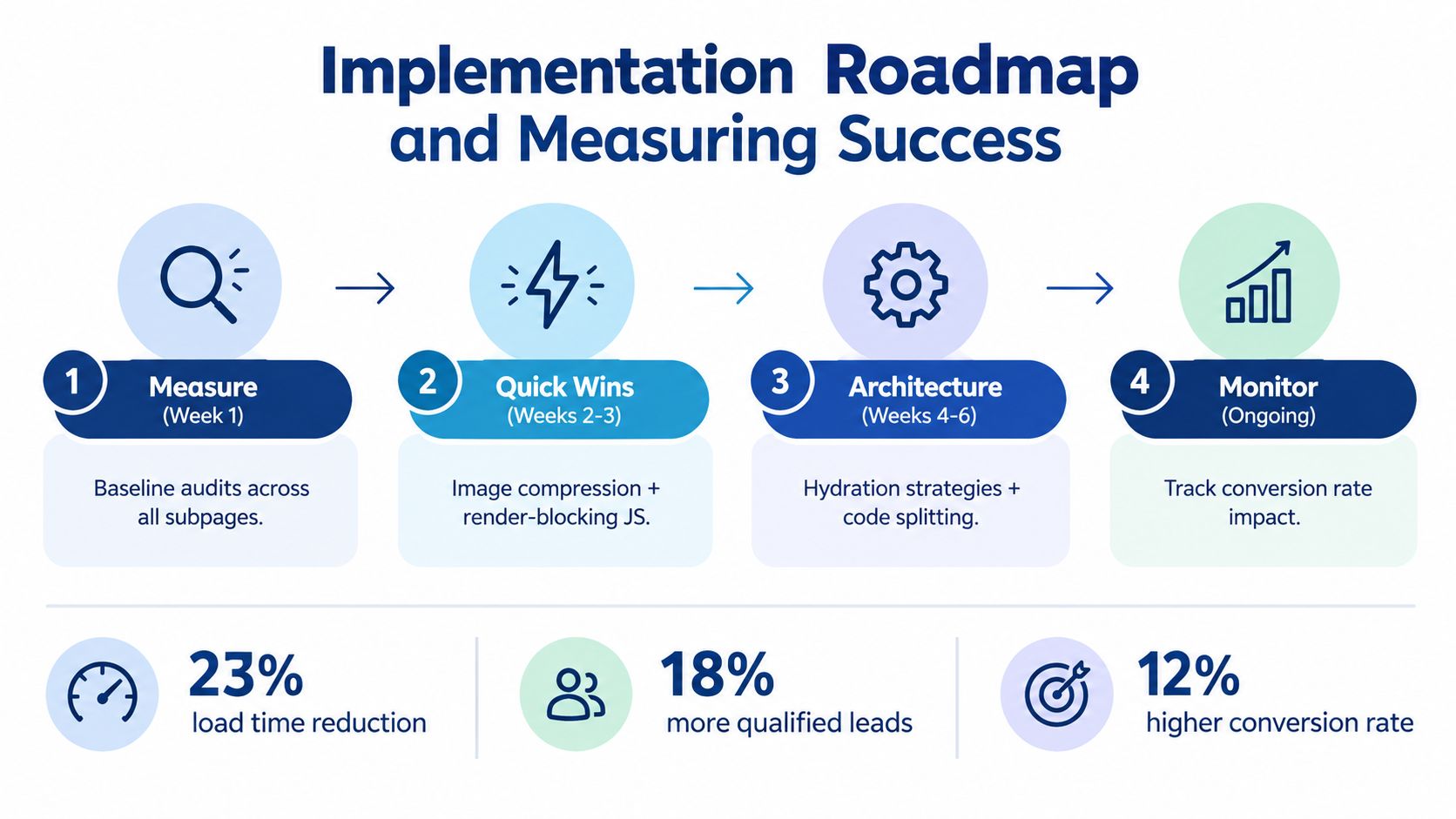
A faster website becomes a growth asset only when the team connects technical changes to buyer behavior. PageSpeed scores are useful diagnostics, but they aren't the outcome. The outcome is a qualified visitor completing an action that can influence revenue.
Use a phased roadmap so your team can learn from each release instead of betting the entire site on a vague redesign.
Measure the current system
Begin with field baselines for LCP, INP, and CLS at the 75th percentile over a rolling 28-day period. Segment the data by device and page template where your analytics and monitoring setup allow it.
Record commercial events alongside performance:
- Quote form starts and completed submissions
- Contact form completion
- Phone clicks
- Technical-document downloads
- Product-selector completion
- High-value page sequences
- Qualified-lead rate
- Assisted opportunities
Your baseline should tell you where speed and pipeline overlap. If a technical page has significant qualified traffic but weak document completion, inspect that journey before improving low-value pages.
Release quick wins carefully
Fix the obvious blockers first. Optimize the LCP asset, defer scripts that don't support the first interaction, remove duplicate tags, and check the quote journey on a real mobile device.
Change one material variable at a time. After each release, compare field performance and commercial events against the baseline. A better lab score without better form completion may mean you optimized the wrong page, removed a necessary interaction, or failed to address the underlying bottleneck.
Google's “Milliseconds Make Millions” research measured a 10.1% increase in mobile conversion rate when load time improved by 0.1 seconds. It also reported average conversion increases of 8% for retail sites and 10% for travel sites after a 0.1-second improvement. Google's conversion and speed research should be used as a testing principle, not a forecast for your manufacturing business. Establish your own baseline and measure your own quote requests, calls, forms, and high-value journeys.
Invest in architecture where evidence supports it
If quick wins improve delivery but interaction remains slow, move to deeper fixes:
- Split code by route so product pages don't load catalog functionality they don't use.
- Reduce hydration work where the framework allows it.
- Replace large client-side components with simpler server-rendered content where appropriate.
- Isolate configurator logic from unrelated page functions.
- Review hosting response time and CDN delivery for geographically dispersed buyers.
- Replace or renegotiate third-party tools that add cost without supporting a measurable business action.
Don't pursue architectural work because it sounds modern. Pursue it when the same high-value interaction remains slow after asset and critical-path work.
Monitor after every release
Performance decays when teams add a new chat vendor, tracking tool, product video, consent change, or content block. Add performance checks to the same release process that governs forms and CRM integrations.
Review:
- Field Core Web Vitals
- Long tasks and JavaScript execution
- LCP elements by template
- Form completion and error rates
- Document downloads
- Qualified-lead rate
- Phone and email interactions
- New third-party vendors and scripts
Use the technical SEO audit checklist to keep technical checks connected to the broader site system. Speed shouldn't sit in isolation with developers while marketing evaluates leads in another dashboard.
The measurement standard: A successful speed project makes an important buyer journey easier to complete without weakening attribution, accessibility, form handling, or lead quality.
For a small or midsize industrial company, page-level prioritization is more defensible than rebuilding every URL. Focus first on landing pages tied to pipeline, then expand improvements to shared templates and lower-priority resources. That approach protects budget while giving you evidence for deeper investment.
A practical next step is to select one product page, one quote journey, and one technical-document journey. Capture the field baseline, test those journeys on mobile, inventory every blocking script and asset, then release the smallest change that addresses the largest verified bottleneck.
Machine Marketing helps manufacturers and industrial businesses diagnose website performance, improve responsive website systems, and connect technical changes to lead generation. Visit Machine Marketing to discuss a focused audit of your product pages, quote forms, technical resources, and conversion journeys.
