
You already have a CRM full of contacts. The problem is that your sales team still treats most of them the same, so hot accounts get the same follow-up as tire-kickers and nobody can tell which opportunities deserve attention this week. That's not a CRM software problem. It's a CRM segmentation strategy problem, and in manufacturing it usually shows up as slow response times, generic outreach, and a pipeline that looks busy but doesn't move cleanly.
A solid segmentation system fixes that by turning customer data into action. A 2024 Aalto University study frames segmentation as a core CRM process because it groups customers with shared characteristics and makes identification, acquisition, cultivation, and retention more systematic, while also reinforcing the old Pareto logic that a small share of customers drives a disproportionate share of gross profit Aalto University study. That's the core job here, to decide which accounts get sales effort, which get content, which get a call, and which should be left alone.
If you're trying to keep reps focused, it also helps to think about capacity. When you need more outbound coverage, some teams choose to hire sales development representative, but extra headcount won't fix a bad routing model. The better move is to align your CRM with how industrial buyers buy, then let the system direct effort where it belongs. For a useful companion on that alignment problem, see our guide on how to align sales and marketing.
Table of Contents
- Why Your Sales Team Treats Every Account the Same
- What a CRM Segmentation Strategy Actually Is
- The Four Building Blocks of a Strong Segmentation Model
- Five Segment Definitions That Work for Manufacturers
- Why Most CRM Segmentation Fails at the Account Level
- A Five-Step Path to Implementing Segmentation in Your CRM
- How to Measure Whether Your Segmentation Is Working
- Your 30-Day CRM Segmentation Starter Plan
Why Your Sales Team Treats Every Account the Same
Your rep opens the CRM, sees 400 accounts, and still cannot tell who deserves a call first. Habit takes over. Familiar names get attention, while a strategic account with active buying signals receives the same quote template and follow-up cadence as a dead end.
That pattern starts with a CRM built around individual contacts rather than industrial buying groups. Purchasing, engineering, operations, and finance may influence one account, yet the record often treats one contact as the customer. Segmentation adds the decision layer. A 2024 Aalto University study connects customer grouping with more systematic identification, acquisition, cultivation, and retention, while highlighting how a smaller share of customers can produce a larger share of gross profit. If roughly one-fifth of those 400 accounts drive most of your profit, calling the easiest names first is a costly routing mistake.
Diagnose the real failure
The CRM may hold adequate data. The failure sits in the rules that decide which account receives attention, by whom, and for what reason.
Practical rule: If your team cannot explain why one account gets an executive call while another enters automated nurture, segmentation is unfinished.
Industry labels alone do not show whether a machine shop is ready to buy, whether a plant is expanding, or whether an account should be suppressed. Segment at the account level, then map the buying group, current intent, commercial value, and lifecycle stage to different sales actions.
Sales and marketing must also agree on what counts as intent. If marketing runs broad campaigns while sales pursues only named accounts, the CRM becomes a storage box. Align sales and marketing around shared account signals and ownership rules, then let the system route work accordingly. If coverage is limited, you can hire sales development representative, but extra headcount will not repair weak prioritization. Value, behavior, and lifecycle should determine the next action.
What a CRM Segmentation Strategy Actually Is
A CRM segmentation strategy is an operating system for allocating commercial attention. It determines which accounts receive sales coverage, which content they see, how quickly teams follow up, and when retention work begins. A segment earns its place only when it changes the next action in the CRM.

Static labels versus working segments
A static label fills a field. A working segment changes routing, messaging, ownership, and timing. “Industry = machining” describes an account. “Strategic account, sales task due today, technical content queued, renewal review scheduled” gives the team a coordinated response.
Dynamic segments respond to account behavior. A prospect that requests a quote, returns to a product page, or reopens a buying conversation after months of silence should move into a different workflow. That shift prevents stale records from receiving the same treatment as active opportunities.
Diagnose the failure underneath the data
The Aalto University study describes segmentation as a way to connect customer data with differentiated commercial actions Aalto University study. For industrial sales, that distinction matters. A machine shop with repeat orders and strong margin needs a different sales motion from a low-fit prospect that requested pricing once.
A practical strategy gives the team clear operating rules:
- Input fields define the account, buying group, product context, and fit.
- Scoring rules set the level of attention an account receives.
- Triggers move accounts when behavior or circumstances change.
- Workflows assign the next task, message, owner, or review.
Use account-level segments, then connect them to the people influencing the purchase. A CRM that stores contacts without showing who approves, specifies, operates, or funds the purchase cannot guide differentiated action. The result should be visible in task queues, campaign audiences, and sales handoffs. If those outputs remain unchanged, the CRM has collected labels rather than built a usable commercial system.
The Four Building Blocks of a Strong Segmentation Model
A manufacturing segmentation model needs several signals working together. Company size alone misses buying intent, while engagement alone can attract poor-fit accounts. Combine fit, behavior, lifecycle, and product relevance so the CRM separates accounts that look similar in a database but require different sales actions.
1. Firmographics define fit
Firmographics establish the account's operating context: industry, revenue band, employee count, geography, production model, and equipment profile. A 24/7 plant with in-house maintenance needs a different route and message from a job shop with irregular demand. Both may be manufacturers, but their commercial priorities differ.
2. Behavioral data shows intent
Behavioral signals reveal what an account is doing now. Quote requests, repeat purchases, website visits, email engagement, and sales-cycle velocity indicate current interest. A smaller manufacturer returning to a specification page may deserve faster attention than a larger account that has been inactive for months.
3. Lifecycle stage sets the relationship
Lifecycle stage identifies whether the account is a new lead, active opportunity, customer, repeat customer, or dormant account. Each stage requires a different message and follow-up motion. A dormant customer should not receive the same content as an active opportunity negotiating scope.
4. Product fit prevents wasted outreach
Product fit answers a practical question: can this account use the offering? A plant may suit one service line and have little relevance for another. Capture that distinction in the CRM, or sales representatives will spend time on conversations that cannot progress.
The account should carry the segment, while the buying group shows who approves, specifies, operates, or funds the purchase. This keeps segmentation tied to real commercial action rather than isolated contact labels.
Practical rule: A useful segment needs at least one fit signal and one intent signal. A segment built on only one signal is too thin to trust.
Apply the same test to every segment: does it change the task queue, campaign audience, owner, message, or review process? If the outputs remain identical, the CRM has collected labels without changing sales behavior. Together, these four signals turn a contact list into a commercial prioritization system.
Five Segment Definitions That Work for Manufacturers
Most manufacturers don't need twenty segments. They need five that are clear, actionable, and hard to misuse. If a segment doesn't trigger a different action, it's clutter.
| Segment | Defining Criteria | Primary CRM Trigger | Sales Action |
|---|---|---|---|
| Strategic accounts | High fit, high value, strong growth potential | Account score crosses strategic threshold | Executive involvement, custom technical content, proactive renewal review |
| Growth accounts | Good fit, active engagement, expansion signal | Repeated intent signals or quote activity | Application engineering content, quarterly reviews |
| Repeat transactional accounts | Consistent buyers with predictable reorder behavior | Reorder window opens or purchase frequency pattern appears | Automated reorder reminders, self-service resources |
| Dormant accounts | Past activity, no recent purchase or engagement | Inactivity passes defined threshold | Reactivation sequence with clear exit criteria |
| Unqualified accounts | Low fit, no buying signal, poor product match | Suppression rule triggered | Remove from active campaigns |
A machine shop with 800 contacts doesn't need all 800 in the same routing pool. One practical split might put a small set of strategic accounts into executive review, a larger group into growth, a steady middle into repeat transactional, a dormant pile into reactivation, and the rest into suppression. The visible win is simple, reps stop wasting time on accounts that will never buy, and marketing stops blasting everyone with the same content.
Use one rule per segment
Keep the criteria tight. Strategic accounts should be defined by both fit and value, not by someone's hunch. Dormant accounts need an exit rule too, otherwise reactivation turns into a dead-end campaign that never ends.
If you need a practical way to build the email side of this, our guide on how to segment email lists is a useful companion. It maps cleanly to the same logic, segment first, then send.
Why Most CRM Segmentation Fails at the Account Level
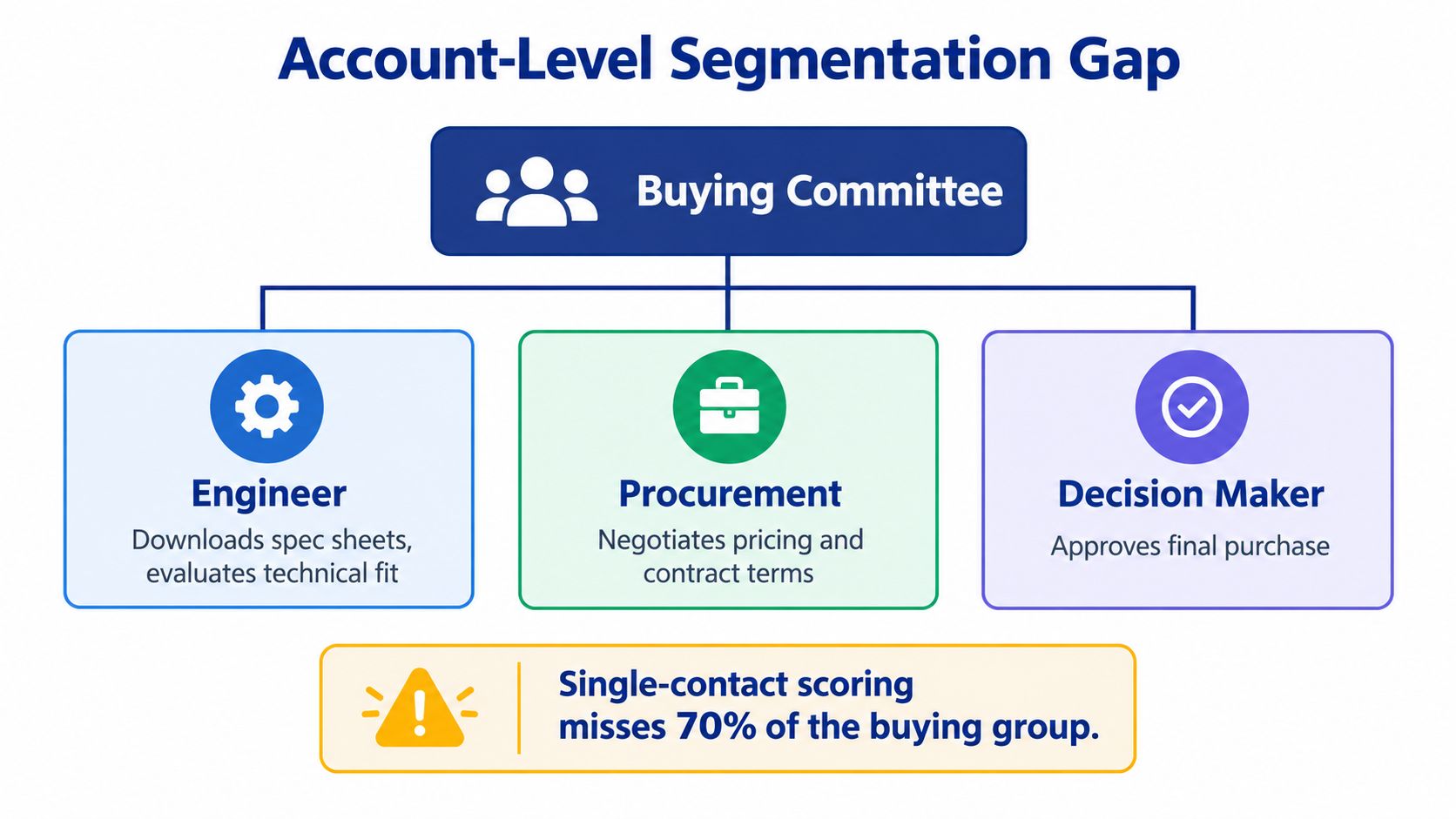
Most CRM systems still reward the wrong unit of analysis, the contact. That breaks industrial selling because the buying decision rarely belongs to one person. An engineer wants technical proof, procurement wants price and terms, and the owner or plant leader wants confidence that the risk is controlled.
Score the buying group, not one person
The practical fix is to model the buying group inside the CRM. Give each stakeholder a role, an influence level, an information need, and a likely objection. Then roll those signals up to the account so one engineer's download doesn't get mistaken for full account intent, and one procurement email doesn't reset the whole picture.
A manufacturing marketing source on industrial buying behavior points to the same problem, buyers often research independently before first contact, so single-contact scoring misses the buying process Optimum7 source. That means your CRM should treat engagement as collective evidence, not isolated activity.
Build account-level thresholds
Set thresholds that trigger coordinated action across stakeholders. If an engineer downloads technical content, procurement requests pricing, and an owner visits a case study, the CRM should promote the account, not fire three disconnected campaigns.
That also means suppressing conflicting automation. Don't let marketing send a beginner nurture while sales is preparing a proposal. Don't let procurement get a price chase while engineering is still reviewing specs. The account gets one commercial path, and every contact inside it should support that path.
Practical rule: If your CRM can't show who in the buying group has engaged, what they care about, and what the account needs next, your segmentation is too shallow to trust.
Industrial segmentation becomes more honest than most marketing advice. It's not about more personalization. It's about representing how a purchase gets approved.
A Five-Step Path to Implementing Segmentation in Your CRM
A segmentation rollout fails when the CRM creates neat labels but gives sales no different action. Build the system around accounts, buying groups, and decisions your team can act on.
1. Audit the CRM fields
Start with fields your team trusts. Flag duplicate accounts, missing firmographics, unclear lifecycle stages, and inconsistent ownership. Check whether contacts are tied to the correct account and buying group. Park any field too unreliable to guide routing until someone owns its cleanup.
2. Define segments in writing
Document the qualifying and disqualifying criteria for every segment. Define account fit, buying-group role, intent signals, and the action each segment should trigger. If sales and marketing define a growth account differently, the CRM will route inconsistently. Before writing the rules, review this CRM implementation strategy so the rollout fits your existing setup.
3. Build dynamic lists
Use dynamic lists, saved views, or equivalent rules so accounts change segments as fit and activity change. Static lists age quickly and separate contacts from the account context. A dynamic segment should show which buying groups are active, which accounts need attention, and which records require review.
4. Wire segments to workflows
Connect each segment to a specific workflow, email sequence, sales task, alert, or reactivation path. Define ownership before launch. If an account enters a segment and nothing changes, you built a reporting label, not a working system. Suppress conflicting messages when sales is already handling the account.
5. Pilot two segments for 30 days
Choose two account segments that should receive clearly different treatment. Test routing, alerts, handoffs, and sales follow-up. Review whether contacts within the same buying group receive coordinated actions rather than disconnected campaigns. Expand only after the CRM produces a visible difference in execution.
For hands-on setup, Machine Marketing handles CRM implementation, automation workflows, lead scoring, and pipeline structure for industrial companies. The same discipline applies with outside support such as GoHighLevel staffing for property managers.
How to Measure Whether Your Segmentation Is Working
Don't measure segmentation by how tidy the lists look. Measure it by whether the CRM helps people make better decisions and move faster. If the numbers don't show that, the system is decorative.
Start with segment health
Look at distribution, movement between segments, and coverage of the active pipeline. If one segment swallows everything, your rules are too broad. If accounts never move, your triggers are too stiff.
Then check campaign performance
Use metrics that connect to real commercial behavior, not vanity. Opportunity creation rate, win rate, average order value, and sales cycle length matter. Open rates don't tell you whether the segment was useful, they only tell you that an inbox was opened.
Finish with business impact
Track pipeline contribution, revenue per segment, retention rate, and revenue saved from suppression. The suppression metric matters more than many teams admit, because removing low-fit accounts from active campaigns frees time for better opportunities. That's real ROI, even if no one celebrates it in a dashboard review.
A published peer-reviewed RFM segmentation study found improvement in active customers, total purchase volume, and total consumption amount after segment-specific strategies were applied, which is exactly the kind of pattern you want to see in your own CRM work, even if your own results will depend on execution quality Wiley RFM study. If your segments aren't changing behavior, the model needs work.
For recurring review, run a monthly segment-health check and a quarterly commercial review. Monthly tells you whether the system is functioning. Quarterly tells you whether it's worth expanding.
Your 30-Day CRM Segmentation Starter Plan
Start with the fields you trust, not the fields you wish you had. Choose the three segments most likely to move revenue this quarter, write the entry and exit rules, build one dynamic list per segment, and connect each list to one workflow. Then pick two metrics that prove the pilot is working, one operational and one commercial.
That's enough to get moving without turning the CRM into a science project. Teams rarely need more tools, they need a tighter system that makes the tools they already have do actual work.
Nielsen's 2025 global marketing survey found that 44% of marketers were using AI for customer segmentation, while 31% identified data privacy and security as their leading concern, which is a good reminder that segmentation quality depends on governed data before automation Nielsen survey. Don't automate garbage. Clean the account model first, then let the system scale.
If your CRM looks organized but your team still wastes time on the wrong accounts, we should fix the segmentation before we add more automation. Machine Marketing builds CRM systems for manufacturers, machine shops, and industrial teams that need clearer routing, better lead scoring, and fewer dead-end campaigns. Visit Machine Marketing to book a working session and get a segmentation diagnosis for your current CRM.
