
You're looking at the staging site, the launch date is close, and someone wants to know whether the new design is ready. Don't approve it because it looks polished. Approve it when you can show that quote requests still work, valuable search pages still lead somewhere useful, and the team knows what to do if performance drops.
For a manufacturer, a website redesign launch is a revenue-continuity project. The gates below protect qualified leads, search equity, and the day-to-day tools your sales team relies on.
Table of Contents
- What a Website Redesign Launch Actually Means for Manufacturers
- Establishing the Pre-Launch Baseline
- Mapping Redirects and Preserving Search Equity
- The Technical QA Gate Before You Go Live
- Wiring Analytics, Tracking, and Sales Alerts
- Stakeholder Sign-Off and When to Roll Back
- Post-Launch Monitoring and the 30-60-90 Review
What a Website Redesign Launch Actually Means for Manufacturers
A new site can look better and still make it harder for a buyer to request a quote, download a CAD file, find a distributor, or reach the right product page. It can also break the path from a long-tail search for a material, capability, application, or specification to the page that answers that search. Bookmarked sales collateral and links shared by distributors can become dead ends too.
That's why “push it live and watch” isn't a launch plan. It leaves the most important question unanswered: what would count as a business failure, and who acts when it happens? Treat the release like an engineered change. Set a baseline, define acceptance criteria, test the critical paths, and name the person authorized to stabilize or roll back the release.
The evidence doesn't support assuming that a modern visual style automatically improves performance. A 2017 Media Engagement Research Group study found that a redesigned news site produced more page views and lower bounce rates in a Canadian live test of 16,307 visitors, while the U.S. version had a higher bounce rate and fewer users scrolling halfway down the page (study of website redesign effects). The practical lesson for industrial sites is that outcomes depend on audience, content, and implementation, not just appearance.
Launch principle: Protect the paths that create and support sales before you optimize the paths that merely look different.
If your team needs a companion reference for on-page search essentials, use this critical SEO steps for new sites checklist alongside your migration plan. Before launch, be able to identify which pages earn search visits, which actions generate qualified inquiries, and which technical or content changes could disrupt either one. Every gate in the rest of this playbook protects one of those outcomes.
Establishing the Pre-Launch Baseline
You can't call a redesign successful if you didn't record what the old site was doing. Sessions and rankings alone won't tell you whether high-intent product pages stopped producing quote requests or whether the new site is attracting visits that never reach sales.
Industry summaries describe conversion-rate reductions after a poor redesign ranging from 10% to 50%, depending on the level of user-experience disruption, while well-executed redesigns commonly produce a 15% to 25% conversion increase within six months. Treat those figures as directional benchmarks, not promises for your site (industry redesign benchmarks). Your own baseline is the decision tool.
Build a comparable record
Use a 28-day pre-launch window for the field-data baseline. Export landing-page and query data from Google Search Console, and use your analytics platform to record engagement and conversions. Pull qualified form submissions and lead source from the CRM, and include tracked phone calls if your call system captures them.
Segment the report by page template: product detail, capability or service, application, technical resource, and quote-request page. That way, a stable sitewide total can't hide a sharp decline on the pages buyers use to evaluate your products.
| Metric | Why it matters for an industrial site | Source |
|---|---|---|
| Organic landing pages and clicks | Shows which pages attract search visitors and where they enter | Google Search Console |
| Branded and nonbranded queries | Separates navigational demand from discovery searches | Google Search Console |
| Qualified form submissions | Connects site activity to sales-ready inquiries | CRM and analytics events |
| Phone clicks and calls | Captures buyers who prefer to speak with your team | Analytics and call tracking |
| CAD downloads and distributor lookups | Measures high-intent technical and channel activity | Analytics events |
| Core Web Vitals field data | Records real-user loading, interaction, and layout experience | PageSpeed Insights or Search Console |
Turn the baseline into a launch test
Add a launch annotation to your analytics calendar. In the CRM, make sure source and campaign fields persist when a visitor submits a form on the new site. Save the exports, note the date range and filters, and produce a one-page report with a named owner for every metric.
For each priority template, define what counts as a material decline and who reviews it. Don't invent a universal threshold: set one from your historical variation and the commercial value of that page. If you need a broader framework for connecting organic visibility to manufacturing leads, use this guide to SEO for manufacturing companies.
Your sign-off should now answer a clear question: what result must the redesigned page preserve, and what change would trigger investigation?
Mapping Redirects and Preserving Search Equity
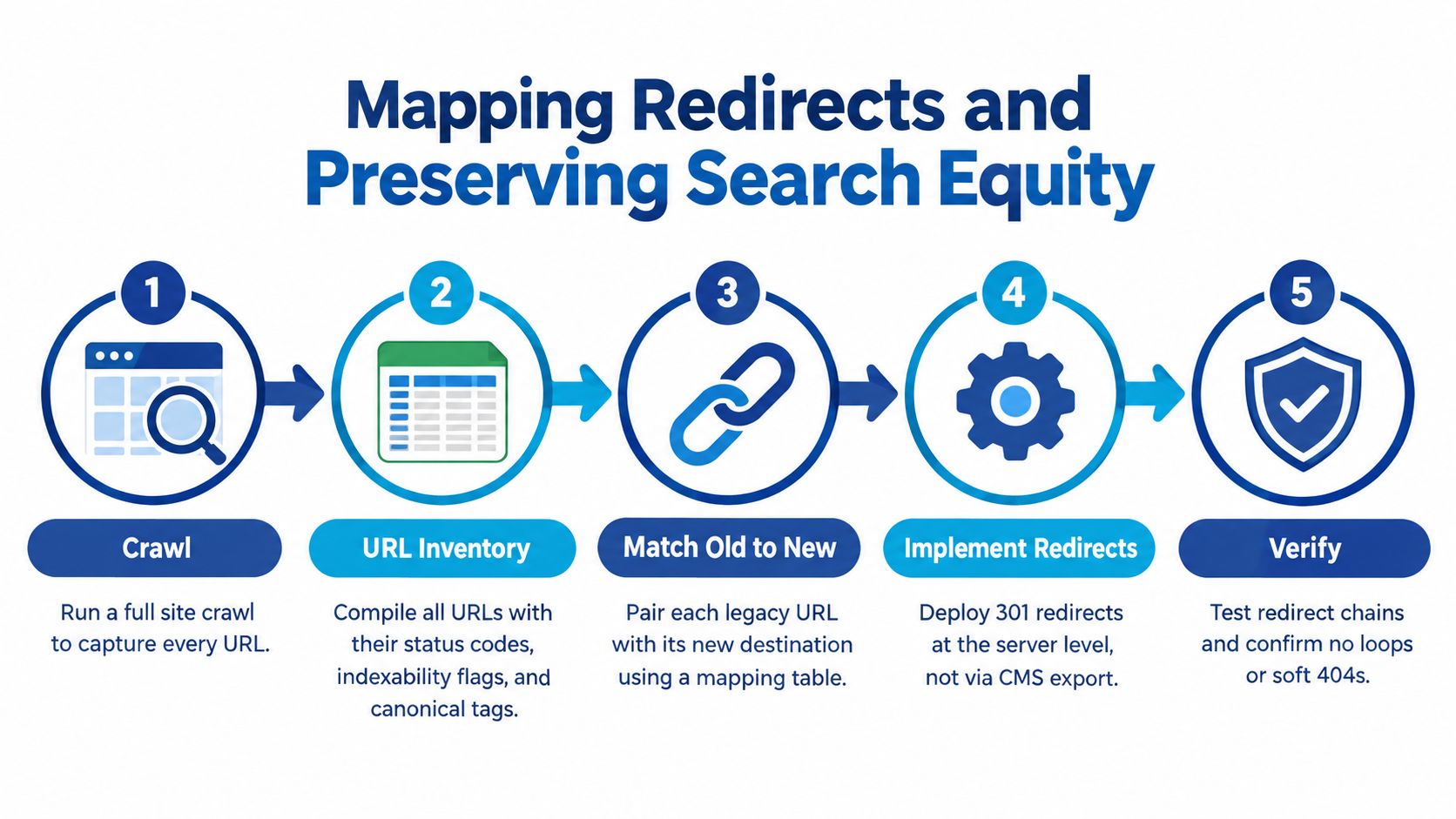
A redirect spreadsheet is an engineering deliverable, not a list exported from the CMS. If a product or technical-resource URL changes, the team needs a relevant destination and a tested rule before the old page disappears.
Start by crawling the existing site. Export every URL with its status code, indexability, canonical tag, title, organic traffic, backlinks, and conversion value. Add notes for pages used in sales collateral, distributor materials, and bookmarked documents. Those pages may not rank prominently, but a buyer may depend on them.
Map destinations by intent
For every important old URL, select the closest useful new destination. Match a specific product page to its replacement, an application page to the corresponding application content, and a technical document to the updated resource. Don't send unrelated pages to the homepage just to avoid errors. That forces the buyer to start over and throws away the context the old URL represented.
Preserve existing URLs where there's no business reason to change them. For the pages that must move, keep a source-of-truth mapping table with the old URL, new destination, reason for the change, redirect type, and test status.
Before release, test the map on staging. Check for redirect chains, loops, incorrect destinations, and soft 404s. At launch, deploy permanent server-side 301 or 308 redirects, update canonical tags, publish the new XML sitemap, and submit it in Search Console. Inspect representative high-value URLs in the live site rather than assuming a successful deployment means the mapping is correct.
Google documented that its own large-scale migration and redesign produced a 159% increase in clicks and a 23% increase in impressions three months later, while requiring monitoring of broken redirects and traffic transfer across thousands of URLs (Google's migration account). That example isn't a forecast for your company. It reinforces the need to measure the transfer instead of treating launch as a one-time switch.
Keep redirects active for at least one year, and longer where practical. Save the old content and redirect rules for high-value pages so the team can restore a destination if a critical URL starts failing. If a developer can't explain how to test and reverse a redirect rule, it isn't ready for production.
The Technical QA Gate Before You Go Live
A page that loads on a designer's laptop has not passed launch QA. Your release gate needs to cover real-user performance, accessibility, internal links, analytics events, and the handoff between forms and the CRM.
Google's Core Web Vitals thresholds are assessed at the 75th percentile, separately for mobile and desktop: Largest Contentful Paint (LCP) should be under 2.5 seconds, Interaction to Next Paint (INP) under 200 milliseconds, and Cumulative Layout Shift (CLS) below 0.1. Set acceptance criteria before development, then use field data after launch to see what real visitors experience. Synthetic tests help diagnose, but they don't represent every plant-floor tablet, older device, mobile connection, or VPN.
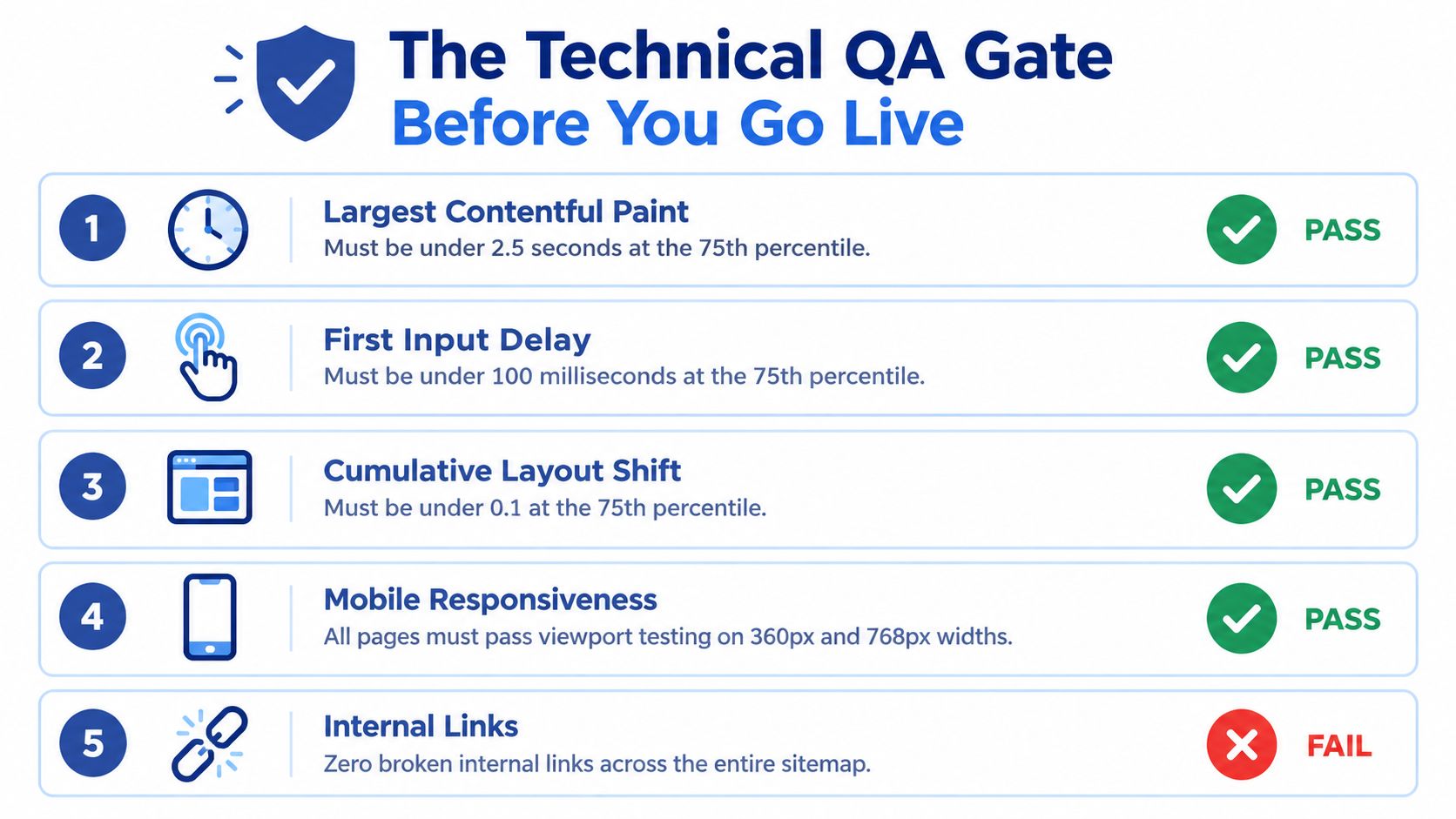
Make the gate pass or fail
Check the full sitemap, not just the homepage. Test priority templates on mobile with throttling, and verify keyboard operation, visible focus, form errors, and successful submissions. Confirm analytics events, canonical tags, structured data, robots.txt, and CRM handoffs. Test PDFs, specification tables, and technical drawings with both automated accessibility tools and human review.
Name a WCAG target in the sign-off. WCAG 2.2 Level AA means meeting all Level A and Level AA criteria; it also requires conformance to WCAG 2.0 and 2.1 at that level or higher (WCAG 2.2 conformance requirements). An automated scan can flag problems, but it can't confirm that an engineer can use a specification table or complete a quote form with a keyboard.
The HTTP Archive's 2025 Web Almanac reported that 48% of mobile websites and 56% of desktop websites achieved good results across all three Core Web Vitals (Web Almanac figures and thresholds). Performance deserves a release gate, not a post-launch wish list. For a practical companion, review this website launch checklist and use this technical SEO audit checklist to check the site's technical foundations.
If a quote form fails, the site hasn't passed because the rest of the design looks finished.
Wiring Analytics, Tracking, and Sales Alerts
Tracking is what catches a launch regression before it turns into a sales problem. Instrument the actions that matter to your pipeline: quote requests, phone clicks, CAD downloads, distributor lookups, and completed contact forms. Confirm each event fires once, carries the right page or template context, and reaches the CRM with lead source and campaign information intact.
Verify both domain and URL-prefix properties in Search Console. Check that analytics conversions match real form submissions, not just button clicks. Add a launch annotation to the reporting calendar, then build a dashboard that can be filtered by template and device. A sales manager should be able to tell whether quote requests fell on product pages, whether mobile forms stopped converting, or whether a particular landing page began returning errors.
For teams setting up measurement from scratch, this analytics measurement plan guide can help organize events and reporting before the release. Use it to document each event's purpose, trigger, owner, and destination. Then test the complete path from visitor action to CRM record, not just the analytics tag.
A 2025 analysis of 892 domain migrations reported an average of 523 days for a replacement domain to reach the predecessor's estimated organic traffic; 17% had not recovered after 1,000 days, while the fastest recoveries occurred within 19 to 33 days (migration recovery analysis). Those figures describe a varied set of migrations, not a timeline to impose on every redesign. They do make one point clear: a quiet dashboard is a risk, not reassurance.
Set alerts for a sudden drop in qualified submissions, redirect errors, index coverage problems, and template-level Core Web Vitals regressions. Route each alert to a named owner who can verify the issue and escalate it within hours. A dashboard nobody watches is just a report.
Stakeholder Sign-Off and When to Roll Back
A rollback plan written after the site goes wrong is not a rollback plan. Before launch, put the decision rule in writing and name who can authorize a cutover, who can order a rollback, and who informs sales and leadership.
The decision should be based on evidence, not a single noisy chart. A temporary ranking movement may call for investigation. A broken quote form, widespread redirect failures, or a sustained loss of qualified leads from priority landing pages calls for immediate escalation. Define those thresholds from your baseline and lead value, then specify the response for each signal.
Use a decision rule, not a debate
- Stabilize: If the issue is isolated and the lead path works, assign an owner, set a repair deadline, and monitor the affected template.
- Escalate: If qualified lead flow or organic entry traffic falls beyond your agreed threshold, bring marketing, development, SEO, and sales together to diagnose the cause.
- Restore or roll back: If a critical form fails, high-value URLs resolve to irrelevant pages, or the team cannot restore the affected path quickly, revert the relevant change or restore the previous destination while engineering investigates.
Make the escalation tree explicit: the launch owner contacts the technical lead; the technical lead confirms whether the issue is code, redirects, or tracking; the sales owner verifies lead routing; and the executive sponsor makes the final business decision if the impact is material. Give sales a short briefing on how to log inquiries and report routing problems during the transition. Give leadership the review cadence and the exact signals that trigger an update.
Accessibility belongs in sign-off, too. The 2025 WebAIM Million report found that 94.8% of one million home pages tested had detectable WCAG 2 accessibility failures (WebAIM Million findings). A scan alone can't establish whether buyers can use your forms, documents, and technical content. Include human review of the tasks that carry commercial value.
Post-Launch Monitoring and the 30-60-90 Review
A launch isn't complete when the new site is visible. It's complete when the team has checked performance against the baseline, resolved release issues, and assigned ongoing ownership.
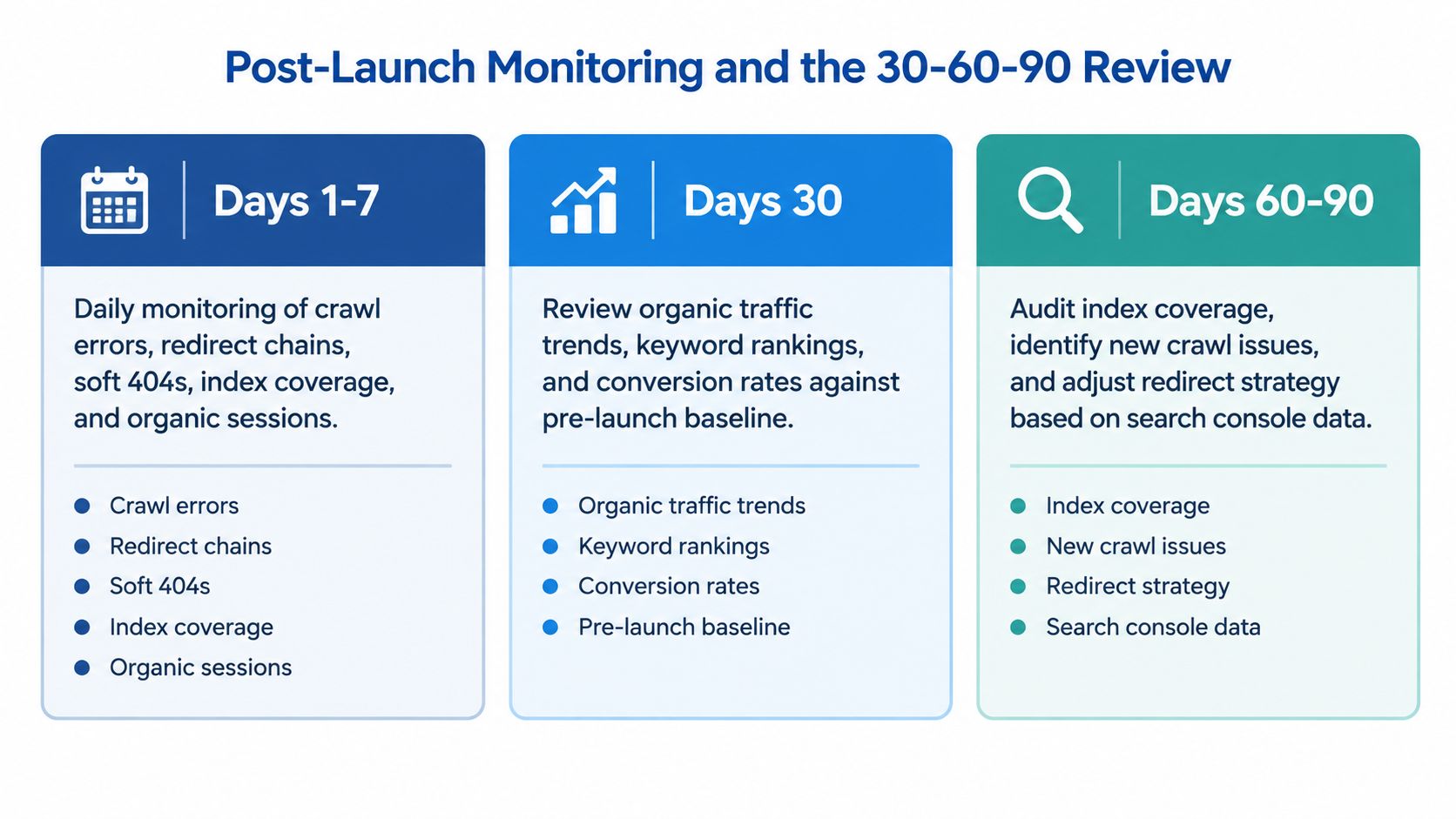
Use a simple operating rhythm:
- Days 1–7: Check crawl errors, redirect chains, soft 404s, index coverage, organic sessions, lead flow, form events, and Core Web Vitals by template every day. Log each issue, its owner, and its resolution.
- Days 8–30: Review weekly against the pre-launch baseline. Segment by landing-page type, device, and geography so a change in one group doesn't disappear inside the sitewide average.
- Days 31–90: Review which templates gained or lost qualified engagement, whether content consolidation removed useful search entry points, and whether any pages need restoration or further testing.
Keep the artifacts. The release record should include the final redirect map, QA sign-off, baseline report, alert owners, and rollback rule. The review record should show the comparison, issues found, decisions made, and next actions.
Iteration matters after launch as well as before it. Across four case studies, Nielsen Norman Group reported a 165% median improvement in overall usability from the first to the last design iteration, with a 38% median improvement per iteration (iterative design findings). Use post-launch feedback to test and refine priority paths, not to defend the design by default.
For help turning website performance and lead activity into a repeatable reporting practice, see this guide to marketing analytics. On launch morning, confirm the forms, redirects, tracking, and owners. The morning after, check the evidence.
Machine Marketing helps manufacturers connect website strategy, industrial SEO, lead generation, and CRM measurement so a redesign supports real sales conversations. If your launch is approaching, visit Machine Marketing to discuss the migration, measurement, and escalation plan your team needs.
