
Marketing automation is software that runs rule-based marketing workflows, triggered by buyer actions, and hands qualified leads to sales with limited manual work. If you're a manufacturer, you know the pattern. A buyer downloads a spec sheet on Tuesday, the notification sits in a shared inbox, and nobody follows up until Friday.
By then, the buyer has called a competitor. Your team didn't lack effort. You lacked a system that reacts the moment a signal appears, logs it, and assigns a named owner.
We approach this as a diagnosis. First, find where leads fall through. Then build one workflow that fixes that leak and proves it with numbers.
Table of Contents
- Marketing Automation in Plain Terms
- How an Automated Workflow Actually Runs
- Where Manufacturers Use Automation First
- Building Lead Scores and Segments That Work
- How Automation Connects to CRM, Website and Sales
- Metrics That Show Whether Automation Pays
- What Automation Delivers and Where It Breaks
- Build Your First Workflow This Quarter
Marketing Automation in Plain Terms
Marketing automation is software that runs rule-based marketing workflows, triggered by what buyers do, and hands qualified leads to sales with limited manual work. Think of manual follow-up as a security guard walking the building every hour. Automation is a sensor. It reacts the moment a door opens and logs every event.
That sensor does more than send scheduled emails. It segments audiences, captures and scores leads, triggers follow-up, syncs with sales, and reports marketing-qualified leads, pipeline, and return on marketing investment, a scope described in Kennesaw State University AMA proceedings on marketing automation. A review cited there of 31 marketing-automation studies published from 2009 through 2020 tied the technology to digital transformation, customer-data integration, and automated decision-making.

Three Tools Buyers Confuse
An email platform sends messages. A CRM stores contacts and deals. Marketing automation sits between them, connecting behavior, records, and messages into one workflow.
| Area | Manual follow-up | Marketing automation |
|---|---|---|
| Trigger | Someone remembers to send, or a calendar date sets it off | A buyer action such as a download, form fill or page visit |
| Speed of follow-up | Depends on who is available that day | Starts within minutes and runs the same rules every time |
| Lead records | Notes spread across inboxes and spreadsheets | One contact record with source, score and history |
| Handoff to sales | A call or email when someone remembers | A task created automatically when a threshold is crossed |
| Scale | Gets harder as contacts grow | The same workflow handles hundreds or thousands of contacts |
| Measurement | Opens and sends counted, if at all | Response time, qualified leads, win rate and revenue tracked |
For you, the practical meaning is one connected system linking website forms, CRM records, nurturing emails, lead scoring, and sales handoffs. It isn't a bulk-email tool. It doesn't replace your sales team, and it can't fix an offer that doesn't fit the buyer.
How an Automated Workflow Actually Runs
Every workflow has four parts. A trigger starts it, a condition checks who belongs, an action happens, and an exit ends it. A 2024 comparative review of marketing automation describes this as a rules-based operating layer connecting behavioral data, CRM records, and outbound channels into repeatable workflows.
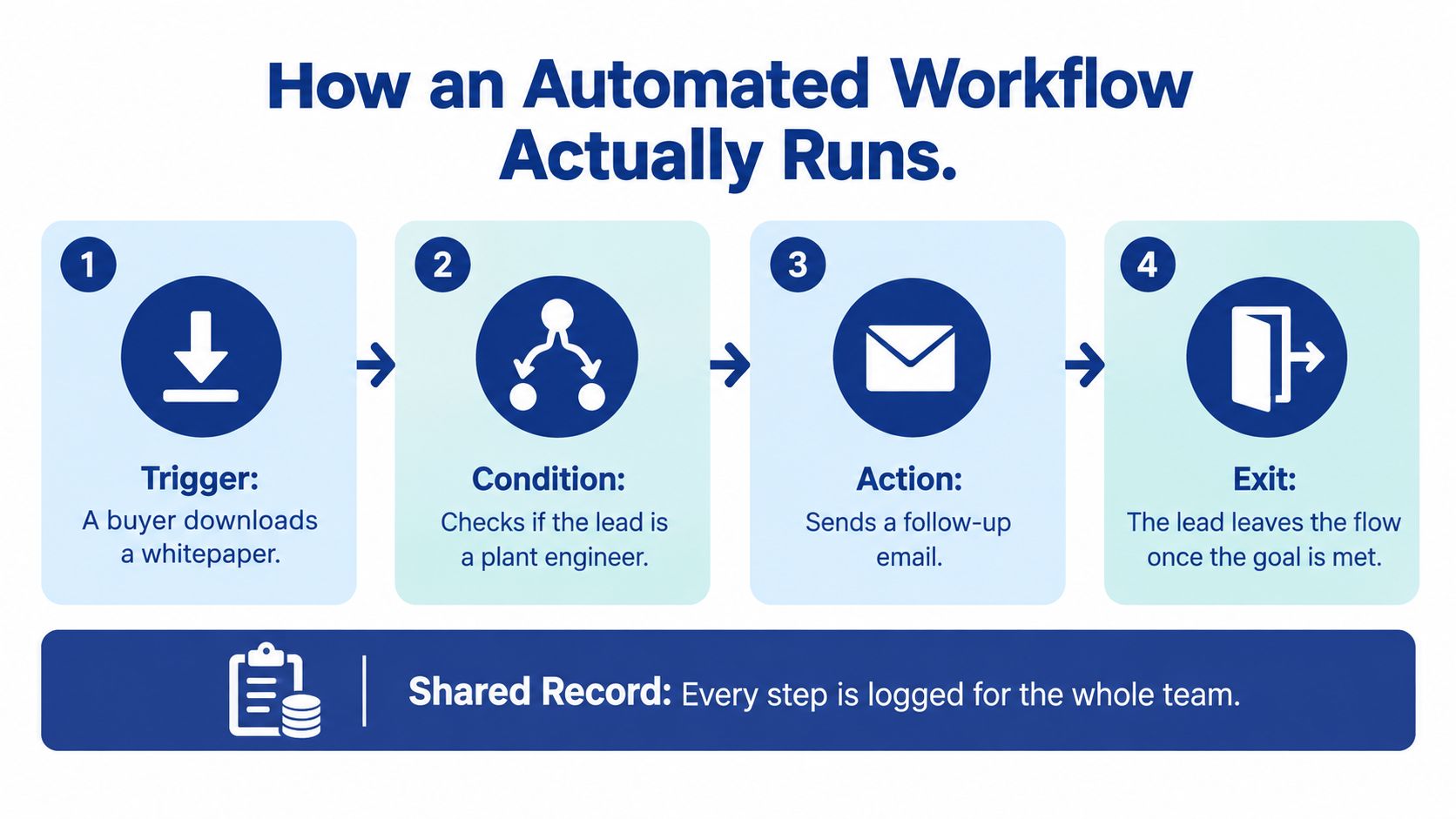
One Engineer Through the System
Say a plant engineer downloads your machine-maintenance guide. Here's how the workflow runs, step by step.
- Trigger fires. The download updates the contact record with the source page. You now know what the engineer cares about.
- Condition checks. The industry field shows manufacturing, so the contact enters the manufacturing segment. Other industries get a different path.
- Action runs. The contact joins a three-email technical sequence spread over ten days. Each email answers one maintenance question.
- Scoring updates. A return visit to a product page adds points to the lead score. Repeat visits signal rising intent.
- Threshold crossed. The score passes the level you agreed with sales, and the system creates a task for the owning representative with a deadline.
- Exit applies. A quote request or unsubscribe removes the contact from nurturing. Automated emails stop once a human takes over.
The record matters as much as the emails. It remembers source, engagement, and handoff history, so two teams don't send the same message twice. That's where the technical value lies: maintaining state across the whole buyer journey.
Practical rule: write every workflow as if/then logic. If a prospect requests a CAD file, then send the matching application note.
Our guide to marketing automation workflows maps more examples in this format. Watch for the common slip, a task with no named owner. A task nobody owns is a lead nobody calls.
Where Manufacturers Use Automation First
Start where a clear trigger already exists and a salesperson already needs to act. These six use-cases cover most first projects we see.
| Use-case | Trigger | Automated action | Sales handoff |
|---|---|---|---|
| Inquiry-to-quote follow-up | Quote or inquiry form submitted | Instant acknowledgment and task to the owning rep with a deadline | Rep contacts the buyer within the agreed window |
| Lead nurturing | Download of a technical guide or spec sheet | Staged educational emails over several weeks | Sales task once the engagement threshold is met |
| Lead scoring | Page visits, downloads and return visits to product pages | Points added to the contact record | Alert when the score crosses the agreed threshold |
| Segmentation | Industry, machine type or job role fields | Separate content paths for each segment | Segment shown on every handoff |
| Distributor or territory routing | Region or product line entered on the form | Lead assigned to the owning rep or partner | Owner notified in the CRM |
| Dormant-account reactivation | No activity for a set period, such as six to twelve months | Service-interval or application reminder | Rep receives a re-engagement task |
Two Buying Cycles Need Two Designs
Treat lead nurturing as a sales-process step, not a shortcut. It can improve the quality of seller and lead conversations, but its effect on conversion depends on sales-cycle length and the buyer's existing relationship with you. One workflow won't fit every product.
Say a machine shop runs two lines. A replacement-part inquiry is short-cycle, so it gets fast scoring, routing within the hour, and a meeting prompt. A capital equipment line gets a multi-week education track with specification content, application examples, and clear sales-readiness criteria before any handoff.
That contrast is the diagnosis. Ask yourself which cycle each inquiry belongs to before you write a single email. Sending a capital buyer a meeting prompt on day two wastes goodwill. Sending a parts buyer six weeks of education loses the order.
Remove contacts from nurturing when they request a quote, become sales-qualified, unsubscribe, or stay inactive for a long stretch.
Exit rules protect trust. Once your representative is talking to the buyer, automated messages should stop, not compete with the conversation.
Building Lead Scores and Segments That Work
A lead score is points assigned to actions that signal buying intent. A quote request, a pricing-page revisit, or a specification download earns high points. A single blog read earns few, because curiosity isn't intent.
Subtract points for disqualifiers. Out-of-territory addresses, student or competitor email domains, and missing company fields all suggest the contact won't buy. Negative points keep weak contacts out of your sales team's queue.
Set the Threshold With Sales
Hold one shared meeting with your sales lead. Define sales-ready in writing before you assign any points, then set the threshold together. Yalc's guide to lead scoring walks through scoring models you can adapt for that conversation.
Our explainer on what counts as a marketing-qualified lead helps you separate marketing-ready from sales-ready. If sales didn't help define the threshold, sales won't trust the handoffs. That single meeting prevents most scoring failures.
Segments Tied to Buying Questions
Start with three to five segments, each tied to a different buying question. A technical buyer researching tolerances needs engineering evidence, test data, and tolerance charts. A plant manager evaluating downtime needs maintenance intervals and throughput numbers.
- Technical buyer: send specifications, application notes, and CAD files.
- Plant manager: send downtime, service, and throughput content.
- Purchasing contact: send lead times, terms, and total cost detail.
Each added segment costs you accurate fields, separate content, testing, and ongoing upkeep. Be honest about that trade-off. Inserting a first name into every email does nothing for a buyer's technical question, so treat personalization gains as real but bounded.
Review monthly. Check whether high-scoring leads really close, and adjust points when they don't. A score that never gets reviewed drifts into fiction.
How Automation Connects to CRM, Website and Sales
Automation reads from your systems and writes back to them. If those systems disagree, the workflow acts on bad information.
| System | What it holds | What automation reads | What automation writes back |
|---|---|---|---|
| CRM | Contacts, accounts, deals and owners | Lifecycle stage, owner and open deals | Lead scores, stage changes and tasks |
| Website or CMS | Forms, page visits and downloads | Form submissions, page events and campaign source | Tracking events and personalized content blocks |
| Email or nurture platform | Sends, opens and clicks | Consent status, segment and engagement | Engagement events and unsubscribes |
| Meeting booking tools | Booked calls and demos | Booking events | Meeting-booked status on the contact |
| ERP or quoting system | Quotes, orders and product data | Quote status and order history | Re-engagement triggers for repeat buyers |
| Service or support system | Service intervals and tickets | Service due dates | Maintenance reminder workflows |
The CRM Is the Single Record
Everything else must agree with your CRM. Before acting, the workflow reads owner, lifecycle stage, and open deals. After acting, it writes back scores, stage changes, and tasks.
Your website supplies form submissions, page events, and campaign source. Set up tracking so the source survives into the CRM record. Without it, you can't tell which campaign produced the lead.
Your ERP and quoting system holds quote status and order history. That's often your most useful data for repeat-buyer and reorder triggers, and usually the least connected.
You're not alone in that gap. The 2025 B2B marketing-operations survey from Widelly found that 73% of respondents identified integration complexity as their top operational challenge, ahead of data quality at 68%.
For a small or midsize manufacturer, connect the two systems behind your first workflow before connecting the rest. Write down which system is the source of truth for each field. That one-page SOP prevents duplicate records and wrong routing.
Metrics That Show Whether Automation Pays
Split your metrics in two. Operational metrics show whether the machine runs. Business metrics show whether it pays.
| Metric | Type | What it tells you | Watch for |
|---|---|---|---|
| Lead response time | Operational | How fast a human follows up after a submission | Set the target before launch, not after |
| Task completion rate | Operational | Share of sales tasks closed on time | Overdue tasks point to routing or capacity problems |
| Contact-to-MQL conversion | Business | Share of new contacts becoming marketing-qualified | Rising volume with falling win rate signals weak scoring |
| MQL win rate | Business | Share of marketing-qualified leads that become won deals | The best single test of lead quality |
| Pipeline sourced by marketing | Business | Share of opportunities traced to marketing activity | Agree on the source rule once and keep it |
| Acquisition cost per marketing-sourced customer | Business | Total marketing cost divided by customers it sourced | Compare across segments, not only in total |
| Revenue by segment and sales-cycle type | Business | Closed revenue for each segment | Use it to decide where to extend workflows |
Prove Lift Instead of Claiming Credit
Hold back a control group of comparable contacts that receives no automation. Compare win rate and revenue against the automated group over a fixed period. That's how you know the workflow caused the result.
Our walkthrough on how to measure marketing ROI shows how to set up that comparison. The last touch rarely deserves full credit, because your buyer may read technical pages, talk to a representative, and visit your trade show booth over months.
Keep the numbers trustworthy with consent records, suppression rules for active opportunities, frequency caps, and human approval for AI-generated messages. Review revenue by segment every quarter. Extend workflows only where revenue moves.
What Automation Delivers and Where It Breaks
Our verdict is direct. Automation pays for most B2B manufacturers that receive steady inbound inquiries and have a sales team that responds. It isn't a universal win.
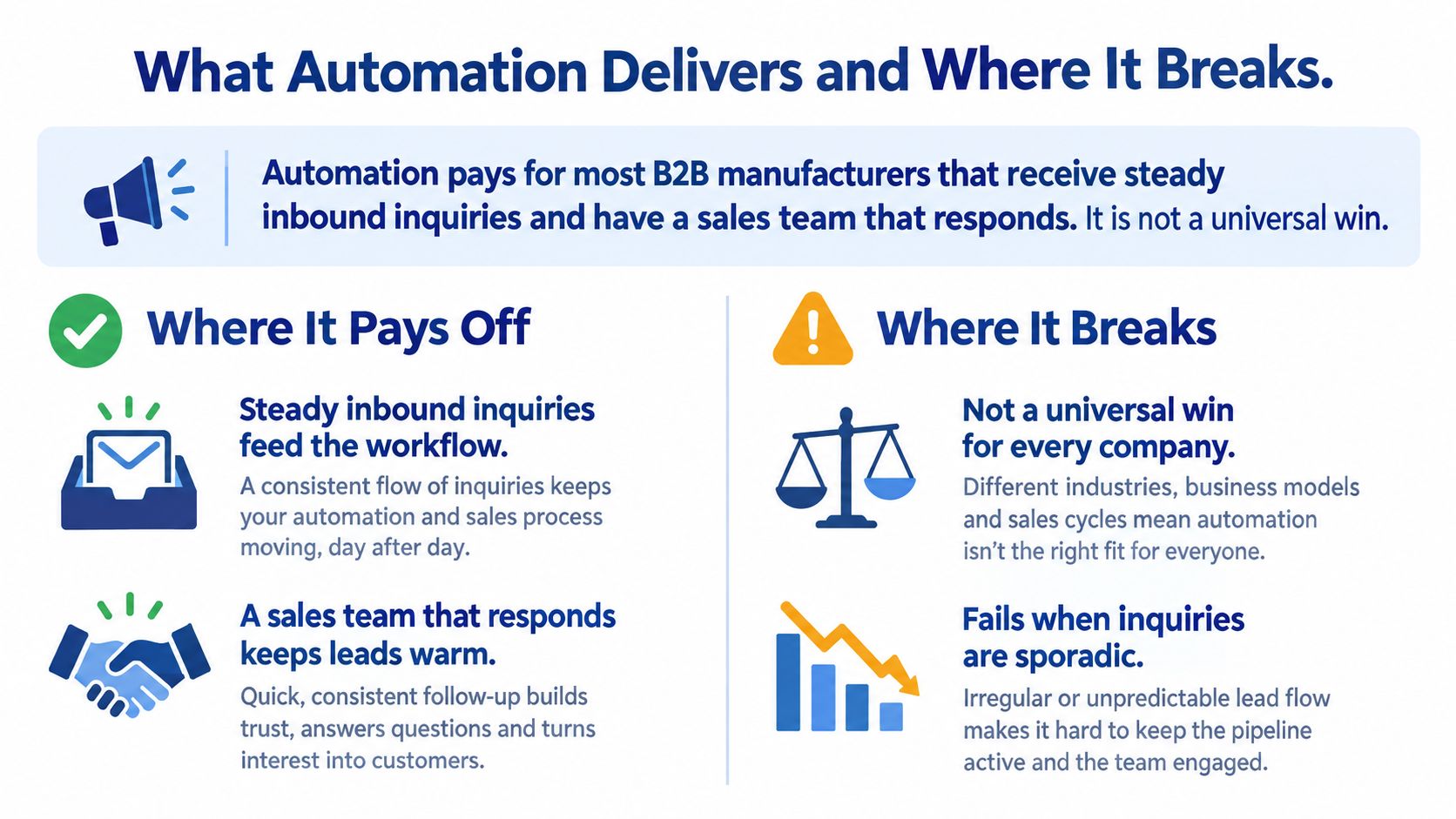
The Adobe summary of the Funnel Overload research reported that 76% of organizations using marketing automation achieved a return on investment within their first year, while 12% reported returns in less than one month. Those results set a reasonable expectation, not a guarantee.
Where It Pays Off
- Faster follow-up: every inquiry gets acknowledged in minutes, every time.
- Auditable handoffs: timestamps show who received the lead and when.
- Reusable workflows: the process survives staff changes because it's documented in the system.
- Clearer lead quality: scoring data shows which sources produce won deals.
Where It Breaks
- No named owner: a platform nobody maintains decays within months.
- Poor data: disconnected records route leads to the wrong person.
- Weak offer fit: no tool fixes a product the buyer doesn't need.
- Bad timing: automated messages irritate a buyer already talking to your representative.
If you receive only a handful of inquiries a month, a disciplined manual process and one good email sequence may serve you better than a full platform. Run this test first. If your real problem is process or data, fix that before buying anything.
Build Your First Workflow This Quarter
Start with one diagnostic question. Where do your leads fall through, at response speed, routing, qualification, or sales capacity? Your answer picks the first workflow.
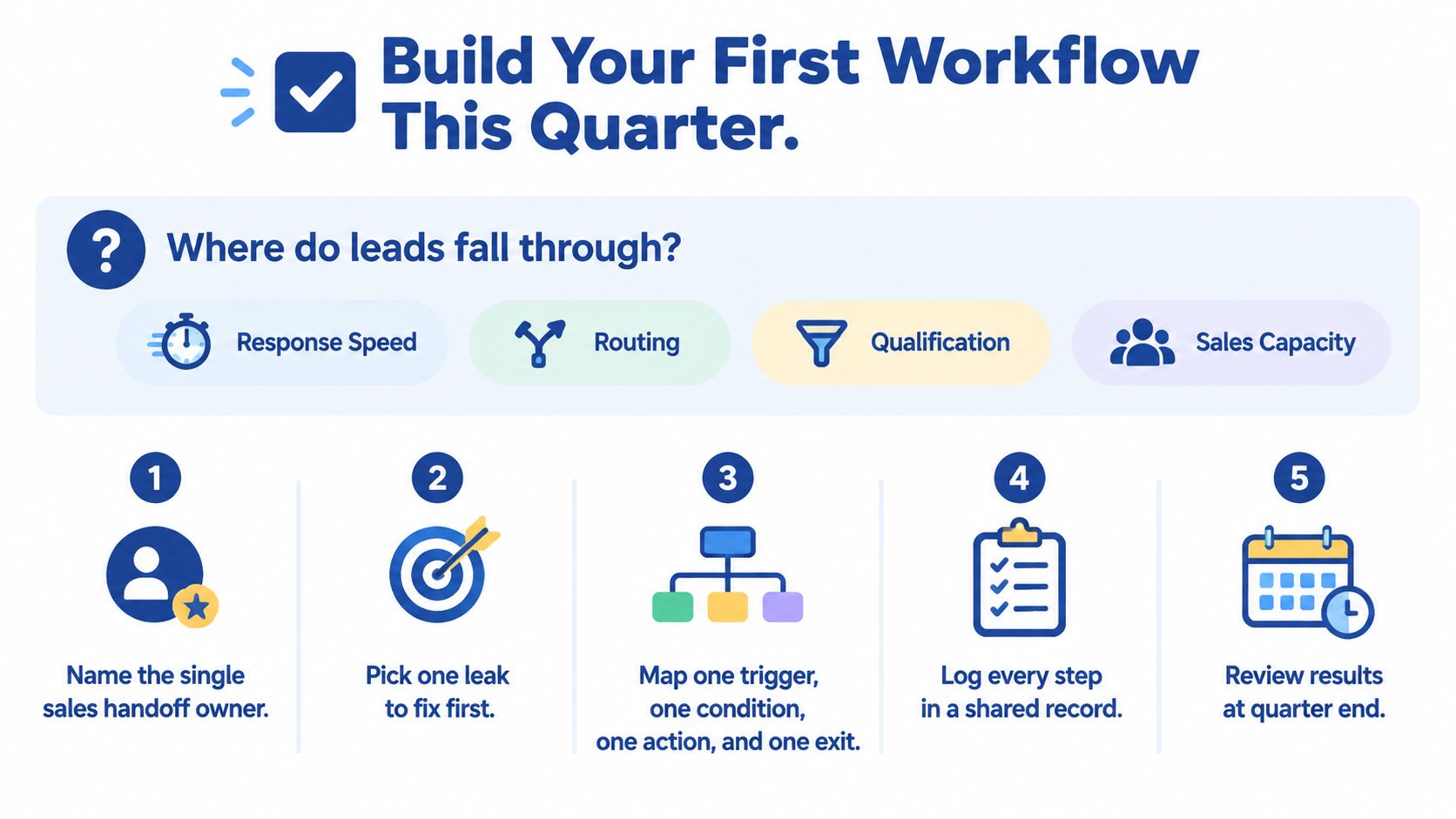
Your Eight-Step Checklist
- Name the handoff that loses the most leads.
- List the data fields the workflow needs and check which system holds each one.
- Write a sales-ready definition with your sales lead and agree the score threshold.
- Choose one workflow, usually inquiry-to-quote follow-up.
- Document the trigger, audience, action, exit, and named owner in one page.
- Record a 30-day baseline for response time and win rate.
- Launch with a holdout control group so you can measure lift.
- Review monthly and add the next workflow only when the first one is stable.
This short video walks through the same build sequence visually.
Do one thing this week. Spend one hour auditing your first handoff, from form submission to first human contact. Time it, name the owner, and count how many inquiries got no response.
If your CRM, forms, and quoting data don't share clean records, Machine Marketing runs a system-readiness diagnosis that shows whether your constraint is technology, process, data quality, or sales adoption. Before any vendor demo, answer three questions in writing. Which system holds your contact record, who owns the workflow after launch, and how will you know it worked? Ask every platform the same three, because no vendor can answer them for your business.
If your inquiries are steady but your follow-up isn't, we can run a system-readiness diagnosis that maps your first workflow, its data fields, and its sales handoff before you buy any platform. Visit Machine Marketing to request that diagnosis and see exactly where your leads fall through.
