
Let's get straight to the point: a shocking number of CRM projects don't just underperform; they flat-out fail. If you’re worried about making a costly mistake, you’re asking the right questions. The problem is almost never the software itself. It's the strategy—or the complete lack of one—that turns a powerful growth tool into another forgotten subscription.
In this guide, we'll show you how to diagnose the real problems in your business and give you the step-by-step framework to build a CRM system that actually delivers results. The difference between a CRM that prints money and one that gathers dust is decided long before you ever see a software demo.
Why Most CRM Projects Fail and How Yours Will Succeed
Before we dive into the nuts and bolts, we need to diagnose the common traps that sink even well-intentioned businesses. Industry stats paint a grim picture: a staggering 55% of CRM implementations fail to hit their goals, often missing the mark by an average of 51%. You can read more about these CRM failure rates to see just how high the stakes are.
But here’s the flip side, and this is why we’re here. When you get it right, the payoff is massive. A well-executed CRM can deliver an ROI of over $8.71 for every dollar spent and has been shown to boost sales revenue by a whopping 29%.

The Core Problem Diagnosis
The root cause of failure almost always comes down to a fundamental disconnect between the technology and the business’s real, day-to-day operational problems.
Companies buy a CRM hoping it will magically fix broken processes. That’s like buying a gym membership and expecting to get fit without ever breaking a sweat. The tool can't solve a problem you haven't clearly defined yourself.
A CRM system should be the central nervous system of your business, not just another line item on your credit card statement. Its job is to make your proven processes more efficient, not to invent them from scratch.
To ensure your project lands in the success column, we’re going to approach it with an engineer’s mindset. That means starting with a thorough diagnosis of where you are right now.
Use this quick checklist to see if your current thinking is setting you up for success or steering you toward failure. Be honest with yourself—it can save you a world of headaches down the road.
CRM Success vs. Failure: A Diagnostic Checklist
| Key Area | Sign of a Failing Approach | Sign of a Successful Approach |
|---|---|---|
| Objectives | "We need a CRM to get more organized." | "We need to reduce lead response time from 24 hours to 1 hour." |
| Process | "Our sales process is in our reps' heads." | "Here's a flowchart of our exact sales process, from lead to close." |
| Team Buy-In | "The sales team will use it because I told them to." | "Our top sales reps helped us choose the key features they need to win." |
| Technology Focus | "Which CRM has the coolest features?" | "Which CRM best supports our documented process?" |
| Data Strategy | "We'll import our contacts and figure it out later." | "We've audited our data and have a clear plan for cleanup and migration." |
This checklist isn't just a formality; it's the foundation of your entire project. If you find yourself leaning toward the "failing approach" column on any of these points, now is the time to course-correct.
The Foundation for a Successful CRM Implementation
Success starts by asking the right questions way before you look at any software. Get these fundamentals locked down first:
- Pinpoint Your Objectives: What specific, measurable pain are you trying to eliminate? Is it slow lead follow-up? Are customer details scattered across ten different spreadsheets? Are you losing deals because you have zero visibility into your sales pipeline? Get specific.
- Get Process Clarity: Can you grab a marker and draw your current sales or service process on a whiteboard, from the very first touchpoint to the final handshake? If not, a CRM will only help you do the wrong things faster. Automated chaos is still chaos.
- Secure Team Buy-In: Have you actually talked to the people who will be in this system all day, every day? A CRM forced on a team without their input is dead on arrival. They need to see it as a tool that helps them close more deals, not as a micromanagement device.
Step 1: Diagnose Your Processes and Align Your Team
Before you touch a single piece of software, you have to get a brutally honest blueprint of the problems you're trying to solve. This diagnostic phase is the most overlooked—and most critical—part of any CRM implementation. We see it time and time again: companies rush this step and end up automating a broken process. All that does is help you make the same mistakes, faster.
Think of this as an internal audit. It's time to get real about your current sales, marketing, and customer service workflows—the good, the bad, and the parts that are just plain broken. The goal isn't just to find problems; it's to build a unified vision for how you're going to fix them.

Map Your Current Workflows
Get your key players from sales, marketing, and support in a room with a giant whiteboard or a stack of sticky notes. Your objective is to map every single step of your customer's journey as it happens today—not how you wish it happened.
Start digging with some direct questions to get to the truth:
- Lead to Opportunity: What happens the exact moment a new lead comes in? Who owns it, what's the first action taken, and how long does that action usually take?
- Sales Cycle: What are the actual stages a deal moves through? What specific criteria must be met to move a deal from "Discovery" to "Proposal," for example?
- Customer Handoff: When a deal is marked "Closed-Won," how does the customer service or operations team find out? Is it a smooth handoff, or is it a chaotic scramble of emails and Slack messages?
- Support Tickets: How do you track and resolve customer issues right now? Where do the common requests get stuck in limbo?
This exercise is incredibly revealing. It will immediately expose the bottlenecks, communication gaps, and tedious manual tasks that are sucking the life out of your team and draining profit from your bottom line.
Bring Your Stakeholders to the Table
Team alignment isn't a "nice-to-have." It's the single most important factor that determines whether your CRM project succeeds or crashes and burns. When sales, marketing, and service teams are operating in their own little worlds, the project is doomed before you write the first check.
The data on this is unforgiving. A staggering 70% of CRM projects crash due to cross-functional misalignment, making it the top killer of implementations. This gets even worse when you learn that 37% of sales reps don't fully use their CRM because it feels disconnected from their daily reality. You can find more detail in these critical CRM adoption statistics.
The only way to prevent this is to facilitate workshops that bring everyone to the same table. You're trying to build a shared reality and, most importantly, get buy-in from the people who will be in the system every single day.
Your CRM project is a business change initiative first and a technology project second. If you don't get the people and processes right, the technology doesn’t stand a chance.
Set Crystal-Clear, Measurable Goals
Once you've mapped your broken processes and started aligning your team, you can finally define what success will actually look like. Vague goals like "improve sales" are useless here. You need specific, measurable targets that the CRM is going to help you hit.
The trick is to translate your process pain points into tangible outcomes.
-
Instead of: "We need faster lead follow-up."
-
Try: "We will reduce our average lead response time from 48 hours to under 2 hours."
-
Instead of: "Our sales pipeline is a mess."
-
Try: "We will increase our lead-to-opportunity conversion rate by 15% in the next six months."
-
Instead of: "We need better customer service."
-
Try: "We will resolve 90% of customer support tickets within 24 hours of submission."
These concrete goals do two things. First, they give your implementation a clear "why," ensuring every configuration decision serves a real business purpose. Second, they give you the benchmarks you'll use later to measure your ROI and prove the project’s value. This is how you build momentum that lasts long after the go-live date.
Step 2: Prepare Your Data and Configure Your CRM
A brand-new CRM is just an empty engine. To make it run, you need to fill it with high-quality fuel—your data. This is the stage where all your planning meets the reality of software and spreadsheets.
Get this right, and your CRM becomes your single source of truth. Get it wrong, and you’ve just built a very expensive, disorganized spreadsheet.
The process breaks down into two connected parts. First, you have to audit and clean up your existing customer data. Second, you’ll configure your new CRM, like GoHighLevel, to mirror the business processes you’ve already mapped out.
The No-Nonsense Data Audit
Let’s be honest: your current data is probably a mess. It's likely scattered across old spreadsheets, buried in email inboxes, and maybe even living on a few sticky notes. Before you import a single contact, you need to figure out what’s worth keeping, what needs fixing, and what belongs in the trash.
The old saying “garbage in, garbage out” is the unbreakable law of any data system. Migrating messy, outdated, or incomplete information will cripple your CRM’s effectiveness from day one.
Start by asking these tough questions for every data source you have:
- Is it still relevant? Do you really need to import leads from a trade show five years ago that never went anywhere? Be ruthless. Archive old, irrelevant contacts.
- Is it accurate? Are the email addresses correct? Do you have current phone numbers and job titles for your key accounts?
- Is it complete? Is critical information missing? For a manufacturer, this might be the type of machinery a client uses. For a B2B service, it could be the client's industry or company size.
- Is it consistent? Do you have "United States," "USA," and "U.S." all in the same country field? Standardizing these values now will save you from massive reporting headaches later.
Think of this as spring cleaning for your business intelligence. A clean dataset ensures your sales team trusts the information they see, your marketing automations reach the right people, and your reports actually mean something.
Hands-On CRM Configuration
With your clean data ready to go, it's time to shape the CRM to fit your business—not the other way around. This is where your process maps from the previous phase become your blueprint.
If you're using a platform like GoHighLevel, the goal isn't to turn on every single feature. The goal is to build a focused tool that directly supports your team's daily work. If you're still weighing your options, our guide on how to choose a CRM system can offer some clarity.
Your configuration should focus on immediate impact. We've put together a checklist to guide your initial setup in GoHighLevel, prioritizing the tasks that will deliver value right away.
Essential GoHighLevel Configuration Checklist
This table isn't about everything you can do, but what you should do first to get your team up and running effectively.
| Configuration Task | Why It Matters | Pro Tip |
|---|---|---|
| Set Up Sales Pipelines | This visually represents your sales process. Each stage should match the steps you mapped, from "New Lead" to "Proposal Sent" to "Closed-Won." | Don't overcomplicate it. A pipeline with 5-7 clear stages is far more effective and manageable than one with 15 granular steps. |
| Create Custom Fields | Standard fields like "Name" and "Email" aren't enough. You need specific data like "Machine Type" or "Contract Renewal Date." | Make critical custom fields mandatory. If a sales rep can't advance a deal without entering the prospect's budget, you guarantee data consistency. |
| Define User Roles & Permissions | Not everyone needs access to everything. A sales rep shouldn’t be able to delete marketing campaigns, and support doesn't need to see financial data. | Create roles based on function (e.g., Sales Rep, Sales Manager, Admin). This makes onboarding new hires much faster and protects your data. |
| Configure Basic Automations | Start with simple, high-value workflows. A rule that auto-assigns a new web lead to a salesperson based on territory is a perfect first step. | Focus on automating the initial follow-up. An instant, automated email confirming a contact form submission buys your sales team valuable time. |
By taking the time to meticulously prepare your data and thoughtfully configure your CRM, you build a system that empowers your team from the very first day.
Step 3: Build Automations and Integrate Your Tech Stack
Okay, your CRM is configured and your data is clean. Now for the fun part. This is where we turn that static database into an active growth engine for your business.
Automations and integrations are what separate a simple digital filing cabinet from a true central nervous system. This isn't just about storing contact info anymore; it's about making that information work for you. The goal is to create a system where data flows seamlessly between all your tools, killing off tedious manual entry and giving your team a genuine 360-degree view of every customer.
We're essentially building a simple, powerful flow: get leads in, automate the follow-up, and create one unified customer view.
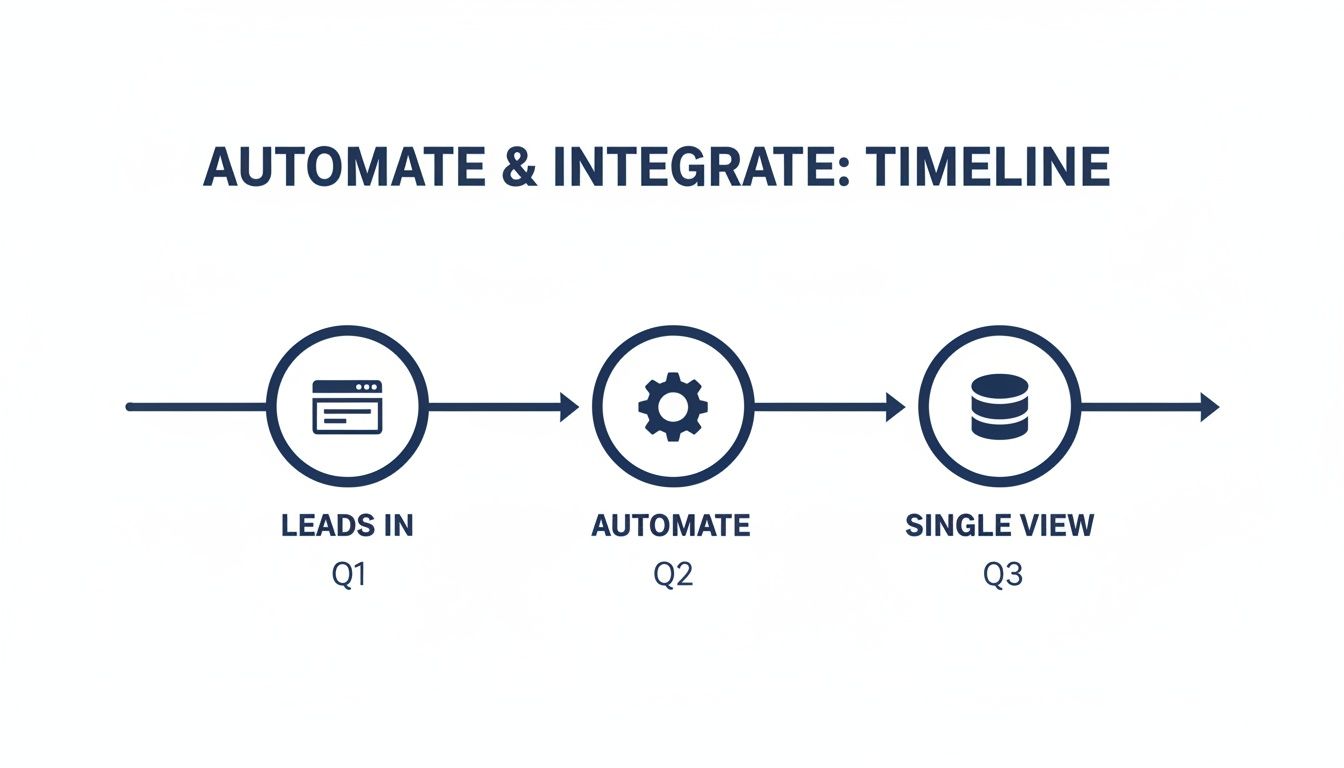
Automation is the critical bridge that connects a new lead to a complete, actionable customer profile.
From Manual Tasks to Intelligent Workflows
So, where do you start? Don't overcomplicate it. Begin with your biggest time-wasters and revenue leaks.
Ask your sales and service teams, "What repetitive tasks do you absolutely hate doing every single day?" Their answers are a goldmine for your first automation builds.
Let's take a real-world example from a B2B manufacturer. A prospect fills out a "Request a Quote" form on the website.
-
Before CRM Automation: That form submission lands in a general email inbox. Someone has to spot it, figure out who to forward it to, and then hope that sales rep follows up in a timely manner. The lead could be waiting hours—or even days—for a response.
-
After CRM Automation: The second that form is submitted, a workflow instantly triggers. It checks the lead's state, assigns them to the correct regional rep, creates a new deal in their pipeline, and fires off a personalized "Thanks for your inquiry, we'll be in touch shortly" email to the prospect. The whole thing happens in less than a second.
This isn't just about being more efficient. It's about capitalizing on intent. A lightning-fast response can be the single difference between winning the deal and losing to a competitor who got there first.
The point of automation isn’t to replace your people. It’s to handle the mind-numbing administrative work so your team can focus on what they do best: building relationships and solving customer problems.
Connecting Your Entire Tech Stack
Your CRM can't live on an island. To get that complete picture of your business, it needs to talk to the other tools you use every day. Integrations are the digital handshakes that make this conversation happen.
Think about the core systems that run your operation:
- Your Website: This is a no-brainer. Connect your contact forms, quote requests, and lead magnets directly to the CRM to capture every new lead instantly.
- Email Platform: Sync the CRM with your email marketing tool. This allows you to build hyper-targeted lists based on customer behavior, purchase history, or where they are in the sales cycle.
- Accounting Software: Integrating with a system like QuickBooks gives your sales team visibility into a client's billing status without having to chase down the finance department.
- Project Management Tools: Link your CRM to a platform like Asana or Trello to automatically kick off a new project board the moment a deal is marked "Closed-Won."
Each integration closes another data gap and eliminates another manual copy-paste job. When combined, you create a single source of truth where everyone in the company is working from the same up-to-the-minute information. A connected system is also the foundation for running powerful, data-driven marketing initiatives, which is key when you start running campaigns in your CRM.
Step 4: Launch With a Phased Rollout and Drive Adoption
Let’s be honest: a successful CRM launch is never a single event. It’s a process. We’ve seen too many companies try the "big bang" approach—where they just flip a switch and hope everyone figures it out. It's a guaranteed recipe for chaos, confusion, and abysmal adoption rates.
Instead, the smartest way to launch is with a phased rollout. You have to treat this like a strategic internal campaign. The goal isn't just to get the software live; it's to build momentum, get real-world feedback, and prove the CRM’s value before it touches the entire company. You're changing habits and workflows, which is a human challenge, not just a technical one.

Start With a Pilot Program
Before you even dream of a full rollout, you need to run a pilot program with a small, hand-picked group of users. This isn't just one last round of testing. This is your first shot at creating internal champions for the new system.
Your pilot group should be a mix of personalities:
- The Power Users: Grab one or two of your top performers who are comfortable with tech and open to change. When they start raving about the new system, their endorsement will carry serious weight with everyone else.
- The Skeptics: Intentionally include a team member who is respectful but hesitant. If you can show them exactly how the CRM solves their biggest headaches, you can win over anyone.
- A Manager: Having a manager in the mix ensures the pilot is tied to real business goals and helps turn user feedback into actual process improvements.
Let this crew use the CRM for their actual day-to-day work for about two to four weeks. Their job is to try and break it, find what's clunky, and pinpoint what’s actually making their lives easier. This feedback is absolute gold. It lets you make critical tweaks before the system goes wide.
Create a 90-Day Rollout Roadmap
Once the pilot is done and you've smoothed out the rough edges, it’s time to map out a clear, 90-day launch plan. A roadmap like this prevents the team from feeling overwhelmed and makes the entire transition feel manageable.
Here’s a practical structure we often use with clients:
| Phase | Timeline | Key Activities and Goals |
|---|---|---|
| Phase 1: Foundation | Days 1-30 | – Onboard the Sales Team: Start with the core sales pipeline and contact management. Nothing else. – Goal: Hit 100% adoption for logging new deals and communications. Celebrate the very first deals closed inside the new CRM. |
| Phase 2: Expansion | Days 31-60 | – Introduce Marketing & Service: Begin training the marketing team on automation and the service team on ticketing. – Goal: Launch the first automated lead nurture sequence and get all support interactions tracked in the system. |
| Phase 3: Optimization | Days 61-90 | – Refine and Report: Start building out the custom dashboards and reports that each team needs to see their impact. – Goal: Hold a review session to show off performance wins (like faster lead response times) and gather ideas for the next round of improvements. |
Drive Adoption Through Training and Change Management
The tech is the easy part. The people are the hard part. Overcoming resistance to change is where most CRM projects live or die. Your training can't just be a demo of where to click.
It has to answer the one question every single person is asking: “What’s in it for me?”
Your training sessions must connect every feature to a direct, personal benefit. Don't just teach them how to create a task. Show them how creating that task means they'll never miss a follow-up—and a commission—again.
Your whole change management strategy should be built on clear communication and celebrating small wins. During the rollout, send out weekly updates highlighting successes. Share a quick story about how a sales rep used a CRM template to save 30 minutes writing emails, or how an automation caught a hot lead that would have otherwise slipped through the cracks.
These little victories build belief and prove that the CRM is a powerful tool, not just more administrative work.
Step 5: Measure Success and Continuously Improve
Your CRM implementation doesn’t end the day you go live—that’s actually when it begins. The system is up, your team has been trained, but now the real work starts. It's time to turn this powerful tool into a source of actionable intelligence that actually drives growth.
This is where you close the loop and start proving the ROI of the entire project.
Frankly, a CRM without clear metrics is just a glorified, expensive address book. To make sure that doesn't happen, you need to tie your reporting directly back to the specific, measurable goals you defined way back in the diagnostic phase. We aren't talking about vanity metrics here; these are the numbers that tell the real story of your business.
Define and Track the Right KPIs
Your Key Performance Indicators (KPIs) are the vital signs of your sales and marketing health. They need to be simple, clear, and directly reflect the problems you originally set out to solve. Forget about drowning in a sea of data; focus on the handful of metrics that truly matter.
The first thing to do is build a simple, effective dashboard inside your CRM that tracks these KPIs in real-time. This isn’t just for management—it gives immediate visibility to your entire team.
Here are a few essential KPIs we always start with:
- Sales Cycle Length: How many days, on average, does it take to move a deal from a new lead to a closed-won deal? Seeing this number trend downward is a massive win for efficiency.
- Lead-to-Opportunity Conversion Rate: What percentage of your qualified leads are turning into actual sales opportunities? This metric tells you if your initial qualification and follow-up processes are actually working.
- Customer Lifetime Value (CLV): How much revenue does the average customer generate over their entire relationship with your company? A rising CLV is proof that your retention and upselling efforts are paying off.
- Lead Response Time: This one is huge. It's the average time it takes for a sales rep to make the first contact with a new lead. We aim to get this as low as humanly possible to capitalize on that initial spark of interest.
These numbers are the bedrock of effective reporting. To go a level deeper, you can check out our complete guide on what is marketing analytics to build an even more robust measurement framework.
Your dashboard isn't just a report for the leadership team. Think of it as a scoreboard for your entire company. When everyone can see the numbers that define a win, they become far more invested in moving those numbers in the right direction.
Create a Framework for Continuous Improvement
A great CRM is never "finished." It has to evolve right alongside your business. The final piece of a successful implementation is establishing a rhythm for regular reviews and making iterative improvements.
We've found a quarterly review cycle works best. Get your key stakeholders back in a room and ask some very direct questions:
- What's working well? Start by celebrating the wins. Which automations are saving the most time? Which pipeline stage is flowing smoothly without any friction?
- Where are the bottlenecks? Use the data and, just as importantly, user feedback to find the points of friction. Are deals getting stuck in a particular stage? Is a specific workflow causing more confusion than it solves?
- What has changed in the business? Did you launch a new product line or service? Your CRM processes might need an update to reflect that reality.
This feedback loop—measure, review, adapt—is the secret to making sure your CRM continuously delivers a powerful return on investment. It transforms the system from a static tool into a dynamic asset that actively helps you scale your business.
Questions to Ask Yourself Before You Start
We've walked through the core of a solid CRM implementation, but we know there are always those lingering questions that pop up. Let's tackle a few of the most common ones we hear from business owners and managers getting ready to make the leap.
How Long Does This Actually Take?
For a small to midsize business, a well-planned implementation usually lands somewhere between 4 to 12 weeks. This isn't a random number; it's a realistic window that allows you to do things right without dragging the project on forever.
Here’s what that timeline typically looks like on the ground:
- Weeks 1-2: This is all about diagnosis. We're digging into your processes, mapping workflows, and getting crystal clear on what "success" actually means.
- Weeks 3-6: Now we get our hands dirty. This is the heavy lifting of data cleanup, system configuration, and building out the first round of automations.
- Weeks 7-10: We start connecting the dots—setting up key integrations, running user acceptance testing (UAT) with your team, and developing the training materials.
- Weeks 11-12: Go time. We'll start a phased rollout, run hands-on training workshops, and provide that crucial post-launch support.
Of course, the final timeline depends on how complex your business is and how messy your data is, but a 90-day plan is a solid, achievable target for most.
What’s the Single Biggest Mistake I Could Make?
Easy. Skipping the diagnosis and process mapping phase. It's the most common and most fatal error. We've seen it happen time and again: a company gets excited about the new software and rushes straight into configuration because it feels like they're making progress.
But what they're really doing is building a system based on guesswork. They end up with a shiny new tool that doesn't actually solve their team's real-world problems, leading to abysmal adoption and a completely wasted investment. You're just automating the same old chaos.
A CRM should adapt to your business process; you shouldn't have to break your process to fit a piece of software. If you don't know your process, you can't build the right tool.
How Do I Get My Team to Actually Use This Thing?
You can't force people to adopt new software. Adoption really boils down to two key ingredients: involvement and value.
First, pull your key team members into the project from day one. Ask them what drives them crazy about the current way of doing things. When they see their feedback directly shaping the new system, they stop being spectators and become champions for the project.
Second, make it personal. Focus on building automations that solve their biggest, most annoying headaches. When you train them, don't just click through features. Show them, "This workflow is going to save you an hour every Friday," or "This automation will keep you from ever having to manually follow up on a quote again." Frame the CRM as a tool that makes their job easier and more successful, not as a new way for management to watch over their shoulder.
If you're ready to build a CRM system that genuinely works for your business instead of against it, we can help. We provide the strategic diagnosis and hands-on GoHighLevel implementation to turn your CRM into a true growth engine. Book a discovery call with us to get started.
