
Are you reviewing customer relationship management (CRM) platforms but still feel like you're guessing? If so, you’re not alone. We see this all the time—business owners get stuck comparing feature lists instead of diagnosing the real problem in their operations. This leads to wasted time, frustrated teams, and a hefty software bill for a tool that doesn’t actually fix anything.
The truth is, before you even look at a customer relationship management review, you need to diagnose your own business needs with an engineering mindset. In this guide, we’ll show you exactly how to do that, compare the top contenders, and build a system that drives real growth.
First, Diagnose Your Needs—Then, Find the CRM
Picking a CRM without a clear diagnosis is like a doctor prescribing medication without asking about your symptoms. You wouldn’t stand for it in healthcare, so why do it with a critical business system? A CRM is a tool meant to solve specific operational problems, whether that's inconsistent lead follow-up or sales and marketing data living on different planets.
Your goal isn't to find the "best" CRM on the market. It’s to find the right one for your workflow. Before you dive in, it’s a good idea to get a handle on the fundamental customer relationship management basics. With that foundation, you can start asking the right questions.
Audit Your Current Sales and Marketing Process
To find the right solution, you first have to map out where you are right now. This isn't about pointing fingers or finding fault; it's a transparent data-gathering mission to spot the gaps and opportunities. A thorough audit is the only way to build a system that genuinely supports your team instead of getting in their way.
Here are the questions to ask yourself and your team:
- Lead Capture: How do leads actually find you? Are they coming from website forms, phone calls, trade shows? And what happens to them once they arrive?
- Lead Follow-Up: Is there a standard operating procedure (SOP) for following up with a new lead? More importantly, is everyone on the team actually following it?
- Data Management: Where does customer information live right now? Is it scattered across spreadsheets, siloed in email inboxes, or jotted down in notebooks?
- Sales Pipeline: Can you see, at a glance, where every deal is from initial contact to close? What are the actual stages in your sales cycle?
- Marketing & Sales Alignment: How does marketing hand off a lead to sales? Is it a clean, automated process, or does it feel more like tossing something over a wall and hoping for the best?
Define What a Win Actually Looks Like
Once you’ve pinpointed the problems, you can start defining the solution. What does a successful CRM implementation look like for your business in 90 days? Six months? A year? When you set clear, measurable goals, you turn a generic software purchase into a strategic investment.
This kind of forward-thinking is non-negotiable in a market that's absolutely exploding. The global Customer Relationship Management (CRM) market was valued at USD 84.6 billion in 2025 and is projected to hit a staggering USD 339.6 billion by 2035. For B2B operators, this growth just hammers home how critical these systems are for automating workflows and keeping customers engaged.
Your "success criteria" become the checklist you use during your customer relationship management review. This forces you to evaluate platforms based on your real-world needs, not just slick marketing claims. For a deeper dive, check out our guide on how to choose a CRM system. By taking the time to do this diagnosis upfront, you build a clear blueprint of requirements that will guide every decision you make.
Comparing Top CRM Contenders for B2B Operations
Now that you’ve diagnosed your operational needs, it's time for a head-to-head comparison of the top CRM contenders. It’s incredibly easy to get tangled up in endless feature lists and slick marketing promises. We're going to slice through that noise and focus on what truly matters for B2B operations—especially for manufacturers and service-based businesses.
We'll break down the platforms we see most often: HubSpot, Salesforce, Zoho, and our go-to system, GoHighLevel. Our objective isn't to crown one ultimate "winner." Instead, it's to help you figure out which platform's DNA aligns with your team's workflow and your long-term business goals. A CRM should bend to fit your process, not force you to change everything.
To help you track the key differences, here’s a quick snapshot of how these platforms stack up on core functionalities that are critical for most B2B companies.
CRM Platform Snapshot for B2B Operations
| Feature | HubSpot | Salesforce | Zoho | GoHighLevel (Our Recommended System) |
|---|---|---|---|---|
| Primary Focus | Inbound Marketing & Sales | Enterprise Sales & Customization | All-in-One Business Suite | SMB Sales & Marketing Consolidation |
| Ease of Use | Very High | Low (Requires Admin) | Medium | High |
| Core CRM | Strong | Very Strong | Strong | Very Strong |
| Native Marketing Tools | Excellent (Email, SEO, Blog) | Limited (Requires Add-ons) | Good (Broad but separate apps) | Excellent (Email, SMS, Funnels, Ads) |
| Customizability | Good | Excellent (Near-infinite) | Very Good | Good (Focused on SMB needs) |
| Best For | Marketing-led SMBs | Large enterprises with complex needs | Budget-conscious SMBs needing many tools | Service businesses & SMBs wanting one system |
This table gives you a 30,000-foot view, but the real decision comes down to the details and how each system feels in practice. Let's dive deeper.
HubSpot: The Inbound Marketing Powerhouse
HubSpot built its entire reputation on being the champion of content and inbound marketing. Its user interface is famously clean and intuitive, making it a crowd-pleaser for teams that value ease of use and need to get up and running fast. If your main objective is attracting leads through blogging, SEO, and email campaigns, the HubSpot ecosystem was literally built for you.
The platform is brilliant at bringing your marketing activities under one roof. The trade-off? Its marketing-first design can sometimes make the sales and service hubs feel like tacked-on additions. For a business with a complex quoting process and long sales cycles, the out-of-the-box sales tools might feel a bit thin without jumping to a much higher price tier.
What to look for in HubSpot: Its strength is its incredibly user-friendly interface and best-in-class marketing automation. If your biggest headache is generating and nurturing leads with content—and you need a tool your team will actually enjoy using—HubSpot solves that problem better than anyone.
Salesforce: The Enterprise Customization Engine
Salesforce is the 800-pound gorilla in the CRM space, known for its sheer power and almost limitless customizability. For massive enterprises with intricate sales processes and dedicated IT departments, Salesforce can be molded to do just about anything. It’s an operational beast for tracking complex customer journeys and producing incredibly deep reports.
But that strength is precisely what makes it a massive challenge for most small and mid-sized businesses. The platform’s complexity usually requires a certified administrator or a pricey consultant just to get it set up and maintained. For a business without a dedicated IT staff, the overwhelming number of options often leads to poor adoption rates and features that gather dust. This is a crucial trade-off to consider.
What to look for in Salesforce: Unmatched customizability for complex, enterprise-level sales operations. If your business has a highly specific sales process and the budget for dedicated implementation and ongoing administration, Salesforce gives you a powerful framework you can bend to your exact will.
This flowchart lays out the diagnostic steps you need to take before pulling the trigger on any system.
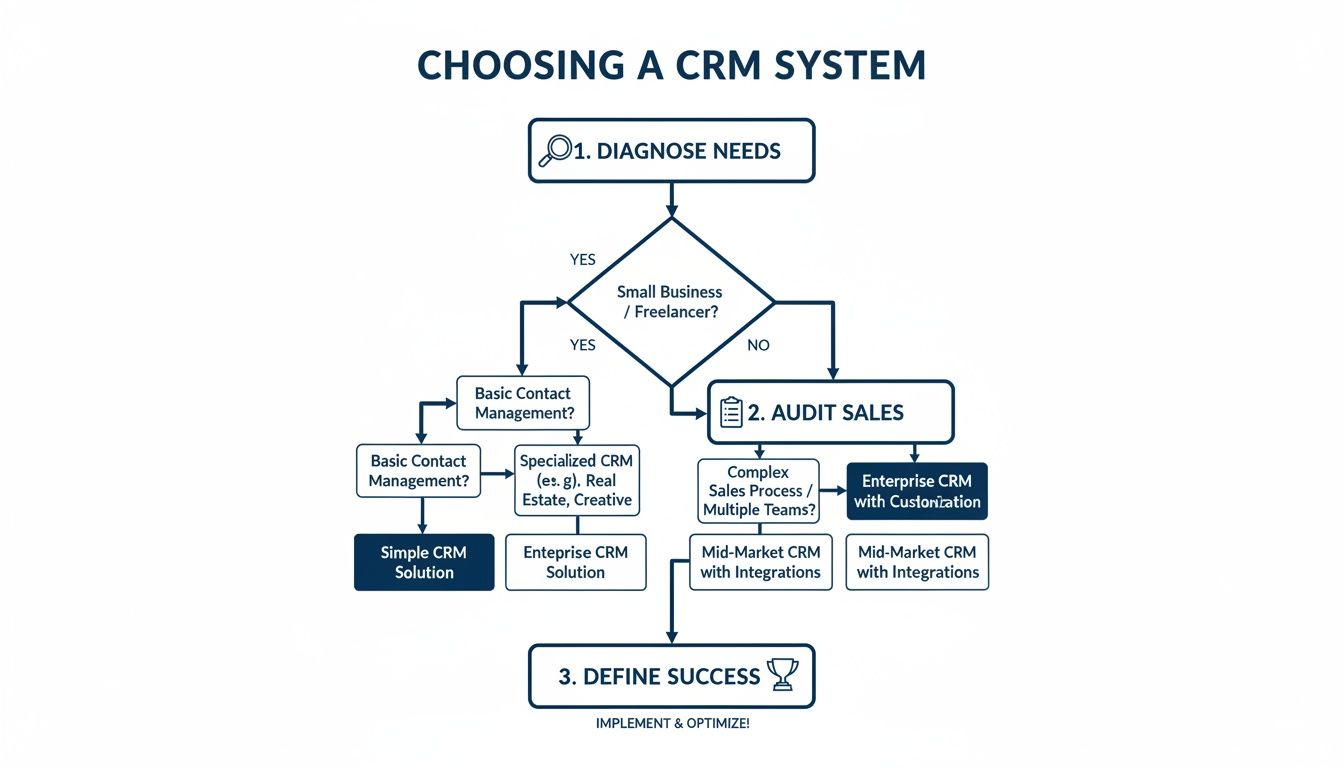
As you can see, a successful CRM choice always begins with a hard look at your internal sales process and a clear definition of what "success" actually looks like.
Zoho: The All-In-One Business Suite
The main draw for Zoho is its massive suite of interconnected business apps. It offers everything from CRM and email marketing to accounting and project management—often at an extremely competitive price. For businesses that want to run their entire operation within a single ecosystem, Zoho makes a compelling case.
This "all-in-one" approach has its limitations. While Zoho does a lot of things, it’s not necessarily the absolute best at any single one of them. The user experience can feel less polished, and getting all the different Zoho apps to talk to each other seamlessly can take a surprising amount of setup. It’s a fantastic option for businesses on a tighter budget who need a wide range of tools and are willing to put in the time to connect the dots.
What to look for in Zoho: An enormous suite of business apps at a budget-friendly price. If you need a CRM that can also handle your invoicing, project management, and HR—and you're trying to get the absolute maximum functionality for your money—the Zoho ecosystem is tough to beat.
GoHighLevel: The Sales and Marketing OS for SMBs
GoHighLevel throws out the old playbook and consolidates all the essential sales and marketing tools into one unified platform built specifically for small to mid-sized businesses. It blends a powerful CRM with native tools for email and SMS marketing, funnel building, call tracking, online scheduling, and reputation management. That consolidation is its superpower.
This is a game-changer for small and medium-sized enterprises (SMEs), which are rapidly adopting CRM and represent the fastest-growing market segment. In the U.S. alone, the CRM market is projected to more than double from USD 24,972.6 million in 2024 to USD 51,527.0 million by 2030, with SMEs leading that charge. You can dig into the data behind this trend over at Grand View Research.
For a business owner, this means getting rid of five or six different software subscriptions and using a single login. The platform is built for action—automating follow-up, managing every conversation in one inbox, and tying marketing campaigns directly to sales results without needing messy third-party integrations. You can get a deeper look into its specific strengths in our guide to the best CRM for small business.
What to look for in GoHighLevel: Complete consolidation of the sales and marketing tech stack into one platform. If your main goal is to eliminate software chaos, slash your monthly tech spend, and have a true operational command center for capturing, nurturing, and communicating with leads, GoHighLevel was built for you.
Evaluating CRM Scalability and Total Cost of Ownership

A CRM's sticker price is just the tip of the iceberg. The number on the pricing page almost never reflects the total cost of ownership (TCO), a metric that captures every dollar and hour you’ll pour into making the system actually work. Flying blind on TCO is a surefire way to blow your budget on a system that costs more than it delivers.
When we conduct a customer relationship management review, we don't just look at features. We approach it from an engineering perspective, diagnosing every potential cost—both obvious and hidden—to calculate the true investment you're making.
Deconstructing the Total Cost of a CRM
The real price of any CRM is a mix of direct and indirect expenses. It’s the hidden costs that blindside most businesses after they've already signed the contract. Don't let that be you.
Here are the primary cost factors you absolutely have to account for:
- Subscription Fees: This is the base cost, but the devil is in the details. Watch out for user minimums and contact limits, because your costs can jump significantly once you cross those thresholds.
- Implementation and Onboarding: Will you need a consultant just to get the system running? A platform like Salesforce, for example, often requires a hefty upfront investment for expert implementation.
- Training and Adoption: How much time will your team spend learning the new software? Lost productivity during that learning curve is a real, though often unmeasured, cost.
- Integrations and Add-ons: Does the CRM talk to your accounting software or ERP system out of the box? Or will you need a third-party connector like Zapier? Those "small" monthly fees add up fast.
The most dangerous hidden cost is "feature creep." This is what happens when you're forced to upgrade to a pricier tier just to unlock one or two critical functions that were conveniently locked away in the entry-level plans.
Forecasting Scalability for Your Future Needs
Scalability isn’t just about handling more contacts. It’s about whether the system can support more complex processes as your business grows. A CRM that’s perfect for a 5-person shop might completely fall apart for a 25-person team with multiple sales pipelines.
A cheap system today could force an expensive and disruptive migration in just two years. Think of it like planning a factory floor—you wouldn't install equipment without leaving room to add new production lines. Your CRM is no different. You have to forecast your operational growth and make sure your chosen platform can keep up.
Questions to Diagnose CRM Scalability
To stress-test a platform’s ability to grow with you, you need to ask the right questions. Here’s where we start:
- Contact & User Pricing: How exactly does the price change as we add more contacts or team members? Is the cost per user linear, or do we get better economics at scale?
- Automation Capabilities: Are the powerful automation features available on lower tiers, or are they locked behind an expensive "Enterprise" paywall? A system like GoHighLevel builds in robust automation from the start, while others make you pay a premium for it.
- API and Integration Limits: Does the platform cap how many times your other software can "talk" to it each day? Hitting those API call limits can bring your entire operation to a grinding halt.
- Customization Flexibility: As your sales process evolves, can you easily add new pipeline stages, custom data fields, and tailored reports without needing to hire a developer?
Choosing a CRM is a long-term commitment. By calculating the total cost of ownership and rigorously evaluating scalability, you protect your investment. You end up with a partner for growth, not just a piece of software for today. This diagnostic approach grounds your customer relationship management review in reality, not just sales hype.
Why We Built Our Agency on GoHighLevel (And Recommend It to Our Clients)
After conducting our own deep-dive customer relationship management review, we made a crucial decision: to build our agency’s entire operational framework on GoHighLevel. We recommend it to the businesses we work with for one simple reason—it solves the single biggest headache they all share: tech stack chaos.
Most business owners find themselves duct-taping five, six, or even ten different software tools together to run their sales and marketing. You have one platform for email, another for scheduling, and a third for landing pages. It’s a mess of data silos, ballooning monthly costs, and clunky workflows.
GoHighLevel was built from the ground up to fix this. It’s a true all-in-one platform, combining these critical functions into a single, cohesive operating system for your business.
From Multiple Bills to One Command Center
The real transformation with GoHighLevel is consolidation. Instead of forcing your team to jump between a half-dozen different logins, you get one unified inbox, one central contact database, and one set of automation rules that runs the whole show. This isn't just about convenience; it's about building a customer journey that actually makes sense.
For our clients, the impact is immediate and tangible.
- Slash Your Software Spend: You can cancel separate subscriptions for email marketing, funnel builders, and scheduling tools. We often see clients save hundreds of dollars a month right out of the gate.
- Simplify Your Workflows: With everything under one roof, your team can launch campaigns faster and with far fewer opportunities for things to break.
- See the Whole Picture: Every interaction—every email opened, form filled out, phone call made, or text message sent—is tracked in one contact record. You get a complete, 360-degree view of every lead.
This integrated approach is quickly becoming the new standard. The market for cloud-based CRMs is projected to explode by USD 59 billion between 2022 and 2027, driven by the demand for the exact kind of built-in AI and automation our clients need. You can discover more insights about CRM market growth to see just how fast this shift is happening.
How This Works in the Real World for Manufacturers and Service Businesses
Features are one thing, but a generic customer relationship management review won’t tell you how a tool solves your specific problems. Here are a couple of real-world examples of how we use this system for our clients.
Example 1: Automated Nurturing for a Manufacturer’s Sales Rep
A potential customer downloads a technical spec sheet from a manufacturer's website. In a disconnected system, that lead might just sit in an email list, getting cold while waiting for a salesperson to manually follow up.
With GoHighLevel, we build a simple, automated workflow:
- The moment the form is submitted, the contact is created in the CRM and tagged as a "Hot Lead."
- The system instantly assigns the lead to the correct regional sales rep.
- A personalized email and SMS are immediately sent from that rep, offering to answer questions about the spec sheet.
- If the lead doesn't reply in 48 hours, a follow-up task is automatically dropped into the rep's calendar.
This entire sequence runs on autopilot, making sure 100% of leads get immediate and persistent follow-up without anyone lifting a finger. This is the transformation from manual chaos to a predictable system.
Example 2: A Reactivation Campaign for a Local HVAC Company
A local HVAC company has a list of 2,000+ past customers they haven't talked to in over a year. Calling or emailing them one by one would be a massive, time-consuming project.
Using GoHighLevel, we can spin up a quick reactivation campaign:
- First, we segment the customer list based on their last service date.
- Then, we launch an automated SMS campaign offering a "We Miss You!" discount on a seasonal tune-up.
- Anyone who replies is funneled straight into the unified inbox, where a team member can book the appointment right inside the platform's calendar.
This type of simple, automated campaign can reactivate 5-10% of a dormant customer list in just a few days, pulling revenue out of a previously dead asset.
Knowing When GoHighLevel Isn't the Right Fit
Our job is to find the right solution for you, and that requires complete transparency. GoHighLevel is a powerhouse, but it’s not the perfect tool for every single business on the planet.
It’s an absolute game-changer for small to mid-sized B2B companies, service businesses, and manufacturers that need to consolidate their core sales and marketing operations. However, if you're a massive enterprise with thousands of employees and a highly complex sales process, a system like Salesforce might be a better—albeit far more expensive and complicated—choice.
For the vast majority of businesses we serve, GoHighLevel hits the sweet spot. It provides the ideal balance of power, simplicity, and affordability needed to drive real, measurable growth. It's the engine we trust to build efficient, scalable marketing systems.
Your 90-Day CRM Implementation Roadmap

Picking the right CRM is just the first step. The real ROI comes from a smart, structured implementation—something most businesses fumble. A powerful new system is useless if it just sits there collecting digital dust because your team isn't using it correctly.
To make sure that doesn't happen, we use a practical, 90-day roadmap. This plan is designed to deliver a quick win, prove the system's value, and build momentum. It's the same approach we use with clients to ensure a smooth transition that minimizes headaches and maximizes results from day one.
Phase 1: Foundation (Days 1-30)
The first 30 days are all about building a rock-solid foundation. Forget about launching complex campaigns; the goal here is to get your data, team, and core processes set up right. Rushing this stage is the fastest way to guarantee messy data and poor user adoption down the line.
You're focusing on migrating clean information and setting up the system to mirror how your business actually operates. It's less about shiny features and more about getting the fundamentals perfect.
Your Foundation Checklist:
- Data Migration: Start by exporting contacts from spreadsheets, email clients, and old systems. Crucially, clean this data before you import it. Get rid of duplicates, fix formatting, and standardize your fields.
- User Onboarding: Add your team to the platform. Make sure you assign the correct roles and permissions so everyone only sees what they need to see.
- Pipeline Configuration: Map out your sales stages directly in the CRM. These should reflect your real-world process, from "New Lead" to "Quote Sent" and "Deal Won."
- Core Integrations: Connect your essential day-to-day tools, like your business inbox (Google Workspace or Outlook) and your digital calendar.
This initial phase is non-negotiable. A clean data import and a pipeline that actually reflects your sales process are the bedrock of a successful CRM. Get this right now, and you'll prevent countless headaches later.
Phase 2: Activation (Days 31-60)
With a solid foundation in place, the next 30 days are about bringing the system to life. This is where you start using the CRM's core communication and automation tools to actually engage with leads and customers. Your team should now feel comfortable navigating the platform and managing their contacts within it.
The main objective is to launch your first simple, automated campaign. This delivers a tangible result—like booking a meeting or re-engaging a cold lead—that proves the system's value. For a deeper dive, our guide on how to implement a CRM system breaks it down even further.
Your Activation Checklist:
- Launch a Simple Workflow: Build your first automated sequence. It could be as simple as a "welcome" email for new leads or a two-step follow-up for contact form submissions.
- Team Training on Workflows: Hold a hands-on training session focused on daily use. Show the sales team exactly how to move deals through the pipeline and use the unified inbox to manage conversations.
- Set Up Canned Responses: Create pre-written email and SMS templates for common questions. This is a massive time-saver for your team.
Phase 3: Optimization (Days 61-90)
The final 30 days of your roadmap are all about reviewing the data and optimizing your processes. By now, you should have a baseline of activity—leads coming in, deals moving, and automations running. Now it’s time to ask, "What's working, and how can we make it better?"
This is where you stop guessing and start using the CRM's reporting tools to make data-driven decisions.
Your Optimization Checklist:
- Review Initial Reports: Dig into your sales pipeline report. Where are deals getting stuck? What's your average close time?
- Gather Team Feedback: Talk to your team. Find out what they love and what frustrates them. Their feedback is gold for spotting friction points and opportunities for better automation.
- Refine Your Workflows: Based on that data and feedback, make small tweaks. Maybe you add another follow-up email to a sequence or adjust the timing of an SMS.
This 90-day roadmap transforms a CRM from a passive database into an active, revenue-generating engine. It breaks a daunting project into a manageable, three-stage process focused on building momentum and proving its value, fast.
Your CRM Implementation Questions, Answered
Jumping into a new CRM system always kicks up a lot of questions, even with a solid plan in place. That’s perfectly normal. You’re redesigning a core part of how you do business, and it’s smart to get into the details. We’ve pulled together the most common questions we hear from business owners to give you straight, practical answers.
Think of this as the final diagnostic check before you commit to a system that’s about to become the operational heart of your company. Our goal here is to give you the clarity to move forward with confidence.
How Do I Know If My Business Is Ready for a CRM?
You're ready for a CRM the moment you start seeing symptoms of process breakdown. Are good leads slipping through the cracks? Is your sales team's follow-up hit-or-miss? Can you actually trace a customer’s journey from their first call to the final invoice? If spreadsheets are holding your most critical data hostage and your sales process feels like organized chaos, it’s time.
The trigger isn’t about company size; it’s about operational complexity. Even a small team with a high volume of leads or a long sales cycle can get a massive lift from the structure and automation a real system provides. It’s all about building a scalable foundation before the small cracks turn into major fractures.
What Is the Biggest Mistake Businesses Make When Implementing a CRM?
The single biggest—and most expensive—mistake is a lack of team adoption. A powerful CRM that nobody on your team uses is just an expensive, glorified database. This failure almost always boils down to two things: the system is way too complex for your team's actual needs, or leadership failed to explain the "why" behind the change.
A successful rollout depends on choosing a platform that’s genuinely user-friendly and clearly communicating how it will make your team’s jobs easier, not harder. We always recommend starting small. Pick a couple of core features that solve an immediate, painful problem. This proves the value right out of the gate and gets your team to actually embrace the new tool.
Can a CRM Like GoHighLevel Really Replace Multiple Marketing Tools?
Yes, for the vast majority of small and midsize businesses, it absolutely can. GoHighLevel was built from the ground up as an all-in-one platform to consolidate your sales and marketing tech. It natively handles email campaigns, SMS marketing, landing pages, web forms, online scheduling, and call tracking—all inside one system.
For a manufacturer or a local service company, this kind of consolidation is a game-changer. It means you can ditch separate monthly subscriptions for tools like Mailchimp, Calendly, and ClickFunnels. That doesn't just cut costs; it dramatically simplifies your workflow and guarantees all your customer data lives in one place.
How Much Customization Does a Typical CRM Implementation Require?
The level of customization really depends on your specific business processes. A super simple, linear sales cycle might work just fine with an out-of-the-box setup. But to get the maximum ROI, most B2B and manufacturing clients we work with need some level of tailoring.
This usually involves a few key steps:
- Configuring sales pipeline stages to perfectly mirror how you actually sell.
- Creating custom fields to capture industry-specific data—think project specs, machine types, or specific service requirements.
- Building automated workflows to take care of routine tasks like lead assignment, follow-up reminders, and post-sale communication.
Our entire approach is built on this principle: the CRM should be molded to fit your workflow, not the other way around. A system that forces you to change your proven processes is a system that's destined to fail.
Your CRM is the engine for your growth. At Machine Marketing, we specialize in implementing and optimizing GoHighLevel to build marketing and sales systems that deliver measurable results for manufacturers and service businesses. We handle the technical setup so you can focus on what you do best.
Ready to see how a properly configured CRM can transform your operations? Book a discovery call with us today to get your personalized diagnosis and roadmap.
