
If your lead generation has hit a wall, your email platform might be the problem. A direct email marketing platforms comparison reveals the massive gap between tools that just send emails and systems engineered for growth. The right platform is an engine, automating lead nurture and pushing sales forward. The wrong one is an anchor holding you back.
Diagnosing Your Current Email Marketing System
A system that doesn’t fit your business—whether you're a manufacturer or a local service provider—creates friction and costs you opportunities. We see this all the time: business owners using tools that can't connect to their CRM, segment audiences properly, or automate simple follow-ups. This guide is a direct, no-fluff comparison to help you diagnose what you need and choose a tool that delivers a real return.
We’re going to skip the generic feature lists and focus on what actually drives results for owners like you.

Why This Diagnosis Matters
Email marketing isn’t just about sending newsletters; it’s an economic powerhouse. Businesses see an average ROI of $36 to $45 for every $1 spent. For manufacturers, engineers, and sales teams, this means email sequences can warm up old leads and nurture new ones far more cheaply than running paid ads. Just look at triggered campaigns—they pull in 8x higher open rates than generic bulk emails, a huge advantage in long B2B sales cycles. You can see the full data breakdown and more key email marketing statistics here.
Before you compare platforms, run a quick diagnostic on your current setup. Ask yourself these questions:
- Integration Gaps: Does my email tool talk to my CRM, or am I manually exporting and importing lists?
- Automation Limits: Can I build workflows that trigger when a lead visits a specific product page? Or am I stuck with a basic "welcome" series?
- Segmentation Issues: How easily can I group my audience by industry, purchase history, or engagement?
- Reporting Clarity: Are my reports giving me actionable data, or just vanity metrics like open rates that don’t tell the whole story?
Your answers will shine a spotlight on the friction in your system. This comparison is about finding a platform that solves these specific problems and turns your email marketing from a chore into an automated growth machine.
Laying the Groundwork: How to Evaluate an Email Marketing Platform
Before you start comparing email marketing platforms, you need a solid framework. It’s easy to get distracted by flashy features that do nothing for your bottom line. From an engineering perspective, a powerful system is built on a strong foundation, not a dozen superficial add-ons.
To figure out what you truly need, we focus on four pillars. These four areas determine 90% of a platform’s success for your business. Get them right, and you're building a growth engine. Get them wrong, and you’re just buying a prettier version of the problem you already have.

The Four Pillars of Platform Evaluation
Forget sprawling feature lists for a minute. Use these four pillars to guide your decision. They force you to think about how a tool will actually perform inside your business.
Pillar 1: Automation and Workflow Capabilities
This is about more than just a welcome email. Real automation runs on conditional logic—if a lead visits a product page, then they get a targeted follow-up. A weak system just sends timed sequences. A strong one reacts to what your customers are doing in real time.Pillar 2: Segmentation and Personalization
How deep can you go? Basic platforms let you segment by list. Advanced platforms let you create dynamic segments based on purchase history, email engagement, website activity, and custom tags. This is the difference between a generic newsletter blast and a personal message that connects.Pillar 3: CRM and App Integrations
Your email platform must communicate with the rest of your tech, especially your CRM. If your sales team can't see marketing interactions inside their CRM, you’ve created a data silo. This pillar is about having a single source of truth for every customer relationship.Pillar 4: Deliverability and Analytics
Great features are useless if your emails land in spam. The platform's sending reputation is critical. Strong analytics go beyond opens and clicks to show you revenue per email, lead-to-customer conversion rates, and the actual ROI of your campaigns. You can learn more about how to protect and improve your email deliverability best practices in our guide.
Key Insight: Stop asking, “What features does this platform have?” Start asking, “How does this platform solve my specific automation, segmentation, and integration problems?” This simple shift turns you from a feature shopper into a system builder.
A Quick Diagnostic for Your Business Needs
Before looking at a single platform, answer these questions about your own operations. Your answers will become your personalized checklist.
Questions to ask yourself:
- On Automation: Do I need to trigger emails based on website behavior (like visiting a pricing page)? Is my sales cycle long enough for multi-step, logic-based nurture sequences?
- On Segmentation: Do I need to segment customers by their purchase history? Is it important to tag leads based on how they found us (e.g., trade show, website form)?
- On Integration: What is our primary CRM, and does this platform offer a deep, two-way sync with it? Do we need to connect our email platform to other tools, like an e-commerce store or scheduling software?
- On Analytics: Are we okay with just seeing opens and clicks, or do we need to tie email campaigns directly to sales revenue?
Once you have these criteria locked down, you’re ready to conduct a meaningful email marketing platforms comparison that focuses on what will actually grow your business.
A Side-By-Side Email Marketing Platforms Comparison
With the framework in place, let's put these platforms to the test. This isn't just about reciting feature lists; it's about seeing how each one performs against the real-world challenges a business owner faces every day.
We're going to look at this through the lens of our four pillars, applying them to scenarios you'll recognize. The goal is to cut through the marketing fluff and match a platform's true DNA to your company's operational needs.
Mailchimp: The User-Friendly On-Ramp
There's a reason Mailchimp is the first stop for so many businesses. Its interface is clean, and you can get a basic newsletter out the door quickly. It’s a solid launchpad for anyone just starting with email marketing.
However, that initial simplicity can become a ceiling. As your ambitions grow, you may feel the constraints. While Mailchimp has added automation features, they often lack the depth of its competitors. Segmentation typically relies on managing separate lists instead of flexible tags, which gets messy—and expensive—as you scale.
- Best For: New businesses that need to send simple, good-looking newsletters and announcements.
- Key Limitation: Costs can balloon as your list grows, and the automation doesn't keep pace with more sophisticated platforms. You'll eventually hit a wall when you try to build complex, behavior-driven campaigns.
ActiveCampaign: The Automation Powerhouse
ActiveCampaign is for businesses that don't just do email marketing—they build their entire sales and nurturing process around it. Its superpower is an incredibly robust and flexible automation engine. You can create workflows based on almost anything: website visits, email opens, or deal stages in its built-in CRM.
Imagine you're a B2B manufacturer with a six-month sales cycle. This is where ActiveCampaign shines. You can build intricate nurture sequences that educate prospects over time, automatically tagging them based on the whitepapers they download. This hands your sales team a prioritized list of the hottest leads.
Key Differentiator: ActiveCampaign's magic is the deep connection between its marketing automation and CRM. Data flows seamlessly between sales and marketing, tearing down the silos that hamstring so many companies.
Of course, all that power comes with a steeper learning curve. The visual workflow builder is intuitive, but unlocking the platform's full potential is a real commitment. It’s an investment in building a serious marketing and sales system.
Constant Contact: The Small Business Staple
For years, Constant Contact has been a trusted workhorse for small businesses, non-profits, and local shops. It nails the fundamentals: creating professional emails, managing lists, and delivering easy-to-understand reports. Its event marketing and survey tools are also solid features that set it apart.
The limitations appear with advanced automation and deep integrations. It handles basic autoresponders well, but it doesn't have the sophisticated "if-this-then-that" logic or behavioral triggers found in a tool like ActiveCampaign. If your strategy depends on multi-step, automated follow-up, you'll find it restrictive.
Think of it as a dependable pickup truck. It gets the job done reliably every day but isn't built for the racetrack. It's a solid, safe bet for businesses focused on consistent communication rather than complex, automated nurturing.
GoHighLevel: The All-In-One Operating System
GoHighLevel is a completely different animal. It isn’t just an email tool; it's a unified sales and marketing operating system. Email and SMS are baked right in, but they’re part of a larger ecosystem that includes a CRM, funnel builder, appointment scheduler, and reputation management.
For a local service business, this consolidation is a game-changer. You can build one automation that kicks off with an email, sends a follow-up text if there's no reply, and automatically requests a review after the job is done—all from a single dashboard. No more duct-taping three different apps together.
- Real-World Example: A local HVAC company uses GoHighLevel to handle new website leads. A form submission instantly creates a contact, drops them into a nurture campaign (email + SMS), and alerts the sales team. The entire process, from lead to booked appointment, lives in one place.
The trade-off? An all-in-one system's individual features might not be as deep as a specialized, best-in-class tool. The email editor may not have as many slick templates as Mailchimp. But for many businesses, the power of having everything truly unified is worth more than having the absolute best version of every single feature.
Navigating The Crowded Marketplace
The demand for these tools is exploding. The email marketing software market hit $1.38 billion in 2023 and is projected to reach $3.73 billion by 2032. This growth means more options are available than ever, powering everything from newsletters (used by 81% of companies) to automated welcome sequences (79%).
With so many choices, it's easy to get lost. To get a wider view of the landscape, checking out an in-depth review of the 12 Best Email Marketing Software Options can introduce other contenders that might be the perfect fit for your specific niche.
Feature Comparison For Key Business Use Cases
Let's make this comparison practical. The table below isn't a simple feature checklist; it's a diagnosis of how these platforms handle mission-critical tasks for different types of businesses. It's designed to help you see which one aligns with your operational reality.
| Feature/Use Case | Mailchimp | ActiveCampaign | GoHighLevel (as an integrated system) |
|---|---|---|---|
| B2B Lead Nurturing (Long Sales Cycle) | Limited. Good for a simple drip series but struggles with the complex, behavior-driven logic needed to nurture a lead over several months. | Excellent. This is its sweet spot. You can build incredibly detailed, branching workflows that react to prospect engagement, site visits, and sales stage changes. | Good. Offers solid email and SMS automation, but the logic isn't as granular as ActiveCampaign. Its strength is in combining channels, not just deep email logic. |
| Local Service Business Lead Management | Poor. Simply not built for this. It lacks the native SMS, scheduling, and two-way communication features needed to manage a lead from first contact to appointment. | Fair. It can handle the email nurture part well, but you’d need to integrate separate tools for SMS, scheduling, and phone calls, which can get complicated and costly. | Excellent. Purpose-built for this exact scenario. A lead is captured, nurtured via email/SMS, booked on a calendar, and managed in the CRM, all seamlessly within one platform. |
| Segmentation for Targeted Campaigns | Fair. Primarily list-based, which is rigid and can lead to paying for duplicate contacts. Dynamic segmentation is possible but clunky compared to tag-based systems. | Excellent. Its flexible tagging and custom field system allows for razor-sharp segmentation based on virtually any data point you collect on a contact. | Good. Provides robust tagging and smart lists that cover the bases for effective segmentation in most SMB use cases. It gets the job done well. |
| CRM Integration and Sales Alignment | Fair. It integrates with many CRMs, but the sync is often surface-level. It feels like a separate marketing tool bolted onto a sales tool, creating data silos. | Excellent. The built-in CRM and deep integrations make sales and marketing alignment feel effortless. Sales reps can see every marketing touchpoint right on the contact record. | Excellent. It is the CRM. Sales and marketing functions are inherently unified, providing a single source of truth for the entire customer journey by default. |
By looking at these specific use cases, the right choice starts to become clearer. It’s not about which platform is "best" overall, but which one is built to solve the specific problems your business faces every day.
Choosing the Right Platform for Your Business Model
Theory is nice, but practical application is what drives results. A long list of features doesn't tell you how a tool will solve your specific business challenges. The real test is matching the right platform to your day-to-day operational reality.
To help you connect the dots, we're moving from a simple comparison to direct, actionable recommendations. We’ll walk through three common business scenarios, diagnose the core problem, and prescribe the type of platform that provides the most effective solution. This is about seeing exactly how your choice translates into tangible business transformation.
To start, this decision tree can help you determine which path to explore based on your immediate goals.
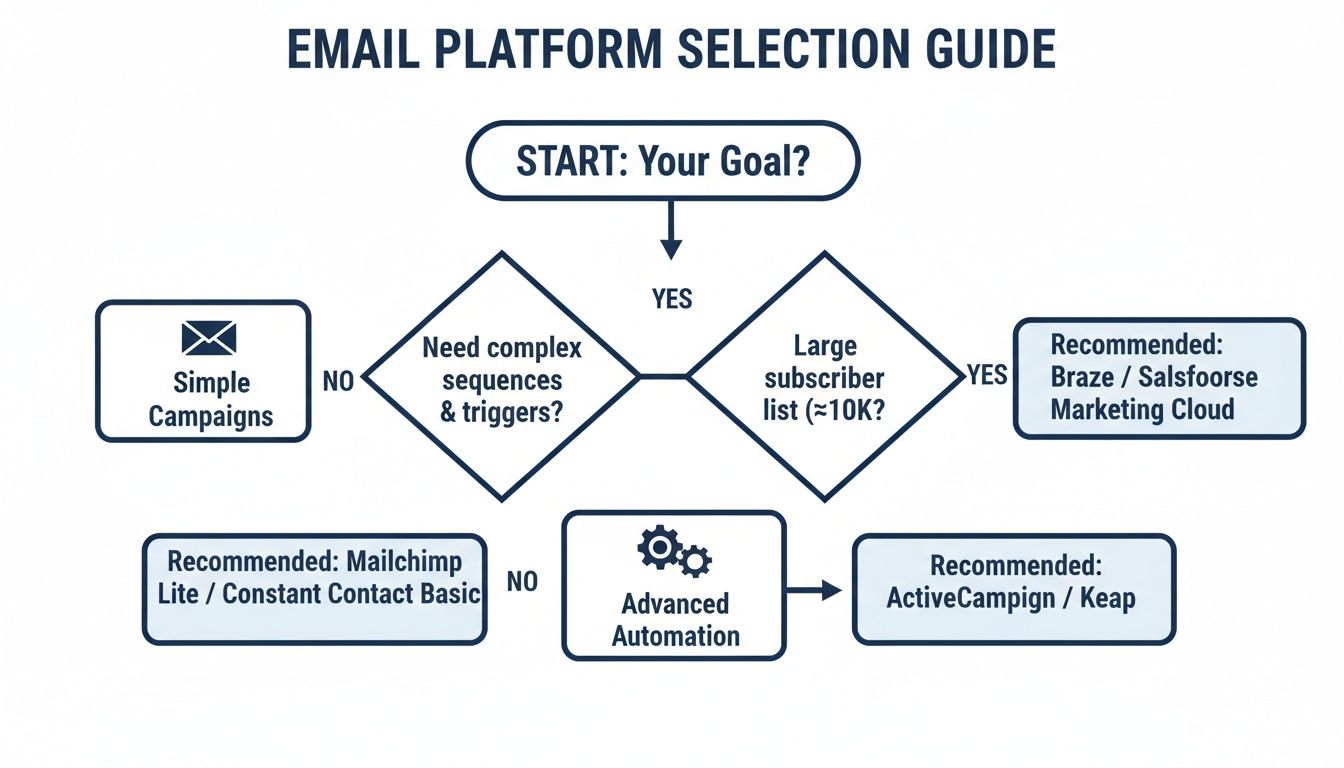
As the chart shows, the first question to answer is what you need to accomplish—simple campaigns or complex automation. That single answer will set the stage for a much clearer diagnosis.
Scenario 1: The B2B Manufacturer
Diagnosis: The biggest challenge for most B2B manufacturers is managing a long, complex sales cycle. Leads aren't making impulse buys; they need consistent, educational follow-up over weeks or months. The classic problem is a disconnect between marketing efforts (like capturing leads at a trade show) and the sales team’s follow-up process. This gap causes valuable, hard-won leads to go cold.
Solution: For this business model, a platform with robust lead nurturing automation and deep CRM integration is non-negotiable. Your system must trigger multi-step email sequences based on a lead’s behavior, like downloading a technical spec sheet. We're not talking about sending a monthly newsletter; this is about building an automated system that educates and qualifies leads before a sales rep ever gets involved. Tools like ActiveCampaign are engineered for this exact scenario.
Transformation: With the right system in place, marketing hands off genuinely warm, educated leads to the sales team. Sales reps can see a lead's entire engagement history, leading to more productive conversations and a shorter sales cycle. The result is a predictable lead generation engine that works in the background, freeing up your sales team to focus on closing deals.
Scenario 2: The Local Service Business
Diagnosis: A local service business—think an HVAC company, plumber, or contractor—lives and dies by its ability to respond to inquiries fast and manage its local reputation. The problem is usually operational chaos. Leads flood in from website forms, phone calls, and Google Business Profile, but there's no single system to manage them. Follow-up is manual and inconsistent, and asking for reviews is an afterthought.
Solution: The perfect fit here is an all-in-one platform that combines email, SMS, and reputation management. In this context, email is just one piece of the puzzle. The real power comes from a unified workflow that captures a lead, sends an immediate SMS confirmation ("We got your request!"), follows up with an email, and automatically sends a review request after the job is done. A system like GoHighLevel is designed specifically for this, pulling all communication channels into one manageable inbox.
Transformation: The business goes from reactive to proactive. Lead response times drop dramatically, which instantly increases the booking rate. The automated review requests consistently build social proof on platforms like Google, which in turn drives more inbound leads. It creates a powerful, virtuous cycle of communication, service, and reputation that fuels local growth.
Scenario 3: The Growth-Focused SMB
Diagnosis: A growing Small to Midsize Business (SMB) often runs into a different problem: they’ve outgrown their first, basic email tool. Their list is bigger, their customer base is more diverse, and sending one-size-fits-all campaigns is starting to hurt engagement. The core issue is a lack of sophisticated segmentation, preventing them from sending the right message to the right person at the right time.
Solution: The ideal solution is a scalable platform with advanced, tag-based segmentation and personalization features. This lets the business move beyond simple list management and start creating dynamic audience segments based on purchase history, website activity, and engagement level. The goal is to make every communication feel relevant. You can explore how different tools support these capabilities in our guide to building the right marketing technology stack.
Key Insight: You can’t personalize communication if you can’t segment your audience effectively. A platform that allows you to apply flexible tags and create rules-based segments is the foundation for any scalable email strategy.
- Transformation: By implementing a system that enables true personalization, the SMB sees a direct impact on the metrics that matter. Open and click-through rates improve because the content is more relevant. More importantly, customer lifetime value increases because the communication nurtures the relationship long after the first purchase. The business moves from generic broadcasting to building genuine, data-driven relationships at scale.
Your Practical Platform Implementation Plan
Choosing the right platform is just the first step. Now, the real work begins: turning that decision into a system that actually makes you money. Migrating your data and workflows can feel overwhelming, but when you break it down, it's a series of manageable steps.
This is more than just uploading a contact list. A successful migration is an engineering project. It demands a methodical approach to protect your sending reputation, avoid downtime, and get you to a positive ROI as fast as possible. This is the SOP we use to ensure a smooth transition.
Step 1: Diagnose and Clean Your Existing Data
Before moving a single contact, you have to know what you’re dealing with. A migration is the perfect opportunity to clean house. Trimming inactive contacts from your list will directly boost your deliverability and engagement from day one.
Start by pulling your entire contact list from your old system. And don't just grab emails—get all the custom fields, tags, and engagement history you can.
- Scrub Your List: Run your list through a verification service to weed out invalid addresses, inactive contacts, and spam traps. Starting with a clean list signals to email providers that you're a reputable sender.
- Segment for the Move: Isolate your most engaged subscribers—people who have opened or clicked an email in the last 90-120 days. This group will be the first to hear from you on the new platform.
Step 2: Configure and Warm Up Your New Account
With a clean list in hand, it’s time to set up your new platform for success. This involves critical technical steps that shield your sender reputation. Skipping this is like building a house with no foundation.
First, you must set up your sending domain correctly. This authenticates you as a legitimate sender and is non-negotiable for deliverability.
Next is the "warm-up." You can't just blast an email to 20,000 people from a brand-new system on day one. You need to ease into it, gradually increasing your sending volume over a few weeks.
Key Insight: Domain warming is the process of building trust with a new IP or domain. You're proving to inbox providers that you're not a spammer, which is absolutely critical for staying out of the promotions tab or, worse, the spam folder.
A standard warm-up schedule often looks like this:
- Week 1: Start small. Send only to your most engaged segment, capping it at 500-1,000 contacts per day.
- Week 2: Double your daily volume, still focusing on highly engaged subscribers.
- Week 3-4: Continue ramping up the volume and slowly start mixing in less-engaged segments.
Step 3: Rebuild and Integrate Your Core Systems
While your domain is warming up, you can start rebuilding your most important assets in the new platform. Don't try to do everything at once. Focus on recreating the systems that drive the most value for your business first.
Make these your priority:
- Core Automation Sequences: Rebuild your money-makers—your welcome series, lead nurturing campaigns, or abandoned cart sequences.
- Signup Forms: Swap out the old forms on your website with new ones from the new platform so no new leads fall through the cracks.
- CRM Integration: Set up and test the connection to your CRM. Ensure data is flowing correctly in both directions. For a deeper dive, our guide on database email marketing breaks down how a connected system drives results.
By following this three-step plan, you systematically de-risk the entire migration. You’re cleaning your data, protecting your reputation, and rebuilding your core systems in a logical order.
A Few Common Questions We Hear
Even after a side-by-side comparison, practical questions always pop up. We’ve been through this process with hundreds of business owners, so we’ve gathered the most common sticking points to help you get the final details sorted out.
Should I get a platform with a built-in CRM or integrate with my own?
This comes down to your sales cycle. For businesses like manufacturers with complex, multi-touch sales processes, a deep integration with a dedicated CRM is non-negotiable. It’s the only way to give your sales and marketing teams a single, real-time view of a lead’s entire journey.
On the other hand, if you're running a simpler B2C operation or a local service business, a platform with a solid built-in CRM might be all you need. Just be aware that a dedicated CRM almost always offers more power and room to grow.
What exactly is email deliverability, and why does it matter so much?
Think of deliverability as the foundation of your email marketing. It’s the percentage of your emails that actually land in an inbox instead of getting flagged as spam. A platform can have all the features in the world, but if your emails aren't being seen, it's a complete waste of money.
This is why we focus on reputable platforms. They pour resources into maintaining their sending infrastructure, which directly helps you. It's also why we insist on cleaning your email list and properly setting up your sending domain. These aren't suggestions; they're essential for reaching the people who want to hear from you.
Can I switch platforms without losing my subscribers?
Yes, absolutely. Any credible email platform will let you export your contact lists, usually as a CSV file. The trick to a smooth migration is making sure you export all important data, not just email addresses.
Our Pro Tip: Before you export, make a checklist of all the data points you use for segmentation. Think names, custom tags like "Trade Show Lead" or "Repeat Customer," purchase history, and other custom fields. A clean, complete export is the key to a painless transition.
What’s a realistic budget for an email marketing platform?
The cost can swing widely, but it almost always boils down to two things: how many contacts you have and which features you need.
Here’s a realistic breakdown of what to expect:
- For Small Businesses: Plan on spending anywhere from $20 to $150 per month for a solid platform with the fundamentals.
- For Advanced Needs: If you're looking for sophisticated automation, deep CRM integration, and have thousands of contacts, your costs will likely be in the $150 to $500+ per month range.
Our advice is to always frame the cost in terms of the potential return it can generate for your specific business goals, not just the monthly sticker price.
Feeling clear on your choice but need a hand with the technical setup and integration? Machine Marketing specializes in building and managing the integrated marketing systems that drive real growth for manufacturers and B2B businesses. We handle the migration so you can focus on what you do best. Book a discovery call with us at https://machine-marketing.com to get your growth engine running.
