
A procurement engineer downloads a specification sheet on Tuesday. A dealer representative calls on Wednesday. By Friday, the inside sales representative can't see either interaction in the CRM. The ERP shows a purchase order from a sister plant, but marketing can't connect that revenue to the campaign that introduced the company.
This is not a tooling problem. It's a wiring problem. A practical first-party data strategy connects the customer signals already sitting in your CRM, ERP, website, service system, email platform, and advertising accounts, then gives sales one usable account view. The objective isn't to collect more data for its own sake. It's to make the data you already own identify accounts, guide action, and explain pipeline performance.
Table of Contents
- Why Your Manufacturer Leads Live in Silos and What to Do About It
- What First Party Data Actually Means for a B2B Manufacturer
- The Four Stages of a Working First Party Data System
- Inventory and Governance Before You Buy Another Tool
- A 90 Day Implementation Roadmap for Manufacturers
- KPIs and Activation Use Cases Across CRM Email Ads and Sales
- Real World Manufacturer Examples and Templates
- Objections Trade Offs and Your Next Move
Why Your Manufacturer Leads Live in Silos and What to Do About It
Manufacturers often run capable systems that disagree with one another. The CRM knows who requested a quote, the website knows which technical pages a visitor reviewed, the ad platform knows which campaign generated the visit, and the ERP knows whether the account eventually purchased. None of those systems automatically understands the complete sequence.
That gap creates familiar symptoms:
- Sales distrusts marketing attribution: Reps see opportunities that appear disconnected from campaigns, even when a marketing interaction helped start the buying process.
- Marketing optimizes activity instead of revenue: Teams report downloads, clicks, and form fills because they can't reliably connect those actions to opportunities or orders.
- Account ownership becomes unclear: A distributor, sister plant, parent company, and end customer may appear as separate records.
- Forecasting loses context: Sales leaders can't tell whether an account is actively researching, waiting on engineering approval, or browsing.
The strategic shift toward owned data accelerated as marketers prepared for a cookieless future. A Google and Deloitte first-party data report found that 65% of survey respondents planned to increase their focus on first-party data to mitigate the loss of third-party cookies. Yet the same source set described a major execution gap. BCG reported that only about 30% of companies had created a single customer view across channels, while just 1% to 2% were using data to deliver a full cross-channel experience.
The implication is clear. The hard part isn't capturing another form submission. It's linking a quote request to a company, contact, web session, campaign, opportunity, and order without losing the meaning of each interaction.
Practical rule: Don't buy another platform until you can explain which system owns each customer field and how records join across systems.
Start with the two systems that disagree most often. Reconcile account names, domains, ship-to locations, contact emails, and opportunity identifiers. Then create one account-level view that sales can use during its normal workflow. That first connection will expose the next bottleneck more accurately than another software demonstration.
What First Party Data Actually Means for a B2B Manufacturer
First-party data is information your company collects directly through its own customer and prospect interactions, with consent where required. Google describes it as data gathered from multiple online and offline sources, including information such as demographics and purchase history, through direct relationships with customers. For a manufacturer, the phrase should include more than website analytics.
Your owned data may include:
- CRM accounts, contacts, opportunity stages, and sales activity
- ERP orders, invoices, product history, and ship-to locations
- Website visits, specification downloads, quote requests, and configurator activity
- Service tickets, warranty registrations, maintenance records, and documentation requests
- Trade show scans, distributor portal activity, and customer preference submissions
- Installed-equipment data or IoT telemetry, where collection is appropriate and consented
A first-party cookie is narrower. It's created by the website a visitor is using, not an outside party, and it helps that site recognize returning visitors, remember preferences, and measure activity. The first-party cookie definition explains that only the site's own domain can access it.
Second-party data belongs to another company but is shared through a direct arrangement. A distributor portal feed is a useful manufacturing example. Third-party data comes from external providers that aggregate or sell audience and intent information. It can support reach, but it isn't the same as intelligence from your direct customer relationship.
| Data Type | Manufacturer Example | Source | Control Level |
|---|---|---|---|
| First party | Quote request, CRM account, ERP order | Your owned channels and systems | High |
| Second party | Distributor-provided account activity | Direct partner arrangement | Shared |
| Third party | Purchased industrial intent segment | External data provider | Limited |
Collection alone creates a storage problem, not a growth system. The value appears when you resolve identity across records. Match a company domain, account identifier, DUNS number, ship-to address, or hashed contact email so a website visitor and CRM contact can belong to the same account.
Without that matching layer, each system keeps its own version of the buyer. If you're evaluating the difference between volunteered preferences and observed behavior, use this zero-party data overview as a related reference.
The Four Stages of a Working First Party Data System
A working system has four operating stages: collect, unify, activate, and measure. Treat them as connected production steps. If one fails, the downstream output becomes unreliable.
Collect the signals that matter
Capture behavioral, transactional, and declared information at meaningful touchpoints. That includes website forms, quote configurators, gated technical documents, dealer portals, trade show scans, service records, and post-sale interactions.
The question isn't “What can we capture?” Ask instead, “Which signal changes what sales or marketing does next?” A request for a CAD file may deserve different treatment from a general newsletter signup. A repeat visit to a compliance page may matter more than a single product-page view.
Unify accounts and contacts
Create a reliable account and contact layer. Use company domains, DUNS numbers, email hashing, CRM IDs, and carefully governed ship-to information to connect records across the CRM, ERP, marketing automation platform, warehouse, analytics, and ad systems.
This is identity resolution, and it's the technical bottleneck. If two systems use different account names or treat a plant location as a separate customer, activation and attribution will drift.
Activate the unified view
Push the resolved profile into the systems that influence revenue:
- CRM: Account scoring, buying-stage fields, ownership rules, and next-best actions
- Email: Nurture paths based on role, product interest, and sales stage
- Advertising: Matched account audiences and suppression lists
- Sales enablement: Playbooks triggered when account engagement changes
Activation should reduce manual research. A sales representative shouldn't need to open four systems to learn that an account requested a quote, downloaded a technical document, and has an open service issue.
Measure the commercial output
Track match rate, opted-in reach, pipeline influenced, and closed-won attribution back to the signals that informed action. Compare first-party audience performance with generic audience performance, then use the difference to decide whether capture surfaces and refresh automation deserve more investment.
Collecting without unifying produces dashboards nobody trusts. Unifying without activating creates a data lake with no revenue lift. Activating without measuring guarantees that budget waste remains hidden.
Inventory and Governance Before You Buy Another Tool
Do the audit before you approve a new platform. Most manufacturers already have customer truth distributed across the CRM, ERP, website forms, trade show scanners, service tickets, distributor portals, marketing automation, and advertising accounts.
Build a source register that answers five questions for every system:
- Who owns the data?
- How often does it refresh?
- How is consent captured?
- Which field joins it to other records?
- Who can change, export, or delete it?
The owner should be a named person, not a department. Sales Operations may own CRM standards, IT may own ERP records, and Marketing Operations may own web and advertising collection. The accountable person doesn't need to perform every task, but they must resolve conflicts and approve changes.
| Data Source | Owner | Durable Key | Consent Method | Refresh Cadence |
|---|---|---|---|---|
| CRM | Sales Operations | Account ID and hashed email | Form and sales-process record | Defined by system workflow |
| ERP | IT or Finance Systems | Customer ID and ship-to address | Transaction and customer relationship basis | Defined by order process |
| Website forms | Marketing Operations | Hashed email and company domain | Consent checkbox and timestamp | Near real time or scheduled sync |
| Distributor portal | Channel Operations | Partner account ID and domain | Partner agreement and documented permissions | Partner-defined feed |
| Ad accounts | Marketing Operations | CRM audience ID | Consent-aware audience sync | Campaign-dependent sync |
Your governance document doesn't need to become a legal encyclopedia. Start with one page covering what you collect, why you collect it, how long you retain it, who can export it, and what happens after opt-out.
Consent mechanics must account for the regulations that apply to your business. OneTrust's privacy-centric first-party data roadmap discusses consent management across frameworks including GDPR, CCPA, LGPD, TCPA, HIPAA, GLBA, and India's DPDPA. Your privacy team should determine the applicable requirements, especially where contracts or customer locations create additional obligations.
Use this marketing technology stack guide to keep the architecture tied to business processes rather than vendor categories. Finish with a stitchability test: can your current systems connect an identified website visitor to the CRM account they belong to? If not, that is your first project.
A 90 Day Implementation Roadmap for Manufacturers
Don't launch a giant transformation program. Run three focused 30-day sprints, each with a usable output. Assign only three core roles: a data lead to manage joins and quality, a marketing operations owner to manage collection and activation, and a sales champion with authority to change adoption rules.
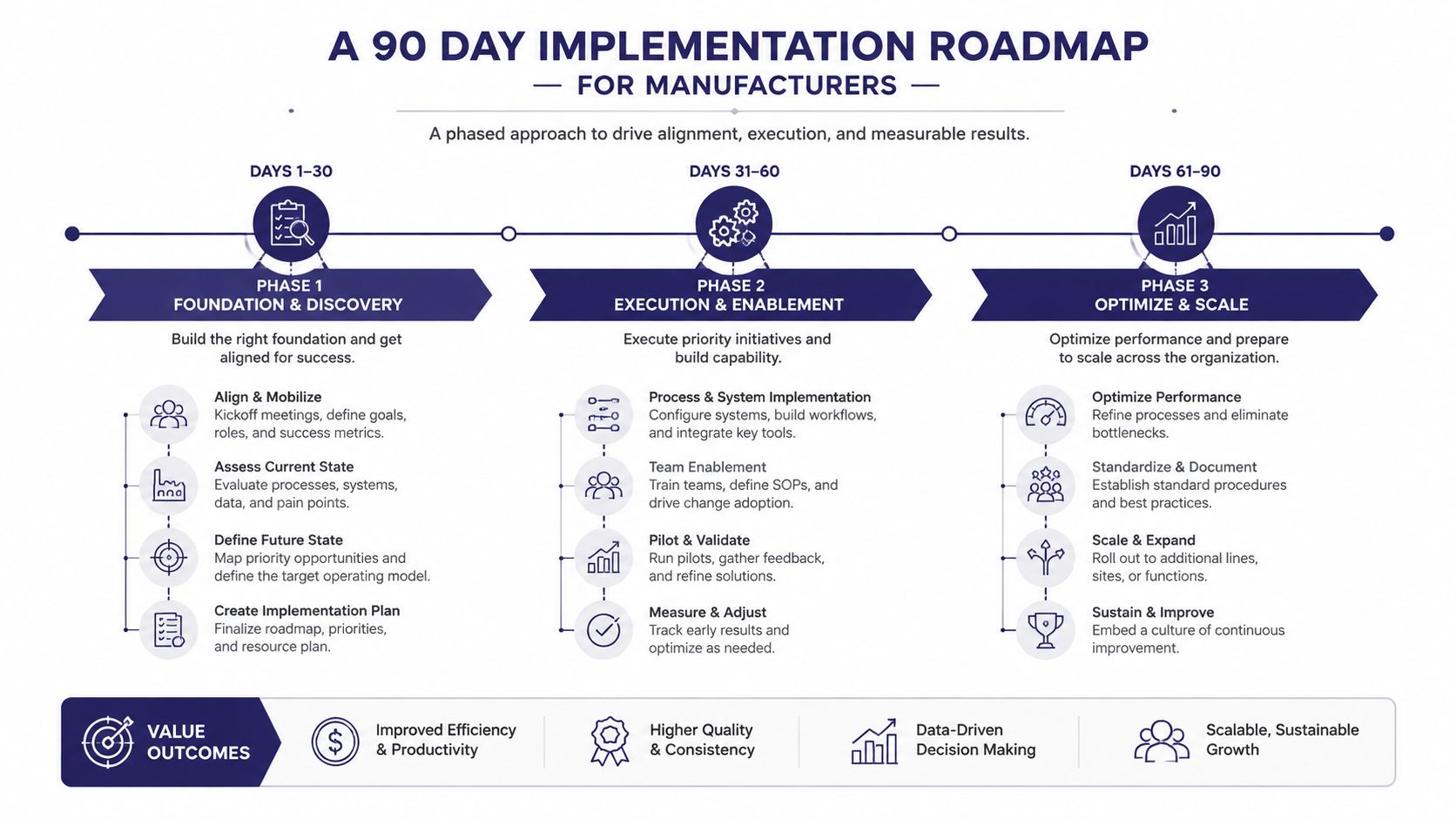
Days 1 through 30 build the plumbing
In week one, document the account keys used by the CRM, ERP, website, and advertising accounts. Decide which identifier will be authoritative for accounts and which contact fields can be safely matched.
In week two, ship the minimum viable integration. Connect CRM account data to web analytics and publish a basic account-level dashboard. Don't wait for warehouse architecture, advanced scoring, or perfect historical cleanup. Sales needs a useful first view while the broader system develops.
In weeks three and four, reconcile obvious duplicates and document exceptions. Identify parent companies, sister plants, distributors, and ship-to locations that currently distort reporting.
Days 31 through 60 improve identity and consent
Dedupe contacts using company domain plus hashed email where appropriate. Standardize form fields so sales receives usable company and role information without forcing prospects through an unnecessarily long form.
Add privacy and preference controls, then ensure each marketable record carries a consent status and timestamp. Connect the marketing automation platform only after the rules are clear. Otherwise, automation will spread bad assumptions faster than a manual process.
Days 61 through 90 activate the system
Push consent-aware audiences to Google and LinkedIn using CRM account membership. Build email paths around buying stage and role, not a generic funnel label. Create sales alerts for meaningful intent changes, such as a quote configurator completion or repeated technical-document engagement.
Review the system weekly with the three accountable roles. Ask which records matched, which signals reached sales, which audiences were suppressed, and which opportunities changed stage. Expand only when the current workflow works reliably.
KPIs and Activation Use Cases Across CRM Email Ads and Sales
Your dashboard should prove that the wiring works. Activity metrics still matter, but they aren't enough for a manufacturer with multiple stakeholders and a long buying cycle.
Match rate shows whether the system can recognize accounts
Match rate is the share of known accounts that your systems can identify consistently across web, email, and advertising. A strong result on priority accounts is more useful than broad coverage with unreliable joins.
Low match rates usually point to:
- Inconsistent account names: “ABC Holdings,” “ABC Manufacturing,” and a plant nickname may represent one buying organization.
- Missing durable keys: Records lack a company domain, customer ID, or approved location identifier.
- Poor contact hygiene: Shared inboxes, changed roles, and duplicate emails weaken contact matching.
Opted-in reach protects the relationship
Opted-in reach measures the contacts you can lawfully and appropriately market to. Segment by role and communication preference before sending. An engineering contact may want technical documentation, while a procurement contact may want quote or availability information.
Pipeline attribution connects first-party interactions to opportunities and closed-won records. Don't claim that one click caused a complex industrial purchase. Use attribution as a decision aid that shows which signals appeared in the buying path and whether those signals correlate with qualified pipeline.
Account-level engagement combines activity across roles and contacts. One champion's engagement can't represent an entire buying committee, especially when engineering, procurement, operations, and finance all influence the decision.
| KPI | Definition | CRM Play | Email Play | Ad Play | Sales Play |
|---|---|---|---|---|---|
| Match rate | Identifiable accounts across systems | Flag unresolved accounts | Suppress duplicate contacts | Improve audience quality | Prioritize recognized accounts |
| Opted-in reach | Marketable contacts with valid consent | Display consent status | Segment by permission and role | Build consent-aware audiences | Respect communication preferences |
| Pipeline attribution | Touchpoints connected to opportunities | Add influenced-signal context | Support stage-specific content | Compare account audiences | Review buying-path evidence |
| Account engagement | Activity across roles and channels | Show account heat | Tailor messages by stage | Retarget or suppress by account | Trigger a coordinated playbook |
Use the marketing analytics guide to keep reporting focused on decisions. The practical test is simple: when a KPI changes, does someone know what action to take in the CRM, email program, ad account, or sales process?
Real World Manufacturer Examples and Templates
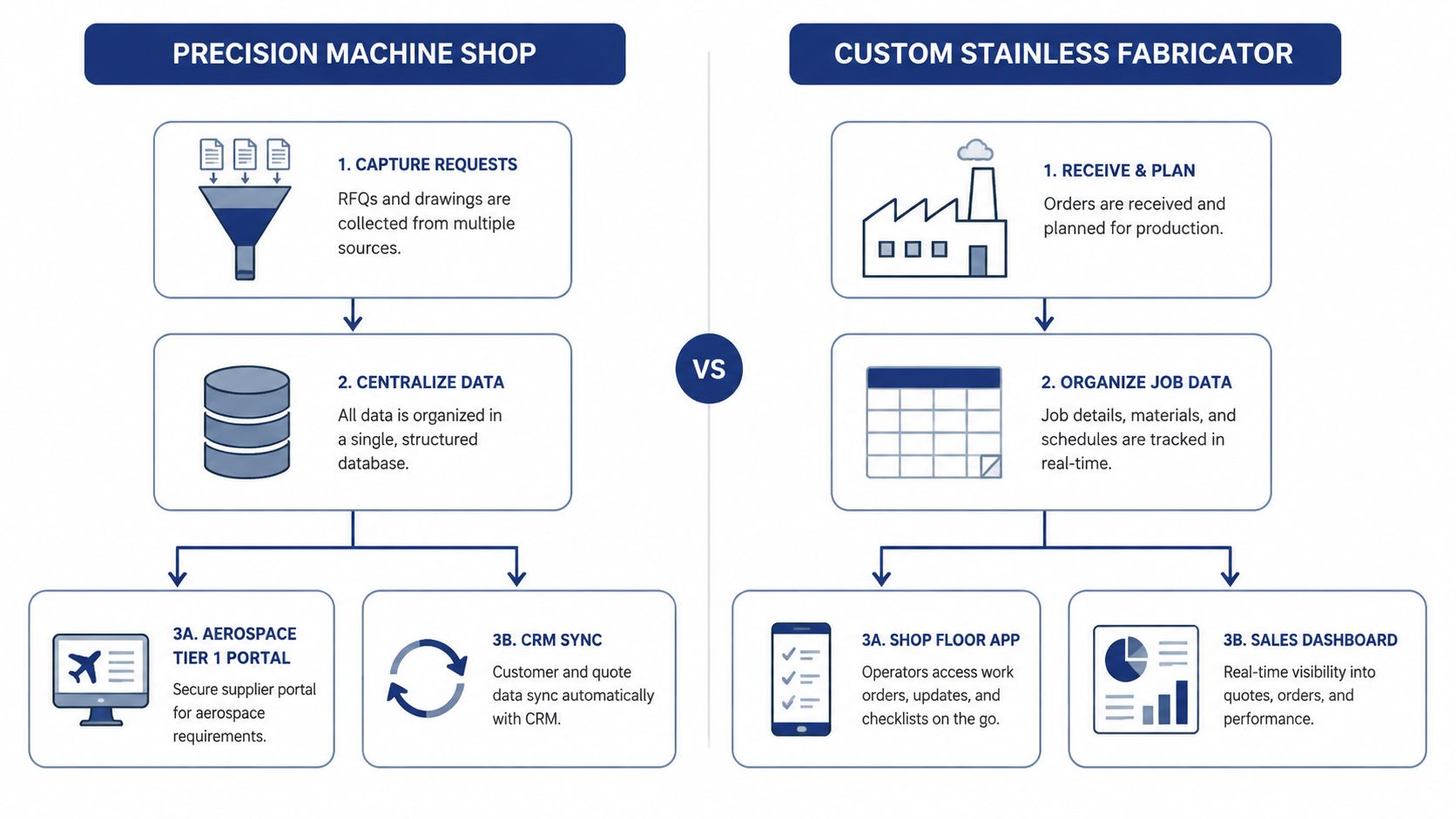
Consider a representative precision machine shop with a 120-person team selling to aerospace Tier 1 accounts. The shop already has technical downloads, quote requests, CRM records, ERP orders, and activity from an aerospace portal. The problem is that the portal account name didn't match the CRM account, while the ERP treated each ship-to location as the customer master.
The first fixes were operational:
- Map the aerospace portal account to the CRM parent account.
- Use the CRM account ID to connect quote activity with ERP order history.
- Give sales an account view showing technical engagement and open opportunities.
The delay came from treating the ERP ship-to record as the commercial account. That choice made one buying organization look like several unrelated customers.
Now consider a representative custom stainless fabricator with a 60-person team serving food and pharmaceutical EPCs. Its signals were spread across spreadsheets, a shop-floor application, email conversations, and a sales dashboard. The company ignored repeat documentation requests and project-specific form submissions because neither signal entered the account record.
The useful moves were to standardize company and project fields, connect the shop-floor reference to the CRM opportunity, and create a sales alert for repeat technical activity from an active account. The failure was adding more form fields before deciding which existing records should join.
Copy-paste templates
Data source inventory worksheet
| Source | Owner | Fields captured | Durable key | Downstream use |
|---|---|---|---|---|
Consent and retention rules
| Region or market | Purpose | Consent required | Retention rule | Opt-out action |
|---|---|---|---|---|
| EU | ||||
| US |
Weekly activation standup agenda
- Which accounts failed to match?
- Which consent records changed?
- Which new signals reached sales?
- Which audience or email rule activated?
- Which opportunity or order now has better attribution?
- What single data-quality issue gets assigned this week?
Objections Trade Offs and Your Next Move
“We don't have the bandwidth.” Start with CRM and web data only. A minimum viable integration is better than a platform rebuild that never reaches sales.
“Our systems are too fragmented.” That's precisely why you need an inventory and join rule. Fragmentation is a condition to diagnose, not a reason to postpone the first reconciliation.
“Sales won't log anything.” Don't add fields and call it adoption. Remove duplicate entry, surface useful account context automatically, and make the sales champion responsible for proving that the view helps close work.
“Privacy creates too much exposure.” An undocumented program creates more risk than a governed one. A first-party data system forces you to document consent, retention, permissions, and opt-out handling. Those obligations already exist whether your systems are connected or not.
Server-side measurement also belongs in the infrastructure discussion. A 2026 server-side tracking playbook reports that pixel-only Meta setups may lose roughly 30% to 40% of events, while adding the Conversions API can reduce loss to about 5%. For B2B and manufacturing teams, the lesson is practical: connect consent propagation and CRM conversion feeds to the platforms that report demand generation, or your dashboards will systematically undercount it.
Your next move: Pick the two systems that disagree on the most accounts and reconcile them this week. That cleanup is the cheapest, clearest starting point for a first-party data strategy.
Machine Marketing helps manufacturers connect CRM, web, advertising, sales enablement, and reporting into a practical growth system. Visit Machine Marketing to request a diagnosis of the data gaps slowing your pipeline and define the first integration your team should ship.
