
Choosing the right CRM comes down to one unavoidable truth: diagnose your business problems first, then find a tool that solves them. It’s easy to get distracted by flashy features and endless demos, but the win comes from focusing on your specific operational headaches—like fixing lead follow-up delays or killing manual data entry for good.
If you’re a business owner struggling with disorganized customer data or a leaky sales pipeline, you’re not alone. We see this all the time—and the root cause is often hidden in plain sight. In this guide, we’ll show you how to diagnose the real gaps in your system and share practical steps you can take today to choose a CRM that delivers results.
Step 1: Diagnose Your Real Business Needs
Jumping into CRM demos without a clear diagnosis is a recipe for expensive mistakes. We see it all the time: a business invests in a powerful system, only for it to gather digital dust because it doesn't solve the team's actual, day-to-day problems. The most critical first step isn’t browsing software—it's pinpointing your operational challenges with an engineering mindset.
This approach ensures you pick a system that delivers a real return. The CRM market is booming for a reason. Its global value sits at roughly $101.4 billion and is projected to climb to over $262.74 billion by 2032. This growth is fueled by businesses like yours trying to get more efficient. You can explore more CRM industry trends to see where the market is headed.
Ask the Right Questions First
Before you can find the solution, you have to define the problem. Get your key people in a room—sales, marketing, customer service, even operations—and have an honest conversation. The goal here is to build a unified picture of what’s broken.
Here are the questions you should be asking:
- What's the single biggest bottleneck in our sales process right now? Is it slow lead response times? Disorganized follow-ups? Inaccurate forecasting that leaves everyone guessing?
- Where is customer information living today? If the answer is "a mix of spreadsheets, email inboxes, and sticky notes," you've found a major pain point.
- How much time does the team spend on manual, repetitive tasks each week? Think about data entry, logging calls, or sending the same follow-up emails over and over.
- Do our marketing and sales teams have a shared, single view of a lead's journey? Misalignment here is where countless opportunities go to die.
- What critical customer data are we failing to track? This could be anything from purchase history and support ticket resolutions to website activity.
The process is simpler than it sounds. You just need to talk to your team, define what's holding you back, and set clear goals to fix it.
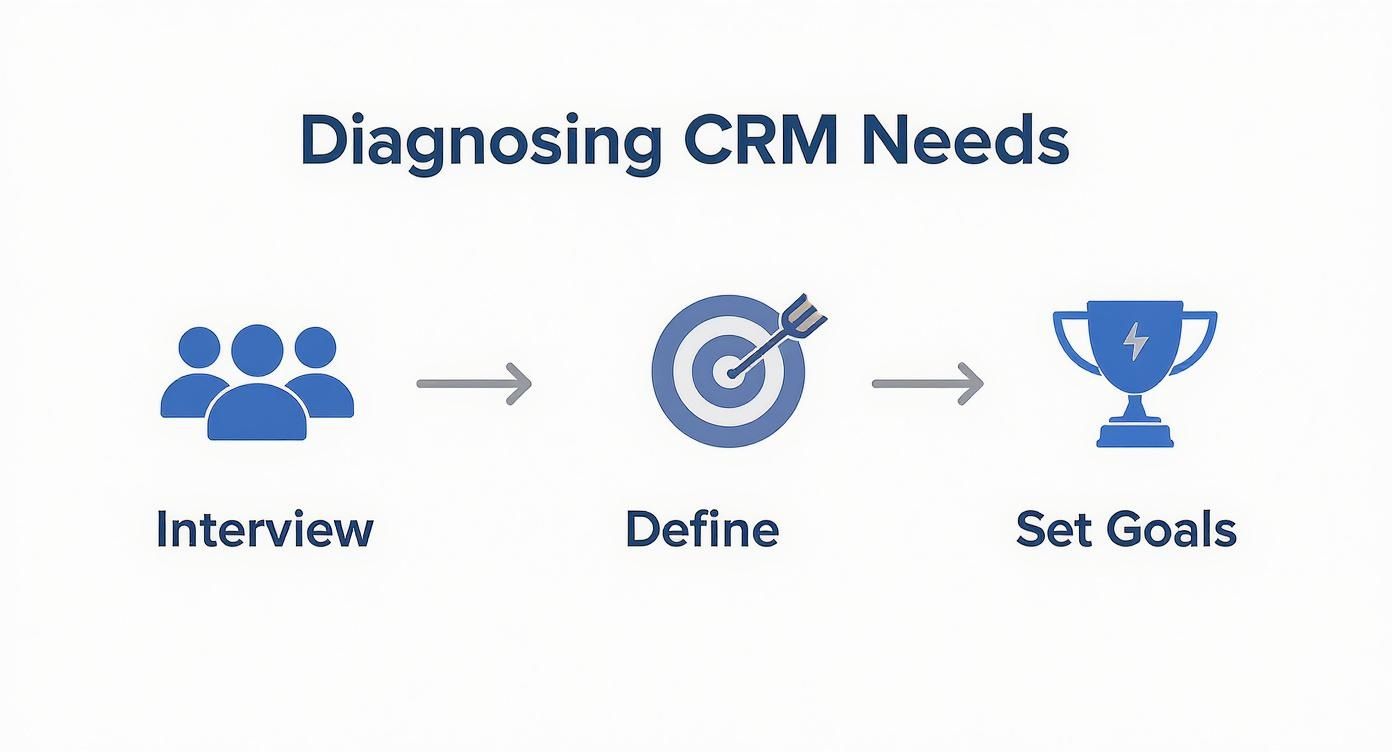
This simple flow—Interview, Define, and Set Goals—grounds your search in real-world challenges, not just a checklist of abstract features.
Translate Pain Points into Measurable Goals
Once you've identified the pain points, translate them into concrete, measurable objectives. This is how you move from complaining about a problem to defining what a solution looks like. Vague desires won't help you compare systems, but specific goals will.
To help organize this, you can use a simple framework to connect departmental problems to CRM functions and success metrics.
| Department | Identified Problem (The Diagnosis) | Required CRM Functionality (The Solution) | Success Metric (The Transformation) |
|---|---|---|---|
| Sales | "Leads are falling through the cracks." | Automated lead assignment & follow-up reminders. | Reduce average lead response time by 50%. |
| Sales | "We waste hours logging calls and emails." | Automatic email sync & call logging. | Automate 80% of manual data entry tasks. |
| Marketing | "We have no idea which campaigns are working." | Lead source tracking & marketing attribution. | Attribute 95% of new deals to a specific campaign. |
| Service | "Customers repeat themselves to different reps." | Unified customer profile with all interaction history. | Increase first-call resolution rate by 20%. |
| Table: Problem Diagnosis Framework |
This table isn't just an exercise; it's your blueprint for evaluating any potential CRM.
Your diagnosis isn't just about listing features; it's about defining the specific business transformations you need. A CRM is a tool to execute a strategy, not the strategy itself.
Think about it this way: a fuzzy goal like "we need better organization" becomes a specific, actionable target like "centralize all customer contact and communication history into a single record." Suddenly, you know exactly what to look for.
With these data-driven goals in hand, you are no longer just shopping for software. You are searching for a specific solution to a well-diagnosed problem. This clarity will be your compass as you navigate the rest of the selection process.
Step 2: Build Your Must-Have Feature Checklist
You've done the diagnostic work and have a clear map of the problems you need to solve. Now it's time to turn those pain points into a practical, no-nonsense checklist of features your new CRM must have.
This isn't about chasing the longest feature list or getting dazzled by a slick sales demo. It's about building a blueprint for the exact system you need—an objective guide that keeps you grounded in what will actually move the needle for your business.

Prioritize Core CRM Functions
First, let's nail down the essentials. Pretty much every CRM on the market will offer some version of these, but the quality and usability can be miles apart. Your job is to define what "good" looks like for your team, based on the goals you’ve already set.
-
Contact & Lead Management: This has to be more than a digital Rolodex. You need a complete, 360-degree view of every customer—their entire history of interactions, past orders, and support tickets, all in one clean interface. Can you add custom fields that are specific to your business?
-
Sales Pipeline Visualization: Can your sales team see the entire process at a glance? Look for a simple drag-and-drop interface that makes it easy to move deals from one stage to the next. That visual clarity is critical for forecasting and spotting where deals are stalling.
-
Automation Capabilities: This is where you get your team’s time back. Based on your diagnosis, what are the repetitive tasks killing productivity? You should be looking for a CRM that can automatically assign new leads, trigger follow-up email sequences, or create tasks based on specific customer actions.
Scrutinize Integrations: The Linchpin of a Good System
Here's a hard truth: a CRM that doesn't talk to your other tools is just another data silo. It creates more work, not less. What’s the point of a system that isolates information?
Don't just ask a vendor, "Do you integrate with X?" The real question is, "How deep is that integration?" You need to know if data flows both ways in real-time or if it's just a clunky, one-way sync.
Make a simple list of the software your business can't function without. Then, dig into how each potential CRM connects with them.
- Email & Calendar: Does it sync perfectly with Google Workspace or Outlook? Your team shouldn't have to bounce between screens just to log an email.
- Accounting Software: A solid connection to QuickBooks or Xero is a game-changer. It gives your sales team visibility into a customer’s payment history.
- Marketing Platforms: If you’re using something like Mailchimp or GoHighLevel, the CRM should sync your contact lists and track campaign engagement automatically.
- Project Management Tools: For businesses juggling multiple projects, an integration with Asana or Trello can link a closed deal directly to the team responsible for delivery.
A well-thought-out CRM integration strategy is what pulls everything together, creating a single source of truth for your entire operation.
Tailor the Checklist to Your Unique Workflows
Now, pull these pieces together into one prioritized checklist. Get specific. Think about your team’s actual day-to-day work, not just generic features.
What to Look For: A Checklist Example
Here's a sample checklist for a manufacturing company. Notice how specific the requirements are:
- Lead Management: Must have custom fields for "Equipment Type" and "Project Timeline."
- Quoting: Needs a built-in quoting tool or a deep, two-way integration with our current proposal software.
- Pipeline Management: Must have a visual pipeline that we can customize to our unique six-stage sales process.
- Integrations: Non-negotiable real-time sync with QuickBooks for invoice tracking and Outlook for calendar/email logging.
- Reporting: Needs to easily generate reports on sales cycle length broken down by product line.
This tailored checklist is now your North Star. As you start looking at vendors, you can score each one against these real-world requirements. It ensures your final decision on how to choose a CRM system is based on solid data, not just a gut feeling.
Step 3: Use a Scorecard to Shortlist Your Top Vendors
You've done the internal work and have your feature checklist in hand. Now it's time to shift from diagnosis to evaluation. This is where we get methodical and bring objectivity to the vendor selection process by scoring potential CRMs against your unique needs.
Forget finding the "perfect" CRM. The goal here is to identify the best-fit solution for your team—the one that solves the specific business problems you identified right from the start. A data-driven approach strips away the flashy sales pitches, leaving you with a clear, logical path forward.
Build Your Evaluation Scorecard
A scorecard is a simple tool for comparing CRMs head-to-head. At its core, it’s a spreadsheet where you list your non-negotiable criteria and score each vendor against them. The real power comes from assigning a "weight" to each criterion based on how critical it is to your business.
For instance, a small team with limited IT support might give “Ease of Use” a heavy weight, while a data-obsessed manufacturing firm will prioritize “Custom Reporting Capabilities.”
Here's how to build it:
- List Your Criteria: Pull the must-haves directly from your feature checklist.
- Assign Weights: Use a simple scale, like 1 to 5, to rate how critical each feature is (5 = deal-breaker, 1 = nice-to-have).
- Create Scoring Columns: Make a separate column for each vendor you’re considering.
- Score Each Vendor: As you demo each CRM, score them on a scale of 1 to 10 for every line item.
- Calculate the Weighted Score: Multiply the vendor’s score by the criterion’s weight. Sum it all up for a final, objective number.
This simple calculation gives you a clear winner based on your priorities.
Sample CRM Evaluation Scorecard
| Feature/Criteria | Weight (1-5) | Vendor A Score (1-10) | Vendor B Score (1-10) | Vendor C Score (1-10) |
|---|---|---|---|---|
| Integration with ERP | 5 | 8 | 6 | 9 |
| Ease of Use | 5 | 9 | 7 | 6 |
| Custom Reporting | 4 | 7 | 8 | 8 |
| Mobile App Functionality | 3 | 9 | 9 | 7 |
| Customer Support | 4 | 8 | 9 | 6 |
| Total Weighted Score | – | (Calculate) | (Calculate) | (Calculate) |
By filling this out, you create a data-backed rationale that every stakeholder can understand and support.
Research Vendors and Narrow Your List
With your scorecard ready, it's time to find the contenders. The goal is to narrow the vast CRM market down to a manageable list of 3-5 top vendors for a deep dive.
Don't just take the vendor's marketing materials at face value.
Dig into unbiased, third-party review sites like G2, Capterra, and TrustRadius. Pay close attention to reviews from companies that look like yours—similar size, same industry. What are they saying about customer support? The onboarding process? Hidden costs? This is where you find the unvarnished truth.
A scorecard forces an honest conversation about priorities. It prevents the 'coolest' feature from overshadowing the most critical one and keeps the entire team aligned on what truly matters for business growth.
Ultimately, replacing subjective opinions with a weighted scoring system creates a defensible, data-backed reason for your decision. It ensures the final choice is a strategic one aligned with the goals of the entire organization.
Step 4: Run a Pilot Program to Validate Your Choice
You’ve done the research, built your scorecard, and whittled the list down to one or two top contenders. Don’t sign the contract just yet. It's time for the single most important step: the pilot program.
Think of it as the final test drive. You’re moving beyond polished demos to see how this system actually handles in your real-world environment, with your team behind the wheel. A well-run pilot replaces assumptions with data, giving you the final evidence you need to know you're making a smart investment.
How to Structure a Successful Pilot
A pilot isn't just letting a few people "play around" with new software. To get real value, it needs structure and clear goals. The aim is to simulate how your team will use the CRM day-in and day-out and measure what happens.
Here’s how to get it right:
-
Pick Your Test Crew: Grab a small, dedicated group of 3-5 users. Make sure they represent the key departments—maybe two salespeople, a marketing coordinator, and someone from customer service. Crucially, include both your most tech-savvy employee and someone who's skeptical of new tools. Their combined feedback is gold.
-
Define What a "Win" Looks Like: Before you start, decide what success looks like. Go back to the goals you set at the very beginning. Can your sales reps log calls 50% faster? Does the pilot reduce manual data entry? Tie the pilot’s success directly to those initial business metrics.
-
Set a Realistic Timeline: You don't need a six-month trial. A 14- to 30-day pilot is usually the sweet spot. It gives your test group enough time to get past the initial learning curve and start using the CRM for their actual, everyday tasks.
Calculating the Potential Return on Investment
During the pilot, you need to answer the one question every executive will ask: "What's the ROI?" Answering this flips the conversation from cost to value. The CRM stops being an expense and becomes a data-backed investment in growth.
You don't need a convoluted financial model. A simple, back-of-the-napkin calculation grounded in real data from your pilot is incredibly persuasive.
The point of an ROI estimate isn't to be perfect. It's to build a logical, compelling case for how the CRM will generate more value than it costs by making specific, measurable improvements to your business.
Here are a couple of angles to focus on:
-
Time Savings from Automation:
- Ask your pilot users to track the time they're saving on tasks the CRM now handles, like logging emails or creating follow-up tasks.
- Let's say each of your 10 salespeople saves just 3 hours a week. That’s 30 hours of productive time reclaimed every single week.
- Multiply that by their average hourly pay rate, and you've just put a dollar figure on that newfound efficiency.
-
Increased Sales Conversion:
- Keep an eye on whether the pilot group—armed with automated follow-up reminders and cleaner data—improves their lead-to-customer conversion rate, even slightly.
- Bumping your conversion rate from 2% to 2.5% on 1,000 leads a month isn't a small change. That translates directly into new revenue that can often pay for the CRM several times over.
This practical, data-driven approach takes the decision from a subjective "I like this one" to an objective, evidence-based choice. It gives you—and your leadership—the confidence to know you're making the right move.
Step 5: Plan for a Smooth Rollout and Onboarding
You’ve made the call. After the research, demos, and internal debates, you've finally chosen a CRM. But let’s be honest—this is where the real work begins. The decision to buy software is just the first step. The real value is delivered during implementation.
A messy launch leads to frustrated teams, dismal user adoption, and a hefty investment that collects digital dust. To avoid that fate, you need a solid onboarding plan that gives equal weight to the technical details and the people who will use the system every day.
The Technical Checklist for a Clean Transition
Before you can get your team excited, you have to get the data right. Nothing kills momentum faster than a messy data migration. The goal is a clean, seamless transition from your old spreadsheets or legacy software into the new CRM.
Here's what to look for in your technical prep:
- Data Cleaning and Preparation: This is non-negotiable. Go through your existing customer data—wherever it lives—and purge duplicates, fix typos, and standardize your formats. Remember: garbage in, garbage out.
- Field Mapping: This sounds technical, but it’s really just creating a simple map. You’re just showing where each piece of old data will go in the new CRM. "Client Name" in your spreadsheet, for instance, might map to the "Company Name" field in the new system.
- User Permissions and Roles: Not everyone on your team needs access to everything. Define roles right from the start (e.g., Sales Rep, Sales Manager, Admin) and set permissions accordingly. This protects sensitive data and keeps the interface clean for each user.
A smooth rollout is built on clean data. Spending time to scrub, map, and organize your information before you flip the switch is one of the highest-return activities in the entire CRM implementation process.
The Human Element: Driving User Adoption
Now for the part that truly makes or breaks a CRM launch: getting your people on board. Technology doesn't solve business problems; people using that technology do. Resistance to change is natural, so your job is to make this transition as easy and obviously beneficial as possible for every user.
A great onboarding plan is all about building confidence and showing people "what's in it for me" right away. For a deeper dive, our guide to CRM setup and management offers a comprehensive look at what it takes to get it right.
Here are the strategies that make all the difference:
- Create Internal Champions: Find a few enthusiastic team members from different departments to become your CRM power users. Get them trained first and empower them to help their colleagues. Peer-to-peer support is often more effective and approachable than a top-down mandate.
- Role-Specific Training: Don’t throw everyone into a single, generic training session. A sales rep needs to know how to manage their pipeline. A marketing manager needs to understand campaign tracking. Tailor your training to show each person exactly how the CRM makes their specific job easier.
- Get Buy-In, Not Mandates: Frame the new CRM as the solution to their biggest headaches—the very ones you uncovered in your initial needs analysis. Show them how it automates the mind-numbing data entry they hate. When they see it as a tool that helps them, adoption becomes a pull, not a push.
By meticulously planning both the data migration and the human transition, you ensure your team starts seeing the benefits from day one. This proactive approach is how you turn a software purchase into a genuine business asset.
Common Questions About Choosing a CRM
Even with a rock-solid plan, picking a new CRM can feel overwhelming. We get it. To cut through the noise, we've pulled together the most common questions we hear from business owners who are right where you are now.

How Much Should I Expect to Pay for a CRM?
CRM pricing is all over the map, from free plans to enterprise solutions that run thousands per month. The cost almost always hinges on the number of users, the features you need, and the level of support you want.
But focusing only on the sticker price is a trap. We always push our clients to think in terms of return on investment (ROI). A system that costs $200 per month but saves your team 10 hours of manual work and helps bump sales by 15% is a much better deal than a "cheaper" tool that doesn't actually fix your problems.
When you're talking to vendors, demand a detailed breakdown of all potential costs. Be sure to ask about:
- Setup or implementation fees
- Data migration costs
- Ongoing training and support packages
- Charges for premium integrations or API access
Knowing the total cost of ownership is the only way to make a smart financial decision.
What Is the Biggest Mistake Businesses Make When Choosing a CRM?
The single biggest mistake we see is chasing features instead of solving problems. It's easy to get wowed by a slick demo with a hundred different functions, but most business owners never stop to ask if their team will actually use any of them.
This is how you end up paying for a bloated, overly complex system that your employees avoid because it makes their jobs harder. You're left with an expensive piece of software that creates more friction than it removes.
The best CRM isn't the one with the most features; it's the one that most elegantly solves your team's top three to five biggest operational headaches. Anything else is just noise.
Start with an honest assessment of your team's daily frustrations and bottlenecks. Only then should you start looking for a CRM that targets those specific issues.
How Long Does It Take to Implement a New CRM System?
This is the classic "it depends" question, but we can give you a realistic ballpark. A simple, out-of-the-box CRM for a small team might take just a few days. A highly customized solution for a larger company could easily take several months.
Your timeline will be shaped by a few key factors:
- Data Migration: The volume and cleanliness of the data you're moving is a huge variable. A well-organized dataset from an old system is a breeze compared to information scattered across dozens of messy spreadsheets.
- Workflow Complexity: If you need to build custom automation, unique sales pipelines, or specific reporting dashboards, that will naturally add time to the project.
- Number of Integrations: Connecting your CRM to other systems requires careful planning and testing, which extends the implementation phase.
Running a well-planned pilot program and assigning a dedicated internal project manager can seriously speed things up. It all comes back to having a clear, structured plan.
At Machine Marketing, we don't just recommend tools; we build integrated systems that solve real business problems. Choosing a CRM is a critical step, but it's only one part of creating a high-performance marketing and sales engine.
If you’re ready to move past confusion and implement a system that drives measurable growth, we can help. Book a discovery call with us today to get a clear, actionable diagnosis for your business.
