
The most popular advice about marketing automation starts with a platform. That's backwards for most industrial businesses. If your CRM has duplicate companies, unclear lifecycle stages, missing source data, and salespeople working from private spreadsheets, a new automation tool won't fix the process. It will execute the wrong process faster.
The practical way to implement marketing automation is to treat it as a connected business system. Start with the customer journey, test the quality of the data that drives decisions, define the handoffs between marketing and sales, and launch only the workflows your team can operate reliably. The result should be faster follow-up, more relevant nurturing, and clearer visibility from first inquiry to revenue.
Table of Contents
- Treating Automation as an Operating System
- Triage Your CRM Data Before Building Workflows
- Designing Behavioral Scoring and Routing Logic
- Balancing Personalization with Compliance Rules
- Measuring Commercial Impact Over Vanity Metrics
- Executing a Phased Rollout and Change Management
Treating Automation as an Operating System
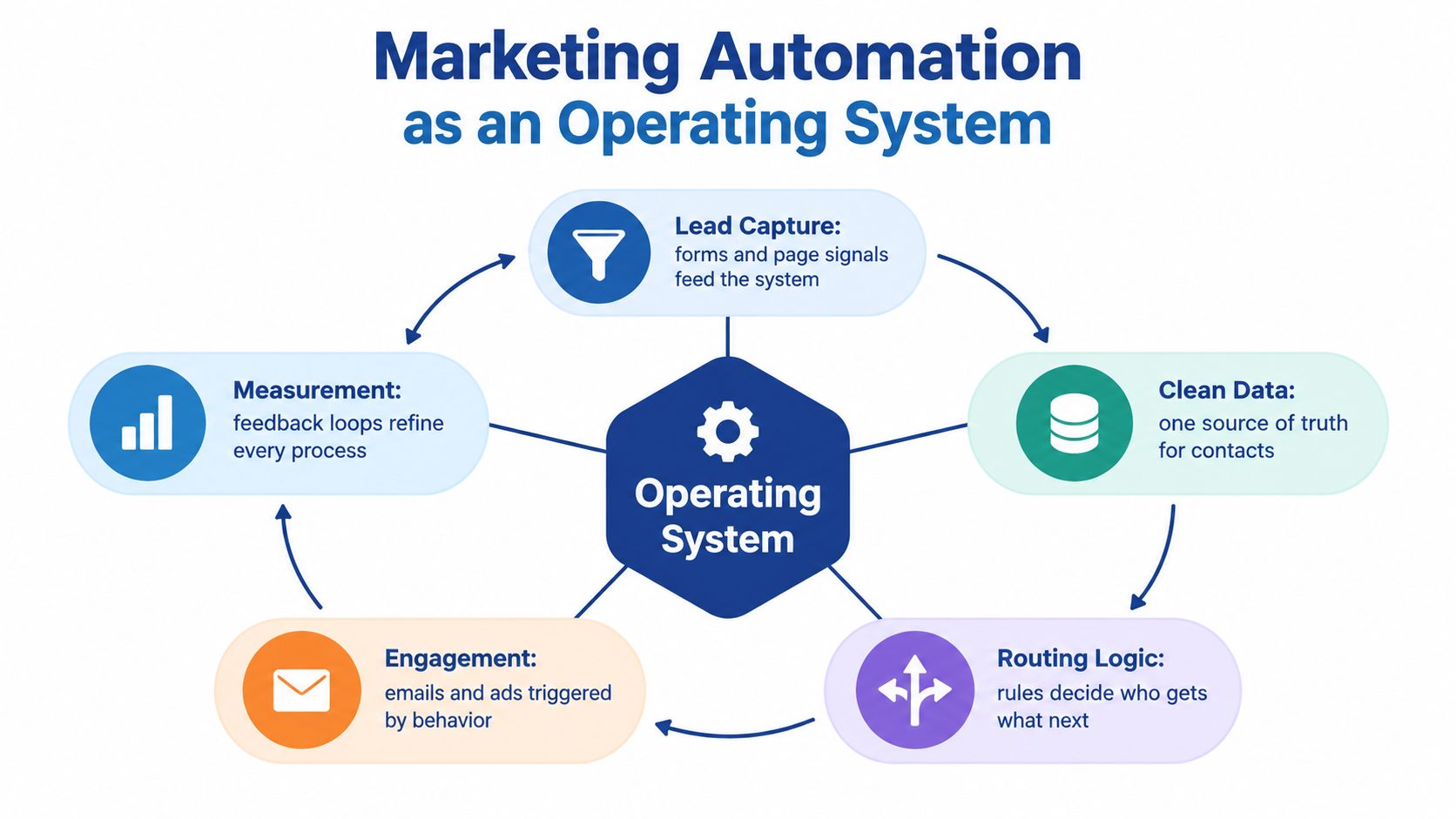
Marketing automation isn't an isolated email tool. It's the operating layer connecting forms, your website, CRM, email platform, advertising accounts, analytics, and sales workflows. If those systems don't share dependable data, an automated email is only a polished version of a manual mistake.
The scale of the technology market makes this architectural question more important. The University of Hamburg's 2023 Marketing Technology Report documented 9,932 marketing technology solutions worldwide, representing a 24% increase in available solutions. More software creates more choices, but it doesn't create clearer ownership, cleaner records, or better sales follow-up.
Map the journey before selecting tools
Begin with the path a buyer takes:
- Anonymous visitor: The person browses your capabilities, industries, or machine pages.
- Known contact: They complete a form, request a resource, or reply to an email.
- Marketing-qualified lead: Their behavior and fit justify structured nurturing or review.
- Sales-qualified lead: Sales confirms a relevant project, need, or buying conversation.
- Opportunity: The inquiry becomes a defined commercial process with an owner and next action.
- Customer: The sale closes, and the record enters onboarding, service, or expansion workflows.
At every stage, document the owner, required fields, trigger event, next action, and exit condition. For an industrial manufacturer, useful CRM fields may include application, industry, machine type, project timing, estimated value, and sales status. If a quote request enters the system without an owner or a next action, the automation is incomplete regardless of how polished the email builder looks.
Practical rule: Automate a handoff only after a human can explain what should happen when the trigger fires.
You'll also need operational safeguards. Set up email authentication before sending automated campaigns, and use a practical resource such as set up email authentication to understand the requirements. Then review your wider marketing technology stack for duplicate functions, broken integrations, and systems that should remain the source of truth.
A sound operating system routes a form submission, enriches or validates the record, assigns responsibility, starts the appropriate nurture path, alerts sales when intent is high, and stops marketing messages when a conversation or conversion changes the context. Governance and data flow create the value. Software only carries the instructions.
Triage Your CRM Data Before Building Workflows
You don't need a perfect CRM before launching automation. You do need to know which data is trustworthy, which fields are incomplete, and what the system should do when information is missing.
This matters especially in manufacturing. New inquiries may arrive through a trade show, a distributor, a phone call, a service conversation, a salesperson's inbox, or a quote request. Those sources rarely produce records in the same format. Adobe's B2B digital trends research identifies data integration and data quality as the biggest challenge for three-quarters of surveyed organizations implementing advanced AI and journey orchestration.
Use a minimum viable data standard
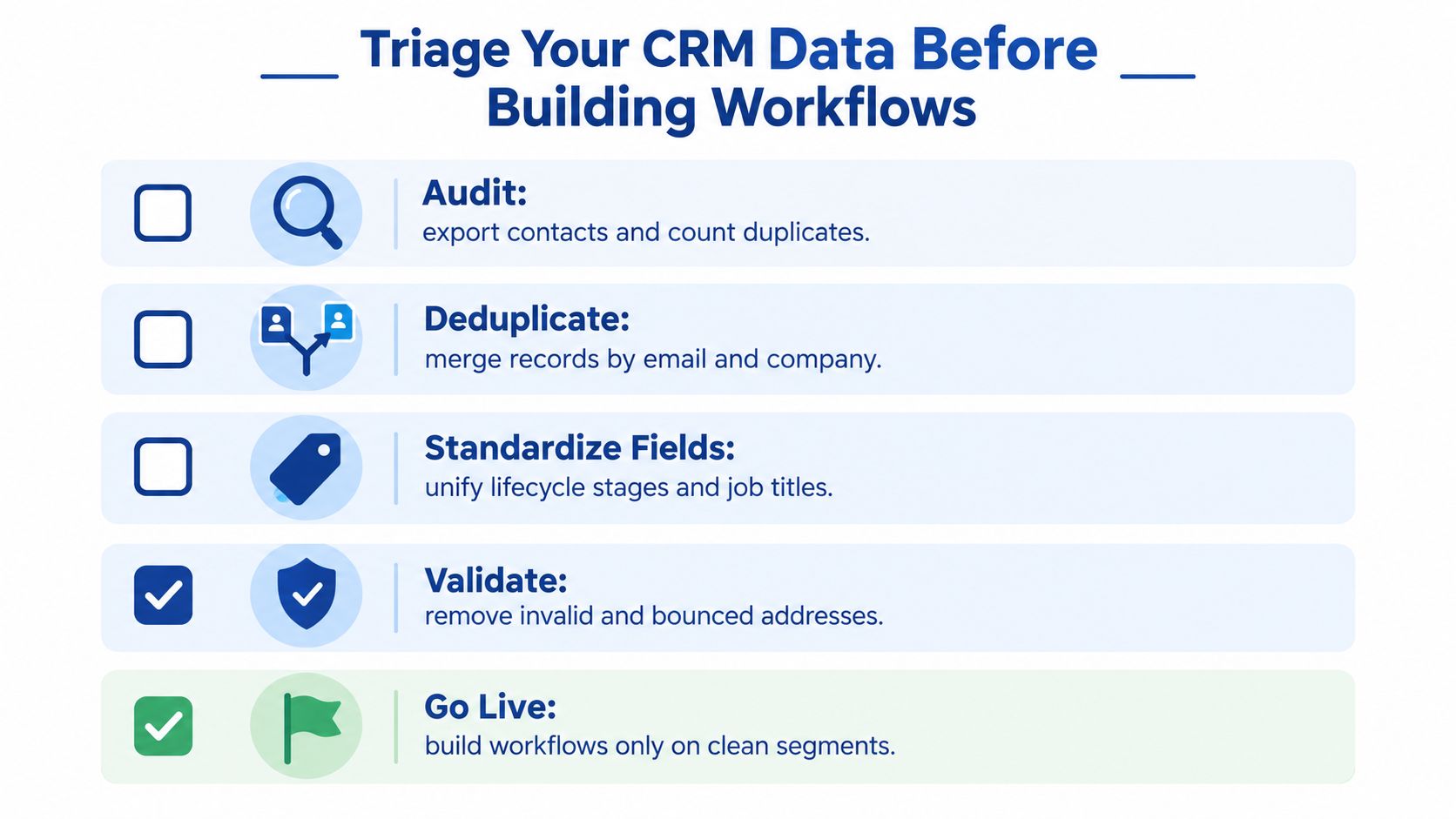
Start with a data-readiness triage rather than a full database renovation.
- Audit the records: Export the relevant contacts and companies. Identify duplicates, missing owners, conflicting lifecycle stages, invalid addresses, and records with no meaningful source.
- Define minimum fields: For a quote request, that may mean name, company, email, application, product interest, source, consent or subscriber status, owner, and next action.
- Normalize company records: Agree on how you record legal names, trading names, locations, industries, and account relationships. Decide whether distributors and end customers require separate account types.
- Choose source-of-truth systems: Your CRM may own lifecycle stage and opportunity status, while the email platform owns subscription preferences. Document which system wins when values conflict.
- Create exception handling: A missing machine type shouldn't automatically enter a machine-specific sequence. Route it to a review queue, record the failure, and let someone resolve it.
This approach avoids two expensive mistakes. The first is waiting indefinitely for a perfect database. The second is building workflows around undocumented fields and discovering that every salesperson interprets them differently.
Launch narrow workflows while cleanup continues
Begin with workflows that depend on a small number of dependable signals. Quote requests can create an owner task and a confirmation message. Dormant accounts can enter a carefully controlled reactivation sequence if their subscriber status and account ownership are known. A high-fit inquiry can alert sales even if enrichment fields remain incomplete, provided the record is clearly marked for review.
Tools such as Clay lead generation workflows can support prospecting and enrichment processes, but enrichment doesn't replace your internal definitions. Your team still needs rules for matching companies, accepting fields, handling uncertainty, and recording the origin of the data.
Keep a data-quality exception log with the record, failure type, responsible person, and resolution. Track routing accuracy, response time, duplicate rate, workflow exceptions, sales adoption, and qualified opportunities. A practical database email marketing process depends on this discipline because the database is an operating asset, not just a mailing list.
The right standard is not perfect data. It's documented data with visible exceptions.
Designing Behavioral Scoring and Routing Logic
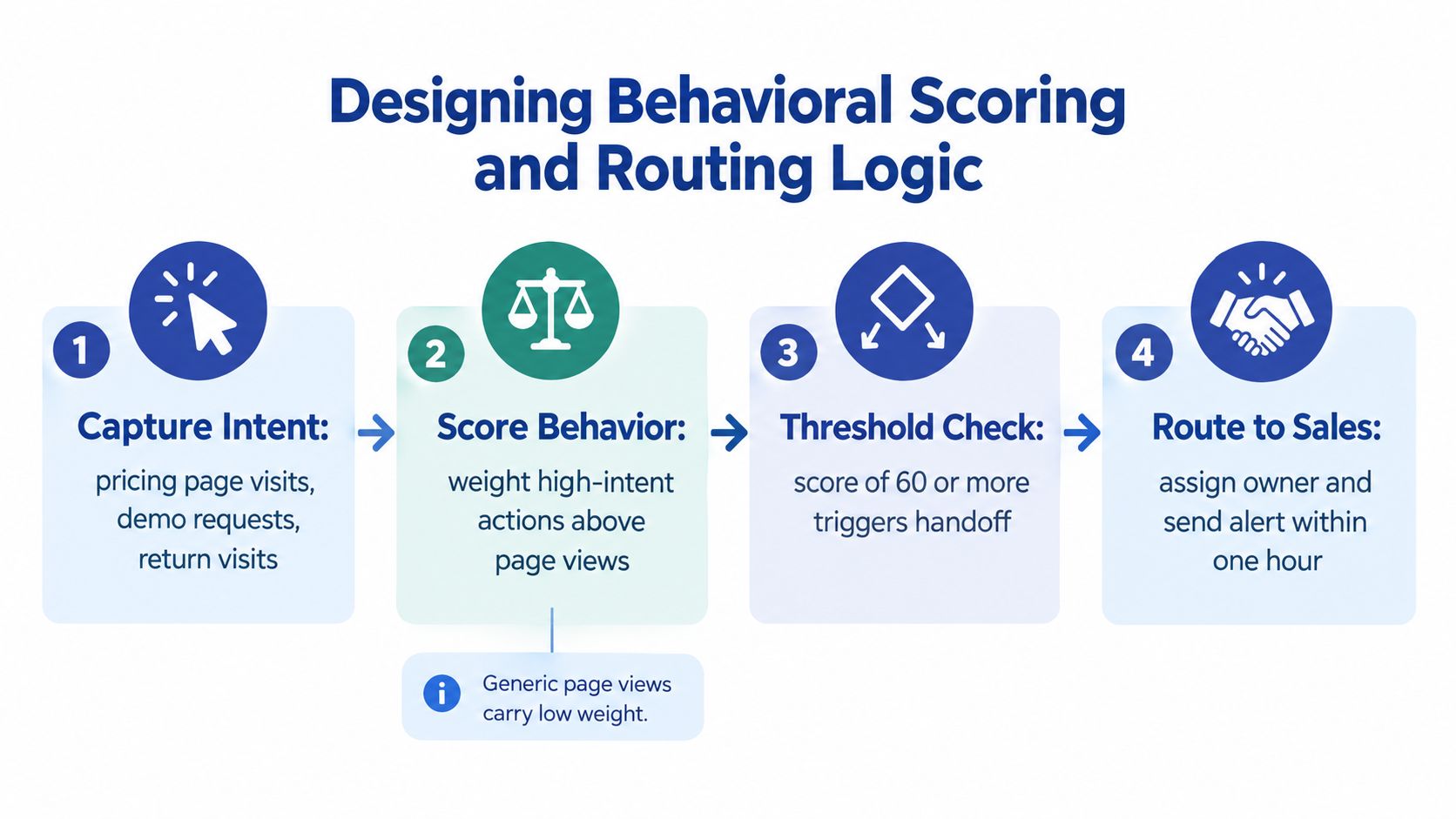
A lead score earns its place only when it predicts a decision your team can take. Five visits to low-value blog posts may indicate broad research, while a materials-guide download followed by a quote request signals a more actionable opportunity. For manufacturers with long sales cycles, that distinction prevents sales from chasing activity instead of buying intent.
Write the scoring specification before assigning points. Define positive intent, confidence-reducing signals, threshold actions, ownership, and review rules. The model should prioritize work and expose uncertainty, not produce a mysterious number that salespeople ignore.
Score buying signals, not activity volume
Useful positive signals include:
- Repeat visits to a capabilities or product page.
- A download of a tolerance, materials, or application guide.
- Engagement with a relevant case study.
- A quote request, consultation request, or technical question.
- Return visits from a known account during a stated project period.
Negative signals reduce false urgency. Apply them to prolonged inactivity, unsubscribes, invalid addresses, student or competitor domains, and low-fit geographies where appropriate. A page view alone rarely proves intent. Generic research may call for education rather than an immediate sales call.
Account context changes the interpretation. Pair behavior with company size, process capability, installed equipment, geography, and known project timing. A purchasing manager at a target account and a student using an unrelated domain should not receive identical routing, even if their email activity matches.
For a deeper explanation of the operating principles, read this guide to B2B lead scoring and qualification, then focus on the connection between fit, intent, and action rather than the score itself.
Calibrate against commercial outcomes
Set a threshold only after defining the handoff. A high-fit, high-intent record should route immediately to an assigned salesperson. A low-intent contact should enter an educational sequence for the relevant role, such as an engineer, purchasing manager, or owner.
Review score bands every quarter against sales-accepted leads, opportunities, and revenue. Change thresholds only when the sample is large enough to limit overfitting. If high scores rarely produce accepted leads, the model rewards the wrong behavior. If valuable inquiries score too low, it misses an important signal.
McKinsey's global B2B survey found that 77% of companies using direct one-to-one personalization reported increased market share. Treat that finding as a correlation, not proof of a guaranteed causal lift. Use holdout groups and measure pipeline, margin, and revenue. Also monitor premature alerts, duplicated messages, stale fields, and sequences that continue after an opportunity is created.
Balancing Personalization with Compliance Rules
Personalization should follow a documented business context, not every field available in the CRM. For an industrial buyer, useful context may include machine type, application, industry, service history, or buying stage. A long sales cycle makes restraint important: one inaccurate assumption can send irrelevant content to several stakeholders and reduce trust before a salesperson speaks with them.
McKinsey's personalization research reports a 10% to 15% revenue lift, with company-specific results ranging from 5% to 25% (source). Treat those figures as reported ranges, not promises. Test a relevant message against a controlled comparison, then assess qualified inquiries, opportunities, revenue, and unsubscribe rates. Keep inferred sensitive attributes out of the workflow, even when they appear useful for targeting.
Build consent into the data model
Under UK PECR, organizations generally need consent before sending unsolicited electronic-mail marketing to individual subscribers, unless a specific soft-opt-in exception applies. The request should be separate from unrelated terms, specific about the marketing purpose, clear about the organization relying on it, and based on an unambiguous affirmative action. Store the consent timestamp, source form, purpose, and subscription category alongside the contact.
US commercial email requires a reliable suppression path under the FTC's CAN-SPAM compliance guidance. The opt-out mechanism must remain capable of processing requests for at least 30 days after the email is sent, and the sender must honor an opt-out within 10 business days. Configure these controls in the sending system rather than relying on a manual CRM update.
Corporate subscribers and identifiable individuals require separate treatment. UK ICO guidance explains that PECR consent isn't generally required for marketing emails to corporate subscribers such as limited companies and limited liability partnerships. Personal-data rules still apply when a named employee's email address or phone number is used, and individuals retain the right to object to direct marketing.
Core compliance requirements for B2B automation
| Requirement | Implementation Action |
|---|---|
| Marketing consent | Store timestamp, source, purpose, and subscription category. Avoid pre-ticked boxes. |
| Subscriber type | Record whether the contact is a corporate subscriber or an identifiable individual. |
| Sender identification | Identify the organization in every marketing email or text. |
| Opt-out handling | Send every unsubscribe event to a central suppression list used by all campaigns and sequences. |
| Preference management | Let recipients stop selected message types while preserving a clear option to stop all marketing. |
| Data usage | Use approved personalization variables, fallback text, and rendering tests. Don't expose sensitive inferred attributes. |
A preference center can improve relevance, but it does not replace a global suppression path. Your CRM, email system, sales-triggered messages, and advertising audiences must all read the same opt-out status. Test that synchronization before activating workflows, especially where several systems can send to the same contact.
Measuring Commercial Impact Over Vanity Metrics
Open rates and click rates can help diagnose delivery, subject lines, and content relevance. They don't tell you whether the system created a qualified inquiry, whether sales accepted it, or whether an opportunity progressed.
For an industrial company with a long buying cycle, measurement must follow the commercial path. A useful dashboard connects the original source and workflow to the actions that matter:
- Qualified inquiries: Did the contact meet your fit and intent criteria?
- Sales acceptance: Did a salesperson agree that the inquiry deserved follow-up?
- Response time: How long did the business take to make the first meaningful contact?
- Opportunity creation: Did the inquiry become a defined sales opportunity?
- Conversion rate: How often did each stage produce the next stage?
- Pipeline value: What potential commercial value entered the pipeline?
- Revenue and margin: Which workflows influenced closed business and profitable work?
Make the handoff measurable
Assign a timestamp to every meaningful stage change. Record when a form arrived, when the owner was assigned, when sales accepted or rejected the lead, when contact occurred, and when an opportunity opened or closed. Without those events, you can't tell whether weak performance comes from poor targeting, slow follow-up, unclear qualification, or a broken integration.
Use rejection reasons instead of forcing salespeople to accept every automated handoff. “No current project,” “wrong application,” “duplicate,” and “not a fit” are more useful than a vague rejected status. Those reasons become feedback for scoring, routing, and content decisions.
A useful measurement system also includes workflow health. Monitor duplicate creation, missing owners, failed actions, stalled records, suppression errors, and messages sent after opportunity creation. These operational indicators often reveal problems before revenue reporting does.
For a broader framework, use how to measure marketing ROI to connect marketing activity with commercial outcomes rather than isolated engagement metrics.
If the dashboard can't show what happened after the click, it's a communications report, not a pipeline report.
Review performance by workflow, segment, account type, and buying stage. Don't claim that automation caused revenue just because a contact received an email. Use attribution carefully, compare against defined groups where possible, and document the assumptions behind every report.
Executing a Phased Rollout and Change Management
A large day-one launch creates too many failure points at once. Sales receives irrelevant alerts, customers receive messages after speaking with a representative, and nobody knows which field controls the next action. The team then blames automation when the actual problem is uncontrolled complexity.
A phased rollout gives you a smaller system to test and a clearer path to adoption. Start with the workflow that has a defined trigger, a reliable owner, and an obvious business outcome.
Build in operating stages
Stage one should establish the foundation. Confirm field definitions, ownership rules, consent handling, suppression behavior, and the source of truth for lifecycle and opportunity status. Create a simple documentation set that a new employee could follow.
Stage two should automate a narrow path. A welcome sequence, quote-request confirmation, or basic lead-routing workflow is easier to inspect than a multi-branch nurture program. Test with a controlled segment, review every message and handoff, then expand after the exceptions are understood.
Stage three should add behavioral branches. Introduce role-specific content, account context, reactivation logic, and scoring only after the initial path operates reliably. Every branch needs an entry condition, exit condition, owner, and failure path.
Stage four should improve the system from evidence. Review sales feedback, opportunity outcomes, response times, duplicate records, and workflow exceptions. Remove branches that create noise. Strengthen the signals that correlate with useful conversations.
Earn sales trust through clear agreements
Salespeople will use automation when it reduces work and preserves context. Give each alert a reason, relevant activity history, qualification details, and a specific next action. Avoid sending a notification for every page view.
Create a service-level agreement for follow-up, but make it operationally realistic. Define who owns the lead, what happens when the owner is unavailable, how rejection is recorded, and when an unresolved record returns to marketing. Add exception handling for stale CRM fields, bounced addresses, duplicate companies, and opportunities that should suppress prospecting messages.
The team also needs a feedback route. Hold regular reviews with marketing, sales, and operations. Ask which alerts were useful, which fields were confusing, and which opportunities arrived without enough context. Then turn those observations into documented changes, not informal workarounds.
Marketing automation can support email, SMS, voicemail, phone calls, web chat, Facebook Messenger, and calendar appointments when the underlying CRM and consent model support those channels. Machine Marketing offers CRM setup and configuration, workflow development, lead scoring implementation, sales pipeline optimization, and ongoing management for businesses that need those systems connected.
The rollout is complete when the workflow survives ordinary working days, not when the automation builder shows a green status.
Start with one journey, one owner, and one measurable outcome. Clean the fields that decision depends on, launch the smallest useful workflow, and review what sales does with the output. If your manufacturing business needs help diagnosing CRM quality, designing routing logic, or building a phased automation system, visit Machine Marketing to discuss the gaps between your existing tools and your growth process.
