
Web-to-lead is the process that turns a website form submission into a lead record in a CRM, where sales can see it, route it, and follow up. A practical response target is human contact within 5 minutes during business hours.
You might already have the form, the CRM, and a sales inbox. Yet when a buyer asks for a quote, you still have to ask around to find out who's handling it. We need to connect those tools into a system you can inspect, trust, and measure.
Table of Contents
- What Web-to-Lead Means for Manufacturers
- How a Lead Travels From Form to Sales Call
- Mapping Form Fields to CRM Fields
- Asking for the Right Data Without Losing Trust
- Routing Leads and Responding Within Minutes
- Blocking Spam Without Blocking Real Buyers
- Confirm Your Setup Before You Go Live
What Web-to-Lead Means for Manufacturers
A buyer submits a form asking for a quote. Web-to-lead turns that submission into a CRM record, assigns a named owner, and creates a follow-up task so someone can act on the inquiry. The form is the mail slot; the CRM and sales workflow determine whether the envelope reaches the right person.
A working system must capture the buyer's details, preserve them as structured CRM data, assign responsibility, and prompt follow-up. Email delivery alone does not show whether a lead has an owner or a next action.
Capture, storage, and action
The system has three jobs:
- Capture: The form collects the buyer's details and reason for contacting you.
- Storage: The CRM keeps the submission as structured data, rather than only as an email.
- Action: A named person receives ownership and a follow-up task.
For manufacturers, inquiries can include quote requests, specification downloads, CAD-file requests, engineering consultations, and distributor referrals. Each signals a different level or kind of interest. Someone downloading a specification may need later follow-up, while a buyer reporting a production problem may need an applications engineer. Asking for only the details needed to route and respond helps avoid turning the form into a barrier to contact.
Email-only forms leave a gap. An inbox can hold a message, but it does not by itself provide consistent fields, ownership, sales stages, or reporting. If a submission arrives late on Friday, the team needs to be able to identify where it went, who owns it, and whether a follow-up is due.
Diagnosis question: Can you trace an inquiry from arrival to its next sales action without searching someone's inbox?
That visibility matters because a message can be captured on the website yet lost before it reaches the CRM or the right sales inbox. A working web-to-lead process makes those handoffs clear, so teams can spot missing records and unassigned inquiries before they slow a response.
How a Lead Travels From Form to Sales Call
Suppose you receive an inquiry about machining a replacement component. The buyer sees a form and a confirmation message. Behind that simple experience, we want an inspectable chain of events.
The diagram shows the main handoffs. Matching, alerts, and reporting sit within that broader path.
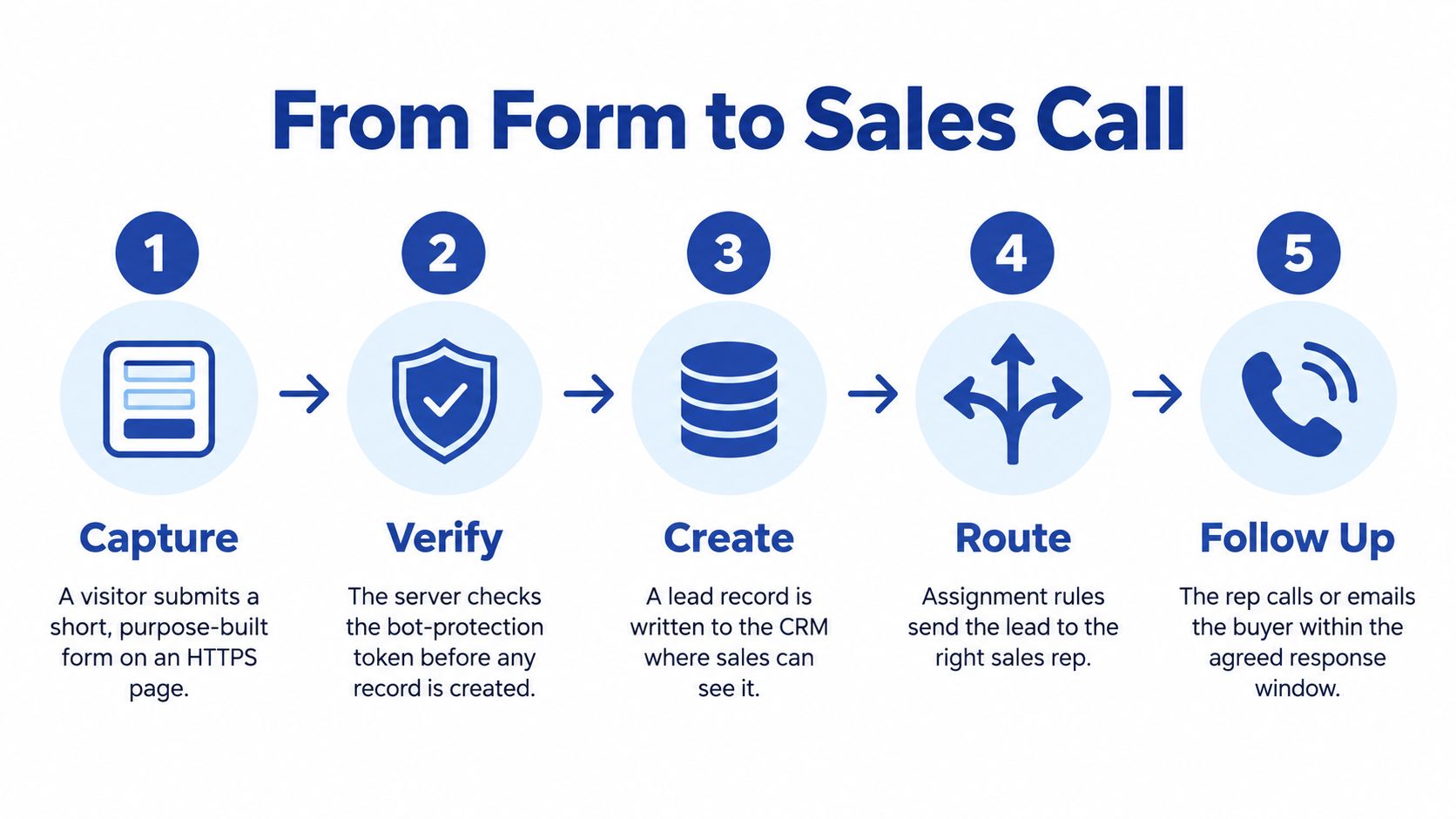
The operational path
Capture. Your visitor submits a short, purpose-built form on an HTTPS page. The form should fit the offer, not serve as a questionnaire for every possible project.
Verify. Your server checks the bot-protection token and rejects malformed fields before accepting the submission. Browser-side checks help visitors correct mistakes, but they aren't the final gate.
Create. Your integration writes a CRM record with the inquiry and its source, campaign, landing page, timestamp, and consent status. Preserve the submission context alongside the contact details.
Match. Check email and company against existing contacts and accounts. If your integration creates the record first, reconcile it before releasing duplicate tasks to sales.
Route. Apply your assignment rules. A successful save without an owner is an incomplete handoff.
Alert. Notify the owner through a CRM task, email, or text. Choose a channel your team reliably monitors.
Respond. A person contacts the buyer and records the outcome. Sending an automatic receipt isn't the same action.
Report. Update the sales stage as the conversation progresses. That's how you connect an inquiry to a qualified opportunity rather than counting submissions alone.
Choose the simplest maintainable connection
A native CRM web-to-lead form is our usual starting recommendation for simplicity, although validation control may be limited. A form tool connected through an API, the interface software uses to exchange data, offers more control but adds another system to maintain.
Middleware such as Zapier or Make can help you launch a connection quickly. It also introduces another handoff that someone must monitor.
If you don't have a developer, start with your CRM's native form, provided it passes your acceptance tests. Move to a form tool when you can name a specific validation or workflow gap, not because another builder looks more polished.
Mapping Form Fields to CRM Fields
Every visible field should identify the buyer, route the lead, or qualify the request. If it does none of those jobs, we'd question why you're asking for it.
The form field is the input. The CRM field is its destination. Field mapping is the instruction connecting them, so a selected process becomes usable routing data rather than text buried in a notification.
Form fields mapped to CRM fields for an industrial lead form
| Form field | CRM field | Why it matters | Required at first contact |
|---|---|---|---|
| Work email | Email (dedupe key) | Identifies the buyer and matches existing records | Yes |
| First and last name | First Name, Last Name | Personalizes follow-up | Yes |
| Company | Account Name | Links the lead to an existing account | Yes |
| Country | Country (picklist) | Drives territory assignment and privacy rules | Yes |
| Project type, such as CNC machining or sheet metal | Process (picklist) | Routes to the right engineer | Yes |
| Part material | Material (picklist) | Tests technical fit | Conditional, technical requests only |
| Tolerance or part size | Size Band (picklist) or free text | Assesses job complexity | Conditional |
| Annual volume | Volume Band (picklist) | Sets priority | Later, after first reply |
| Buying timeline | Buy Window (picklist) | Sets urgency and follow-up cadence | Optional |
| Drawing or CAD file | Attachment on lead, restricted access | Supports the quote once trust exists | Only on request |
| Consent to follow-up | Consent Follow-up (checkbox with timestamp) | Records the basis for sales contact | Yes |
| Marketing opt-in | Consent Marketing (separate checkbox) | Separates newsletters from sales contact | Optional |
| Hidden: UTM source, landing page | Lead Source, Campaign, Landing Page | Attribution without asking the visitor | Automatic |
Start with identity. Email supports matching, names support a useful reply, and company connects the person to an account. Don't assume an email match proves that a new inquiry duplicates an old project.
Country and project type supply routing inputs. Material and dimensions belong only where they help assess the actual request. Annual volume can wait, while an optional timeline lets buyers signal urgency without forcing a commitment.
Treat attachments and consent as deliberate mappings, not miscellaneous notes. Your team should be able to find the permission state and its timestamp without opening an email thread.
Controlled values and invisible context
Use dropdowns for country, process, and buying window so assignment rules can match consistent values. Keep a free-text box for technical nuance, such as a fixture constraint that doesn't fit a category.
Hidden fields can preserve campaign context without asking buyers how they found you. UTM parameters are campaign labels carried in a page address. To plan that handoff, connect campaign data with SourceLoop's CRM guide, then test that the captured values reach their intended CRM destinations.
Apply these checks before adding another field:
- Routing dependency: Every assignment rule needs an input that feeds it.
- Operational use: Every CRM field needs a report or action that uses it.
If a proposed field serves neither purpose, it's clutter. We should remove it rather than make the buyer do unused administrative work.
Asking for the Right Data Without Losing Trust
More questions may help you qualify a project, but they also ask the buyer to spend more effort and disclose more information. Ask nothing about the application, however, and your engineer can't prepare a meaningful response.
The answer isn't a shorter form alone. It's progressive disclosure, asking for detail when there's a clear reason and enough trust to support the request.
Earn the technical detail
Use the mapping table's required column as your starting point. Collect identity and problem context first, clarify technical requirements after a reply, and request confidential drawings only when you've explained the handling process.
Research on B2B proprietary-data disclosure and perceived privacy risk identifies buyer hesitation around sharing proprietary information, while acknowledging that evidence about these decisions remains limited. We shouldn't assume every buyer makes the same privacy calculation.
Before asking for a file, explain:
- Storage: Where your team will keep it and how the buyer should transfer it.
- Access: Which roles can see it and whether anyone outside your business will receive it.
- Retention: How long you intend to retain it and how deletion requests are handled.
Data depth should be earned through a useful conversation, not demanded before you've earned the buyer's confidence.
Separate permission from qualification
Consent to a sales reply isn't the same as permission to send newsletters. We recommend separate follow-up and marketing checkboxes, with wording and legal basis reviewed for the markets you serve.
Our explanation of zero-party data provides useful context for information buyers intentionally share. Their willingness to supply it doesn't remove your responsibility to explain its use.
Place a plain-language sentence beside the submit button, such as: “We'll use these details to respond to your project inquiry; marketing emails require your separate opt-in.” Only publish promises your process consistently keeps.
For an illustrative composite, not a measured client result, consider a machine shop replacing a long technical questionnaire with six first-contact fields, then collecting drawings during the reply call. We'd evaluate whether that improves useful conversations, not assume it does. Confirm country-specific privacy requirements with counsel before treating any form design as universal.
Routing Leads and Responding Within Minutes
| Benchmark | What the evidence shows | What to do |
|---|---|---|
| 5 minutes | Waiting 30 minutes instead of 5 reduced contact odds approximately 100-fold and qualification odds approximately 21-fold. The MIT/InsideSales study examined more than 15,000 web-form leads, over 100,000 call attempts, six companies, and three years of data. | Target first human contact within this window during business hours. |
| 1 hour | A related analysis summarized in the lead-response evidence review reported roughly 7 times greater qualification likelihood than contact after two hours or more. | Escalate to a manager if nobody has made contact within 60 minutes. |
| 42 hours | The same review describes an HBR audit of 2,241 U.S. companies with this average response time; 23% never responded. | Treat a median above this warning level as a process failure to investigate, not a reason to buy more traffic. |
| After hours and weekends | There's no reliable universal benchmark established here. | Acknowledge receipt, queue for the next business morning, and measure the gap. |
These are response-management findings, not guaranteed outcomes for your machine shop. They support urgency, but they don't prove that every industrial inquiry behaves identically.
A buyer requesting a quote may be comparing suppliers at that moment. Your routing process should make it possible to respond while the request is still fresh.
Write rules your team can execute
Use territory as the first filter, then process or machine capability. For repeat requests, apply an account-owner override so the established relationship isn't accidentally reassigned.
- Technical fit: Send suitable inquiries to the salesperson or applications engineer responsible for that work.
- Low fit: Use a relevant nurture path where appropriate and permitted, rather than filling the urgent sales queue.
- No match: Assign a monitored fallback owner. Don't leave exceptions unowned.
Your standard operating procedure, or SOP, should name the alert recipient, the required response action, and the manager who receives an overdue escalation. You can adapt these CRM workflow examples to document those handoffs.
Measure delay separately from conversion
Track median submission-to-first-contact time to understand the typical experience. Track the 90th percentile to expose the slower tail that an average can conceal.
Report both separately from conversion rate. Record attempted outreach and successful contact separately, too, so an unanswered call doesn't look like a completed conversation.
Round-the-clock coverage requires staffing or another sustainable arrangement. If that isn't practical, make the next-morning queue explicit and test whether your coverage matches your buyers' needs.
Blocking Spam Without Blocking Real Buyers
Bot protection belongs at the submission boundary, before your system creates a record or alerts sales. Google's reCAPTCHA integration introduction explains the credentials: the site key operates in the browser, while the secret key stays server-side and authorizes verification of the submitted token.
Your legitimate buyer should still have a clear path through the form.

Bot-protection options for a web-to-lead form
| Option | What the visitor sees | Best fit | Trade-off |
|---|---|---|---|
| reCAPTCHA v3 | No visible challenge; background risk scoring | Quote and consultation forms where friction matters | You must define what happens to low-scoring submissions |
| reCAPTCHA v2 checkbox | Visible “I'm not a robot” verification, potentially followed by a challenge | Forms where explicit verification before acceptance matters | Adds an interaction to every submission |
| reCAPTCHA v2 invisible | A challenge when additional verification is required | Mid-volume forms with occasional spam | Real visitors may receive an unexpected challenge |
| Honeypot field plus server validation | No intended visible interaction; a hidden trap field | A supplementary low-cost layer alongside reCAPTCHA | Not a complete control on its own |
We'd choose based on the form's risk and your ability to handle exceptions. With background scoring, decide whether suspicious submissions receive additional verification, go to review, or are rejected. Google's reCAPTCHA FAQ provides context for choosing between versions.
Implementation checks that matter
Keep the page, submission, and verification request on HTTPS. Google's implementation tips warn against insecure API requests on secure pages and advise skipping verification requests when the response field is empty.
Register every domain hosting the form before launch. Keep the secret key out of browser code, and test the rejection path as carefully as the successful path.
Use the walkthrough as supporting context while your implementer checks the actual integration.
Acceptance rule: A browser checkbox isn't proof. The server must verify the token before accepting the lead.
Google describes reCAPTCHA as protection against spam and automated abuse, not commercial qualification. You still need required-field validation and a sales process that distinguishes a real person from a suitable prospect.
Confirm Your Setup Before You Go Live
A form can show “Thank you” while the inquiry never reaches a salesperson. Before launch, trace one test submission from the published page into the CRM and the person's sales queue. Each handoff works like a relay: if the next owner never receives the baton, a real buying conversation can disappear without an obvious error.
Map the leaks across systems
Start with form view-to-completion rate, the share of form viewers who submit. Treat any industry benchmark as a reference point, not a pass-or-fail threshold. Compare rates only when their definitions and denominators match, and judge results against your own form, audience, and traffic sources.
Then check where identifiable inquiries stop moving:
| Handoff | What to look for |
|---|---|
| Visitor to form | Visitors who leave without submitting |
| Form to CRM | Accepted submissions missing from CRM records |
| CRM to sales inbox | Duplicate alerts, incorrect owners, or unmonitored notifications |
| Distributor to sales | Referrals left in email instead of entering the CRM |
| Phone to CRM | Buying conversations the team never logs |
| After-hours queue to owner | Requests still waiting when the next working period begins |
Anonymous visitors are not automatically recoverable leads. A gap at that stage is a reason to review the offer and form experience, not permission to identify people without an appropriate basis.
Track completion rate, submission volume, assignment delay, duplicate rate, unmatched records, and qualified opportunities by source. Include the response-time measures set for your sales process. When comparing website, CRM, and inbox records, account for rejected spam and legitimate record merging. Otherwise, routine processing can look like lost demand.
Pre-launch acceptance checklist
Test the published form, not only the CRM's record-entry screen. A successful test should travel through the same route a buyer's inquiry will take.
- Device experience: Submit from mobile and desktop.
- Field mapping: Confirm each value reaches the intended CRM field.
- Ownership: Verify the record goes to the right person or queue.
- Notification: Confirm the alert arrives in the expected channel.
- Abuse protection: Check that a bot-style or invalid submission is rejected.
- Permission record: Verify consent values and timestamps are stored.
- Coverage: Test the after-hours route and next-business-day handoff.
Use this CRM implementation guidance to place the checks within your rollout. Assign an owner to repeat them after changes to the form, CRM fields, or routing rules.
If any check fails, fix it before spending on traffic. A dependable setup lets your team account for each inquiry, identify its owner, and see whether the sales conversation progressed. Machine Marketing offers strategy and workflow diagnosis for manufacturers and industrial firms connecting website inquiries, CRM records, and sales follow-up. If your records still do not reconcile, visit Machine Marketing to book a diagnosis and map the path from form submission to revenue.
