
A marketing tech stack is the collection of software and tools your team uses to plan, execute, manage, and measure your marketing. Think of it as your digital workshop. When you pick the right tools and connect them properly, you build a powerful marketing engine. If you don't, you just end up with a cluttered, expensive toolbox that works against you.
So, how do you know if your current setup is helping or hurting?
Is Your Marketing Technology Working Against You?
If you're paying for a dozen different marketing tools but still struggling to generate leads and prove ROI, it’s not a tool problem—it’s a system problem. Your technology is likely working in disconnected silos, creating friction, wasting money, and hiding the very results you need to see.
The goal is to stop collecting tools and start building an integrated system that drives your business forward. In this guide, we'll show you how to diagnose the gaps in your current marketing tech stack and share practical steps you can take to build a system that delivers measurable results.

The Hidden Cost of a Disconnected Stack
Many businesses fall into the "more is better" trap, adding new software to patch problems without a real strategy. It's a common story: marketers are piling on MarTech tools, with 57% reporting they added 1-5 new applications to their stack in 2024 alone.
The problem? Most struggle to show any return on that investment. This "too much tech, too little impact" issue hits B2B companies the hardest, where a staggering 66% point to data integration issues as their top barrier to measuring success.
This fragmentation creates real, painful costs that creep into your bottom line:
- Wasted Spend: You're paying for overlapping features or software licenses that no one is even using.
- Lost Time: Your team is stuck manually exporting and importing data between systems instead of focusing on strategy.
- Poor Customer Experience: Leads get confusing messages because your sales, marketing, and service tools aren't on the same page.
- Inaccurate Reporting: It’s impossible to get a clear picture of what’s working when your data is scattered across five different platforms.
The core issue is rarely the individual tools themselves. It's the lack of a coherent system—an intentional architecture where each component serves a purpose and shares information freely with the others.
Building an effective tech stack means shifting your mindset from buying software to designing an operational system. Does your current setup feel more like a tangled mess than a well-oiled machine?
The table below can help you pinpoint exactly where your system is breaking down.
Diagnosis: Where is Your Current Stack Failing?
Use this checklist to identify common pain points in a disconnected tech stack. Ask yourself if any of these sound familiar.
| Symptom (The Problem) | Root Cause (The 'Why') | Impact on Your Business |
|---|---|---|
| "We have no idea which marketing channels are actually driving sales." | Your analytics, CRM, and ad platforms aren't connected, so attribution is a guessing game. | Wasted ad spend on channels that don't perform and missed opportunities on those that do. |
| "Our sales and marketing teams are constantly fighting over lead quality." | The CRM and marketing automation platform don't share data, leading to inconsistent lead scoring and context. | Friction between teams, poor follow-up, and lost revenue from perfectly good leads. |
| "It takes forever to launch a simple campaign." | Manual processes and data transfers between your email tool, landing page builder, and analytics dashboard. | Slow execution, missed market timing, and a frustrated marketing team. |
| "Customers complain about getting irrelevant emails." | Your customer data is spread across different systems, so you can't create a single, unified view for personalization. | Poor engagement, high unsubscribe rates, and a damaged brand reputation. |
If these symptoms hit close to home, you're not just dealing with minor inconveniences—you're dealing with systemic issues that are holding your business back.
To learn more about the strategic thinking behind this, check out our guide on what marketing operations is and why it matters. Now, let’s move from diagnosis to solution.
The Core Components Of A High-Performing Stack
Building a powerful marketing tech stack isn't about collecting the shiniest new software. It’s about assembling the right tools for the right jobs and ensuring they all talk to each other.
Think of it like a mechanic’s workshop. You wouldn’t use a wrench to cut wood, and you wouldn't leave valuable tools scattered on the floor. A high-performing stack has distinct, specialized components. Once you understand these core pieces, you can quickly spot gaps in your own setup and see how an integrated system builds business momentum.

The Central Hub: Your CRM
Your Customer Relationship Management (CRM) platform is the undisputed heart of your entire tech stack. It's the central database that holds every piece of information on your prospects and customers—from their first website visit to their last purchase.
- What it does: It creates a single source of truth for all customer data, so your sales and marketing teams are always working with the same information.
- Why it's critical: Without a solid CRM, your customer data is scattered across spreadsheets, inboxes, and notepads. This leads to disjointed conversations, missed follow-ups, and a frustrating customer experience.
- How it connects: A well-integrated CRM seamlessly shares data with your email platform, website, and ad tools, ensuring every interaction is personal and well-timed.
The Digital Storefront: Your CMS
The Content Management System (CMS) is your digital storefront. It’s the platform you use to build and manage your website and blog—the primary space where you tell your brand story and capture new leads.
A great CMS empowers your team to publish content, create landing pages, and update information without needing to write a single line of code. It’s the engine that powers your online presence.
Tools like WordPress give you total control over your messaging and user experience. When you connect your CMS to your analytics and CRM, it transforms from a simple website builder into a powerful intelligence tool, revealing how visitors interact with your brand and what content inspires them to act.
The Workhorses: Your Automation Tools
Marketing automation tools are your workhorses, handling the repetitive, manual tasks so your team can focus on strategy. They work around the clock to nurture leads, segment your audience, and deliver timely messages. For instance, integrating powerful platforms for marketing automation can turn a manual, time-consuming process into a streamlined, lead-generating machine.
These tools are responsible for critical workflows like:
- Email Marketing: Sending welcome sequences, promotional campaigns, and newsletters.
- Lead Nurturing: Automatically delivering relevant content to prospects based on their behavior.
- Social Media Scheduling: Posting content across multiple platforms at the best possible times.
By automating these processes, you ensure consistent communication with your audience at a scale that would be impossible to manage by hand.
The Scoreboard: Your Analytics
Finally, analytics and reporting tools are your scoreboard. They measure the performance of everything you do, telling you what’s working and what’s falling flat. These platforms track website traffic, conversion rates, campaign ROI, and customer behavior.
This is the component that lets you make data-driven decisions instead of just guessing. When your analytics platform is properly connected to your CRM and ad platforms, you can finally see a clear, complete picture of the customer journey—from the very first click to the final sale.
The need for this visibility is driving massive growth. The global MarTech market is projected to hit USD 551.96 billion in 2025 and is on track to reach an incredible USD 2,380.49 billion by 2033, fueled by the relentless need to understand customer behavior.
Each of these components is a pillar of a strong marketing system. When you choose them carefully and integrate them correctly, they stop being just "tools" and become a true growth engine for your business.
How To Choose The Right Tools For Your Business
With thousands of MarTech solutions available, picking the right one can feel paralyzing. It’s too easy to get sucked into "shiny object syndrome"—buying a tool because the feature list looks incredible, only to realize it doesn't solve a real problem for your business.
We need to flip the script. Stop focusing on features and start focusing on outcomes. The right tool isn't the one with the most bells and whistles; it's the one that solves a core operational bottleneck, integrates with your existing systems, and makes sense for your team to use. A tool that complicates your workflow is just expensive clutter.
Start With These Diagnostic Questions
Before you watch a single demo, you must diagnose your own operational needs. Thinking like an engineer will keep you from buying technology for its own sake. Ask your team these tough questions to frame the entire decision.
-
What is the single biggest bottleneck in our marketing or sales process right now? Be honest. Is it manual data entry? Terrible lead follow-up? An inability to track ROI? The first tool you select should solve your biggest pain point.
-
How easily will this integrate with our core systems? A new tool that can’t talk to your CRM is a waste of time. It just creates another data silo. Seamless integration isn’t a "nice-to-have"—it's non-negotiable.
-
Do we have the in-house skill to manage this? A powerful platform is useless if your team doesn't have the time or expertise to use it. Be realistic about your resources. Look for solutions with strong support and an intuitive interface.
-
Can we clearly measure the ROI of this tool? You have to define what success looks like before you buy. Will you measure it in hours saved, leads generated, or a jump in customer lifetime value? If you can't tie it to a real business metric, don't buy it.
These questions force you to define the job before you hire the tool. Answering them gives you a clear scorecard to judge any software you're considering. If you're stuck picking a CRM, for example, our article on how to choose a CRM system offers more specific guidance.
All-In-One vs. Best-Of-Breed Stacks
Once you know what you need, you'll face a major decision. Do you go with an all-in-one platform or build a "best-of-breed" stack by piecing together specialized tools? There are trade-offs to each approach.
An all-in-one platform like GoHighLevel bundles everything—CRM, email, SMS, funnels, and websites—into one integrated system. This is often a fantastic choice for small to mid-sized businesses that value simplicity, cost-effectiveness, and having a single source of truth.
A best-of-breed stack, on the other hand, means picking the absolute best tool for each job—maybe HubSpot for your CRM, Mailchimp for email, and Leadpages for landing pages. This strategy gives you incredible power in each category, but it often comes with higher costs and integration challenges.
There is no single "right" answer. The best choice depends on your business's growth stage, budget, and technical resources. A lean startup might thrive with an all-in-one, while a large enterprise may need the specialized power of a best-of-breed stack.
To make smart choices, digging into comparisons like this one on Semrush vs Google Analytics can be a huge help in understanding where each tool shines. By focusing on your specific goals and asking the right questions upfront, you can cut through the noise and build a stack that actually serves you.
Example Marketing Tech Stacks For Real Businesses
Theory is great, but seeing how these tools come together in the real world is where it all clicks. A tech stack isn't just a list of software; it's a toolkit designed to solve specific problems for a specific type of business.
What works for a B2B manufacturer is wildly different from what a local HVAC company needs to book more calls. Let's look at a few tangible examples to see not just what tools to use, but why they work together.
The Lean Stack for a Local Service Business
For a local service pro—like a plumber, electrician, or landscaper—the mission is simple: get found by local customers and make it easy for them to book a job. The stack must be affordable, easy to manage, and laser-focused on reputation and communication.
- Core Goal: Generate local leads, manage appointments, and build trust through reviews.
- Example Stack: An all-in-one platform like GoHighLevel is often the perfect fit. It rolls a CRM, SMS and email marketing, a website builder, and review management into one system.
- How It Works: A customer finds the business on Google and books an appointment on the website. The system automatically sends SMS reminders for the appointment and follows up afterward asking for a Google review. It's a smooth, automated journey from first click to five-star rating.
The Agile Stack for a Growing SMB
A growing Small to Midsize Business (SMB), like a SaaS company or an e-commerce brand, has more moving parts. They need to manage a bigger contact list, run campaigns across multiple channels, and dig deeper into analytics. Their stack needs specialized tools that integrate well.
Industry consolidation is helping here. With 172 mergers and acquisitions in the MarTech world annually by 2024, platforms are becoming more integrated. You can learn more about these industry shifts at Statista.com. This means growing businesses can access powerful, connected systems without the old headache of duct-taping everything together.
An agile stack balances the power of specialized "best-of-breed" tools with the simplicity of strong integrations. It’s designed to scale without breaking.
- Core Goal: Scale lead generation, personalize marketing messages, and prove ROI across multiple channels.
- Example Stack:
- CRM: HubSpot (for its powerful marketing automation and sales pipeline tools).
- CMS: WordPress (for its flexibility and plugin ecosystem).
- Analytics: Google Analytics 4 plus a behavior analytics tool like Microsoft Clarity (to see both what users do and why).
- Ad Platforms: Google Ads & Meta Ads (for reaching targeted audiences).
- How It Works: A prospect fills out a form on the WordPress site. That data shoots straight into HubSpot, triggering a nurture email sequence. HubSpot's tracking then allows for smart remarketing ads on Meta. All performance data feeds back into Google Analytics, giving a unified picture of campaign ROI.
The Robust Stack for a B2B Manufacturer
A B2B manufacturer is playing a different game. They have long, complex sales cycles involving multiple decision-makers. Their marketing tech stack must support account-based marketing (ABM), deep nurturing, and keep sales and marketing perfectly in sync.
- Core Goal: Nurture high-value leads over several months, arm the sales team with critical intelligence, and track the entire buyer's journey.
- Example Stack:
- CRM: Salesforce (the heavyweight for complex sales processes).
- Marketing Automation: Pardot or HubSpot (for advanced lead scoring and nurturing).
- Content: WordPress (to host case studies, white papers, and technical guides).
- Analytics: A business intelligence (BI) tool like Tableau (for deep-dive data analysis).
- How It Works: An engineer downloads a technical white paper from the WordPress site, creating a lead in Pardot. Pardot scores that lead based on their engagement. Once they hit a certain score, the contact and their activity history are pushed to Salesforce, alerting a sales rep to start personalized outreach. Tableau dashboards give leadership a 30,000-foot view of the pipeline.
These examples show there’s no single "best" tech stack—only the one that’s right for your business model and goals.
Example Tech Stacks by Business Type
| Business Type | Core Goal | Example Stack (Key Tools) | Why It Works |
|---|---|---|---|
| Local Service Business | Generate local leads & manage bookings | GoHighLevel (all-in-one CRM, SMS, reviews) | Simple, affordable, and automates the entire customer journey from booking to review. |
| Growing SMB | Scale lead generation & prove ROI | HubSpot + WordPress + Google Analytics | Balances specialized power with seamless integration to manage multi-channel campaigns effectively. |
| B2B Manufacturer | Nurture high-value, long-cycle leads | Salesforce + Pardot/HubSpot + Tableau | Provides deep intelligence and sales/marketing alignment needed for complex, high-stakes deals. |
Ultimately, the goal is to build a system where each tool has a distinct job and hands off information to the next one smoothly. When your stack works, it doesn't just support your marketing—it becomes a competitive advantage.
Your 90-Day Implementation Roadmap
Let's be clear: implementing a new marketing tech stack isn't a simple purchase. It’s a project. If you treat it like one—with distinct phases, tasks, and deadlines—you'll avoid the chaos that sinks most rollouts. Rushing is a guaranteed recipe for lost data, confused team members, and expensive shelfware.
We use a structured 90-day plan that breaks the process into three manageable, 30-day sprints: diagnosis, implementation, and optimization. This approach keeps you from getting overwhelmed and ensures every critical step happens in the right order.
The diagram below shows how different businesses might have unique workflows, but they all funnel down to the same place: analytics and optimization.
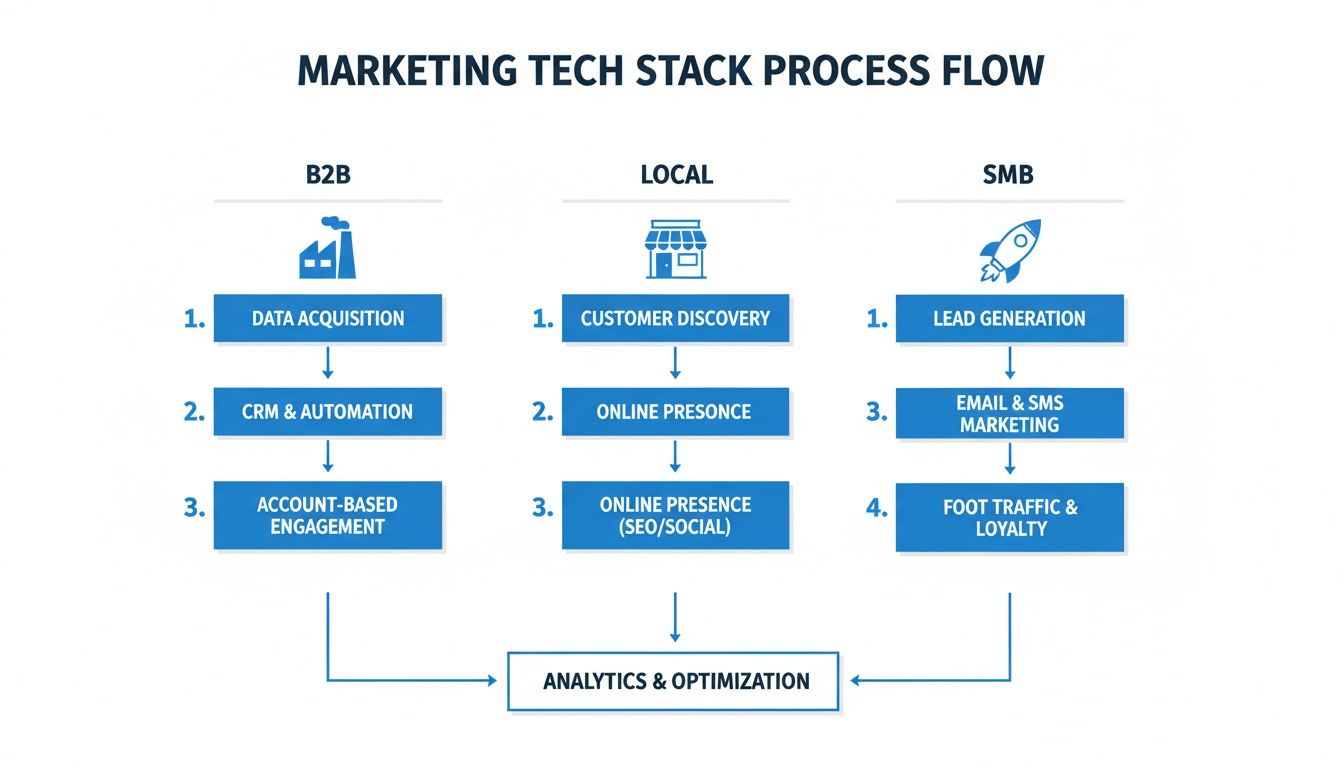
This drives the point home: while your tools may differ, the end goal is always a connected system that produces measurable results. Your 90-day plan is the blueprint to build that system.
Phase 1: Diagnosis And Planning (Days 1-30)
Your first month is all groundwork. You’re not buying or building anything yet. Instead, you're asking tough questions, auditing what you have, and getting clear on what "success" looks like. Getting this phase right prevents costly mistakes down the road.
Your Month 1 Checklist:
- Conduct an Internal Audit: Sit down with your sales and marketing teams. Ask them: where are the biggest time-sucks? What are the most frustrating parts of their daily workflow?
- Define Your Core Goals: Be specific. What business problems must this new stack solve? Think "reduce lead response time to under 5 minutes" or "increase marketing-sourced revenue by 15%," not just "get more leads."
- Set a Realistic Budget: Calculate the total cost of ownership, including software licenses, implementation help, and team training.
- Shortlist and Vet Vendors: Based on your goals, pick 2-3 potential solutions. Schedule demos and make them show you exactly how their tool solves your specific problems.
- Make Your Final Selection: Pick the tool that best aligns with your goals, team skills, and budget.
Phase 2: Implementation And Integration (Days 31-60)
With a solid plan, month two is about the technical build. This is where you configure the software, connect it to your other systems, and migrate data. This phase demands a sharp eye for detail.
Pro Tip: Before you migrate a single contact, back up everything. A clean, reversible process is the best insurance policy against accidental data loss.
Your Month 2 Checklist:
- Assign a Project Lead: One person needs to own this project internally. They'll be the main point of contact for the vendor and your team, keeping everything on track.
- Configure the Platform: Set up user accounts, customize fields to match your business, and build the basic structure of the new system.
- Clean and Prepare Data: This is non-negotiable. Go through your existing customer data and purge duplicates, update old info, and fix inaccuracies before you import anything.
- Execute Data Migration: Carefully import your clean contacts, deals, and company records. Always test with a small batch first to ensure everything maps correctly.
- Set Up Core Integrations: Connect the new stack to essential tools like your email server, website forms, or accounting software.
Phase 3: Optimization And Training (Days 61-90)
The final month is about bringing the system to life. The tech is in place, but now you must build the workflows that make it valuable and train your team to use it. A tool nobody adopts is just an expense.
Your goal is to shift from a system that works to a system that your team uses confidently every day.
Your Month 3 Checklist:
- Build Initial Automations: Start with 2-3 high-impact workflows, like an email nurture sequence for new leads or a Slack notification when a hot lead fills out a form.
- Conduct Team Training: Run hands-on training sessions focused on the actual daily tasks your team will perform in the new system.
- Develop Standard Operating Procedures (SOPs): Create simple, written guides for common tasks, like "How to Add a New Deal" or "How to Send a Marketing Email."
- Launch and Go Live: Flip the switch and officially move over from the old system. Monitor everything closely for the first week to squash any immediate bugs.
- Gather Feedback and Iterate: After two weeks, meet with the team. What's working? What's still confusing? Make small tweaks to smooth out any friction points.
By sticking to this 90-day roadmap, you turn a potentially chaotic project into a methodical, step-by-step process. This is how you ensure your investment in a new marketing tech stack starts paying you back from day one.
How To Measure And Maintain Your Stack For The Long Term
Let’s be honest: your marketing tech stack is not a Crock-Pot. You can't just set it and forget it. It's a living part of your business that needs regular check-ups to keep it running smoothly and profitably.
Without a plan for measurement and maintenance, even the best-designed stack will slowly devolve into a cluttered, inefficient, and expensive mess. Treating your stack like the strategic asset it is means asking the tough questions. Is this tool making us money? Is it saving us time? Or has it just become subscription bloat?
What to Look For: Key Performance Indicators to Track
You can't manage what you don't measure. Gut feelings don't cut it. To diagnose the health of your stack, you must tie its performance directly to business outcomes. Start by tracking a few critical KPIs that show the real-world impact of your technology.
Here are the essential metrics to watch:
- Customer Acquisition Cost (CAC): Take the total cost of your sales and marketing efforts (including software subscriptions) and divide it by the number of new customers acquired. A healthy stack should help you drive CAC down over time.
- Lead-to-Customer Conversion Rate: What percentage of qualified leads become paying customers? This metric directly reflects how well your CRM and automation tools are nurturing prospects through your sales funnel.
- Marketing-Sourced Revenue: This is the ultimate proof of ROI. It answers the one question that matters most: "How much actual revenue did our marketing activities—powered by this tech stack—directly generate?"
Tracking these numbers gives you a clear, honest scorecard for your investment. If you're ready to go deeper, we break it all down in our guide on the fundamentals of marketing analytics.
Your Simple Stack Maintenance Schedule
Think of your tech stack like a car; it needs routine maintenance. A simple, consistent schedule helps you catch problems early, trim costs, and ensure your tech evolves with your business. This isn't about adding another meeting to the calendar—it's about building a disciplined habit.
The goal of maintenance is to prevent 'tech bloat'—the slow accumulation of redundant, underused, or obsolete tools that quietly drain your budget and complicate your workflows.
We've found a quarterly review cycle is the sweet spot. It’s frequent enough to stay on top of things without feeling like a chore.
Your Quarterly Maintenance Checklist:
- Conduct a Tool Audit: Go through every software subscription. Ask your team, "Are we still using this? Does it still solve the problem we hired it for?" If the answer is no, it's time to cancel. Be ruthless.
- Review Key Workflows: Pick one or two critical automated workflows, like your new lead follow-up sequence. Map it out. Are there broken steps or opportunities to make it more effective?
- Check Your Integrations: Make sure your core tools are still talking to each other correctly. A broken connection between your website forms and your CRM can silently kill your entire lead flow.
- Gather Team Feedback: Talk to the people on the front lines. Ask what’s frustrating them. Are any tools slow, buggy, or a pain to use? Their insights are invaluable.
This proactive approach turns maintenance from a dreaded task into a strategic advantage, ensuring your marketing tech stack remains a powerful engine for growth.
Your Questions About Marketing Tech Stacks, Answered
When it's time to build or refine a marketing tech stack, the same questions often pop up. Let's tackle the practical concerns we hear most from business owners about cost, complexity, and getting your team on board.
How much should I budget for my marketing tech stack?
There’s no magic number; it depends on your business size, industry, and goals. However, a solid rule of thumb is to set aside 5–10% of your total marketing budget for technology.
For small businesses, an all-in-one platform like GoHighLevel can be a game-changer, bundling key tools into one predictable monthly fee. The best way to start is by identifying your most painful problem—usually solved by a CRM—and building out from there. Don't buy tech for tech's sake. Focus on tools that solve a real problem and can show a clear return.
What is the single most important tool in any stack?
Hands down, the Customer Relationship Management (CRM) system. Think of it as the central nervous system for your entire marketing and sales operation. Every piece of customer data, every interaction, and all of their history lives here.
Without a solid CRM, all your other tools are just islands. That leads to disjointed customer experiences and lost opportunities. It doesn't matter if you're a manufacturer with long sales cycles or a local business managing appointments—the CRM is the foundation. It's the single source of truth you need.
Your CRM isn’t just another piece of software; it’s the engine of your customer-facing operations. Get this one piece right, and everything else becomes simpler and more effective.
How do I get my team to actually use the new tools?
Adoption is everything. A powerful tool that no one uses is just a line item on your credit card statement. The secret is to get your team involved from the very beginning.
- Involve them in the selection process: Ask about their biggest daily headaches. A tool that solves a genuine pain point for them is a tool they’ll be excited to use.
- Provide practical, hands-on training: Don't just give them a tour of features. Show them exactly how the tool fits into their specific workflows and makes their job easier.
- Lead from the front: When the leadership team actively uses the new system—like pulling reports from the CRM during meetings—it sends a clear message that the tool is important and encourages everyone to get on board.
Ready to build a marketing system that actually drives growth? At Machine Marketing, we specialize in designing and implementing integrated tech stacks that cut waste and deliver measurable results. Book a discovery call with Karl to get a clear diagnosis and roadmap for your business.
