
A manufacturer can have strong search visibility, detailed product pages, and a capable sales team, yet still lose serious opportunities because the phone number on the website is treated as decoration. A buyer may review tolerances, certifications, lead times, or an RFQ form, then decide that calling is too inconvenient or that nobody will understand the request. The problem isn't a missing button. It's a broken measurement and response system.
Calls from website should be treated as lead events with a source, context, qualification status, owner, and revenue outcome. We'll diagnose where industrial websites leak high-intent demand, explain how dynamic number insertion works, compare tracking approaches, and build an operating model that separates sales-ready conversations from inbound noise.
Table of Contents
- Why Manufacturers Are Losing High-Value Phone Leads
- Setting Up Click-to-Call and Dynamic Number Insertion
- Choosing the Right Call Tracking Tool for Your CRM
- Creating Call Handling Playbooks for Industrial Sales
- Measuring Call ROI and Optimizing Performance
- Common Mistakes That Undermine Your Call Strategy
Why Manufacturers Are Losing High-Value Phone Leads
A machining company receives a visit from a buyer searching for a tight-tolerance component. The visitor reaches the right product page, reviews the material options, and sees a phone number in the header. The number is technically present, but it isn't connected to the page, campaign, or CRM. If the buyer calls, the receptionist may not know which product prompted the inquiry. If the call goes unanswered, the marketing team may never know that a paid search visitor tried to speak with sales.
That manufacturer doesn't have a traffic problem. It has an observability problem. The website creates interest, but the business can't reliably identify which sessions produce calls, which calls represent viable opportunities, or whether sales followed up.
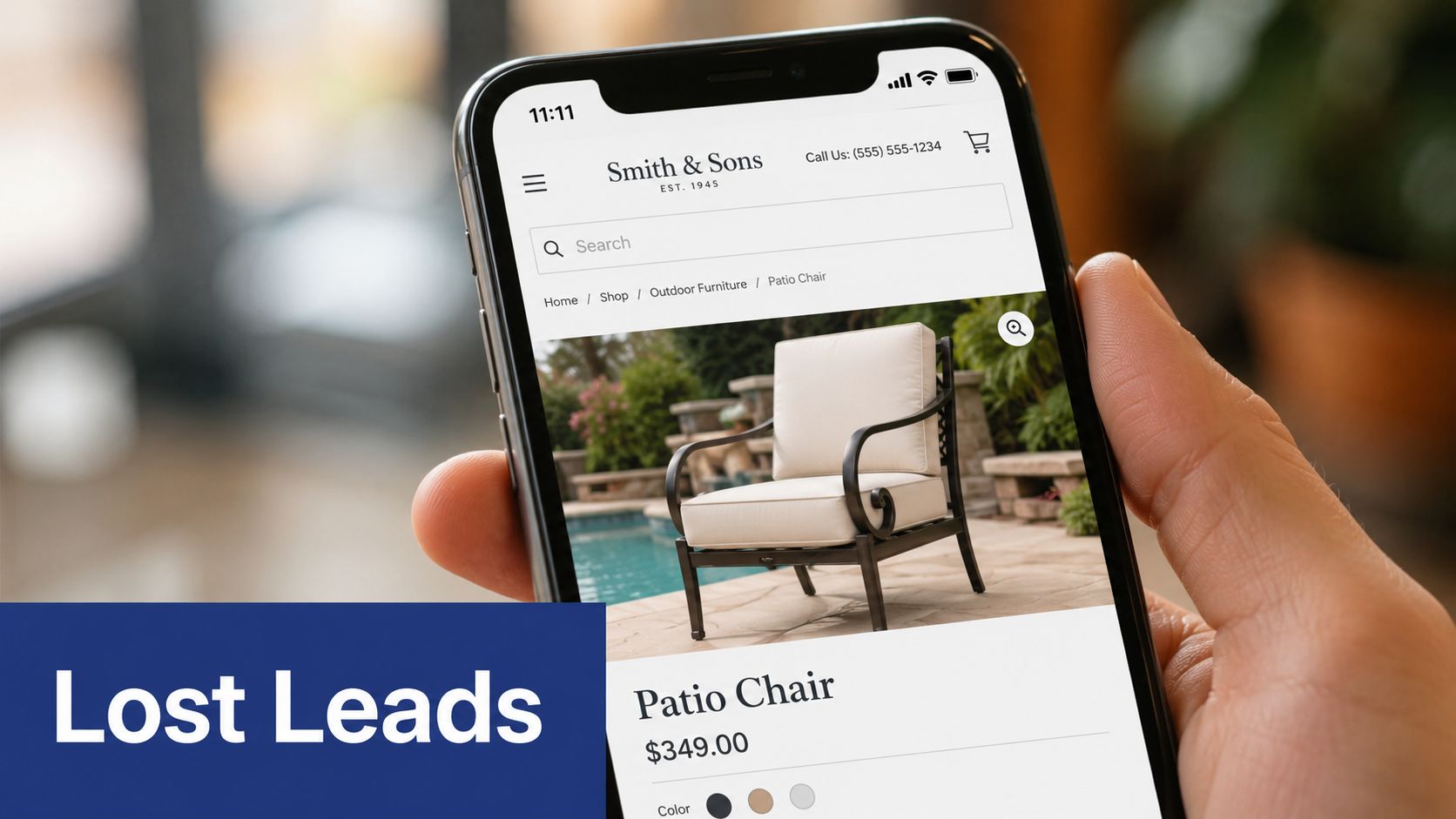
The passive phone number failure
Many industrial websites rely on one static number across every page and marketing channel. That approach creates several blind spots:
- No source ownership: The team can't distinguish an organic visitor from a paid search visitor, referral visitor, or campaign response.
- No page context: A call from a capabilities page may require a different response from a call originating on a repair service page.
- No quality signal: A dial, a wrong number, and a serious engineering discussion can all appear as the same activity.
- No operational feedback: Marketing keeps funding channels without knowing which ones generate conversations that sales can work.
The issue becomes more important on mobile. Google reported that hundreds of thousands of advertisers were using phone extensions and generating millions of calls per month by 2010. By 2014, Google research found that 32% of mobile searchers regularly needed to call a business from search, 52% found click-to-call useful, and the average click-to-call conversation lasted six minutes, with 72% lasting longer than 30 seconds. These figures are documented in Google's click-to-call research coverage.
Practical diagnosis: If your phone number can't tell you where the caller came from and what happened next, you don't have call attribution. You have a ringing device.
Find the leakage before adding more traffic
Start with a journey review. Open your highest-intent pages on a phone and ask:
- Can a buyer call without copying the number manually?
- Does the page explain who will answer and what information the caller should prepare?
- Does the call route to a person who understands the product or service?
- Can the sales team identify the likely source and page context?
- Does an unanswered call create a follow-up task?
A click-to-call element reduces friction, but it won't repair poor routing or absent follow-up. For teams coordinating phone systems with website conversations, these telephone intercom integration tips offer useful context on connecting communication tools instead of treating each channel as an isolated system.
Manufacturers should also resist the assumption that every page needs the same call emphasis. Marketing Charts reported call-based conversion rates ranging from 0.2% in e-commerce to 11.7% in home services, based on call-tracking technology that connected website visits with calls. The range, documented in the industry benchmark report, shows why sector and intent matter. A technical product page may need drawings and specifications first, while a service or urgent-repair page may justify a prominent phone action.
Setting Up Click-to-Call and Dynamic Number Insertion
A tel: link makes a number tappable. It doesn't, by itself, tell you which campaign produced the call or whether the conversation became an opportunity. For that, we use dynamic number insertion, or DNI.
DNI uses a JavaScript snippet to detect the visitor's source, replace the visible phone number with a tracking number from a pool, and forward the call to the normal business line. The system can preserve attribution to a channel, keyword, campaign, landing page, and session. The technical overview of website call tracking describes this source-level approach and the role of dynamic number replacement.
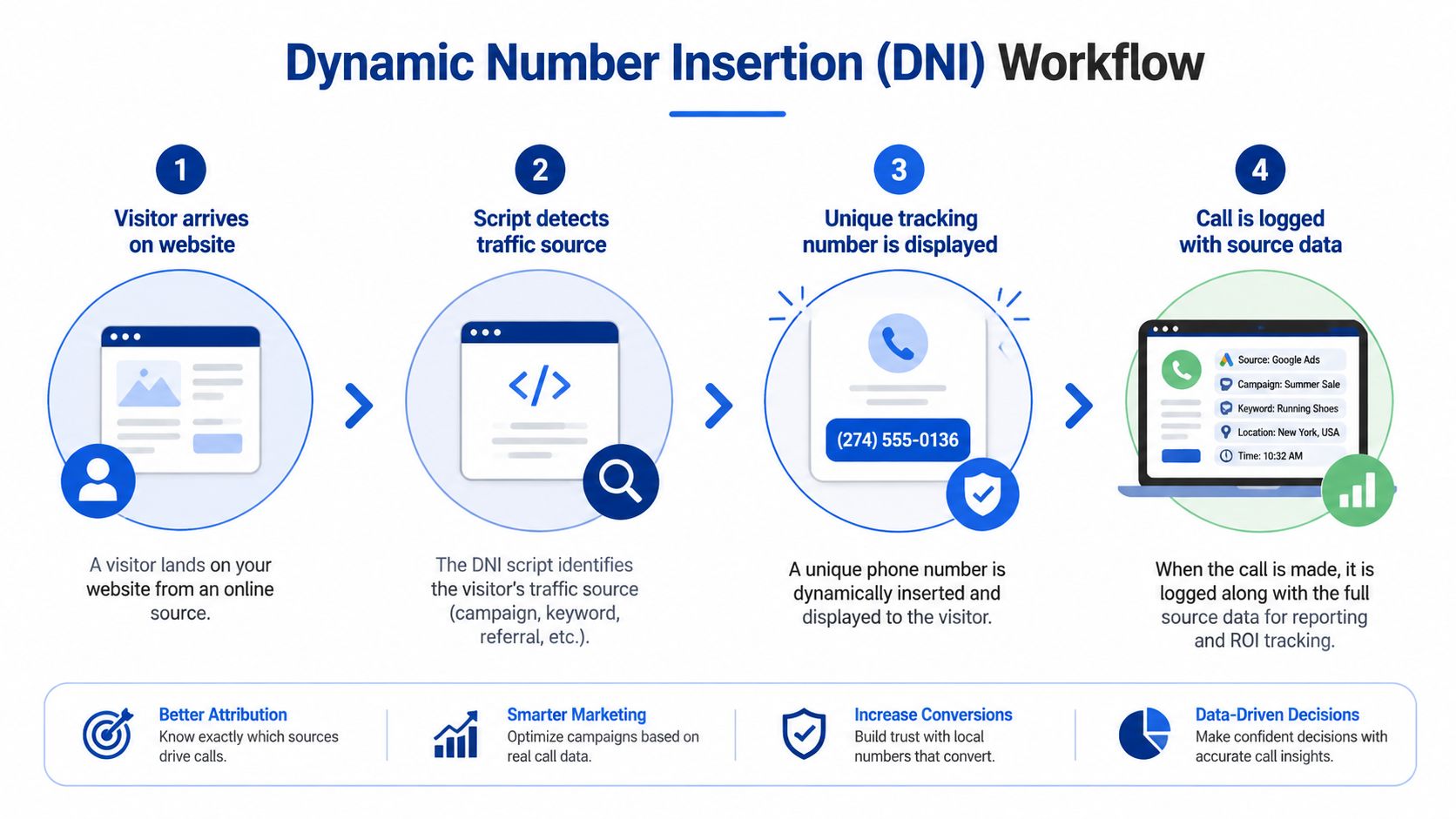
Build the implementation in sequence
1. Define the attribution fields first. Decide which data the CRM needs before choosing a platform. At minimum, capture the source, medium, campaign, landing page, keyword where available, caller number subject to your privacy rules, assigned owner, call outcome, and related account or opportunity.
2. Create a tracking number pool. DNI assigns numbers from a pool so different visitors can receive numbers associated with their traffic context. The number isn't normally the final destination. Call forwarding sends the caller to the business line while the tracking platform retains the source relationship, as explained in this description of DNI and call forwarding.
3. Install the script across the site. The script reads signals such as the referrer, UTM parameters, and the Google Ads click identifier, or gclid. It then replaces every visible instance of the phone number and the associated click-to-call link. Missed instances matter. A header number may swap while a contact-page number remains static, creating inconsistent attribution.
4. Preserve the session carefully. Tracking numbers are assigned for a visitor session and returned to the pool after inactivity. One published explanation uses roughly 30 minutes of inactivity as the return point, while first-party cookies and tracking parameters can help preserve the visitor's assigned number on return visits. The mechanics are detailed in this explanation of session-based DNI assignment.
5. Test the full path. Visit the website from tagged campaigns, check the displayed number, place a call, confirm forwarding, and inspect the recorded source data. Test desktop and mobile layouts, multiple pages, repeated visits, after-hours routing, voicemail, and unanswered calls. A script that swaps the number but fails to log the call isn't ready for production.
Configure click-to-call without hiding the next action
The button label should tell the buyer what happens next. “Call sales” may work on a general contact page. “Speak with an applications engineer” is more specific on a technical capability page, provided the business can deliver that experience.
Keep the phone action near supporting evidence:
- Product pages: Place the call action beside specifications, drawings, and material information.
- Service pages: Put the number near urgency, coverage, and response information.
- RFQ pages: Offer calling as an alternative, but don't remove the form. Buyers may need to upload drawings or communicate asynchronously.
- Mobile layouts: Make the button easy to tap without covering navigation or technical content.
A well-designed industrial website design approach should make these actions visible without forcing every visitor into a phone conversation.
For Google Ads, create a phone-call conversion action, add the call-conversion tag through the site tag or a tag manager, and verify that click-to-call fires. Use a 60-second minimum duration threshold to filter likely misdials and hang-ups, following the implementation guidance in this Google Ads call tracking walkthrough. Treat the threshold as a filtering rule, not proof of qualification. A long call can still be a poor-fit inquiry, and a shorter call can identify a genuine opportunity that requires later technical work.
Choosing the Right Call Tracking Tool for Your CRM
The right tool is the one that preserves attribution through the sales process without creating another administrative island. A small machine shop may need a simple number pool, forwarding, recordings where lawful, and a dependable CRM webhook. A multi-location industrial supplier may need department routing, campaign-level reporting, duplicate handling, user permissions, and opportunity synchronization.
Don't compare platforms by dashboard appearance alone. Compare the data path from website session to call to CRM record to closed revenue.
A practical comparison
| Operating situation | Suitable approach | Main advantage | Main risk |
|---|---|---|---|
| Small shop with one sales line | Basic DNI and call forwarding | Fast implementation and limited administration | Shallow opportunity reporting |
| Growing manufacturer using GoHighLevel | Native integration or webhook into contact and opportunity workflows | Connects calls with automated follow-up | Poor field mapping can create duplicate records |
| Multi-location industrial firm | Platform with number pools, routing rules, and CRM integration | Separates regions, departments, and sources | More configuration and governance |
| Enterprise environment | API-based integration with CRM and analytics systems | Detailed control over lifecycle data | Requires technical ownership and testing |
What to inspect before signing
Integration depth matters more than the logo. Confirm whether the platform can create or update a contact, attach call metadata to the correct opportunity, pass campaign fields, and trigger workflows in GoHighLevel or your existing CRM. A call that appears in a separate dashboard still leaves sales managers without a complete pipeline view.
Reporting should support decisions. Look for source, landing page, campaign, caller, duration, disposition, recording controls, and revenue association. If the system only reports total calls, it can't answer whether a campaign attracts buyers or curiosity.
Routing must match the organization. Check whether you can route by location, product line, business hours, language, or department. Manufacturers often need an applications engineer, estimator, service coordinator, or distributor contact, not a generic queue.
Data governance can't be an afterthought. Recording and caller data require documented access, retention, and consent processes. Several U.S. states require all parties to be notified before recording, including California, Connecticut, Florida, Hawaii, Illinois, Maryland, Massachusetts, Montana, New Hampshire, Pennsylvania, and Washington, as outlined in this guide to call tracking and recording laws. GDPR-focused guidance also emphasizes informing callers, securing data, obtaining consent, limiting storage, minimizing collection, and supporting data-subject rights.
For a structured way to evaluate cost against business outcomes, review DialNexa Labs Private Limited's call tracking ROI guide. Use it as an evaluation aid, then validate every integration against your actual CRM fields and sales workflow.
Creating Call Handling Playbooks for Industrial Sales
Tracking a call doesn't make the conversation useful. The sales team still needs a consistent way to identify the application, decide who owns the next step, and record what happened. Without a playbook, one employee may ask for a part number while another jumps straight to pricing, and neither may capture the information engineering needs.
A good playbook gives people structure without forcing them to sound scripted.
Define the qualification path
Start with the questions that change the routing decision:
- Application: What is the part, assembly, machine, or service used for?
- Technical requirement: Which material, tolerance, dimensions, certification, or operating condition matters?
- Commercial context: Is the caller requesting a quote, checking capability, solving an active issue, or researching suppliers?
- Timing: When does the buyer need an answer, sample, repair, or production run?
- Ownership: Which salesperson, estimator, applications engineer, or service lead should take responsibility?
The caller shouldn't have to repeat information to multiple departments. Give the first responder a short decision tree. A capability question can move to an applications specialist. A quote request can create an opportunity with an RFQ task. A service emergency can route directly to the service queue.
Write the handoff rules
Every qualified call needs a recorded disposition and a next action. Useful dispositions include qualified opportunity, existing-customer support, supplier inquiry, recruiting, wrong number, price-only inquiry, and unqualified request. The labels should match CRM stages, not exist as disconnected call-center terminology.
Set response rules for missed calls, voicemail, and after-hours inquiries. A missed call should create an owner and a deadline, not sit as an unread notification. The missed-call text-back workflow can support rapid acknowledgment, but automation should identify the business and offer a useful next step rather than send a generic message.
Train with real call patterns
Review a sample of conversations with the team, subject to applicable recording and notification requirements. Mark where the representative captured the application, where the buyer became uncertain, and where the next step was left vague. Then update the playbook with actual objections and technical questions.
Operational rule: A call isn't complete when someone hangs up. It's complete when the owner, qualification status, and next action are recorded.
Measuring Call ROI and Optimizing Performance
Call reporting becomes useful when it joins three systems: the website session, the conversation, and the CRM outcome. Total call volume is an activity measure. It isn't a revenue measure.
Use a consistent path:
- Attribute the session. Store source, campaign, keyword, landing page, and tracking number.
- Classify the call. Record duration, answered status, department, disposition, and qualification.
- Connect the opportunity. Associate the caller with an account or contact and create the appropriate CRM stage.
- Track commercial value. Record quote status, won or lost outcome, order value, and relevant customer value fields.
- Review by source and page. Compare channels based on qualified conversations and pipeline, not just dials.
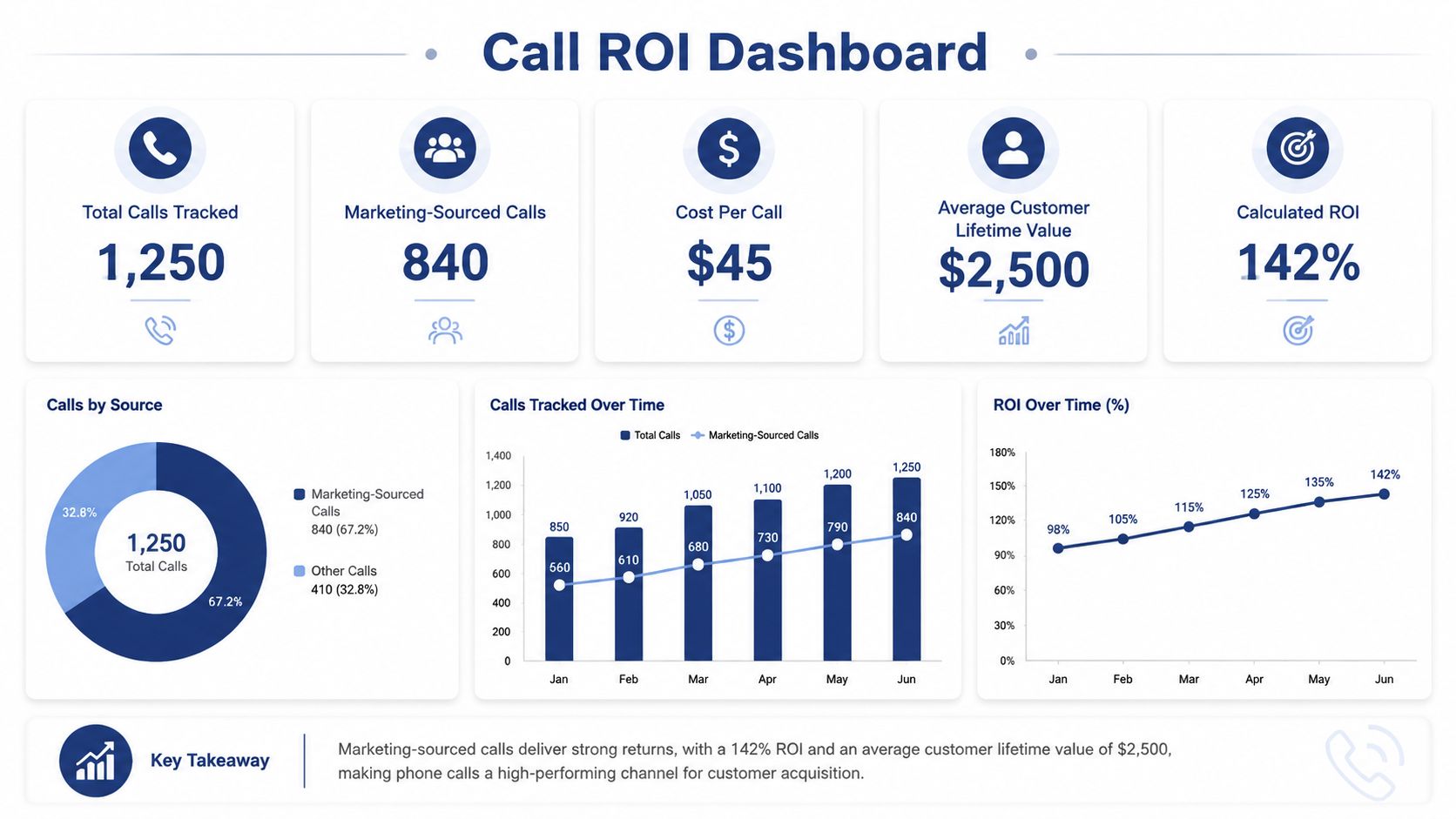
Useful metrics include answered call rate, qualified-call rate, opportunity creation, conversion during the call, sales-cycle progression, average deal size, and source-level cost. Invoca's 2026 benchmark report found that 38% of calls answered by a person across industries were leads, and 42% of those leads converted during the call, according to the published benchmark data. Treat these figures as external benchmarks, not targets. Your definition of a lead and your manufacturing sales cycle may differ.
The optimization loop is straightforward. If a page generates calls but few qualified inquiries, improve its technical clarity, audience targeting, or call prompt. If paid traffic produces qualified calls but poor follow-up, fix routing and ownership before increasing spend. If organic traffic produces strong opportunities from a capability page, strengthen that page and build related content around the same buyer problem.
For a broader framework connecting marketing activity to business outcomes, use Machine Marketing's guide to measuring marketing ROI. A separate collection of SEO and conversion optimization resources from Digital Skyrocket can also help when the call data points to page-level friction.
Common Mistakes That Undermine Your Call Strategy
A manufacturer can receive a busy stream of calls after launching a product campaign, yet still give sales no usable view of intent. Some callers want pricing, others need technical support, and a few may be suppliers or recruiters. Treating that activity as one lead total hides the gap between call volume and sales-ready demand.

The failures to look for
Counting every dial as a lead: Misdials, hang-ups, recruiting calls, supplier inquiries, and existing-customer support can inflate reports. Use duration as an initial filter, then require a disposition and CRM review before classifying a call as an opportunity.
Ignoring call recordings and transcripts: Conversations expose unanswered technical questions, unclear page copy, and routing failures. If recording is enabled, notify callers and manage consent, access, storage, and deletion according to applicable requirements.
Letting tracking numbers drift: A replaced campaign number, missing page instance, or broken script can split attribution. Test visible numbers and click-to-call links after site releases, template changes, and analytics updates.
Keeping call data outside the CRM: A marketing dashboard may show source data while sales works elsewhere. Map calls to contacts, accounts, opportunities, owners, and next actions so managers can connect acquisition activity with pipeline progress.
Routing for convenience instead of fit: Sending every inquiry to one line creates avoidable transfers and delays. Route by product, location, urgency, and buyer type only when the organization can maintain those rules and review exceptions.
Recording without a compliance process: Call recording requires an operating policy. U.S. state requirements and GDPR controls can affect notice language, consent, retention, security, and caller rights. Assign an owner before enabling the feature, and document how requests are handled.
A reliable system answers more than “How many calls did we get?” Ask which calls were sales-ready, what did they cost, who handled them, and what pipeline did they create? That turns calls from website into an operational system that teams can test, audit, and improve.
Machine Marketing helps manufacturers connect website conversion paths, call tracking, CRM workflows, and follow-up processes into a practical B2B growth system. Visit Machine Marketing to review the available strategy and implementation support, then bring your call data and current routing process to the conversation.
