
A request for a custom part arrives while your sales team is on the shop floor. The form notification lands in a shared inbox, the RFQ waits for someone to assign it, and marketing keeps sending general emails because it can't see whether sales has made contact. By the time a rep responds, the buyer may already be comparing another supplier.
Marketing automation in CRM fixes this as a system problem, not an email problem. We connect lead capture, ownership, response timing, qualification, nurturing, service data, and reporting so your team can move opportunities forward without adding manual work. This guide shows how to diagnose the gaps, design the workflow, and pilot the controls that protect pipeline quality.
Table of Contents
- Why Manufacturers Lose Leads Without Connected Automation
- What Marketing Automation Inside Your CRM Really Means
- Key Capabilities That Power Manufacturing Workflows
- How Automation Moves Leads Through Every Lifecycle Stage
- Measurable Benefits and KPIs to Track Performance
- Implementation Pitfalls That Break Your CRM System
- Your Next Steps to Make Automation Work for Growth
Why Manufacturers Lose Leads Without Connected Automation
Manufacturing companies rarely lose leads because nobody cares. They lose them because the path from website inquiry to sales action contains too many unowned steps.
A prospective buyer may complete a form for a machining capability, request a demo of a machine, or submit an RFQ for a difficult-to-source component. The website captures the information, an email platform sends a confirmation, and a CRM may store a contact record. Yet nobody has defined what happens next, who owns the opportunity, how quickly the first response must occur, or what signals should change its stage.
That gap is the shop floor to inbox problem. Your team understands production routing, inspection points, and escalation procedures. Lead handling often has none of that structure. A sales manager checks a notification manually, a rep creates a task when time allows, and marketing can't tell whether the account is active, stalled, or already in a quote conversation.
A connected CRM for lead generation gives you a shared operating model. The form creates a record, the record receives an owner, the CRM creates a task, and the workflow records each action. Marketing can nurture contacts who aren't ready, while sales receives a clear signal when a lead meets the agreed qualification rules.
Diagnose the failure before adding software
Start with the path a lead takes today. Ask:
- Where does the inquiry enter? Website form, email, phone, distributor, event, or referral?
- Who owns the record? A named person, a rotating queue, or nobody?
- What starts the response clock? Submission time, notification time, or manual review?
- What happens when nobody acts? Escalation, reassignment, or silence?
- Which system holds the truth? CRM, marketing platform, ERP, spreadsheet, or inbox?
The transformation isn't a larger campaign calendar. It's a dependable system that gives every inquiry a destination, every stage a definition, and every handoff an observable timestamp.
Practical rule: If you can't trace a lead from first touch to assigned action, more automation will create activity, not control.
What Marketing Automation Inside Your CRM Really Means
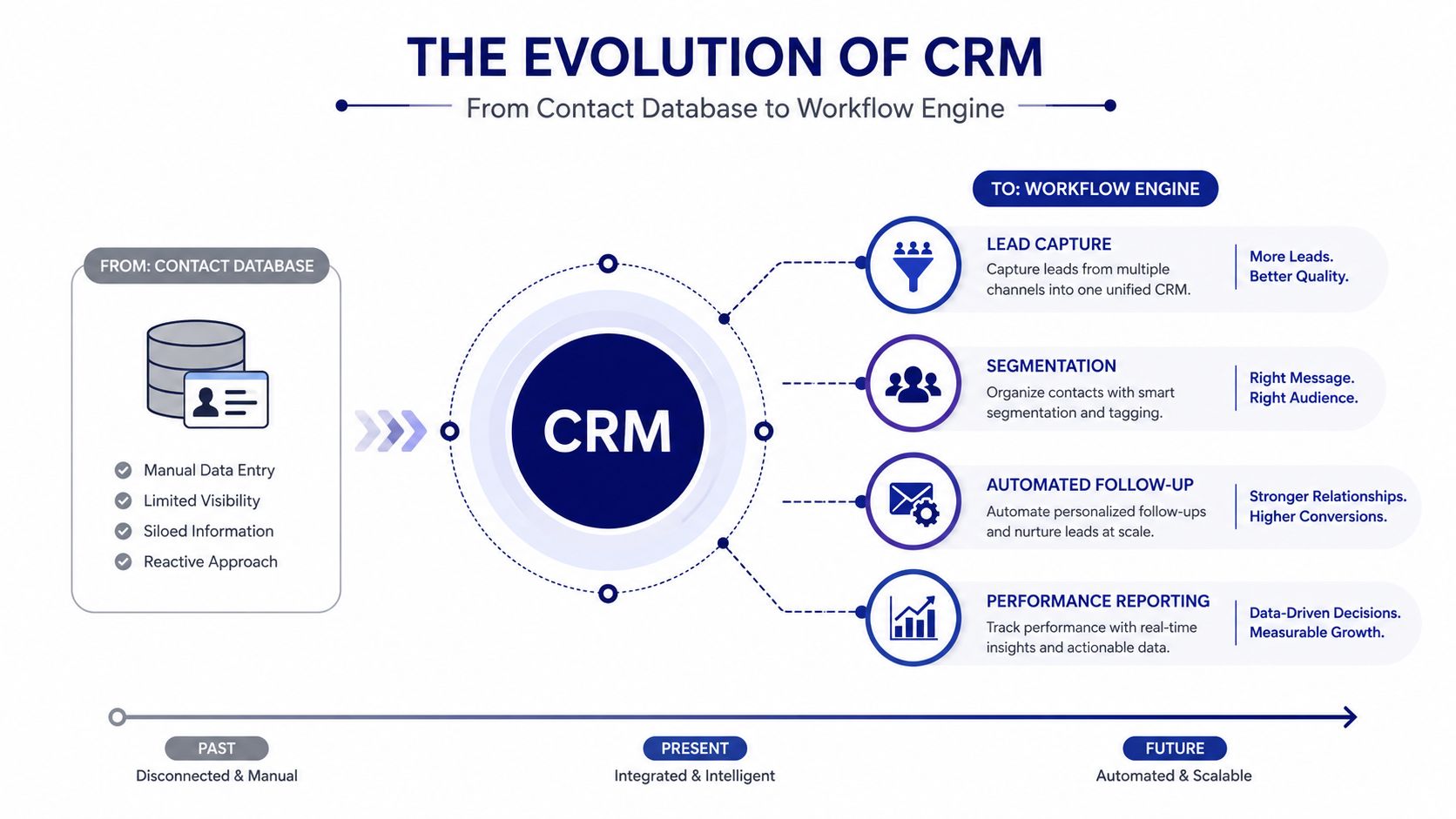
CRM and marketing automation have related but distinct roots. CRM began emerging in the 1980s from database marketing, took clearer shape in the 1990s through sales force automation software for contacts and opportunities, and added machine learning and AI capabilities by the late 2010s, as documented in SAP's history of CRM.
That history explains the modern shift. A CRM isn't merely a digital filing cabinet. It has become a workflow engine that connects lead capture, segmentation, follow-up, ownership, and reporting.
Think like a production control system
A standalone email platform can send a sequence when someone joins a list. That's useful, but it doesn't necessarily know whether the person is an existing customer, belongs to an active opportunity, or has an open service issue.
CRM automation adds operating context:
- Data enters the system. A form, call, event scan, or imported account creates or updates a record.
- Rules interpret the data. The workflow checks company type, territory, product interest, engagement, and current lifecycle stage.
- Ownership is assigned. The right salesperson, distributor, service contact, or account manager receives responsibility.
- Actions are triggered. The CRM creates tasks, sends acknowledgements, starts nurture, updates fields, or alerts a manager.
- Results return to the record. Replies, visits, downloads, calls, quote activity, and stage changes become part of the customer history.
For a manufacturer, this resembles a production line with sensors and controls. The lead is the workpiece, the CRM is the control layer, and each trigger moves the record to the next approved operation. If one sensor fails, the line may keep moving while quality deteriorates. In CRM terms, that means duplicate outreach, stale stages, or a buyer trapped between marketing and sales.
SMS can also belong in this system when it supports a defined customer action, such as appointment coordination or urgent follow-up. For practical implementation ideas, review master SMS integration on Shopify from YipSMS Inc., then apply the same principle to your own consent, ownership, and escalation rules.
The key distinction is simple: email blasts distribute messages; CRM automation coordinates decisions. Long B2B buying cycles need the second capability because several stakeholders may engage at different times, through different channels, while the opportunity moves through technical review, quoting, procurement, and approval.
Key Capabilities That Power Manufacturing Workflows
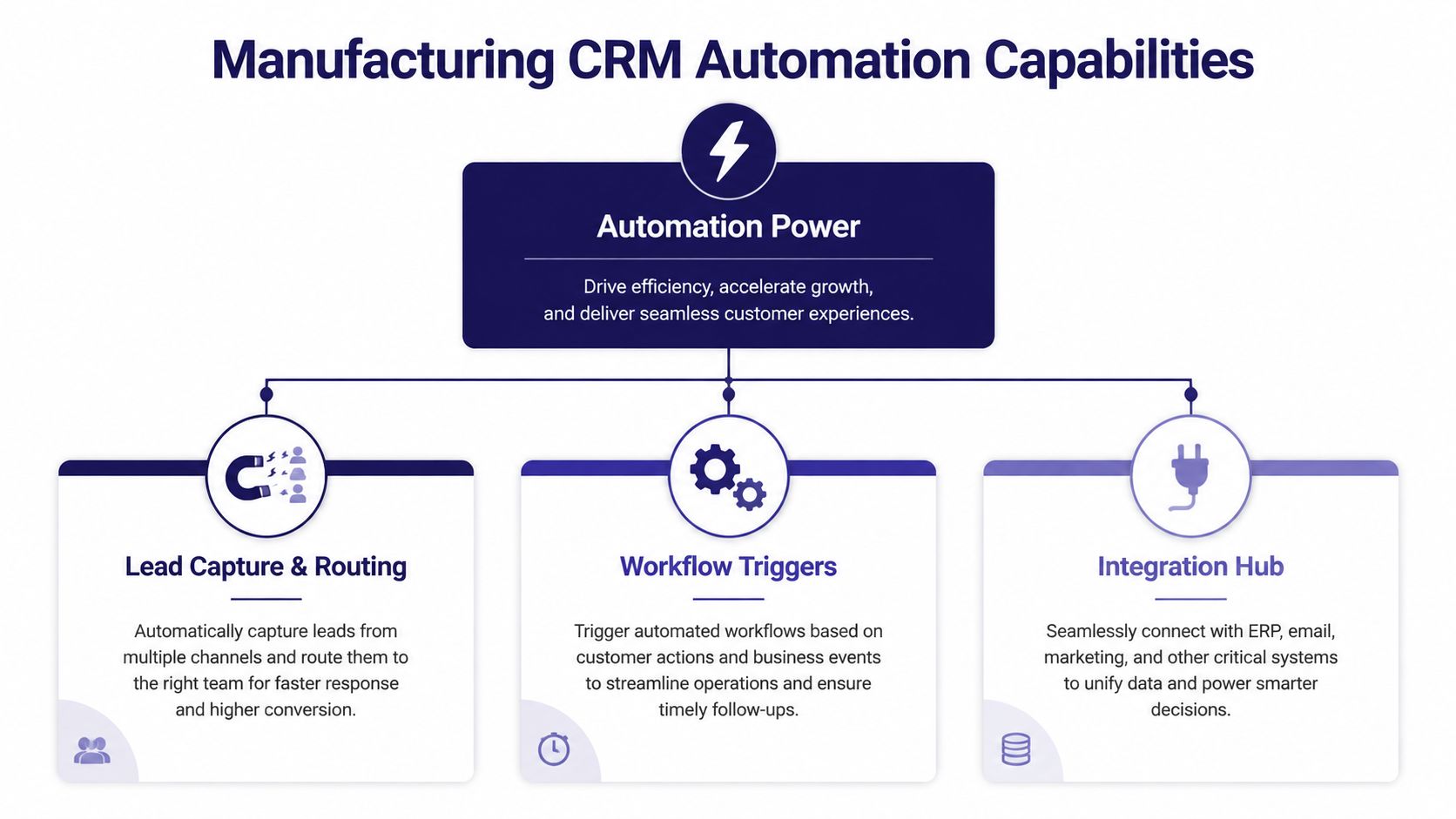
Effective automation is a chain. Lead capture without routing creates a queue. Routing without qualification sends weak opportunities to sales. Scoring without clean lifecycle data creates false urgency. Integration without governance spreads bad information faster.
Start with capture and routing
Your CRM should capture the source, inquiry type, product or capability interest, company details, territory, and time received. A routing workflow can then assign the record based on rules such as geography, industry, account ownership, machine category, or service responsibility.
For an RFQ, the workflow might:
- Create the account and contact: Match the company to an existing record before creating a duplicate.
- Classify the inquiry: Separate RFQs, demo requests, distributor inquiries, service questions, and general information requests.
- Assign ownership: Route to the appropriate salesperson or technical specialist.
- Create the first task: Include the requested capability, source, and response deadline.
- Notify the team: Send an alert through the agreed channel, with escalation if the record remains untouched.
Combine firmographic and behavioral signals
A useful score doesn't rely on one page visit or one email click. It combines explicit information, such as company type, location, application, and buying role, with events such as content downloads, repeat visits, form submissions, or technical documentation requests.
That score should flow back into the CRM. Marketing can run nurture based on engagement, while sales can use the same record to decide whether the contact belongs in active outreach, technical discovery, or long-term development.
Design principle: The marketing platform should interpret engagement. The CRM should govern ownership, stage, and forecast logic.
Build the integration hub
Manufacturing workflows often need connections to ERP, quoting, service, inventory, warranty, install-base, forms, analytics, and communication tools. The objective isn't to connect everything for its own sake. It's to expose the operational facts that change a sales or marketing decision.
Use this evaluation checklist:
- Bidirectional sync: Can CRM status flow to marketing, and can engagement return to CRM?
- Master-data rules: Which system owns account name, product, order, and service fields?
- Error visibility: Can someone see failed syncs, missing fields, or rejected updates?
- Stage governance: What event moves a lead from nurture to sales, or from opportunity to customer?
- Suppression logic: Does a quote, service issue, or closed opportunity stop irrelevant campaigns?
Teams responsible for smaller marketing operations can also review SME marketing execution tips from Zynthoro, particularly when translating campaign activity into repeatable operating procedures.
The test is not whether your CRM has many automation features. The test is whether a real inquiry travels through the system without manual interpretation at every step.
How Automation Moves Leads Through Every Lifecycle Stage
A lifecycle model gives your team a controlled vocabulary. Without one, marketing may call a record a lead, sales may call it an opportunity, and management may count both in the same report.
A practical model uses Lead, Marketing Qualified Lead, Sales Qualified Lead, Opportunity, Customer, and Evangelist stages. Each stage needs a defined owner, entry condition, exit condition, and automation purpose. Structured fields, timestamps, and behavioral events make those rules visible instead of leaving them in individual reps' memories.
| Lifecycle Stage | Owner | Automation Purpose |
|---|---|---|
| Lead | Marketing | Capture, enrich, segment, and begin relevant nurturing |
| Marketing Qualified Lead | Marketing and sales | Notify sales when engagement and fit meet the agreed threshold |
| Sales Qualified Lead | Sales | Create outreach tasks, discovery steps, and response controls |
| Opportunity | Sales | Track quote activity, stakeholder engagement, follow-up, and escalation |
| Customer | Account or service team | Trigger onboarding, education, service coordination, and expansion workflows |
| Evangelist | Marketing and account team | Request referrals, testimonials, introductions, or advocacy participation |
Give each transition a reason
A lead becomes an MQL because the record meets defined fit and engagement rules, not because someone clicked a button. An MQL becomes an SQL when sales accepts the record and confirms that a relevant business need exists. An opportunity should reflect an actual commercial process, such as technical review, quote preparation, or procurement, rather than a hopeful label.
For example, a prospect who downloads a capabilities guide might enter a technical nurture sequence. A later RFQ should update the same record, notify the assigned rep, and suppress generic nurture that no longer fits. If the rep accepts the lead, the CRM can create discovery tasks and record the acceptance timestamp.
Lifecycle tracking works because the CRM stores fields, dates, and events that can trigger actions throughout the relationship. The underlying approach is described in CRM lifecycle tracking, while a common stage model is outlined by SuperOffice's CRM statistics resource.
Prevent stage drift
Stage drift occurs when a record remains in an old stage after the buying situation changes. Add controls such as:
- Required exit fields: Don't allow an opportunity to advance without application, value, decision process, and next action.
- Stale-record alerts: Notify the owner and manager when an opportunity has no meaningful activity.
- Recycling rules: Return unready opportunities to a relevant nurture path without deleting sales history.
- Suppression rules: Stop prospect messaging when a customer, quote, service case, or active opportunity requires different communication.
For regulated or sensitive environments, HIPAA-compliant workflow strategies from Magnitude Marketing offer useful context for permissions, workflow controls, and data handling. The same discipline matters in industrial sales, even when your compliance requirements differ.
You can apply this model to campaigns in CRM so campaign activity, lifecycle movement, and revenue outcomes remain connected instead of living in separate reports.
Measurable Benefits and KPIs to Track Performance
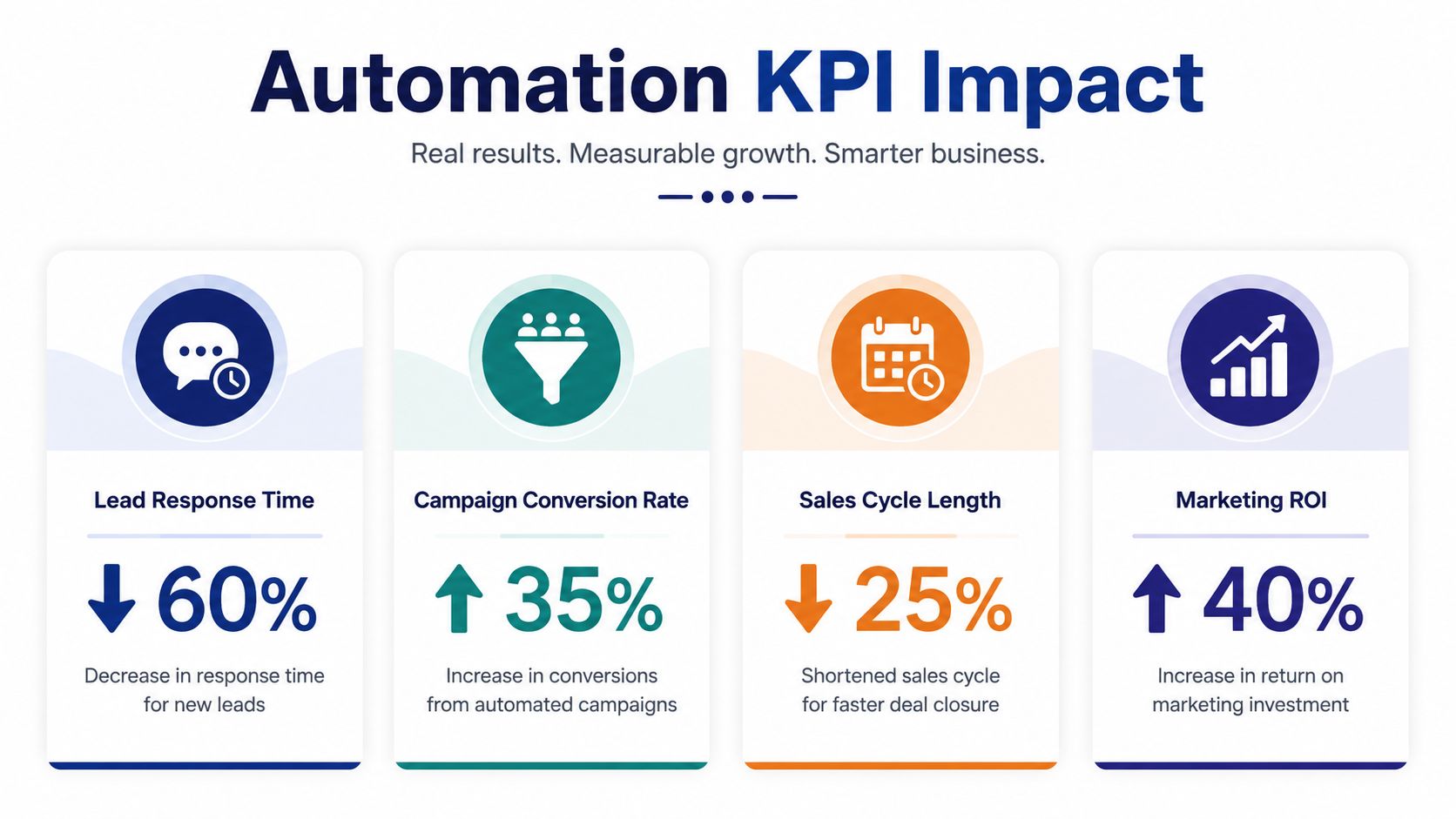
Automation earns its place when it controls a business outcome. For manufacturers, the first outcomes to measure are response latency, qualification, routing accuracy, manual effort, and pipeline movement.
The MIT and InsideSales.com Lead Response Management Study found that moving the first call from 5 minutes to 30 minutes after an inquiry reduced the odds of reaching a lead by phone by 100x and reduced the odds of qualifying that lead by 21x. Harvard Business Review found that companies contacting leads within the first hour were nearly 7x more likely to qualify them than companies waiting another hour, based on an analysis of 2,241 U.S. companies. These findings are summarized with implementation guidance in the CRM email and SMS response-time analysis.
Measure the control points
Don't begin with vanity metrics. Build a dashboard around the points where your process can fail:
- First-response time: Measure form submission to acknowledgement, assignment, and human action separately.
- Qualification rate: Track the share of accepted leads that become sales-qualified, then compare by source and inquiry type.
- Routing accuracy: Review whether records reach the correct owner without reassignment.
- Manual work remaining: Count the steps staff still perform for routing, notifications, approvals, follow-up tasks, and lifecycle updates.
- Stage aging: Identify where records pause and whether the pause reflects a buyer decision or an internal delay.
- Forecast integrity: Compare pipeline movement with meaningful engagement, quote activity, and documented next actions.
The manufacturing KPI guidance can help you separate operational indicators from business results. Your dashboard should show both. A faster acknowledgement matters, but management also needs to know whether the workflow produces better-qualified conversations and more reliable pipeline visibility.
Use email benchmarks carefully
For B2B outbound sales email, healthy open rates are described as 25% to 40%, while warm sequences to previously engaged contacts can reach 40% to 60% open rates and 8% to 15% reply rates, according to CRM email automation benchmarks.
Treat these as directional benchmarks, not promises. Compare similar audiences, offers, sender roles, and stages. A technical follow-up to an engaged engineering contact shouldn't be judged against a cold prospecting sequence. More important, connect replies and meetings back to CRM stages so the dashboard measures pipeline quality rather than opens alone.
Implementation Pitfalls That Break Your CRM System
More automation can make visibility worse. If your data model is weak, the workflow may produce a busy stream of emails, alerts, and tasks while managers lose sight of what happened.
The black hole handoff
A marketing-qualified record can disappear between systems when marketing sends an alert but CRM ownership doesn't update. Sales may not know whether the lead is new, recycled, assigned, or already being worked.
Look for: duplicate records, unaccepted leads, missing timestamps, and reports that count notifications as handoffs.
Fix it: define an acceptance event, assign one owner, record the handoff time, and escalate when the owner doesn't act within the agreed service level.
Hidden buying groups
One contact rarely represents the entire industrial buying process. Engineering, operations, purchasing, finance, and service may all influence a decision. If your CRM treats each person as an isolated lead, marketing can send conflicting messages and sales can miss the account-level relationship.
Look for: several contacts with no shared account view, repeated form submissions, and opportunities linked to individuals rather than companies.
Fix it: use account structures, role fields, buying-group notes, and relationship mapping. Keep engagement visible at both contact and account level.
Fragmented operational data
Manufacturing teams often need ERP orders, entitlements, install-base records, warranty status, service activity, inventory context, and quote history. Recent manufacturing-focused research reports that 55% of leaders want ERP processes such as orders, entitlements, and install base exposed inside CRM, while nearly 90% show interest in AI tied to concrete uses such as recalls and quality, as reported in ServiceNow's manufacturing CRM lessons.
Look for: reps switching systems to answer basic account questions, campaigns that ignore service status, and customer records that disagree across platforms.
Fix it: map the decisions first, then expose only the ERP and service fields that support those decisions. Establish which system owns each field and how updates move between systems.
Ripping and replacing too early
CRM replacement activity fell from 22.1% in 2024 to 9.7% in 2025, according to the manufacturing research cited above. That trend suggests a practical lesson: buyers may be more interested in improving existing stacks than replacing them.
Audit the data model, sync reliability, ownership rules, and workflow logic before selecting another platform. The problem may be architecture and governance, not the software license.
Your Next Steps to Make Automation Work for Growth
Treat this as an engineering project. Define the failure mode, isolate one high-value workflow, test the controls, and scale only after the record behaves correctly.
Use this audit:
- Map the current path: Follow a real RFQ or demo request from submission through first sales action.
- Check the data model: Confirm required fields for account, inquiry type, product interest, owner, stage, and next action.
- Set response controls: Create sub-5-minute acknowledgement and assignment, then add SLA escalation when a rep hasn't touched the record within the first hour.
- Define lifecycle rules: Write the entry and exit conditions for Lead, MQL, SQL, Opportunity, Customer, and Evangelist.
- Test bidirectional flow: Confirm that engagement updates CRM and that CRM stage or suppression rules update marketing.
- Connect operational context: Identify the ERP, service, warranty, inventory, and install-base fields that change a sales or customer decision.
- Pilot one workflow: Start with inbound routing, task creation, and escalation rather than launching every possible nurture sequence.
- Review the dashboard: Measure response time, qualification, routing accuracy, manual work, stage aging, and pipeline movement.
Ask yourself whether your team can answer three questions immediately: Who owns this lead? What happened next? What should happen now? If the answer requires checking several systems, your diagnosis is already clear.
Automation becomes a growth system when it protects response time, preserves handoff integrity, and gives sales, marketing, service, and leadership the same operational view. It isn't about sending more messages. It's about making the right action repeatable.
Machine Marketing helps manufacturers connect CRM strategy, lifecycle stages, lead routing, campaign workflows, and practical automation controls. Visit Machine Marketing to request a diagnosis of your current handoffs and identify one workflow to pilot first.
