
Most LinkedIn advice starts with connection requests, posting frequency, and message volume. That's the wrong starting point for manufacturers. Industrial purchases rarely belong to one visible executive. Engineers, quality leads, plant managers, operations leaders, and procurement teams evaluate risk in the background, often before a salesperson knows an account is active.
Effective B2B lead generation on LinkedIn is therefore less about collecting contacts and more about influencing the buying committee before the first sales conversation. LinkedIn reports 1.2 billion members and more than 130 million decision-makers in its professional network, which gives industrial firms unusual access to technical and commercial stakeholders in the same channel (LinkedIn's B2B audience overview). The challenge is turning that access into a system built around account penetration, technical credibility, useful content, and disciplined follow-up.
Table of Contents
- Why Most LinkedIn Lead Generation Advice Misses Industrial Buyers
- Profile and Company Page Pre-Flight Checklist
- Building a Target Account List in Sales Navigator
- Outreach Cadences and Messaging That Engineers Actually Reply To
- Running LinkedIn Lead Gen Ads for Technical Buyers
- Connecting LinkedIn to GoHighLevel and Your CRM
- Measuring What Actually Predicts Pipeline From LinkedIn
Why Most LinkedIn Lead Generation Advice Misses Industrial Buyers
The popular playbook says to optimize your profile, send more connection requests, and pitch people who accept. That approach can produce activity, but activity isn't the same as pipeline.
Industrial buying groups work differently. A process engineer may identify a recurring production problem. A quality lead may challenge the proposed solution. A plant manager may assess implementation risk, while procurement tests pricing, supplier resilience, and commercial terms. None of those people needs to respond to your post for your content to influence the shortlist.
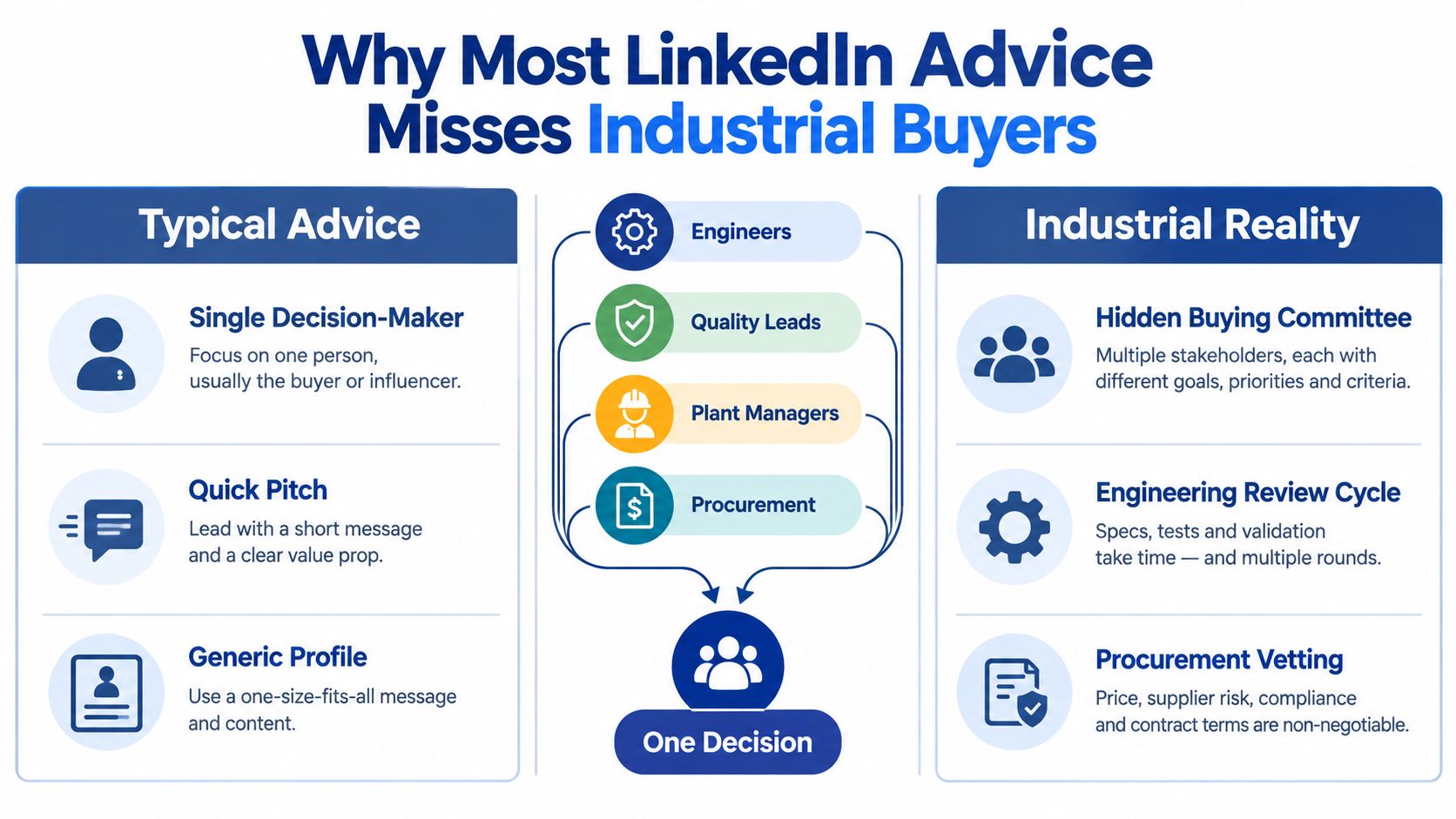
Likes, accepted connections, and InMail opens are weak commercial signals. They can show that your message reached someone, but they don't show whether the right account is becoming more familiar with your capabilities. A technical buyer may read three posts, forward a specification guide internally, and never engage publicly.
LinkedIn's own marketing material reports that 89% of B2B marketers use LinkedIn for lead generation, while 62% say it generates leads for them, more than twice the next-highest social channel (LinkedIn's B2B decision-maker statistics). The same source describes a buying journey with 107 days between MQL and SQL and 62 days in the sales pipeline, a useful reminder that B2B LinkedIn lead generation often supports considered purchases rather than instant conversion.
The industrial buying problem
SaaS-style outreach often assumes one budget owner can approve a purchase after a short sequence. Manufacturing decisions demand evidence that survives technical scrutiny. Buyers want to understand:
- Process fit: Does the solution work with the existing line, material, tolerance, or workflow?
- Operational risk: What changes on the plant floor, and who owns implementation?
- Proof: Is there a test result, drawing, specification, or relevant installation?
- Commercial confidence: Can the supplier support the account after the sale?
That's why content for hidden buyers matters. Edelman and LinkedIn's 2025 thought leadership research reports that 56% of decision-makers and 55% of hidden buyers use thought leadership to evaluate vendors (Edelman and LinkedIn's 2025 thought leadership update).
Build your system around four jobs: select the right accounts, make technical expertise visible, reach several roles without spamming, and measure movement inside target accounts. Our approach to digital marketing for engineers follows that same principle. The objective isn't a larger network. It's a better-informed buying committee.
Profile and Company Page Pre-Flight Checklist
Before you send outreach or spend on ads, make your LinkedIn presence pass a credibility check. A prospect who receives your message will usually inspect your profile before replying. If the page looks generic, your outreach has to overcome doubt you created yourself.
Personal profile checks
Your personal profile should answer three questions quickly: who do you help, what problem do you solve, and what evidence supports the claim?
- Headline: Name the industrial audience and the outcome. “Helping machine builders reduce commissioning friction” is more useful than “Sales Director.”
- Banner: Show the niche served, such as machining, automation, industrial equipment, or process engineering.
- About section: Start with the buyer's operational problem. Explain the situation you diagnose, the work involved, and the proof a serious buyer can review.
- Featured section: Pin one technical asset, such as a specification guide, test summary, application note, or engineering checklist.
- Experience: Rewrite job descriptions around buyer relevance. Explain the systems, applications, and decisions you support.
- Skills and endorsements: Keep skills aligned with the market you want. A long list of unrelated endorsements creates noise rather than authority.
The profile doesn't need polished corporate language. It needs enough substance for an engineer to decide that a conversation won't waste time.
Company page checks
Your Company Page should reinforce the personal profile, not repeat a vague mission statement. Put the market category and customer problem early in the About section, then use the remaining space to describe applications, capabilities, and proof assets.
Check these elements before launch:
- Tagline: State the category and audience clearly.
- About keywords: Use the terms buyers search for, including the relevant process, equipment type, and industrial application.
- Industry and specialties: Select accurate classifications rather than broad labels.
- Custom button: Point it to a useful technical offer or qualification page, not automatically to the homepage.
- Content cadence: Prepare a month of practical posts before asking prospects to follow the page.
Watch for disqualifiers: a default banner, an empty About section, a tagline that could describe any supplier, missing employee profiles, or a Featured section with no proof. If two or more appear, fix the foundation before increasing outreach.
Use the video as a quick visual check, then open the profile on a phone. Industrial buyers may encounter your message away from a desktop, and a mobile review exposes weak formatting quickly.
Building a Target Account List in Sales Navigator
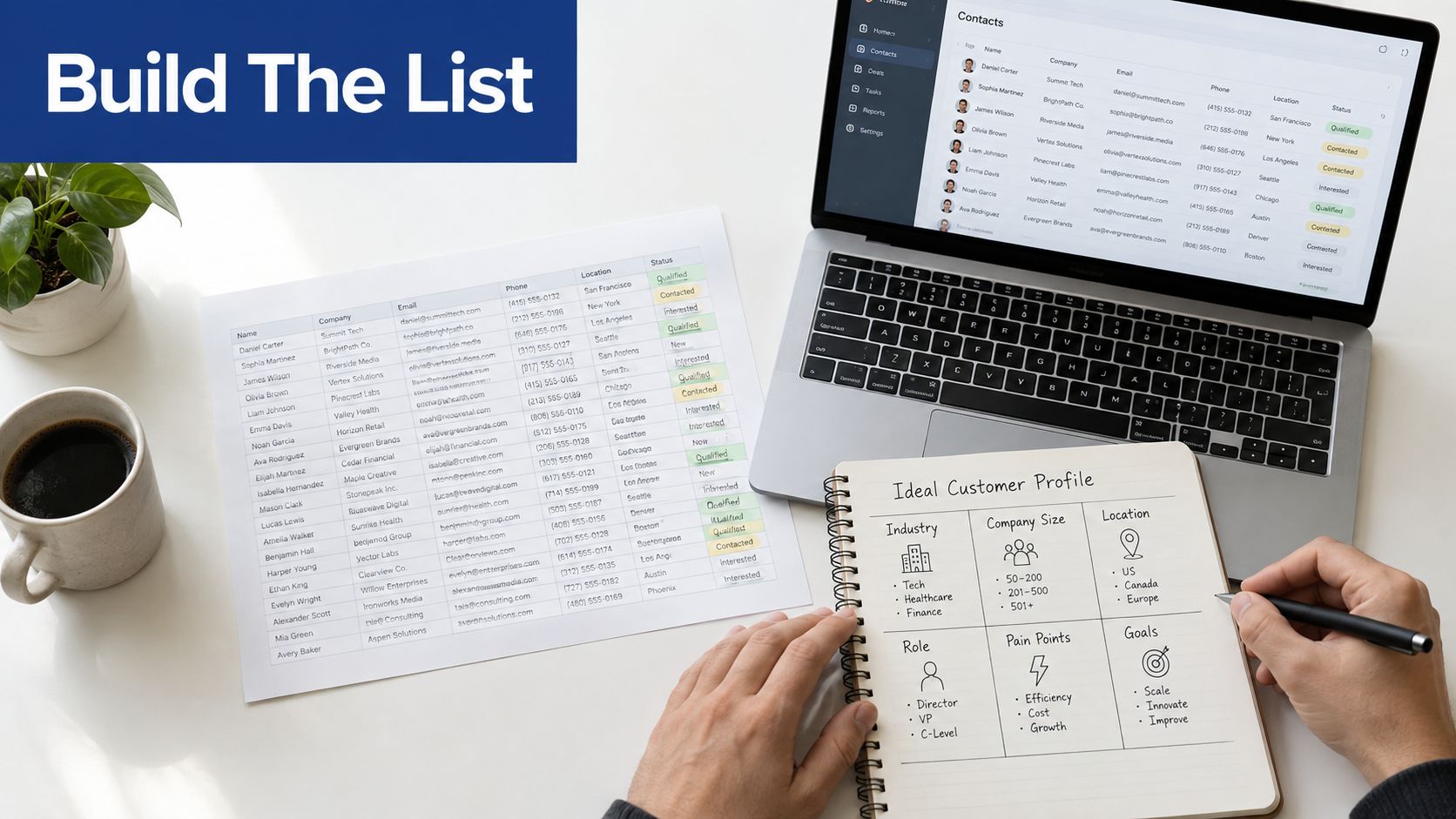
Don't begin by exporting thousands of names. Begin with an account definition your sales team can recognize and reject.
LinkedIn Sales Navigator provides more than 50 search filters, including company headcount, company type, headquarters location, function, current job title, geography, industry, profile language, and buyer-intent signals (Sales Navigator lead filter documentation). Use those filters to define a narrow account universe before you search for individuals.
Start with the firmographic core
Write the ideal customer profile in operational terms:
- Industry: Industrial Machinery or the precise manufacturing sub-vertical you serve.
- Company headcount: A band connected to plant complexity, such as 51 to 200 employees.
- Geography: The territories your team can support properly.
- Company type: Manufacturer, machine builder, distributor, or another relevant category.
- Application: The process, equipment, material, or production challenge you understand.
LinkedIn recommends starting with one to three filters, such as current company, job title, and location, to avoid over-filtering (LinkedIn's Sales Navigator search guidance). Add detail gradually. If you apply every possible criterion at once, you may remove viable accounts before you understand why they matter.
Add the buying committee
Create separate lead searches for the people who influence a purchase:
- Process engineers
- Manufacturing engineers
- Plant managers
- Quality directors
- Operations leaders
- Procurement and sourcing managers
Use Boolean title logic where the market uses inconsistent language, such as ("process engineer" OR "manufacturing engineer") NOT intern. Save both the account list and the lead list. When you identify a relevant account, add several roles rather than treating the first visible contact as the whole opportunity.
Sales Navigator supports inclusion and exclusion within filters, pinned filters, saved searches, and weekly updates for new matching leads (Sales Navigator search workflow guidance). Use exclusions for competitors, recruiters, vendors, and irrelevant company types.
A practical quality rule: if the saved account list exceeds 1,000 companies, narrow the ICP before outreach or advertising. A list that broad usually hides an unclear application, geography, company size, or buying role. For a fuller account-based process, compare this workflow with account-based marketing for B2B.
Outreach Cadences and Messaging That Engineers Actually Reply To
A connection request isn't a campaign. It's one event in a sequence that should earn the next interaction.
For technical audiences, use a 7-touch, 14-day cadence with enough space for the recipient to assess relevance:
- Day 1: Send a connection request based on one observable industry or process detail.
- Day 3: Share a useful technical asset without asking for a meeting.
- Day 5: Ask a soft question about the process problem.
- Day 7: Add a relevant case-study or application note.
- Day 9: Review the profile and engage with a relevant post if one exists.
- Day 14: Send a concise breakup message.
- After 60 days: Re-engage only when a new trigger, insight, project, or technical resource makes the message relevant.
Keep connection notes under 300 characters, with no pitch and one specific observation. A process engineer doesn't need “We're an industry-leading provider.” They need a reason to believe you understand the application.
Practical rule: Mention the problem in the buyer's language before you mention your company.
Three messages you can adapt
Cold connection request
Hi [Name]. I noticed your team works with [process or equipment]. We've been comparing approaches to [specific issue] in similar plants. I'd be interested in connecting and sharing what we're seeing.
Second touch
Thanks for connecting. A question for you: when [cycle time, yield loss, tolerance drift, or downtime] becomes the constraint, does your team usually adjust the process first or review the equipment setup? I can send a short technical note if useful.
Breakup message
I'll close the loop here so I don't add noise to your inbox. If [specific process issue] becomes active later, I'm happy to share the relevant test or application material.
Don't automate the judgment. Move a contact to a human call when they mention an active project, request specifications, identify a production constraint, introduce another stakeholder, or ask about implementation. Those are buying signals, not invitations for another automated step.
Keep sending activity conservative, respect LinkedIn's policies, and test weekday windows that match engineering work patterns rather than launching indiscriminate bursts. For teams coordinating email follow-up alongside LinkedIn, this guide to sales outreach from Gmail is a useful reference for sequence planning and merge-field discipline.
Running LinkedIn Lead Gen Ads for Technical Buyers
Lead Gen Forms work best after organic content has shown that a topic matters. If engineers ignore your application note organically, paying to place the same offer in front of them won't solve the relevance problem.
Start with the campaign architecture:
- Objective: Lead generation.
- Audience: Match the account universe built in Sales Navigator.
- Roles: Plant Manager, VP Operations, Manufacturing Engineer, and Director of Procurement.
- Exclusions: Recruiters, competitors, students, vendors, and irrelevant industries.
- Offer: A technical specification sheet, application checklist, test summary, maintenance guide, or process diagnostic.
A worked planning example is a $3,500 monthly budget split across two ad sets. Treat that as a budget scenario, not a performance promise. One ad set can focus on plant and operations leadership, while the other targets engineering and procurement. Compare qualified conversations and account coverage, not just form volume.
Use a small creative mix:
- Single image: Show the equipment, application, or failure mode clearly.
- Document ad: Offer a specification sheet or engineering checklist that can be reviewed privately.
- Short video: Show a line, machine, test, or inspection step in operation.
The form should collect only what sales needs to route and qualify the inquiry. A practical four-field structure is name, work email, company, and job function, with one qualifying question added only if it changes follow-up.
The offer should help a technical buyer do their job, not force them into a sales call.
Retarget people who engage with the profile, page, or technical content, then score submissions by account fit and intent. A plant manager downloading an application guide from a target company deserves a different workflow from an irrelevant contact downloading a general brochure. Set frequency controls so one person isn't repeatedly shown the same creative, and rotate proof assets when the audience has already seen the first message.
LinkedIn's own audience positioning makes the channel valuable because professional roles and business context sit close together, but that targeting precision doesn't remove the need for a credible offer. Ads amplify a useful system. They don't replace one.
Connecting LinkedIn to GoHighLevel and Your CRM
A lead that stops in a LinkedIn inbox isn't pipeline. It's an unassigned task with no service-level expectation.
Route every meaningful signal into a system your sales team already uses. For Lead Gen Forms, map the campaign name, form name, UTM source, account, job function, territory, and offer downloaded. For Sales Navigator conversations, capture the contact, company, message context, reply sentiment, and next action. Profile engagement can enter the system as a softer signal for nurture rather than an immediate sales task.
A practical routing design
Use native integrations where available and Zapier as a bridge when the handoff needs custom logic. A typical GoHighLevel workflow looks like this:
- Inbound ad lead: Create or update the contact, check for an existing account, assign territory, and deliver the promised asset within five minutes.
- Positive outbound reply: Apply a positive-sentiment trigger, notify the assigned rep, and create a call task with the full LinkedIn conversation.
- Unqualified contact: Suppress immediate sales notifications, add the person to a long-term nurture pipeline, and record the disqualifying reason.
For a manufacturer with two SDRs, assign one workflow by region or account tier, not just by round robin. If a target plant already belongs to one SDR, every new contact from that account should stay with that owner unless a manager changes the rule.
Use SMS notifications sparingly for hot leads, such as a request for pricing, specifications, a site visit, or implementation details. A content download alone shouldn't wake a rep during a production shift.
The integration should support the wider CRM and digital marketing system, not create another isolated inbox. Machine Marketing is one option for businesses that need landing pages, forms, calendars, inbound phone handling, and connected lead capture around their existing tools.
Hygiene rules that prevent bad handoffs
- Deduplicate first: Match on work email, company, domain, and account owner.
- Suppress noise: Exclude competitors, vendors, job seekers, students, and existing disqualified records.
- Preserve context: Store the campaign, offer, message, and engagement source on the contact record.
- Close the loop: Sync qualification, meeting outcome, opportunity status, and reason lost back to reporting.
Sales should see why the contact appeared, what they consumed, and which account relationships already exist. Without that context, automation creates faster confusion.
Measuring What Actually Predicts Pipeline From LinkedIn
Reporting becomes useful when each metric answers a diagnosis question. Did we reach the right people? Did the account become more familiar with us? Did a conversation create a commercial next step? Did revenue follow?
LinkedIn's scale makes raw activity easy to generate. LinkedIn also reports about 9% year-over-year membership growth and roughly 70 million new members annually in its market-maturity reporting (LinkedIn membership growth overview). That expanding audience matters, but reach alone won't tell an industrial firm whether the right plant, application, or buying committee is moving.
Four layers of measurement
Leading indicators show whether the system is reaching a plausible audience:
- Profile views from target roles
- Post impressions from target accounts
- Connection acceptance
- InMail replies
These metrics are diagnostic, not commercial proof. A high acceptance rate can coexist with poor positioning if contacts accept out of politeness.
Mid-funnel signals show whether attention is becoming a conversation:
- Conversation-to-meeting rate
- Meeting show rate
- Cost per qualified Lead Gen Form submission
- Number of buying roles engaged within target accounts
The 15M-plus contact study from Sopro reports a 7.2% overall reply rate, a 12.2% total reply rate for messenger campaigns among already connected contacts, a 26% average connection rate, 18.7% invite acceptance, and 1.3% of connected prospects booking a meeting (Sopro's LinkedIn lead generation statistics). Those figures aren't a guarantee for manufacturing, but they illustrate why the first reply isn't the technical win. The post-connection sequence and account-level coverage matter more.
Pipeline metrics connect activity to sales execution:
- Opportunities created from target accounts
- Average deal size
- Time to first meeting
- Time from first qualified conversation to opportunity
- Number of stakeholders engaged before proposal
Revenue attribution should show sourced pipeline, influenced pipeline, closed revenue, and the touchpoints that contributed. Industrial deals rarely belong to one click, so use both first-touch and account-influence views rather than forcing every result into a single-channel model.
A practical diagnosis table
| Metric layer | KPI | Benchmark range | What it tells you |
|---|---|---|---|
| Leading | Connection acceptance | Qualitative target based on account fit | Whether the profile and targeting create enough trust to start |
| Leading | InMail reply rate | Qualitative trend over time | Whether the message earns attention from relevant roles |
| Mid-funnel | Conversation to meeting | Qualitative improvement target | Whether the problem, proof, and timing are commercially relevant |
| Mid-funnel | Qualified form cost | Qualitative comparison by offer | Whether the offer attracts the right technical audience |
| Pipeline | Opportunities created | Account-based trend | Whether conversations are entering a real sales process |
| Pipeline | Time to first meeting | Shorter or longer by segment | Whether routing and follow-up match buying intent |
| Revenue | Sourced and influenced revenue | Compared with sales-system records | Whether LinkedIn contributes to commercial outcomes |
Don't add unsupported benchmarks to this dashboard. The assignment brief's proposed ranges for connection acceptance, conversation-to-meeting rate, and cost per qualified lead aren't included in the verified data, so treat them as hypotheses to test rather than facts to publish.
The 30-day operating rhythm
Week 1: Check profile views, target-account reach, audience exclusions, and whether the content attracts technical roles.
Week 2: Review replies, message themes, offer downloads, and the gap between form submission and first human response.
Week 3: Inspect meetings, show rates, account penetration, and whether more than one buying role is appearing at priority companies.
Week 4: Reconcile opportunities and revenue with CRM records. Keep the audiences and messages that create qualified movement, then remove activity that only produces volume.
Use these diagnosis rules:
- High impressions, no meetings: Recheck ICP, profile proof, and offer relevance.
- High acceptance, no replies: Rewrite the message around a specific process problem.
- Replies, no SQLs: Inspect qualification, routing, and the handoff to sales.
- Meetings, no opportunities: Test whether the audience has an active problem and whether sales is bringing adequate technical evidence.
- Opportunities, no progress: Map the hidden buying committee and give each role content they can use internally.
The right question isn't “How many leads did LinkedIn generate?” It's “Which target accounts became more informed, more engaged, and more commercially reachable because of LinkedIn?” That question produces a system your sales team can improve.
Machine Marketing helps manufacturers and industrial firms connect LinkedIn strategy with lead-capture pages, forms, calendars, CRM workflows, and practical content for technical buying committees. Visit Machine Marketing to request a focused diagnosis of your account targeting, messaging, and lead-routing system.
