
Your manufacturing website gets visitors, but the sales team still hears, “We'll get back to you.” Product pages attract existing demand, generic blog posts earn occasional clicks, and technical buyers leave without identifying themselves. The problem usually isn't a lack of content. It's a broken content marketing B2B lead generation system that stops at traffic instead of carrying anonymous research through qualification and sales handoff.
We'll diagnose that system like an engineering problem. You'll see how to map content to design engineers, plant managers, and procurement officers, choose assets that create genuine utility, build capture paths that qualify without creating friction, and connect every meaningful action to CRM workflows.
Table of Contents
- Diagnosing the Broken Content Pipeline
- Mapping Search Intent to the Buying Committee
- Engineering Content Formats That Convert
- Building High-Converting Capture Paths
- Automating the Handoff with CRM Workflows
- Measuring Pipeline Impact and Next Steps
Diagnosing the Broken Content Pipeline
A high-traffic website can still have a weak pipeline. The common assumption is that more top-of-funnel blog posts will eventually produce more opportunities. That only works when the rest of the system gives readers a clear reason to continue, identify themselves, and engage with sales.
Content already plays a meaningful role in B2B demand generation. The Content Marketing Institute's B2B benchmark data reports that 74% of B2B marketers say content marketing helped generate demand or leads, while 62% say it helped nurture subscribers, audiences, or leads. The implication for manufacturers is practical: content must support both discovery and progression. A post that answers an early research question has value, but it won't create pipeline by itself.
Find where the system leaks
Start with an asset-level audit. Don't ask only which pages receive traffic. Ask what each page is supposed to make a qualified buyer do next.
Look for these failure points:
- No defined buyer stage: A broad article about production efficiency may attract several audiences, but it doesn't tell you whether the reader is researching a problem, comparing suppliers, or preparing an internal business case.
- No next action: The page ends after the answer. There's no calculator, specification guide, consultation path, related case study, or technical download.
- Weak qualification: A generic “Contact us” form gives sales little context about the application, equipment, timeline, or buying role.
- Disconnected follow-up: A visitor downloads a whitepaper, then receives the same newsletter as everyone else. The company loses the opportunity to continue the technical conversation.
- No CRM visibility: Marketing can report sessions and downloads, but nobody can see whether the account later became a qualified opportunity.
A useful audit records the URL, target audience, search intent, funnel stage, conversion action, qualifying fields, follow-up sequence, and pipeline outcome. If several columns are blank, you don't have a content system. You have a collection of publications.
Practical rule: Every important page needs a job beyond attracting attention. It should educate, qualify, convert, or assist sales. If it does none of these, question its place in the program.
Replace publishing with systems engineering
A systems mindset changes the planning question from “What should we publish this month?” to “What information does this buyer need before the next commercial decision?” That shift helps you build content around process stages instead of editorial habits.
You can also use a founder's content operating system to think through ownership, repeatable workflows, and the connection between strategy and execution. Then document the baseline through a marketing audit that includes content performance, conversion paths, CRM records, and sales feedback.
The diagnosis should end with a short list of constraints:
- Which audience is finding you but not converting?
- Which high-intent questions have no dedicated answer?
- Which assets demonstrate technical credibility?
- Which forms collect information sales can actually use?
- Which workflow moves a new lead toward a useful human conversation?
Fix those constraints before increasing publishing volume. More traffic through a damaged pipeline only makes the leakage harder to explain.
Mapping Search Intent to the Buying Committee
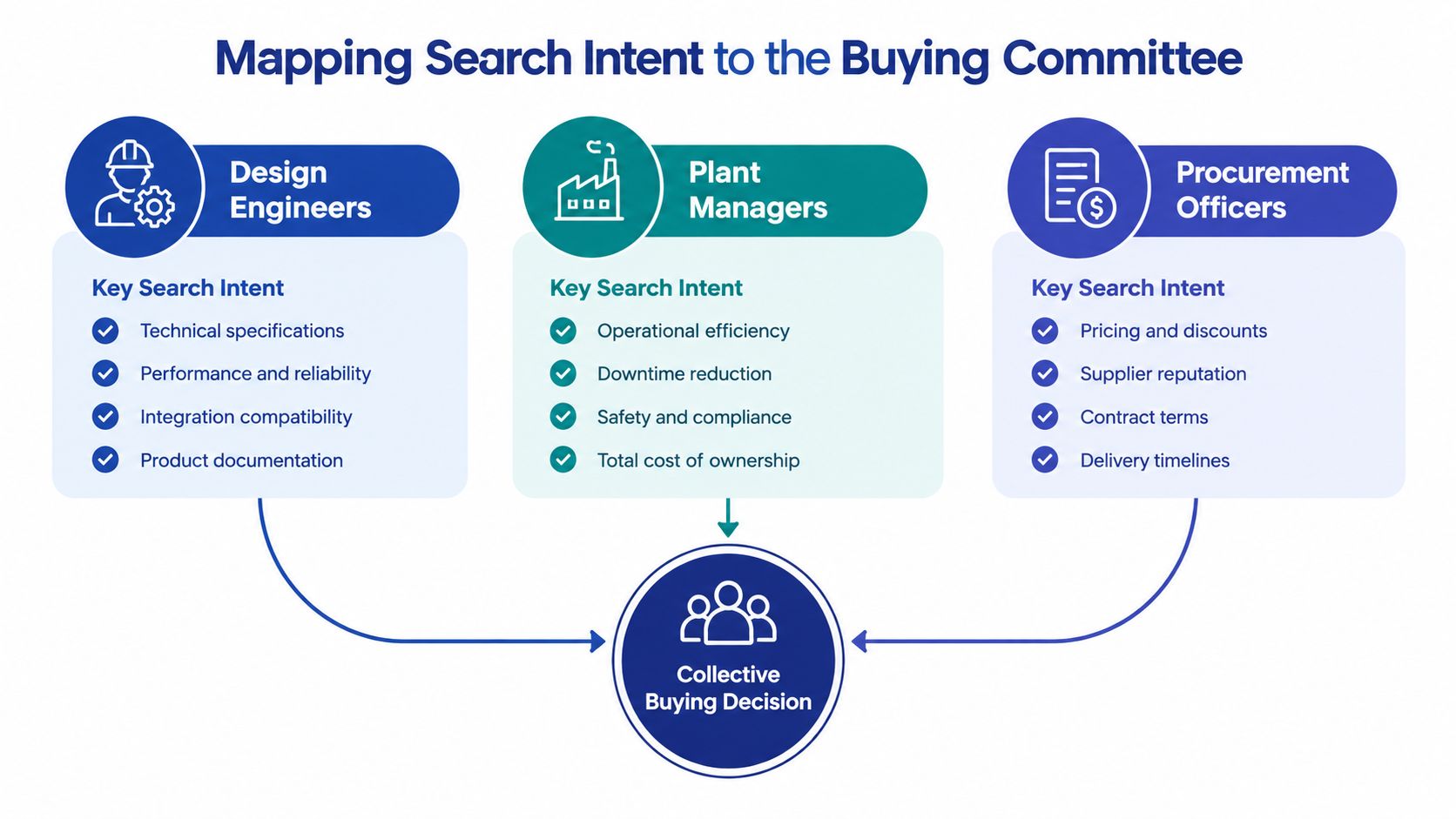
Industrial purchases rarely belong to one person. A design engineer may define technical requirements, a plant manager may assess operational risk, and a procurement officer may compare commercial terms. Each person searches differently, values different evidence, and can block progress for a different reason.
B2B buyers also educate themselves extensively before speaking with vendors. The Semrush overview of B2B marketing statistics cites 13 pieces of content consumed before purchase as the average and reports that 67% of the buying journey is self-directed. Your content therefore has to answer questions that sales may not hear until much later.
Give each stakeholder a different reason to engage
Design engineers search for technical confidence. Their queries tend to include application conditions, tolerances, materials, integration requirements, maintenance constraints, and failure modes. Useful assets include CAD files, dimensional drawings, compatibility guides, engineering notes, and detailed process explainers.
Plant managers focus on operational consequences. They want to understand downtime exposure, implementation disruption, throughput constraints, training requirements, service response, and the practical effect on the production floor. A plant manager may respond better to an implementation guide, maintenance checklist, process walkthrough, or operational case study than to a product brochure.
Procurement officers need evidence that supports a defensible commercial decision. They care about specification clarity, supplier capability, lead times, service terms, standardization, compliance documentation, and total ownership considerations. Comparison guides, request-for-quote checklists, supplier qualification documents, and clear purchasing information serve this stage.
These audiences overlap, but they shouldn't receive identical content. A technical article can attract the engineer while a linked implementation guide reassures the plant manager. A procurement checklist can then give the buying group a shared document for internal evaluation.
Build an intent matrix
Create a spreadsheet with five fields:
| Buying role | Search question | Evidence required | Content asset | Next action |
|---|---|---|---|---|
| Design engineer | Will this work in our application? | Specifications and compatibility | Technical guide or CAD resource | Download or request review |
| Plant manager | Can we implement it without disrupting production? | Process and service detail | Implementation guide | Discuss application |
| Procurement officer | Can we justify this supplier? | Commercial and qualification evidence | Comparison or RFQ checklist | Request pricing or documentation |
Keyword research should follow this matrix. Start with problem-specific language, not just broad product terms. Queries that contain an application, material, operating condition, failure symptom, or comparison usually reveal more useful intent than a generic category keyword.
The guide to B2B SEO can help frame search strategy around business buyers rather than consumer-style volume chasing. You should also document the audience in buyer personas, but don't stop at job title. Include the questions each person must answer, the internal objection they face, and the evidence they trust.
Design for collective progress
A lead isn't fully understood because one person completed a form. The account becomes more valuable when several stakeholders engage with related assets. Track content by account where possible, and use topic clusters that allow one reader to forward a useful resource to another member of the committee.
The strongest structure often looks like this:
- A searchable technical article creates discovery.
- A deeper guide addresses evaluation.
- A case study or comparison asset reduces perceived risk.
- A calculator, CAD file, or RFQ path creates conversion.
- CRM automation records the topic and routes the account for follow-up.
That sequence respects self-directed research without leaving the buyer alone when the commercial decision begins.
Engineering Content Formats That Convert
Technical buyers don't exchange contact information for vague promises. They exchange it for something that reduces uncertainty, saves engineering time, supports an internal decision, or helps them avoid an expensive mistake.
The Digital Applied summary of B2B content benchmarks highlights a useful distinction: long-form pillar content, original research, and customer case studies tend to convert better than short-form posts when paired with a lead-generation wrapper. The format matters, but the true test is utility. A long document with no operational value is still weak content.
Choose the format from the decision being made
Use a simple decision rule:
- The buyer is defining a problem: Publish a search-optimized diagnostic article, process explainer, or failure-mode guide. Keep the language specific enough that an engineer can recognize the application.
- The buyer is comparing approaches: Create a technical comparison, original test summary, selection guide, or webinar with a subject-matter expert.
- The buyer is validating a supplier: Offer a detailed case study, implementation plan, service overview, reference workflow, or qualification checklist.
- The buyer is preparing to act: Provide a CAD file, specification pack, calculator, RFQ worksheet, or application review.
A pillar page can organize the topic, but it shouldn't become a dumping ground for every keyword. Build it around one operational problem, then link to focused supporting assets. A case study should show the situation, constraints, decision criteria, implementation considerations, and result in qualitative terms when verified numbers aren't available.
Make the lead magnet useful before the form
The best lead magnets help the buyer do work. They aren't merely longer versions of the blog post.
Consider assets such as:
- CAD files: Let engineers assess fit and integration without waiting for a sales response.
- Specification calculators: Help a reader test a configuration or prepare a more informed inquiry.
- Technical whitepapers: Explain a process, material choice, risk, or compliance issue in enough depth to support internal discussion.
- Diagnostic checklists: Help plant teams identify symptoms, likely causes, and the information a supplier needs.
- RFQ templates: Give procurement and engineering a shared structure for requesting comparable responses.
Put the asset behind a form only when the exchange is fair. If the download is a basic brochure, a form may feel obstructive. If it contains a useful calculator, detailed specifications, or an application framework, a buyer may accept a modest qualification step.
Write for technical trust
Avoid inflated claims such as “industry-leading” unless you can substantiate them. Engineers look for assumptions, constraints, tolerances, maintenance implications, and failure conditions. Procurement wants clarity about what is included, excluded, and required from the customer.
Before publishing, ask:
- Does the asset answer a real question from a named buying role?
- Does it contain enough detail to be useful without a sales call?
- Does it show where the solution may not fit?
- Does the CTA match the reader's immediate intent?
- Can sales use the asset in a real conversation?
Content marketing costs 62% less than traditional marketing and generates about three times as many leads, according to the benchmark summarized by ZoomInfo's B2B content marketing statistics. That advantage isn't automatic. It appears when the content has a defined job, a relevant offer, and a follow-up process that turns interest into a business conversation.
Building High-Converting Capture Paths
A strong article can still produce no leads if the conversion path asks the buyer to make an unexplained leap. Someone reading about equipment selection isn't necessarily ready to “contact sales.” They may be ready to download a specification guide, check compatibility, calculate a requirement, or request an application review.
Build the page around one exchange
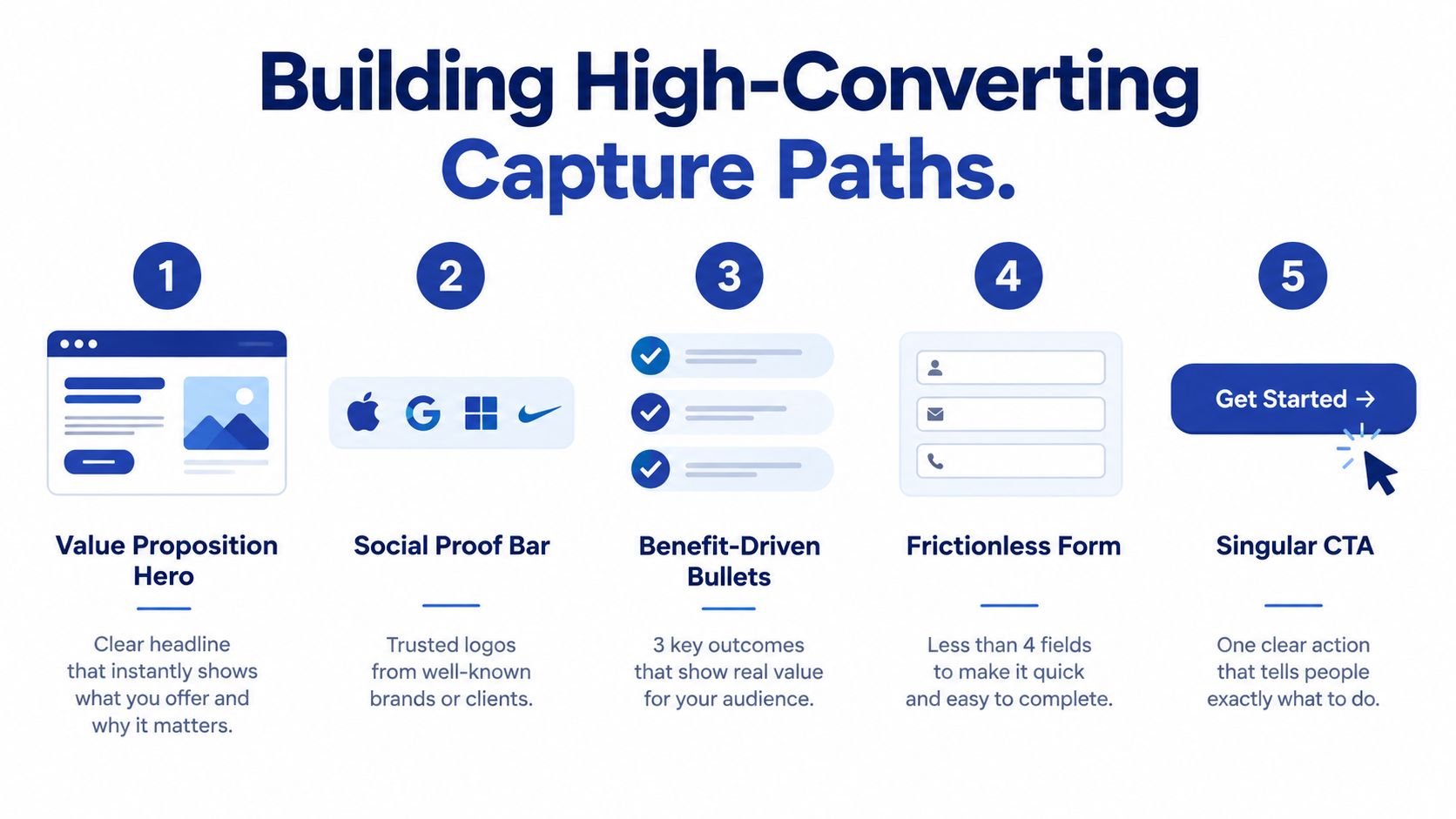
A landing page should make the exchange obvious within seconds. The visitor gives information, and in return receives a specific operational benefit.
Use this anatomy:
- Value proposition hero: State exactly what the resource helps the buyer evaluate, prevent, calculate, or prepare.
- Social proof bar: Show relevant customer or partner logos only when you have permission and the association is meaningful.
- Benefit-driven bullets: Explain the practical outcomes of using the asset, not generic features.
- Frictionless form: Ask only for information required to deliver the asset or route the inquiry.
- Singular CTA: Use one clear action instead of competing buttons.
The form should reflect intent. A technical download may need name, work email, company, and buying role. An application review may justify an additional field about the equipment or problem. Don't ask for a phone number just because the CRM supports one.
Match the CTA to the pain
“Submit” describes the mechanics, not the value. Better CTA language tells the buyer what happens next:
- Download the equipment selection guide
- Check application compatibility
- Get the specification pack
- Prepare an RFQ
- Request an engineering review
Place the CTA at the point where the reader has enough context to value it. A technical article may use a low-friction inline offer near the first relevant answer, then a stronger offer after the conclusion. Keep the destination consistent. If the button promises a calculator but opens a generic contact form, trust drops immediately.
Qualify without creating resistance
Use progressive qualification rather than a long first form. Capture a useful minimum, then collect additional context through follow-up emails, progressive fields, or a sales conversation. The first objective is not to interrogate the visitor. It's to identify the account, preserve intent, and make the next interaction relevant.
A good page also answers silent objections:
- What will I receive?
- Is this applicable to my equipment or process?
- Will someone call me immediately?
- Do I need to provide confidential information?
- Can I use this internally?
Add a short privacy explanation and set expectations about delivery. If a human follow-up is part of the offer, say what kind of follow-up the buyer should expect.
Conversion principle: Reduce uncertainty before you increase commitment. Technical buyers convert when the next step feels useful, specific, and safe.
Test the complete path yourself. Submit the form, inspect the confirmation page, verify the email delivery, check the CRM record, and confirm that the assigned person receives enough context to act. A broken thank-you page or missing notification can erase the value of an otherwise excellent campaign.
Automating the Handoff with CRM Workflows
A captured lead isn't yet a sales-ready opportunity. The form submission tells you that someone wanted an asset. It doesn't prove budget, authority, timing, application fit, or organizational urgency.
Automation should preserve the context of the original interaction and provide progressive technical value. It shouldn't send an aggressive sales pitch immediately after a whitepaper download.
Start with the event and the context
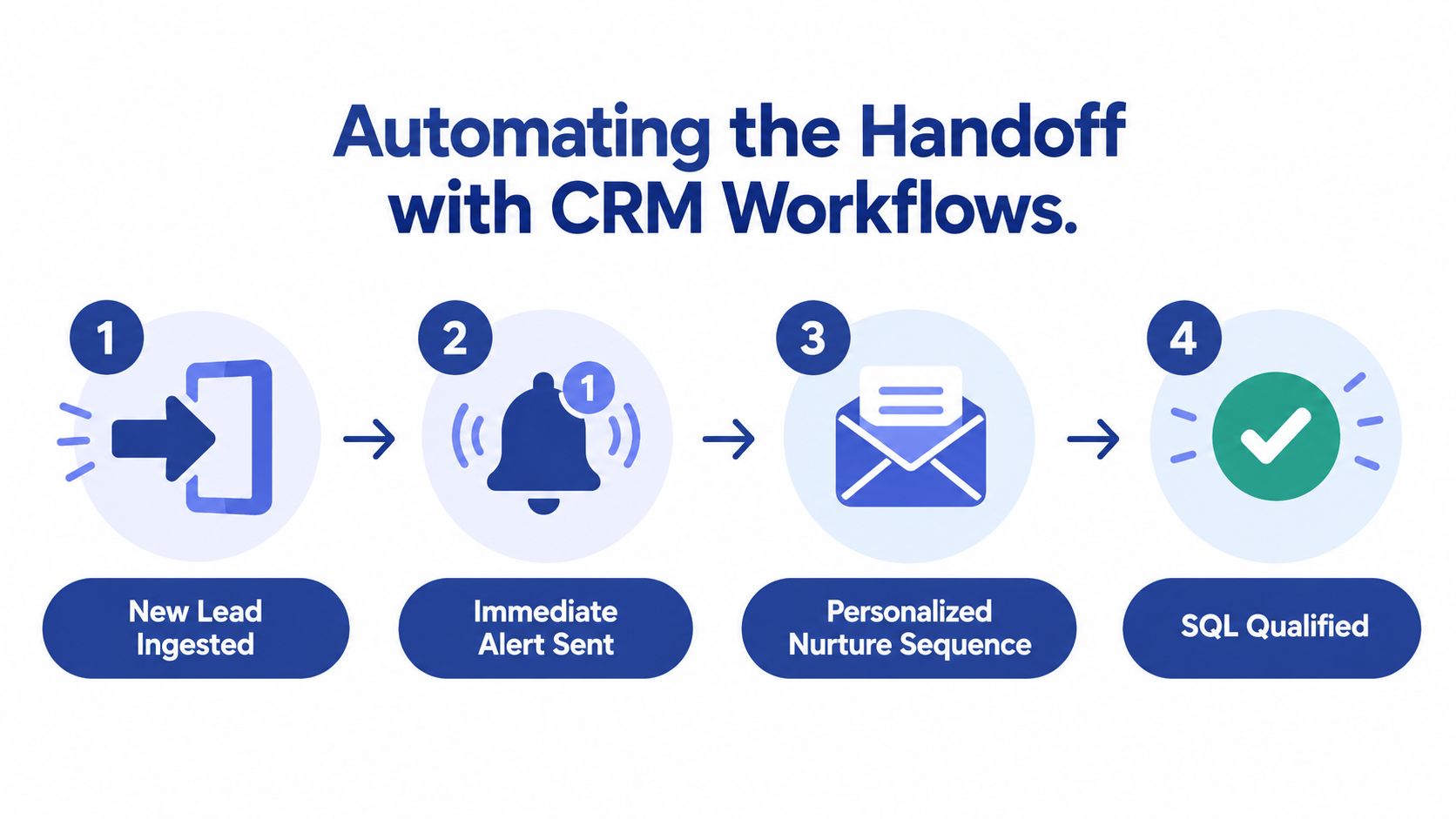
Create a workflow for each meaningful conversion path. When a visitor downloads a technical guide, store the asset name, topic, landing page, source, company, role, and any qualifying response. Apply a clear lifecycle stage and a topic tag that sales can understand.
A practical sequence might work like this:
- Immediately: Deliver the requested asset and confirm what the buyer can do with it.
- Next message: Address a related technical question, such as compatibility, implementation, maintenance, or selection criteria.
- Later message: Offer a case study, checklist, or comparison resource connected to the original topic.
- Sales trigger: Notify the assigned person when the lead requests an application review, revisits a high-intent page, replies to an email, or provides meaningful project context.
GoHighLevel can be used to build forms, pipelines, tags, email sequences, notifications, and task assignments in one workflow. Other CRM platforms can support the same logic. The platform matters less than the field design, routing rules, content relevance, and agreement between marketing and sales.
A practical CRM for lead generation setup should make the handoff visible. Sales needs to know what the buyer read, what they downloaded, which application they mentioned, and what action triggered the alert.
Use progressive value, not repeated promotion
Every message should answer a question that naturally follows the previous one. If the first asset explains how to select a component, the next message might cover common installation constraints. A later message can explain how to prepare an application review.
Avoid sending the same generic newsletter to every technical contact. Segment by:
- Buying role
- Topic or equipment type
- Funnel stage
- Stated project timing
- Engagement with the asset
- Account fit and geographic coverage
Use scoring as a prioritization aid, not as an automatic declaration of readiness. A person who downloads several documents may still be a student, an existing customer, or an unqualified supplier. Sales and marketing should agree on the behaviors and information that justify an SQL designation.
The workflow should also include exit conditions. If a lead books a meeting, stop the nurture sequence. If the email address is invalid, route it for correction. If sales marks the lead as not ready, return it to a relevant educational path rather than treating the record as lost.
Watch the implementation sequence in this walkthrough, then test each branch with internal records before sending traffic to it.
The handoff works when the buyer experiences continuity. The article, form, confirmation message, nurture email, and sales call should all refer to the same problem. That continuity is what turns automation from a broadcast tool into a controlled pipeline process.
Measuring Pipeline Impact and Next Steps
Pageviews can tell you whether a topic attracts attention. They can't tell you whether the topic helps a manufacturer win qualified business. A useful dashboard connects content activity to lead quality, account progression, sales acceptance, and opportunity creation.
Track the system at four levels:
- Discovery: Organic impressions, relevant landing-page visits, and engagement from target industries or accounts.
- Capture: Conversion rate by asset, form completion, asset downloads, and the percentage of leads providing usable qualification data.
- Qualification: Sales acceptance, response rate, meeting requests, application reviews, and movement from marketing-qualified to sales-qualified status.
- Pipeline: Opportunities influenced by content, opportunity value, stage progression, and closed revenue where CRM attribution is available.
The Lead Forensics B2B lead generation FAQ notes that inbound content usually takes three to six months to produce leads, and that combining inbound with outbound is often more effective than relying on one channel. Treat that as a planning reality, not a promise. Your timeline depends on technical authority, existing demand, distribution, sales follow-up, and the quality of the conversion path.
Use a 90-day implementation sequence
Days 1 to 30 should establish the diagnosis. Audit existing assets, interview sales, identify the highest-value buying roles, map search intent, and inspect every form and CRM route. Choose one commercial problem rather than trying to rebuild the entire library.
Days 31 to 60 should build the system. Create one cornerstone asset, one useful conversion offer, one landing page, and one nurture path. Define the fields, tags, lifecycle stages, notification rules, and sales follow-up standard before launch.
Days 61 to 90 should test and refine. Review search engagement, conversion quality, sales response, and objections. Improve the offer or routing when leads are unqualified. Expand the topic cluster only after the first path produces reliable learning.
Ask yourself these questions in every reporting review:
- Did the content attract the buying role we intended?
- Did the conversion offer reveal useful project context?
- Did sales receive the lead quickly enough and with the right information?
- Did the follow-up answer the next technical question?
- Did the account progress, or did we only accumulate contacts?
A mature content marketing B2B lead generation program isn't measured by how much the team publishes. It's measured by whether the system helps the right buyers move from research to a credible sales conversation.
Machine Marketing helps manufacturers connect industrial SEO, technical content, lead capture, CRM workflows, and reporting into a practical growth system. Visit Machine Marketing to request a diagnosis of your content pipeline and identify the next conversion path to build.
