
If you're standing in a shop, looking at a machine that took months to spec, install, or refine, Instagram can feel like the wrong place to explain it. The platform looks fast, casual, and built for entertainment. Your work is technical, expensive, and bought by people who ask hard questions.
That gap is exactly why a recording system matters. When you know how to record videos for Instagram in a way that fits industrial buyers, the platform stops being a distraction and starts acting like a visual sales tool. You can show motion, tolerances, setup logic, maintenance steps, operator expertise, and process discipline far faster than static photos or long text ever could.
Table of Contents
- Why Your Industrial Business Needs an Instagram Video System
- The Pre-Production System Planning and Messaging
- Your B2B Video Toolkit Gear and Setup
- Capturing High-Quality Footage Camera and Framing
- The Mobile Editing and Export Workflow
- The Go-Live Checklist Uploading and Testing
Why Your Industrial Business Needs an Instagram Video System
A lot of industrial companies still treat Instagram like a side channel for brand awareness. That's usually a symptom of a bigger diagnosis problem. They don't have a system for translating technical value into short visual proof.
For B2B manufacturers, reps, and machine builders, video does work that brochures can't. It shows cycle motion. It captures startup sequence. It puts your engineer, service lead, or owner on camera explaining why a design choice matters. That lowers friction for buyers who want evidence before they start a serious conversation.
The hesitation is understandable. Teams worry that video production will become a creative time sink, or that their audience isn't there. In practice, the issue usually isn't the platform. It's the lack of a repeatable operating method.
Video works best when it solves a specific buyer question
The strongest industrial videos usually answer one of these questions:
- What does this machine do: Show the process, finished output, and operator interaction.
- Why is your approach different: Highlight a design detail, setup method, or quality control step.
- Can your team be trusted: Put a real person on camera explaining a real problem clearly.
- What should a buyer expect next: Walk through quoting, install, training, or support.
Practical rule: If a video doesn't answer a buyer question, it usually turns into generic shop footage with no business value.
That matters because Instagram rewards clear communication, not just motion. A shaky pan across a shop floor might look active, but it doesn't help a prospect understand capability.
A video system fixes that. It gives your team a standard workflow for planning, recording, editing, approving, and posting. Once that's in place, content gets easier to produce and more useful to sales.
If you're still deciding where Instagram fits in your broader B2B mix, this breakdown of social media in B2B marketing is a good next reference point.
The Pre-Production System Planning and Messaging
Most bad business videos fail before recording starts. The camera isn't the primary issue. The message is usually vague, the shot list doesn't exist, and nobody has decided what the viewer should understand by the end.
Start with the job of the video
Different Instagram formats should do different jobs. If you assign the wrong job, you make production harder and the final post weaker.
A practical way to split formats in an industrial business looks like this:
| Format | Best use in B2B industrial marketing | What usually fails |
|---|---|---|
| Reels | Fast machine demos, process highlights, quick proof of expertise | Trying to explain everything in one clip |
| Stories | Behind-the-scenes updates, install progress, shop activity, event snippets | Posting random footage with no context |
| Live | Q&A with an engineer, walkthrough of a system, launch discussion | Going live without a clear agenda |
| Feed video | Evergreen educational clips and brand-level proof | Reposting horizontal footage that doesn't fit the screen well |
The planning question is simple. What job does this video need to do today? Grab attention, explain, reassure, or prompt contact.
Match message length to buyer attention
Audience age affects how long your clip should run. Dummies notes that viewers under 35 prefer videos around 10 seconds, while viewers 35 and older favor 30-second spots. For B2B industrial marketers, that matters because many engineers, plant leaders, and owners sit in the older bracket and need enough time to process machine capability, safety context, or operational detail.
That doesn't mean every industrial video should be long. It means the message has to fit the audience. If you're targeting a younger operator audience, shorter may work. If you're speaking to a buyer evaluating a technical process, a tighter 30-second educational clip is often the better fit.
The video length should match the decision context, not your recording convenience.
If your message can't fit cleanly, split it into a series. One video for the machine overview. One for the changeover step. One for the quality checkpoint.
Build a simple recording brief
Before filming, use a one-page brief. It doesn't need agency jargon. It needs decisions.
Include these fields:
- Audience: Buyer, engineer, plant manager, owner, operator, or recruit.
- Problem being addressed: Slow cycle time, material handling issue, setup complexity, serviceability, safety, or training.
- Single takeaway: One sentence the viewer should remember.
- Proof shots needed: Control panel, spindle movement, part output, operator interaction, close-up detail.
- Call to action: Visit the site, request specs, ask a question, or schedule a conversation.
If your team needs help tightening the message before anyone hits record, a clear marketing messaging framework can prevent a lot of wasted footage.
Your B2B Video Toolkit Gear and Setup
You don't need a production cart full of cinema gear to record useful Instagram video in a plant. In fact, too much gear slows teams down, especially when you're working around forklifts, machine noise, compressed schedules, and tight walkways.
The better setup is compact, fast, and reliable.
Build around the phone you already carry
A modern smartphone is usually the right camera for this job. It's portable, quick to deploy, and easier for your team to use consistently than a larger camera system.
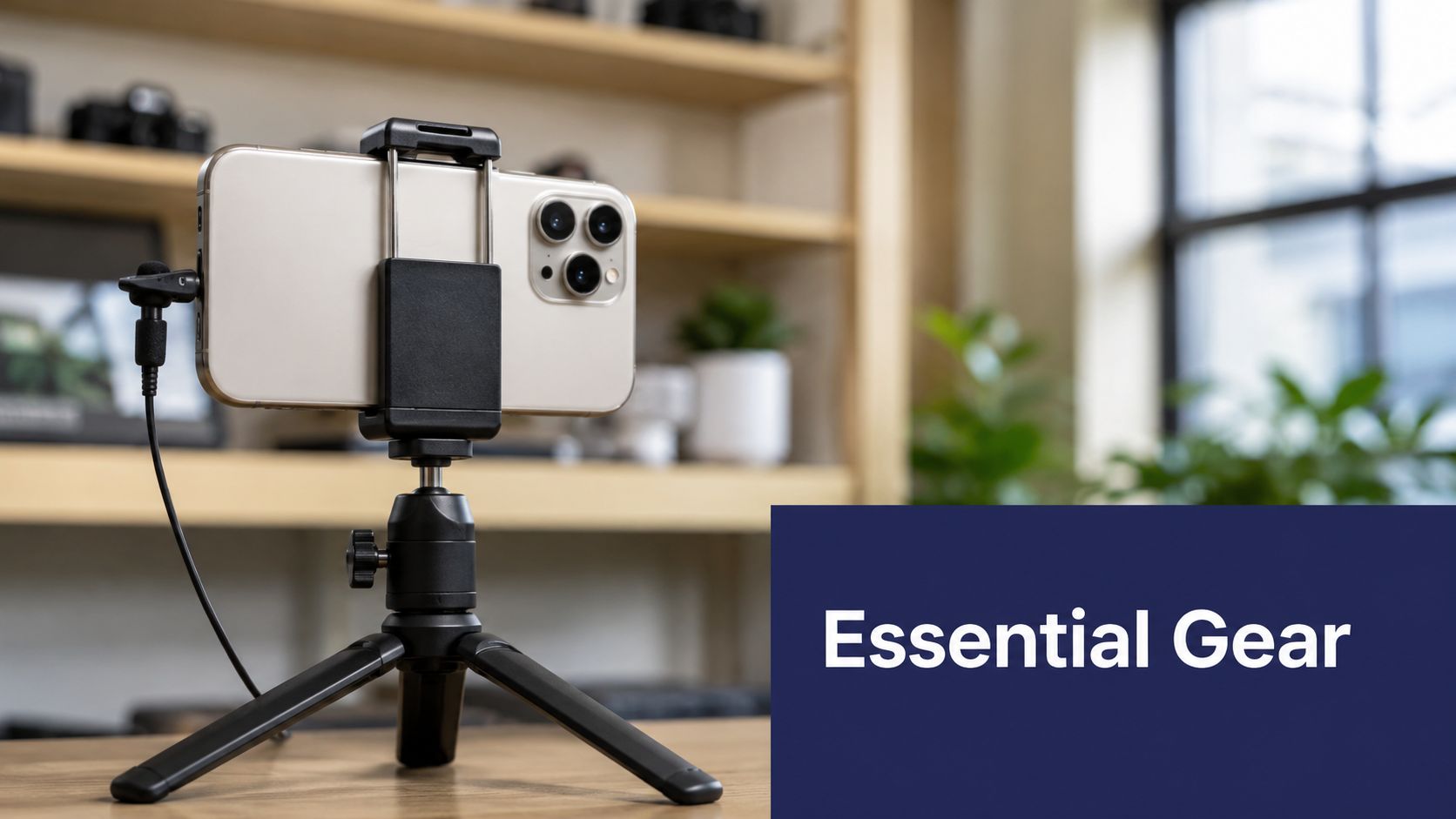
For industrial environments, your core kit should include:
- Phone: Your main capture device. Keep storage free and lens clean.
- Tripod or grip: Stability matters more than fancy movement in most B2B clips.
- External microphone: Clear voice audio is hard to fake later, especially near running equipment.
- Portable LED light: Useful for control panels, tool details, and dim corners of a facility.
- Cleaning cloth and battery pack: Small items, big impact.
The hidden requirement is repeatability. If your setup takes too long to assemble, nobody will use it regularly.
Good better best decisions
Not every team needs the same rig. Budget matters, but environment matters more. A loud shop floor needs different priorities than an office walkthrough.
Tripod
- Good: Small tabletop tripod for benches, desks, and machine surfaces.
- Better: Adjustable full-height phone tripod for operator demos and talking-head shots.
- Best: Tripod with quick-release mount so your team can move fast between setups.
Audio
- Good: Wired lav mic for a single speaker in a quieter area.
- Better: Wireless lav system for walkthroughs around equipment.
- Best: Wireless lav plus backup audio plan, such as recording a voiceover later if machine noise overwhelms speech.
Lighting
- Good: Window light or open bay door light when available.
- Better: Small LED panel for faces, machine controls, and product close-ups.
- Best: Portable LED with adjustable intensity so you can avoid glare on metal surfaces and screens.
Some teams also benefit from a lightweight planning tool that standardizes shoot requests, content notes, and approvals. A simple workflow app like the LunaBloom AI Starter App can help organize recurring content tasks if your marketing process still lives in scattered texts and sticky notes.
A quick visual on compact setup choices helps here:
Keep your kit deployment-ready
The best gear still fails if it's stored badly. Industrial teams do better with a grab-and-go bag packed the same way every time.
Use a simple SOP:
- Charge phone, mic, and lights at the end of each shoot day.
- Return each item to the same bag pocket.
- Keep a printed shot checklist in the bag.
- Test audio before entering a noisy area.
- Clean the lens before every new scene.
If you're learning how to record videos for Instagram, this is one of the biggest trade-offs to understand. More equipment can raise quality, but it also adds setup time and failure points. For most B2B teams, a simpler kit used consistently beats a bigger kit used once a quarter.
Capturing High-Quality Footage Camera and Framing
The recording phase is pivotal: it's where quality is either preserved or sacrificed. Good recording isn't about cinematic tricks. It's about controlling a few technical variables every single time.
Use the phone camera correctly
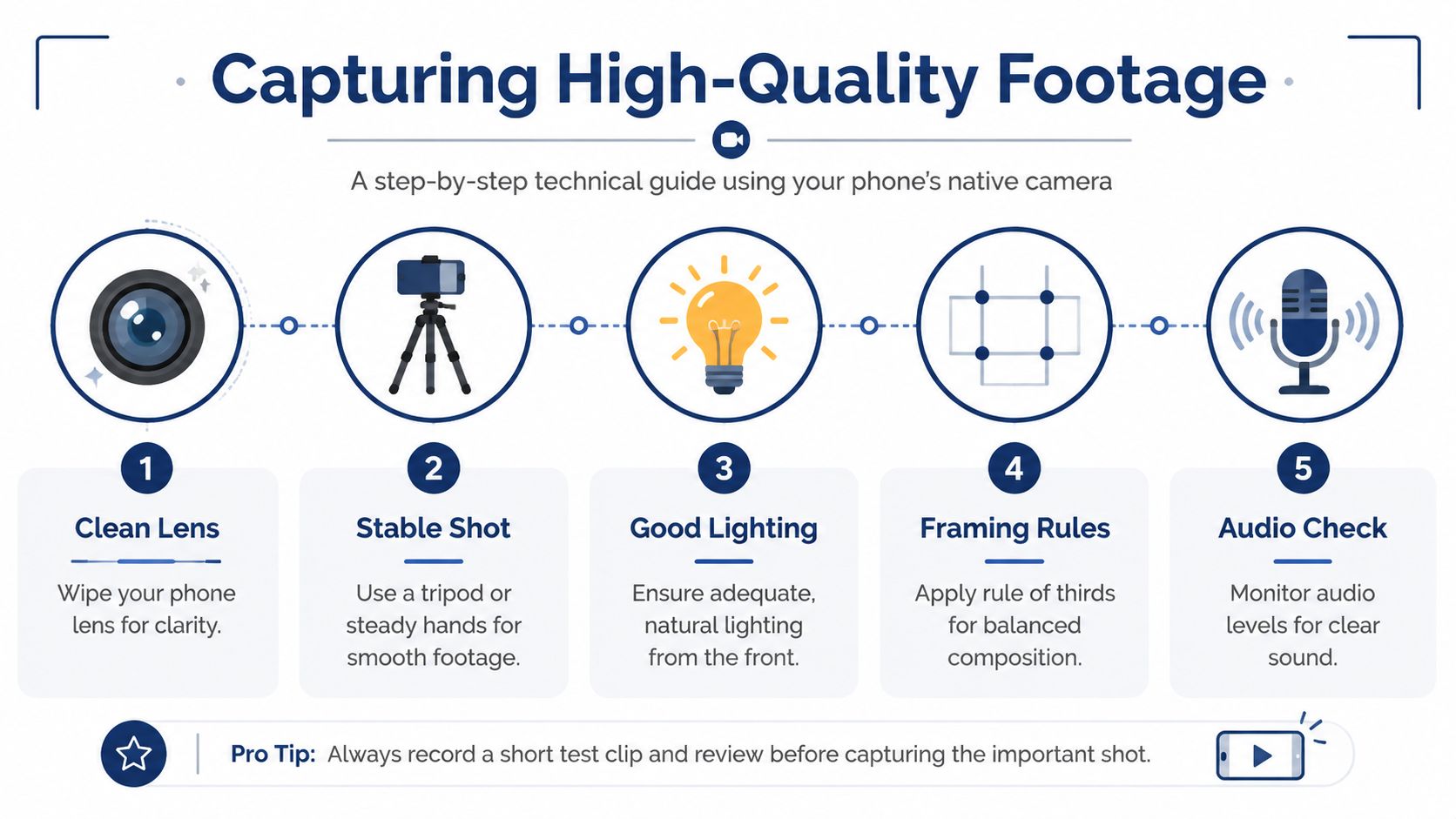
Record with your smartphone's native camera, not Instagram's in-app camera. Klap explains that the in-app camera imposes resolution limits, while using the native camera helps preserve image quality. The same guidance recommends enabling Upload at highest quality in Instagram settings, using the rule of thirds with grid lines turned on, and reserving 30% headroom for interface overlays.
That advice matters even more in industrial footage. A machine demo often includes screens, controls, tooling, warning labels, and moving parts. If Instagram overlays cover those elements, the clip loses meaning.
For the cleanest upload path, record in 4K with the phone's native camera, export in 9:16 vertical dimensions, and turn on Upload at Highest Quality in Instagram settings, as outlined by Jasmine Alley.
Frame for the screen Instagram actually shows
Most weak industrial videos aren't ugly. They're unreadable. The framing ignores how the app displays the content.
Use this field checklist before recording:
- Shoot vertical first: Instagram is built around vertical viewing, so rotate the phone upright before you start.
- Leave safe space: Keep critical text, faces, gauges, and machine details away from the very top and bottom of the frame.
- Use the grid: The rule of thirds helps you place a speaker or machine feature where the eye naturally lands.
- Control exposure: Lock exposure before moving around a machine so brightness doesn't jump as reflective surfaces enter frame.
- Watch the background: Tool carts, scrap bins, or unrelated motion can distract from the point of the clip.
If the viewer can't instantly tell what part of the machine matters, the framing isn't done yet.
A repeatable capture checklist
On a shop floor, consistency beats inspiration. Use the same order every time.
- Clean the lens. Dust and fingerprints are common and easy to miss under plant lighting.
- Set the frame. Choose vertical orientation and place the main subject with enough space for captions and overlays.
- Lock focus and exposure. This reduces visible brightness shifts during movement.
- Record multiple angles. Capture a wide shot for context, a mid shot for process, and a close shot for detail.
- Check audio. If voice matters, test it before the actual take.
A common trade-off shows up here. Handheld movement can make footage feel more immediate, but too much movement around machines creates distraction and blur. In B2B, stable usually wins.
The Mobile Editing and Export Workflow
Editing shouldn't feel like a separate creative profession. For most industrial teams, it should feel like cleanup, sequencing, and packaging. If the footage was planned well, the edit is mostly about removing waste.
Edit for clarity not novelty
Apps like CapCut and VN Editor are useful because they let you trim, reorder, caption, and export quickly on a phone. You don't need aggressive transitions, flashy effects, or trend-heavy templates to explain a machine or process.
A solid B2B edit usually includes:
- A fast opening shot: Show the machine, part, or person immediately.
- Short trims: Remove dead seconds before motion starts or after the key point ends.
- Logical order: Context first, then action, then detail.
- On-screen text: Add part names, process notes, model references, or simple labels.
- Clean audio choices: If machine noise is the point, keep it. If explanation matters, lower background sound and prioritize speech.
Cut anything that doesn't improve understanding.
Export settings that hold up on upload
Export settings matter because Instagram will compress your file. To protect quality, Artlist recommends an export bitrate of 3500 kbps, a frame rate of 30 fps, AAC audio, and MP4 or H.264 formats. The same reference notes that clips need to be at least 3 seconds long to be saved and edited within the platform.
That gives you a practical baseline. If your team keeps posting soft, artifact-heavy video, the problem may not be the camera. It may be the export.
Use this quick reference:
| Setting | Recommended baseline |
|---|---|
| Bitrate | 3500 kbps |
| Frame rate | 30 fps |
| Audio | AAC |
| Format | MP4 or H.264 |
| Minimum clip length for in-platform saving/editing | 3 seconds |
A practical editing sequence
When you sit down to edit, keep the order simple:
- Import all clips and delete obvious mistakes.
- Pick the strongest opening shot first.
- Build the middle around one clear process or explanation.
- Add text overlays only where they improve comprehension.
- Export once using your standard settings.
- Review on a phone before posting.
If you're producing videos regularly, save a reusable template inside your editing app. Keep the same font, text placement, and cover style. That cuts production time and helps the audience recognize your content faster.
The Go-Live Checklist Uploading and Testing
Publishing is quality control, not admin work. A strong recording and editing process can still break down at the last step if the caption is vague, the cover looks off-brand, or the finished post doesn't tell the viewer what to do next.
Quality control before publish
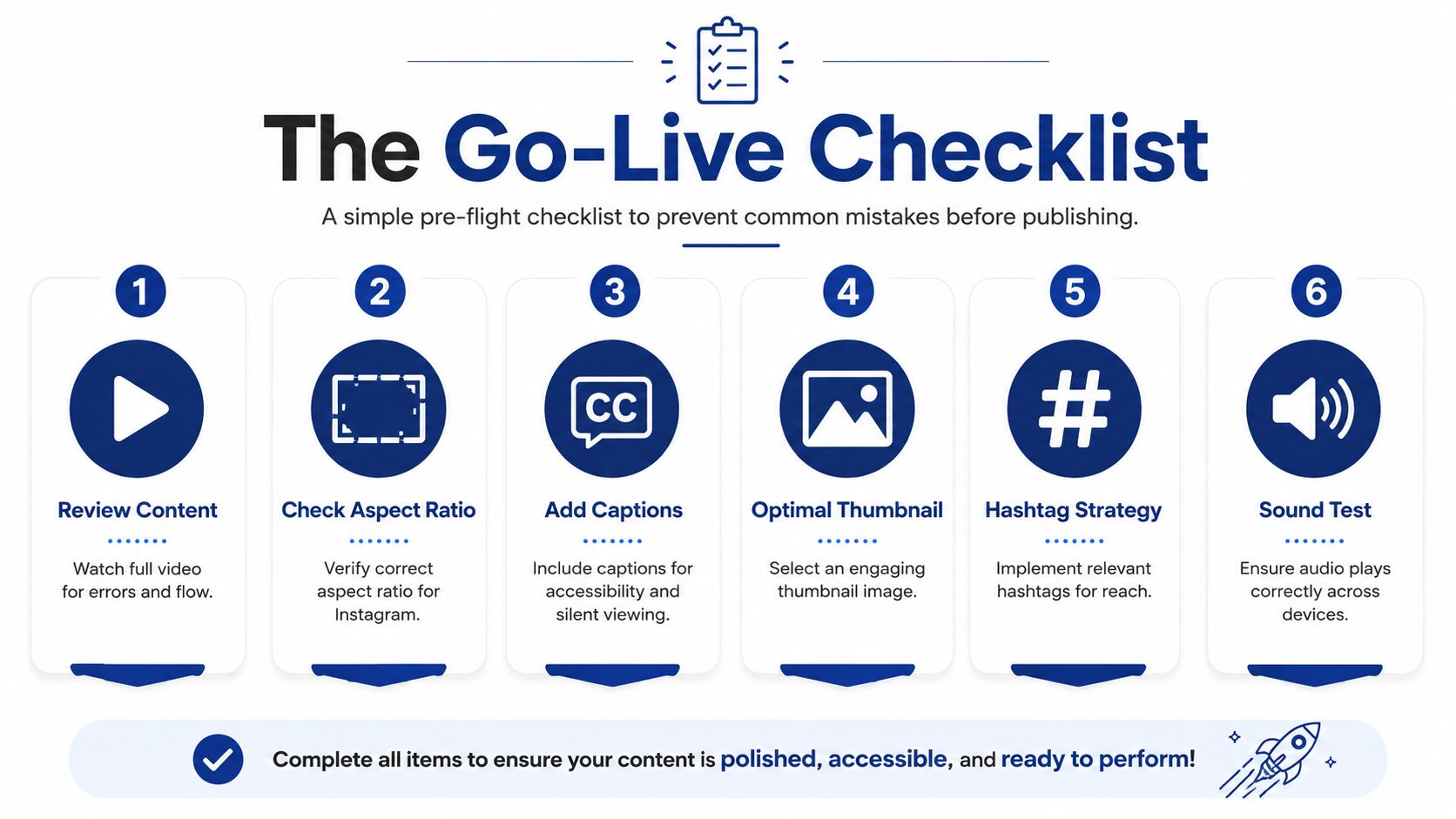
Use a pre-flight check before every upload:
- Review the full video: Watch for visual errors, awkward cuts, or text that disappears too fast.
- Confirm the format: Make sure the aspect ratio fits the Instagram placement you chose.
- Add captions: Many viewers watch without sound, especially during work hours.
- Choose the right thumbnail: The cover should clearly signal the topic, machine, or expert speaking.
- Write a useful caption: Explain what the viewer is seeing and why it matters.
- Include a call to action: Ask for the next step, whether that's a site visit, a question, or a spec request.
Brand consistency matters more than most teams think
Many industrial companies treat covers and visual style as an afterthought. That's a mistake. Alt Marketing School reports that consistent branding for video covers or overall visual look and feel can increase revenue by up to 23% and improve brand recognition by three to four times.
In practical terms, that means your covers shouldn't look random from post to post. Use a repeatable system for color, text treatment, framing style, and topic labeling.
A simple cover SOP might include:
- One font family: Keep titles visually consistent.
- One color treatment: Match your brand colors across covers.
- One thumbnail rule: Feature either the machine, the finished output, or the expert speaker.
- One title pattern: Name the process, result, or topic in plain language.
If your posting cadence is inconsistent, this guide to a B2B social media posting schedule that actually works can help you turn isolated posts into a routine.
Test the system not just the post
Don't judge success by one upload. Look for patterns across a batch of videos.
Ask these questions after publishing a few clips:
- Which opening shot kept attention best: Wide machine context, close-up detail, or a person speaking?
- Which topics triggered replies or questions: Process explanation, troubleshooting, safety, or product capability?
- Which speaker came across clearly: Owner, engineer, operator, or service technician?
- Which format was easiest to produce consistently: Reel, Story sequence, or talking-head explainer?
A reliable Instagram video process is built by reviewing friction points, not by chasing novelty.
If one step keeps slowing the team down, fix the system. Shorten approvals. Pre-build captions. Keep the kit packed. Create a standard cover template. Better content often comes from fewer decisions, made earlier.
If you want help building a practical Instagram video SOP for your industrial business, Machine Marketing can help you diagnose the gaps, tighten the workflow, and turn scattered content efforts into a repeatable system that supports lead generation.
