
If your manufacturing site is about to get a fresh design, you're probably feeling two things at once, excitement and dread. Excitement because the brand needs to look sharper and convert better, dread because you know a redesign can wipe out the pages that already bring in quotes, RFQs, and inquiries. The right move isn't to fear the redesign, it's to treat it like a controlled engineering project, with clear baselines, hard decisions, and a launch plan that protects the business while improving the site.
A redesign can absolutely create SEO lift when it's built around measurement and intent. One published case study showed January 2017 organic traffic 99% higher year over year, Google organic traffic 126% higher, and leads and inquiries up 40% versus the prior January comparison period, with the practical lesson that the win came from preserving strong URLs, redirecting old pages correctly, and rebuilding templates around search intent, internal links, and crawlability. You can read a helpful planning resource for help with your site refresh if you want a broader redesign checklist alongside the SEO work.
The hard truth is that a redesign can also do real damage. Industry guidance says a mismanaged redesign can drop traffic by 20% to 50%, sometimes more, and another source cites research showing 72% of websites lose organic traffic in the first month after a redesign, 34% take 6+ months to recover, and only 15% see immediate ranking improvements. That's why we don't treat website redesign for SEO as a branding exercise. We treat it as a transition that must preserve discoverability, protect equity, and create a cleaner path to conversion.
Table of Contents
- Why Most Redesigns Lose Rankings and How to Beat the Odds
- Run a Pre-Launch Audit You Can Actually Defend
- Decide What Stays, What Merges, and What Goes
- Build the Redirect Map Before You Touch Design
- Technical SEO Fixes to Bake Into the New Build
- Launch Day and the First 30 Days
- Measure What Actually Matters After Launch
Why Most Redesigns Lose Rankings and How to Beat the Odds
Most companies think a redesign fails because “Google hates change.” That's lazy thinking. The problems are almost always self-inflicted, legacy URL sprawl, templates that look modern but ignore search intent, and launch-day chaos that breaks the signals search engines rely on.
The three pressures that sink redesigns
First, legacy URL sprawl. Industrial sites are full of old product pages, outdated application pages, and blog content that overlaps. If you move everything around without a clean map, you force search engines to relearn your site from scratch, and you often lose the equity those pages had already earned.
Second, template redesigns that ignore intent. A page can look better and still perform worse if the new layout hides the answers buyers came for, weakens headings, or buries the main CTA below too much visual noise. For manufacturers, that usually means a visitor looking for a specification sheet, machine capability, or industry application has to work harder than before.
Third, launch-day chaos. Broken internal links, blocked crawling, missed redirects, and missing metadata are not minor issues, they're the kinds of mistakes that turn a redesign into a traffic problem. That's why we use an engineering mindset, defined inputs, a controlled build, QA against the baseline, and post-launch monitoring.
Practical rule: if you can't prove what a page did before the redesign, you can't defend what happens after it.
The right frame is not “How do we preserve everything?” It's “How do we keep what matters, improve the architecture, and remove clutter that's holding the site back?” That's especially true for industrial B2B companies with years of overlapping content and too many near-duplicate pages. A cleaner structure often helps buyers find what they need faster, and it gives search engines a clearer view of topical authority.
If you're using this playbook properly, you'll leave with a system for diagnosis, a list of what to keep or merge, a redirect plan that avoids dead ends, and a launch process that measures impact instead of guessing at it.
Run a Pre-Launch Audit You Can Actually Defend
Start with proof, not opinions. Before design touches a single page, crawl the current site and capture a baseline that tells you what exists, what earns visibility, and what deserves protection. A website redesign SEO checklist should begin with a full crawl of the current site, plus a complete inventory of existing URLs, status codes, internal links, and metadata, because that's what lets you preserve rankings and identify pages that must be kept, updated, merged, removed, or redirected. You can pair that baseline with our technical SEO audit checklist to keep the audit disciplined.
Build the audit in the right order
Start with the crawl. Export every URL, title tag, meta description, H1, status code, and response time. That gives you the working map of the site as it exists today, not as someone remembers it.
Then pull performance data from GA4. You want organic sessions, conversions, and the pages that contribute to leads or inquiries. Don't rely on overall traffic alone. Some pages may not drive volume, but they may be the pages that move prospects closer to a quote request.
Next, export data from Google Search Console. Pull queries, pages, impressions, clicks, CTR, and backlinks where available. That tells you which topics search engines already associate with your site and which URLs have earned external signals you can't casually discard. One case study in the verified data makes the point clearly, redesigns work when the site is measured before and after launch, not when teams assume the new layout will “just work.”
What to look for: pages with traffic, pages with links, pages with conversions, and pages that support key product or service categories.
Turn the audit into a decision sheet
Use a spreadsheet with one row per URL and columns for traffic, links, conversions, topical fit, and a recommended action. The actions should be simple, keep, update, merge, redirect, or remove. That's the cleanest way to brief designers and developers without losing SEO context in the handoff.
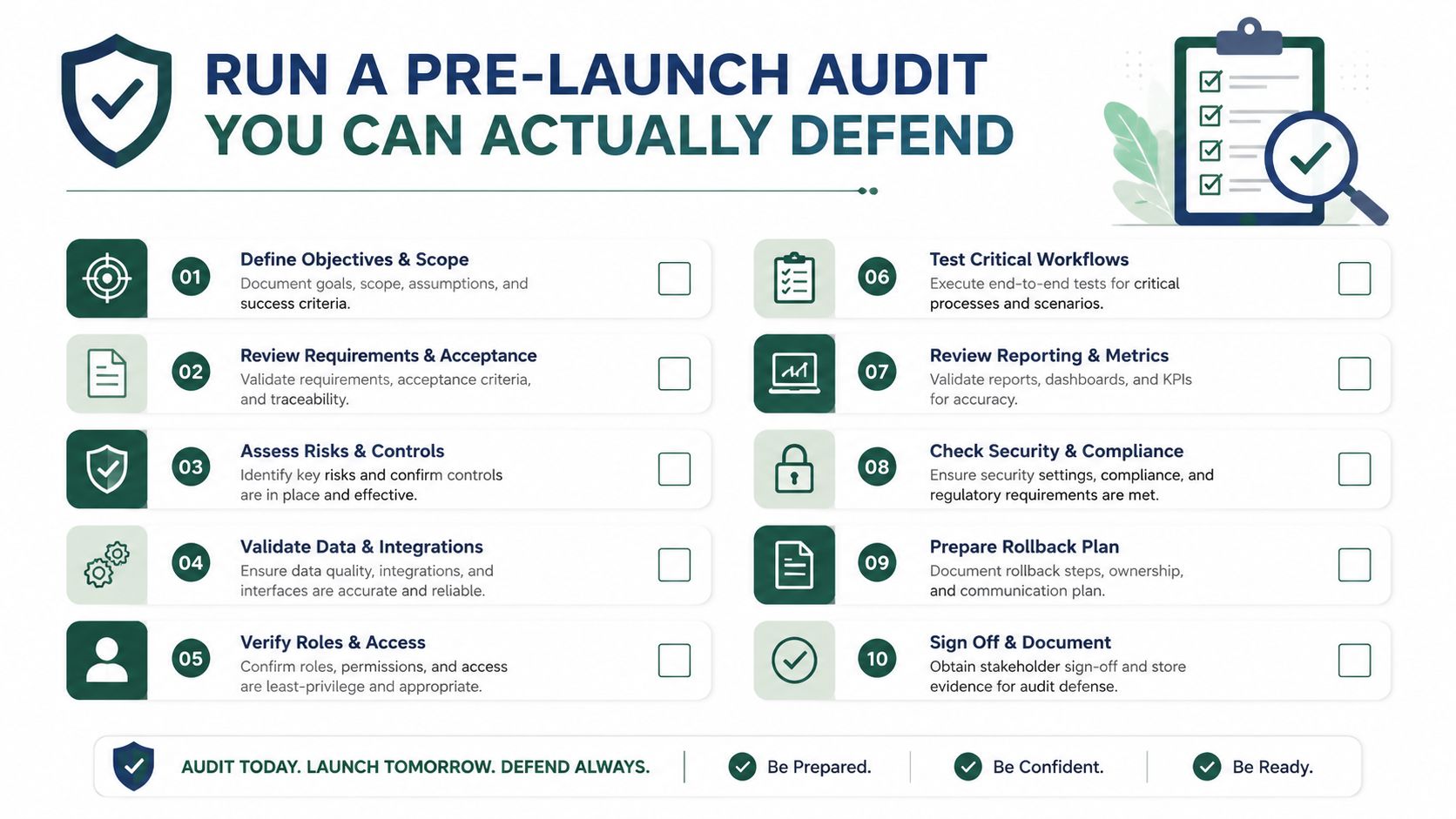
A good audit also tells you what not to touch. If a page is ugly but drives qualified demand, don't let a design preference kill it. If a page has no traffic, no links, and no strategic role, it doesn't deserve the same protection as your strongest pages.
I'd also recommend a stakeholder review before build starts. Sales, engineering, and leadership need to agree on what the site is supposed to do. If the audit says a page should go, you need that decision documented before anyone starts arguing over old habits later.
Decide What Stays, What Merges, and What Goes
Most redesign advice tells you to protect every URL. That's the wrong default for industrial sites with a decade of overlapping product pages, capability pages, and resource articles. A smaller site can win if the architecture is clearer, the intent is tighter, and the pages are grouped around how buyers search.
Use intent, not sentiment, to make the call
If two pages target the same query and answer the same question, one of them should win. Keeping both usually just splits authority and confuses the site structure. The stronger page is usually the one with better links, more traffic, stronger conversions, or a clearer fit with your new architecture.
Thin pages are another easy call. If a capability page exists mainly to fill a navigation slot and doesn't help buyers understand what you do, it's often better to merge it into a stronger parent page. The same logic applies to outdated blog posts that still get visits but no longer deserve standalone treatment. Update them if the topic still matters. Remove or merge them if they're redundant and weak.
The strategic question is simple, does this page help a buyer move forward, or does it just add noise? If it's noise, keep in mind that trimming it can improve the site, even if one or two legacy rankings slip. That's not a failure, that's a cleaner information architecture doing its job.
Here's the internal link taxonomy approach that helps keep the logic sane: taxonomy in website. If your categories are messy, your redesign will be messy too.
Make the decision defensible
Use a scoring system with four factors, traffic, links, conversions, and strategic fit. Then assign the page to a bucket.
- Keep: strong traffic, clear intent, and a direct role in the new site structure.
- Update: valuable page, but content or layout needs a refresh to match current buyer intent.
- Merge: overlapping pages that should become one stronger asset.
- Redirect: legacy URLs that should point to a more relevant destination.
- Remove: content with no value, no links, and no strategic use.
Decision rule: if a page can't justify its existence to sales, search, and the buyer, it probably doesn't deserve a place in the new site.
You'll get pushback from people who are attached to old pages. Don't debate from taste. Show the score, show the overlap, and show the business reason. That's how you defend a redesign that gets sharper instead of just prettier.
Build the Redirect Map Before You Touch Design
The redirect map is not a housekeeping task. It's the document that protects your traffic. If you get this wrong, the rest of the redesign is just a prettier version of a broken site.
Treat every legacy URL like an asset
Build a one-to-one redirect map where every old URL points to exactly one relevant new URL. No chains, no loops, no lazy “just send it to the homepage” shortcuts unless you have no better choice. That's especially important for manufacturers, where product families and category pages often have years of backlinks and internal references attached to them.
The practical standard is simple. If the page still has a relevant new home, redirect it there with a permanent redirect. If the content is being merged, send the old URL to the most relevant consolidated page. If the old page is dead weight, still route it somewhere purposeful, ideally a parent category or a closely related page.
Use redirects and canonicals for the right jobs
A redirect moves people and search engines from one URL to another. A self-referencing canonical tells search engines which version of a page is the preferred one when similar content exists. Don't confuse the two. Use redirects when a page is gone or replaced. Use canonicals when duplicate or near-duplicate versions need consolidation without changing the live URL.
A good QA pass on the redirect map should include these checks.
| Scenario | Treatment | Why |
|---|---|---|
| Old page has a direct new equivalent | 301 redirect | Preserves equity and sends users to the closest match |
| Multiple old pages fold into one stronger page | 301 redirect to the consolidated page | Reduces duplication and concentrates relevance |
| Same content exists in multiple variants | Self-referencing canonical on the preferred page | Helps search engines understand the primary URL |
| Old page has no close replacement | Redirect to the nearest relevant parent page | Avoids dead ends and preserves user flow |
| URL is moving but content is still the same | Keep the URL if possible | The cleanest way to reduce recovery risk |
Before launch, spot-check the map against backlinks from Search Console. If a linked page is being moved, make sure the destination is logical and the link equity isn't wasted on a weak target. Also confirm that internal links in the new build point directly to the final URL, not to redirected versions.
The best redirect map is boring. Every old page has a destination, every destination makes sense, and no one has to guess what will happen after launch.
Technical SEO Fixes to Bake Into the New Build
Designers don't need vague SEO advice, they need build requirements. Developers don't need theory, they need acceptance criteria. The new site should be judged on whether search engines can crawl it cleanly, buyers can use it easily, and the internal structure reflects the new architecture.
Make the build crawlable and fast enough
Start with the staging environment. It should be blocked from indexing until launch, because you don't want unfinished pages showing up in search results. That's basic discipline, and it prevents duplicate or incomplete pages from being treated like live assets.
Then make mobile experience a priority. If the mobile layout hides important content behind awkward interactions, you've created a problem for users and crawlers at the same time. For industrial sites, that often means product specs, service details, and trust signals need to be visible without forcing people through a maze of taps.
Structured data matters too. Product pages, service pages, and FAQ sections should be marked up where relevant so search engines can understand what the page is about. Technical datasheets should stay crawlable, not trapped behind layers of design that make them invisible to search.
Build the internal link plan into the template
Your internal linking structure should reflect the new information architecture, not the old one. Important category pages need support from related content, and strong articles should point to the pages that generate inquiries. If the site has PDFs for machine specs or technical sheets, make sure they can be discovered and indexed appropriately instead of hidden in a way that weakens the site's topical structure.
Implementation standard: if a page matters enough to be a destination, it matters enough to be linked from the right places in the template.
The staging QA should focus on a short list of essentials. Confirm noindex controls are in place on staging. Check that internal links don't point through redirects. Review titles, H1s, metadata, structured data, and the crawl path for the most important page types. Then test key product and service pages on mobile, because that's where many redesigns become harder to use than the old site.
If you want a practical demonstration of how SEO and design can work together in a real web project, the team at Wise Web's SEO-focused design resource is a useful reference point. The principle is the same across good builds, design has to serve crawlability, intent, and conversion at the same time.
Launch Day and the First 30 Days
One of the cleanest launches I've seen was for a regional machine shop that had spent months fixing its content structure before design froze. The team still had nerves on launch morning, which is normal, but they also had a checklist, a redirect map, and a clear monitoring rhythm. That's the difference between a stressful launch and a chaotic one.
What the first day should look like
The cutover should start with verification on staging, then move into live checks once the new site is in place. Search Console should be open from the start, and the top fifty URLs should be inspected right away. You're not looking for perfection, you're looking for obvious breakpoints, crawl errors, wrong redirects, missing titles, or pages that suddenly fail to resolve.
Then watch the first week like a hawk. Check crawl errors, coverage issues, and 404s daily. If a page that should rank suddenly disappears from the index, or if a redirect lands somewhere unrelated, fix it fast. The goal is to stop small mistakes from becoming search visibility problems.
A good launch page for this process is our website redesign project plan, because the launch rhythm matters as much as the build itself.
What not to panic about
Small ranking movement is normal. Search engines need time to process the new structure, and traffic rarely snaps into place on day one. What matters is the direction of the signals, not the noise of the first few refreshes.
If impressions rise while clicks stay flat, that often means the page is being seen but the title or meta description needs work. If impressions stay flat, the redirect map may not be passing enough equity or the new structure may not be helping the right pages surface. That's where a daily review beats gut feel every time.
You should also use this window to communicate clearly inside the business. Leadership wants to know whether the redesign is helping or hurting, and sales wants to know whether quote requests are still coming in. Don't wait for a crisis to explain the monitoring plan.

The first 30 days are about control. If you watch the right pages, respond quickly, and resist emotional overreaction, you'll catch the issues before they become expensive ones.
Measure What Actually Matters After Launch
Rankings are easy to watch and easy to misunderstand. For a manufacturer, the better question is whether the redesign is producing more qualified visibility and better pipeline activity. That means organic sessions, form fills, RFQs, and assisted conversions, not just a prettier search result.
Build your measurement cadence
Check performance at 7, 30, and 90 days. At 7 days, you're looking for breakage, crawl issues, and obvious drops in key page groups. At 30 days, you're asking whether impressions, clicks, and organic sessions are stabilizing. At 90 days, you should know whether the new architecture is helping the site reach more relevant buyers.
Build dashboards in Looker Studio that show the pre-launch baseline next to the post-launch trend. Include organic sessions, top landing pages, conversions from organic, and query groups tied to core products or services. If you use a marketing stack that touches CRM or automation, keep the reporting tied to actual leads, not vanity activity.
If you want help thinking through how AI and automation fit into that measurement layer, AI consulting for businesses is useful context for teams that are trying to connect reporting, workflows, and lead handling more intelligently.
Ask the right questions when the numbers move
If a page type drops, ask which one. If impressions fall, ask which queries lost visibility. If a redirect looks weak, trace where the traffic landed and whether the destination page matches the old intent. Those questions matter more than reacting to a single ranking change.
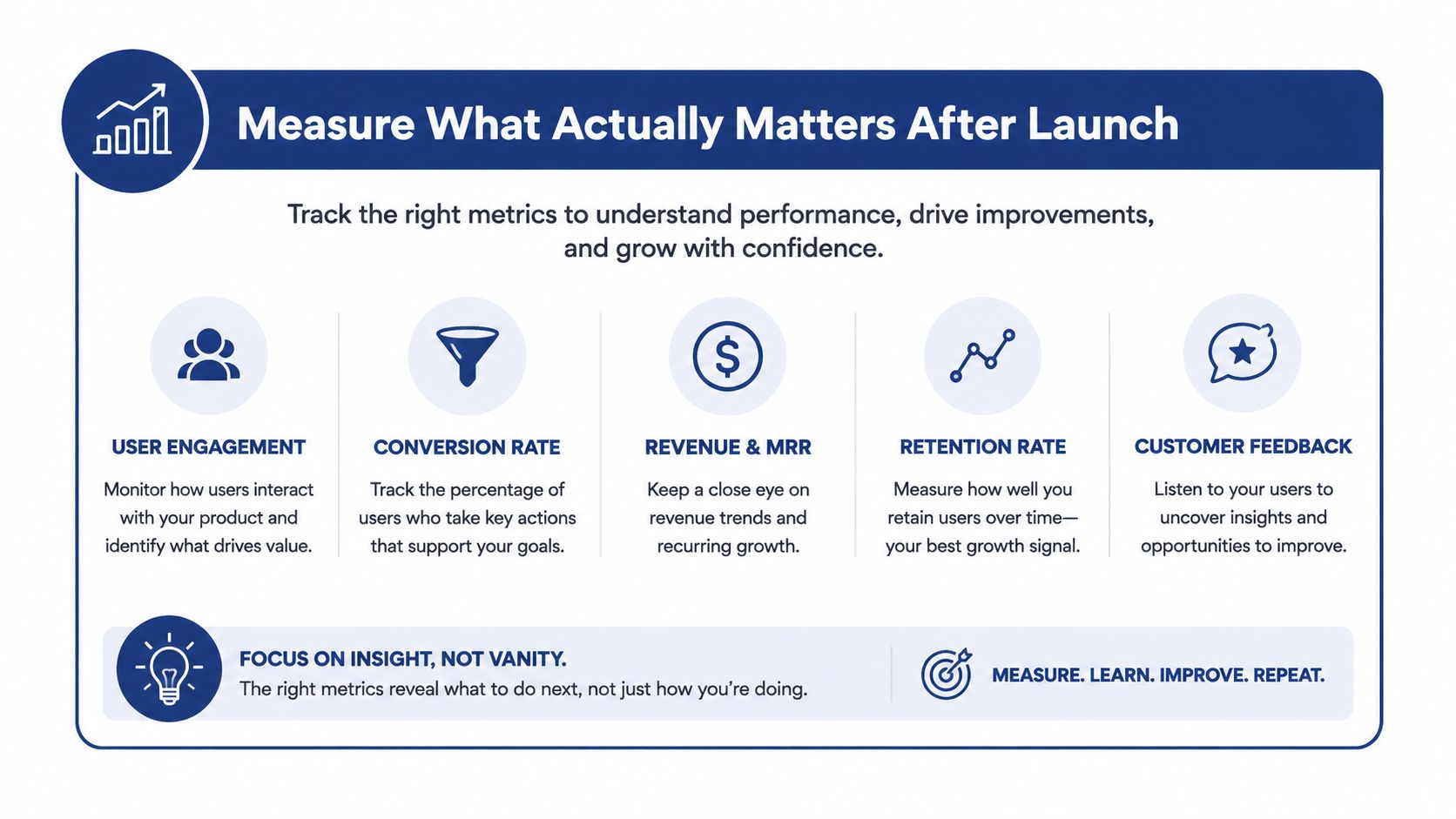
The smartest redesign teams don't celebrate the launch, they measure the system. If you want your next redesign to improve visibility instead of risking it, start with a baseline, make the content decisions with discipline, and hold the build to the same standard you'd use for any other production system. Visit Machine Marketing if you want a partner that can diagnose the current site, map the transition, and help you launch with SEO built in from the start.
