
A website audit is a structured diagnostic of how your site performs technically, in search, in conversion, and in trust. It's not a one-time cleanup, it's recurring maintenance, because the site changes, the crawl changes, and buyer behavior changes with it.
If you run a manufacturer site, you've probably seen this happen. A redesign goes live, the pages look sharper, and then quote requests stall anyway. The problem usually isn't “the website” in the abstract, it's one or two broken systems hiding underneath, and a proper audit finds them before they keep costing you leads.
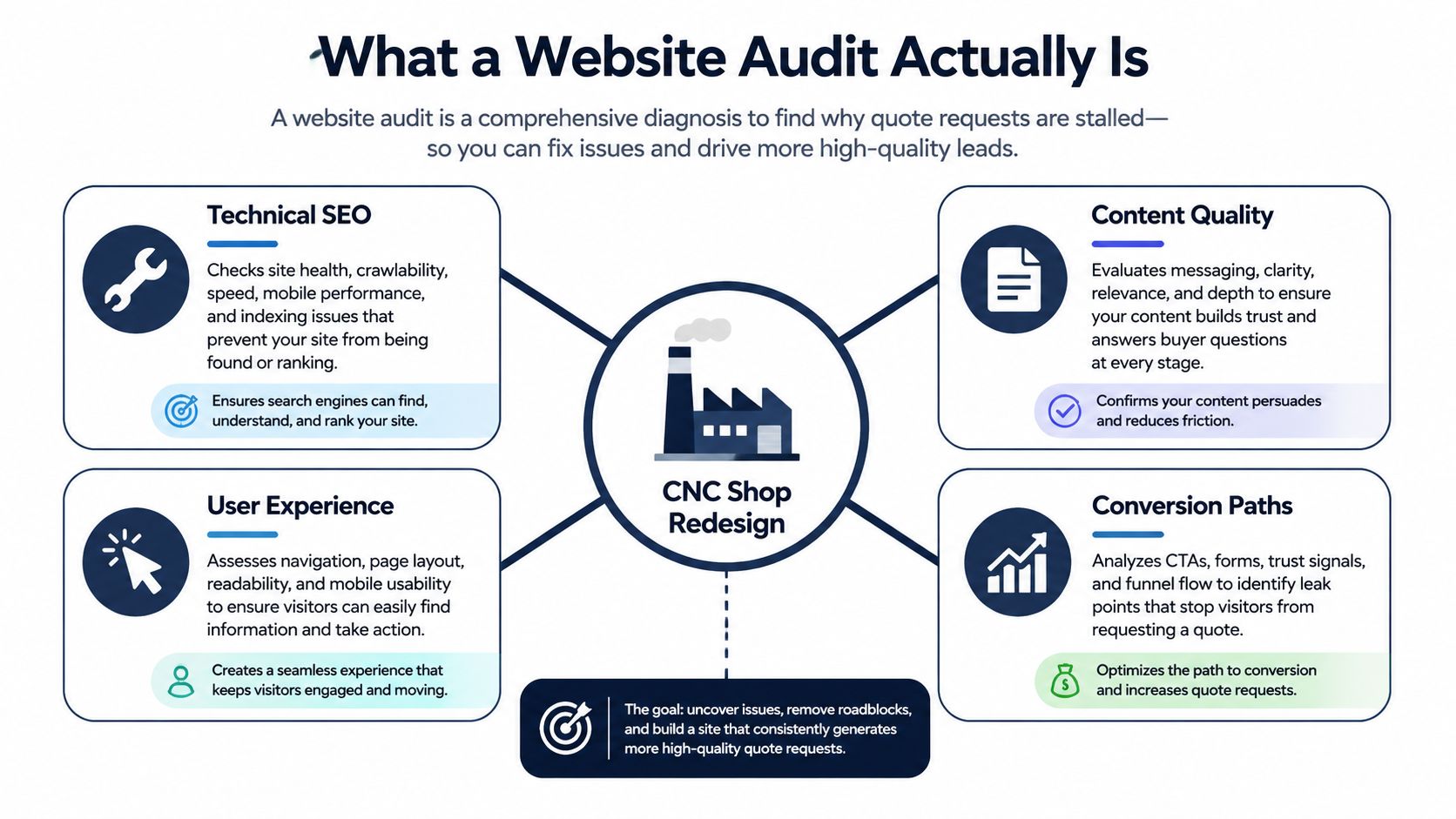
Table of Contents
- What a Website Audit Actually Is
- Why Audits Are Now Recurring, Not One-Time
- The Five Core Components of a Manufacturer Audit
- Tools That Power a Modern Website Audit
- A Practical Audit Checklist for Industrial Sites
- Prioritizing Findings with an Impact vs Effort Framework
- How Often to Audit and What Triggers a Re-Audit
- Sample Deliverables and Your Next Step
What a Website Audit Actually Is
A CNC machining shop can launch a clean new site and still rank for nothing new. The product pages may look polished, but if search engines can't crawl them cleanly, if the RFQ path is clumsy, or if buyers don't see the proof they need, the redesign won't move pipeline.
That's why what is a website audit needs a practical answer, not a marketing one. A real audit is a structured diagnosis with measurable inputs and outputs, covering technical health, search visibility, conversion performance, and trust signals. It looks at how the site behaves page by page, not just whether the homepage “feels modern.”
Practical rule: If a finding doesn't change a decision, a ranking path, or a quote request, it probably isn't a priority.
For manufacturers, the scope has to match the site's job. Product specs, tolerance pages, part drawings, capability statements, and RFQ funnels don't behave like generic B2B brochure pages. Engineers and sourcing managers want proof fast, and the audit has to check whether the site helps them self-qualify or makes them work too hard.
A useful comparison is a conversion review that connects technical findings to revenue. If you want a broader lens on that discipline, turn more traffic into qualified pipeline is a good way to think about the output, not just the inspection. We also keep this work tied to the bigger marketing system, because isolated fixes rarely stick, which is why a marketing audit framework matters alongside the site review.
The best way to think about the audit is as a repeatable system with five parts. We look at the site's crawlability, the content buyers need, the path to a quote, the speed and usability of the pages, and the trust signals that make a procurement team comfortable reaching out. Keep those five lenses in mind, because the rest of the process gets much easier once you stop treating the audit like a vague checklist.
Why Audits Are Now Recurring, Not One-Time
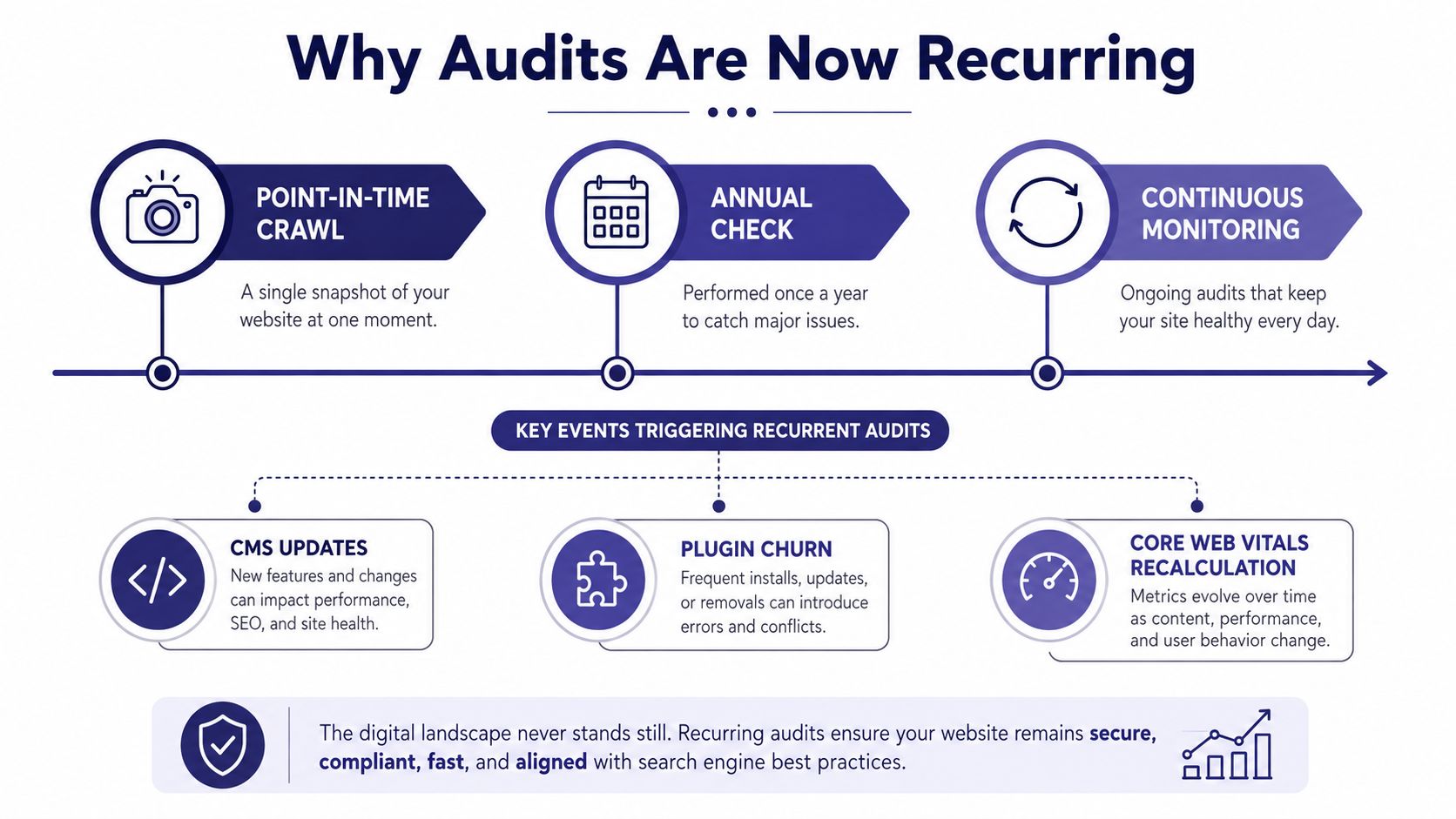
Website audits used to be snapshots. Today, the better platforms store crawl history, compare one audit to the next, and show whether the fix landed, which is a very different job from a one-time technical check. That shift toward history-aware monitoring is the reason audits now behave more like maintenance logs than annual reports.
For industrial sites, the logic is obvious if you think like a plant manager. You don't inspect a critical machine once and assume it stays healthy forever, you watch for drift, wear, and change. Website health works the same way, because CMS updates, plugin churn, template edits, and content rollouts all change the site long after the first audit is done.
A once-a-year crawl misses too much. A product line launch can create new URL patterns. A redesign can break internal links. A new form plugin can change how leads route, and a change in buyer queries can make old content irrelevant even when the site “looks fine.”
Google's own Core Web Vitals reporting reinforces that idea, because performance needs to be checked in field data, not assumed from a single test Core Web Vitals report guidance. The same principle applies to crawl history and index coverage in tools like Search Console and other audit platforms.
The right mindset is simple. One audit gives you a baseline. Recurring audits tell you whether the site is drifting, stabilizing, or improving.
A site that changes in phases needs a diagnostic process that changes with it.
That's why we treat the audit cadence as operational. You're not buying a document, you're buying visibility into whether the machine is still running the way the business needs it to run.
The Five Core Components of a Manufacturer Audit
The five pieces of a manufacturer audit belong together. If you fix speed but ignore indexation, you're polishing the wrong part of the system. If you improve content but leave the RFQ form broken, you've created more traffic to nowhere.
| Component | What You Diagnose | Key Metrics |
|---|---|---|
| Technical SEO | Whether search engines can find and understand the right pages | Crawlability, indexation, redirects, canonicals, structured data, internal links |
| Content Relevance | Whether engineers and buyers get the information they need fast | Spec depth, capability coverage, drawing access, query intent match |
| Lead Generation | Whether visitors can request a quote without friction | Form completion path, routing logic, CTA clarity, tracking integrity |
| Site Performance | Whether pages load and stay stable on real devices | Core Web Vitals, mobile behavior, heavy page load issues |
| Security and Trust | Whether buyers feel safe taking the next step | HTTPS, mixed content, compliance signals, visible trust markers |
Technical SEO comes first
If crawlability is broken, the rest of the site barely matters. Search engines need clear robots rules, clean sitemaps, sensible redirects, canonical tags, and enough internal linking to understand which pages matter most.
For manufacturer sites, I pay special attention to product families and capability pages. Those are often the pages that should attract demand, but they get buried under poor architecture or duplicated template paths. Search Console coverage data and crawl reports show where the machine is leaking.
Content relevance comes second
Engineers don't want fluffy copy. They want dimensions, tolerances, materials, certifications, application fit, and proof that the shop can do the work. If the page answers the wrong question, rankings won't save it.
Conversion has to be measurable
A website can get traffic and still lose revenue if the RFQ path is clumsy. Look at button placement, form length, field logic, routing, and whether the page sends the right signal before the user clicks.
Performance and trust are not afterthoughts
Slow loads, layout shifts, and broken mobile behavior punish real buyers on real devices. Security hygiene, visible HTTPS, and compliance cues matter too, because procurement teams notice the difference between a site that feels maintained and one that feels neglected.
Tools That Power a Modern Website Audit
A manufacturer site audit usually breaks down fast when the tool stack is vague. Use a crawler to expose structural issues, a performance tool to show where pages slow down, and session replay to show where buyers quit. You do not need every platform on the market. You need the few that surface the failures that cost leads.
| Tool Category | Primary Job | Examples | Manufacturer Use Case |
|---|---|---|---|
| Full-site crawler | Map technical issues across the whole site | Screaming Frog, Sitebulb | Find broken redirects, duplicate pages, and missing metadata on product templates |
| Cloud audit platform | Add context, history, and competitive visibility | Ahrefs, Semrush, Lumar | Check backlinks, schema coverage, and project history over time |
| Performance measurement | Measure real and lab performance | Search Console, PageSpeed Insights, real-user monitoring tools | Spot slow hero images, script drag, and mobile instability on spec pages |
| Session replay and form analytics | See where users get stuck | Microsoft Clarity, Hotjar | Watch RFQ drop-offs, field abandonment, and dead clicks |
| Server and uptime monitoring | Catch infrastructure problems | Uptime tools and server monitors | Confirm whether outages or slow responses are affecting quote requests |
Typography and page layout deserve a spot too, especially when a site feels off and the usual SEO reports do not explain why. A practical guide like how to audit website fonts helps you spot readability issues that hurt trust on technical pages.
For a mid-market manufacturer, a lean stack usually wins. Two tools cover most recurring audits if the site is stable and the team is disciplined. Once organic traffic and lead volume justify more oversight, a wider stack makes sense because you are paying for visibility, not just diagnostics.
Machine Marketing also offers a free Website & Marketing Audit, which fits here for teams that want an outside diagnostic instead of building the stack themselves. Use it to confirm what is working, what is slowing the site down, and where more leads can be generated.
A Practical Audit Checklist for Industrial Sites
A good checklist should be handoff-ready. If you can't give it to a developer, agency, or internal marketer and get consistent answers back, it isn't tight enough.
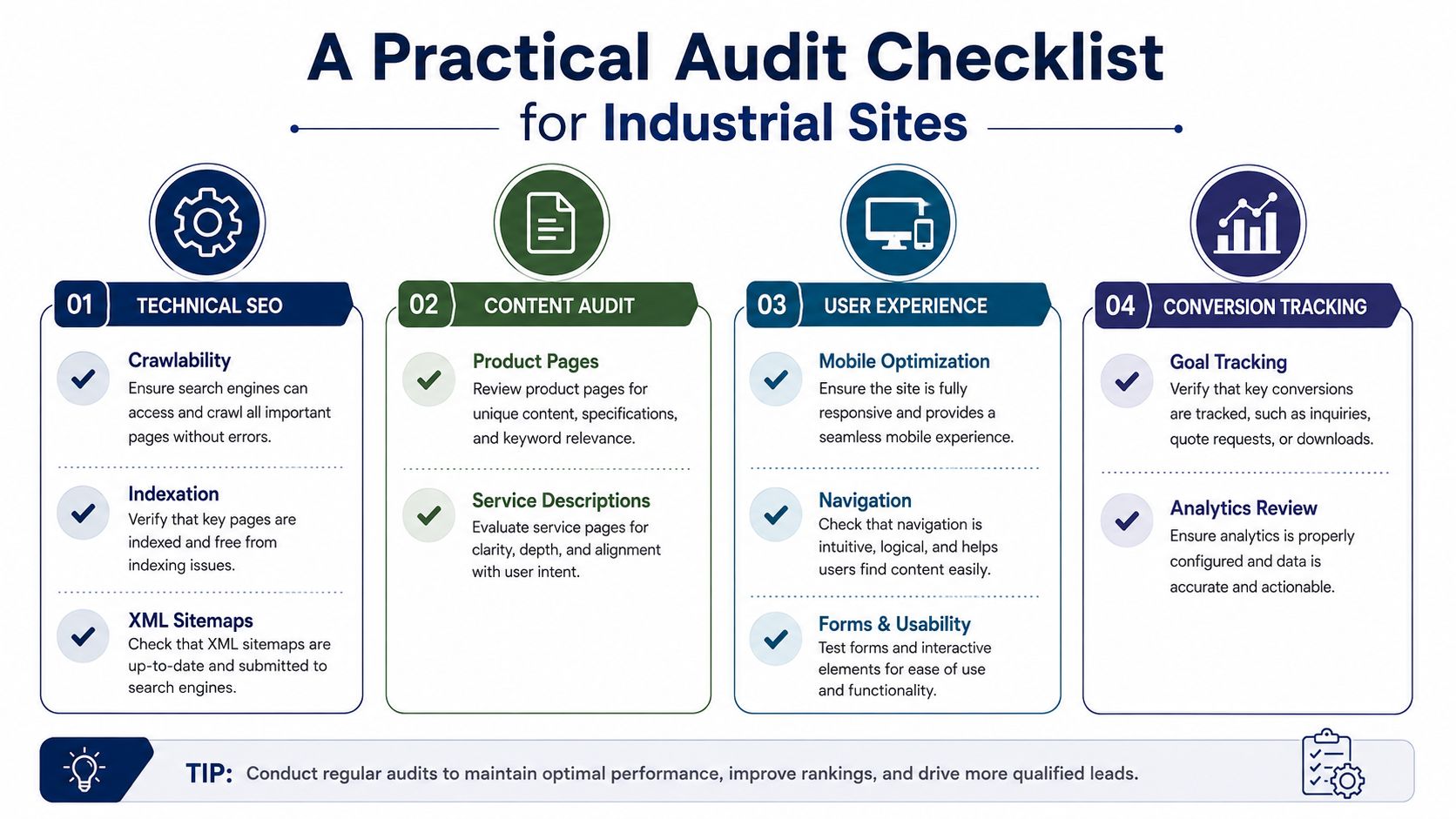
Technical SEO checks
- Can crawlers reach the important pages? Check robots.txt, XML sitemaps, and crawl logs.
- Are redirects clean and intentional? Review 301s, 302s, and redirect chains.
- Are canonicals pointing to the right version? Confirm each key page has one preferred URL.
- Are structured data types present where they matter? Look for Product, Organization, and BreadcrumbList.
- If you operate in multiple regions, is hreflang implemented correctly? Verify language and country targeting.
Content and buyer intent checks
- Does the page answer capability questions quickly? Look for material, tolerance, process, and certification details.
- Can buyers find drawings, specs, or PDFs without hunting? Test the path from landing page to asset.
- Do service pages match how engineers search? Compare the language on the page with the terms buyers use.
- Is each major page tied to a clear intent? Check whether the page is built for discovery, evaluation, or quote request.
Performance and mobile checks
- Do Core Web Vitals meet the good range? Use Search Console and field data for validation.
- Are product images compressed and sized correctly? Review heavy hero assets and galleries.
- Do JavaScript-heavy elements slow down product configurators? Test forms and interactive tools.
- Does the site work well on plant-floor phones and tablets? Open the site on mobile and complete a real task.
Conversion and trust checks
- Can a buyer submit an RFQ in a short, clear flow? Count the steps and fields.
- Do calls to action appear where intent is highest? Check capability pages, not just the homepage.
- Is HTTPS clean, with no mixed content warnings? Inspect browser behavior and page source.
- Are trust badges, privacy links, and compliance cues visible where decisions happen? Review the footer, forms, and quote pages.
A useful field rule is to mark anything that blocks a quote request or hides a core capability as a yes-no issue, not a vague note. That forces the team to act instead of debating wording.
Prioritizing Findings with an Impact vs Effort Framework
An audit is only useful if it tells you what to fix first. I've seen too many teams walk out of a review with a long spreadsheet and no ranked order, which usually means the urgent items get delayed while everyone argues about the easy ones.
Practical rule: If a finding touches the RFQ form, a product page, or schema, move it up one tier in priority.
Use a simple two-axis matrix. Score revenue impact from high to low, and fix effort from high to low. High impact means the issue blocks crawling, hurts a money page, or removes a page from indexation. High effort means developer time, CMS work, or ripple effects across templates.
| Quadrant | What It Means | What You Do |
|---|---|---|
| Quick Wins | High impact, low effort | Fix immediately in the current sprint |
| Strategic Projects | High impact, high effort | Plan, assign, and schedule with owners |
| Fill-Ins | Low impact, low effort | Bundle into spare capacity |
| Thankless Tasks | Low impact, high effort | Drop them unless they unlock something bigger |
Here's the rubric I use. A broken RFQ form is high impact, no debate. A missing alt attribute on a low-value image is usually low impact. A canonical problem on a category page can move up fast because it affects how search engines see the whole section of the site. Effort depends on access, template dependency, and whether the fix repeats across many pages.
The mistake manufacturers make is trying to sort by “SEO importance” alone. That's too narrow. A change that improves crawlability but does nothing for quote flow can still be worth it, but only if it also supports a revenue path.
How Often to Audit and What Triggers a Re-Audit
A manufacturer site should be treated like revenue infrastructure, not a brochure that gets reviewed when someone has spare time. The cadence needs to reflect how often the site changes and how much the site matters to lead flow.
My baseline recommendation is a full audit every quarter, a lighter technical crawl monthly, and alternating content and conversion reviews in the middle months. That's a better fit than a once-a-year event, especially when your site carries product discovery, RFQs, and trust-building at the same time.
Certain events force an immediate re-audit.
- A migration or CMS change can break URLs, templates, and tracking.
- A Google core update can shift which pages surface and which don't.
- A sharp drop in organic traffic or demo requests can point to indexing or conversion decay.
- A new product line launch can reshape the URL map and internal linking.
- A new gated asset or calculator can change how leads move through the site.
The reason to re-audit early is simple. Waiting until traffic falls is the most expensive time to discover the leak. By then, you're diagnosing damage instead of preventing it.
I also adjust cadence by site size and update velocity. A stable brochure site needs less frequent deep review than a fast-changing industrial catalog. The rule is straightforward, if the site changed, the audit changes with it.
Sample Deliverables and Your Next Step
A finished audit should produce decisions, not just observations. If the report can't tell your team what to fix, who owns it, and why it matters, it's unfinished.
| Deliverable | Primary Audience | Decision It Enables |
|---|---|---|
| Executive summary | Owner, marketing lead, leadership team | Whether the site is healthy enough to rely on for lead generation |
| Prioritized findings register | Marketing and web team | Which items to fix first and which to defer |
| Technical issues log | Developer, agency, SEO lead | What needs a crawl, indexation, schema, or speed fix |
| Content gap report | Marketing, sales, subject matter experts | Which buyer-stage topics the site is missing |
| Conversion review | Sales, marketing, operations | Where forms, CTAs, or trust signals are costing quotes |
That's the level of output you want from a serious review, especially if you're rebuilding or planning a site change. If you're also thinking about structural updates, our website redesign for SEO perspective is useful because a redesign should protect search equity, not erase it.
The next step is simple. Package the audit into a one-page brief with three revenue-critical fixes, one owner for each, and a 30-day action window. That turns the audit from a PDF into a work plan.
A good audit doesn't end with “we found issues.” It ends with “here's what we're fixing first, and here's who owns it.”
If you want a manufacturer-focused diagnostic that ties technical SEO, conversion paths, and lead quality together, Machine Marketing can help you run it the right way. Visit Machine Marketing to see how we approach website and marketing audits for industrial companies that need clearer priorities and better pipeline.
