
You already know the pattern. A sales engineer opens a product page, hits play, and finds either a glossy 20-second reel that says nothing or a long, wandering tour that never proves the machine will do the job on their floor. That's the problem with most product demonstration videos for manufacturers, they're built like marketing assets, not like buying tools. Buyers want proof, fit, and confidence, and the video has to answer those questions fast.
Table of Contents
- The Demo Video Gap on the Manufacturing Floor
- Planning the Message for Technical Buyers
- Scripts and Shot Lists That Actually Film
- Recommended Gear and Shop-Floor Settings
- In-House Versus Agency Production
- Editing Priorities That Build Buyer Trust
- Hosting, Metadata, and On-Page Embedding
The Demo Video Gap on the Manufacturing Floor
A machine shop buyer doesn't need a prettier video. They need to know whether the part fits, the cycle holds, the operator can run it, and the result looks like what the purchase order promised. That's why so many demos fail. They show motion, but not evidence.
Industrial buyers are also more skeptical than casual ecommerce shoppers. They're comparing integration fit, downtime risk, setup time, and who has to touch the process after install. The format has to respect that reality. A product demo video isn't a creative asset you hand off and hope for the best, it's a conversion variable tied to how people make decisions.
The buying journey has also shifted into a phone-first habit. In a 2025 B2B video-marketing roundup, 73% of B2B decision-makers preferred product demo videos over whitepapers or brochures, 82% said they watch more business-related videos than they did two years earlier, and 65% watch at least one video every week during research, with mobile devices accounting for 48% of B2B video views, up from 34% in 2021 (B2B video marketing statistics roundup). That means your video has to work on a small screen, in a noisy setting, with a skeptical viewer who's scrolling fast.
Practical rule: If the demo doesn't answer the buyer's next objection, it's just decoration.
A useful mental model comes from the strategist's side of video work. If you need a framework for judging whether a demo is built for engagement and not just playback, the vitelnk video engagement platform is a helpful reference point for thinking about audience attention as a system, not a guess.
The rest of this is simple. We diagnose what the buyer needs, build a message that speaks to that need, then turn it into footage that proves the point.
Planning the Message for Technical Buyers
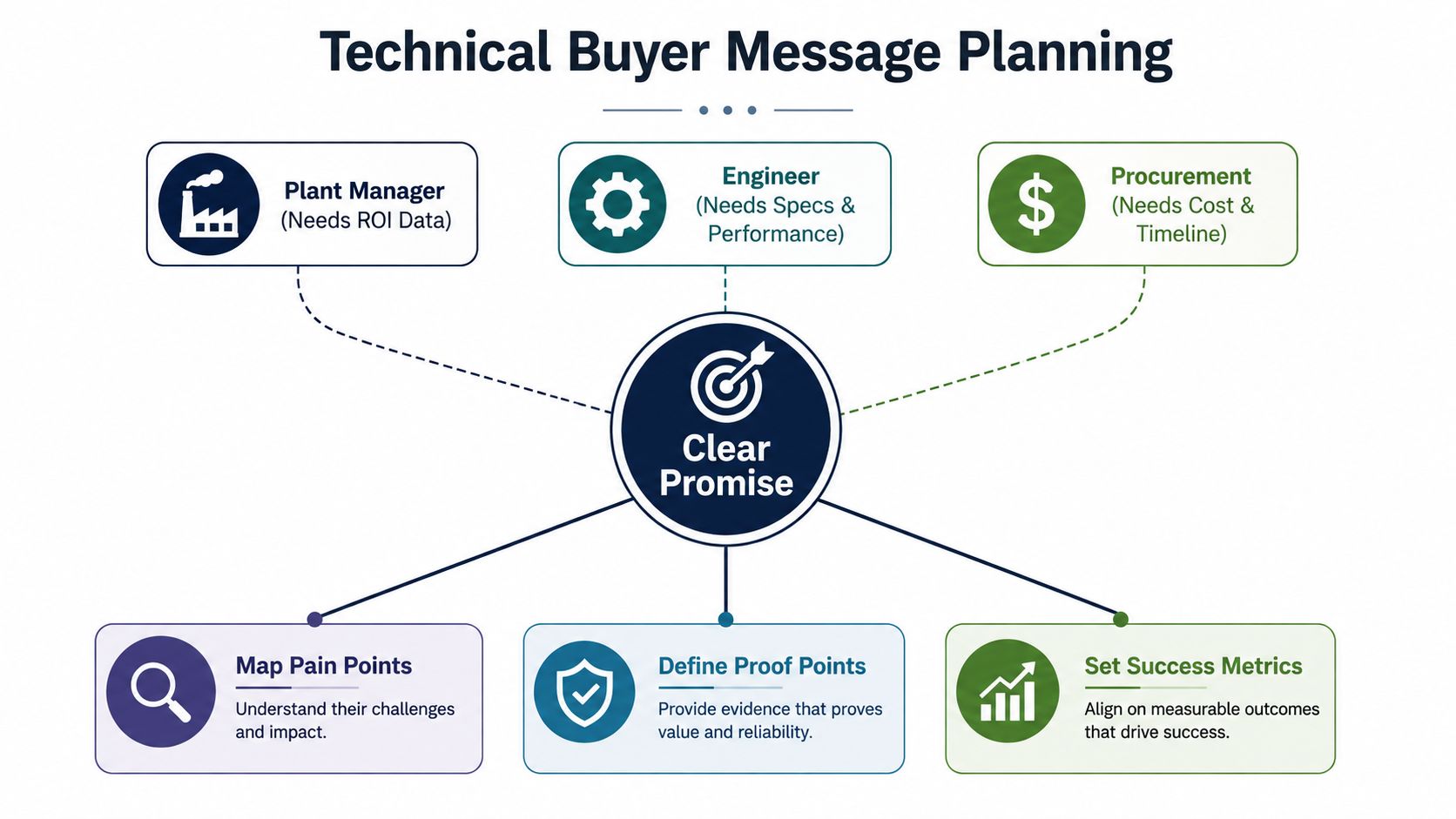
Before you book a camera, write one promise. Not five. Not a feature list. One sentence that tells the right buyer what changes after they watch the demo.
A manufacturing buyer usually comes in at three levels. The engineer wants specs, tolerances, and performance. The operations lead wants throughput, uptime, and a process that won't become a maintenance headache. The owner wants return on investment, risk reduction, and a shorter path to a decision. If your message tries to satisfy all three with the same language, it usually satisfies none of them.
Build a one-page message brief
Use a single page with these fields:
- Primary promise. What should the viewer believe by the end?
- Three objections. What will the buyer challenge first?
- One visible outcome. What should they be able to picture after the demo?
- Proof sources. What do you have on camera, in the machine, or in the process that backs the claim?
That brief keeps the demo from becoming a spec dump. It forces the conversation into a problem-solution flow, which is where industrial buyers evaluate. If you've already mapped audience roles, keep that work close to your script planning. Our internal process usually starts with buyer context, and the buyer persona framework is the cleanest way to keep those roles distinct.
A 30-minute interview with a sales engineer is enough to seed the script. Ask what question stalls the deal, what proof gets the fastest nod, and what happened on the last quote that almost got lost. Then stop talking and write down the actual words they use. That language is gold.
What to look for: if the sales engineer keeps repeating the same objection in different forms, that's your opening hook.
A good demo doesn't try to impress the viewer with breadth. It narrows the field. The strongest message is usually the one that makes a buyer say, “That's the exact thing I'm worried about.”
Scripts and Shot Lists That Actually Film
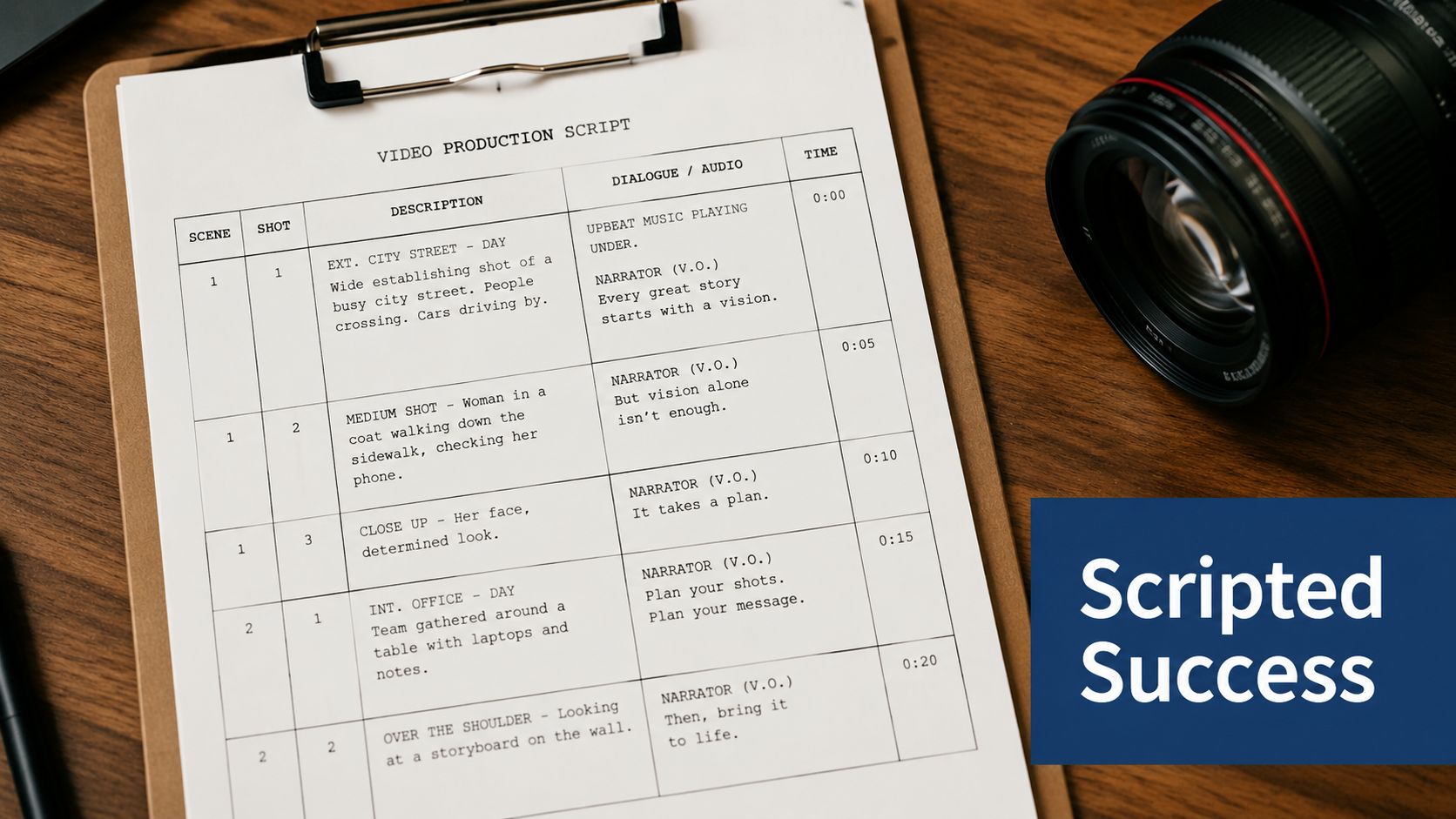
A usable script is not a speech. It's a timed map of what the camera needs to capture and what the buyer needs to understand. For shop-floor demos, I like to work in short beats because long blocks get bloated fast once the machine starts running.
Use a beat sheet, not a speech
A clean structure looks like this:
- Hook. Name the problem in the buyer's words.
- Problem. Show the pain point in context.
- Demo moment. Put the machine, part, or process on camera doing the work.
- Proof. Show the result, measurement, or finished output.
- Objection-handler. Address the likely doubt inside the video.
- Call to action. Tell the buyer what to do next.
The timing matters. Keep each beat tight enough that the viewer doesn't drift. For top-of-funnel product demonstration videos, a 30-second to 2-minute range is the most effective window for many marketers, and deeper evaluation usually sits in the 2 to 3 minute range (product demo best practices). Vidyard also recommends two minutes as ideal and five minutes as the max for demo videos, with a script and no filler words (Vidyard demo guidance). For a manufacturing audience, that's not a suggestion. It's a discipline.
Shoot the process, not the pitch
Your shot list should cover the sequence on the floor:
- Machine setup. Show the operator loading or preparing the system.
- Handoff. Capture the moment the operator begins the cycle.
- Process in motion. Get the actual cut, press, measurement, or run.
- Output. Film the finished part or result.
- Proof close-up. Show the feature, tolerance, or surface finish that matters.
That's the content buyers trust. Not every clip needs to be cinematic. Some of the best process footage is plain, direct, and a little rough around the edges because it looks real.
The on-screen text matters just as much as the footage, especially on a muted phone. Use short captions that repeat the buyer's language, not yours. If the video is about reducing setup pain, say that. If it's about inspection confidence, say that.
A muted viewer still needs the whole story. The captions have to carry the proof.
For a practical reference on recording short-form content in a way that holds up on mobile, see the Instagram video recording guide. The principles carry over cleanly to manufacturing demos, even if the product is larger and louder.
Recommended Gear and Shop-Floor Settings
A strong demo does not need a studio. It needs steady footage, clear audio, and enough control over the light to keep the machine legible for a skeptical buyer.
Pick the right tier for the job
Start with the simplest setup that can still answer the buyer's question. A smartphone on a tripod with a lav mic is enough for many shop-floor demos, especially when the process is repetitive and the only job is to show what happens clearly. A mid-tier mirrorless rig like a Sony ZV-E10 or Panasonic GH5 makes sense when you need tighter focus control, better low-light performance, or lens flexibility. A hired cinema kit belongs on flagship launches, hero products, or any video that has to carry a lot of brand weight.
| Gear and Settings Quick Reference | ||||
|---|---|---|---|---|
| Tier | Camera | Audio | Lighting | Best For |
| Entry | Smartphone on tripod | Clip-on lav mic | Available light with one key light | Fast internal demos, simple machine walkthroughs |
| Mid-tier | Sony ZV-E10 or Panasonic GH5 | Wireless lav or shotgun mic | Mixed-light control, soft fill, practical LEDs | Product launches, repeatable content, better depth control |
| Flagship | Cinema kit | Dual-system audio or high-end wireless | Full lighting package with dedicated grip support | Hero videos, trade show launches, premium brand work |
Control the floor, not just the camera
Shop floors fight video at every angle. Fluorescent overheads, windows, reflective metal, and moving operators all affect the image. Set white balance manually so the machine does not drift blue or green. Use exposure compensation carefully when bright windows sit behind the subject, and keep highlights from blowing out on polished surfaces.
Audio is where many demos fail. Cutting noise and spindle noise will bury a weak microphone every time, so place the mic close to the speaker and out of the direct machine blast. If the message matters, have the operator hold position for the line that explains the process, then get back to work.
Safety comes first. Crew PPE, lockout-tagout where required, and production scheduling around actual runs are required, not optional. A rushed shoot that interrupts the floor costs more than it saves.
For teams that want better framing, cleaner mobile output, and a practical way to plan short-form shots before the first take, the manufacturing social video guide is a useful reference.
In-House Versus Agency Production
The right production model depends on volume, not ego. If you make one polished demo and then do nothing for months, building a full internal video function is usually wasteful. If you're shipping product updates, new cells, or repeated use-case videos, in-house capability starts to pay for itself in control and speed.
Compare the operating model, not the gear
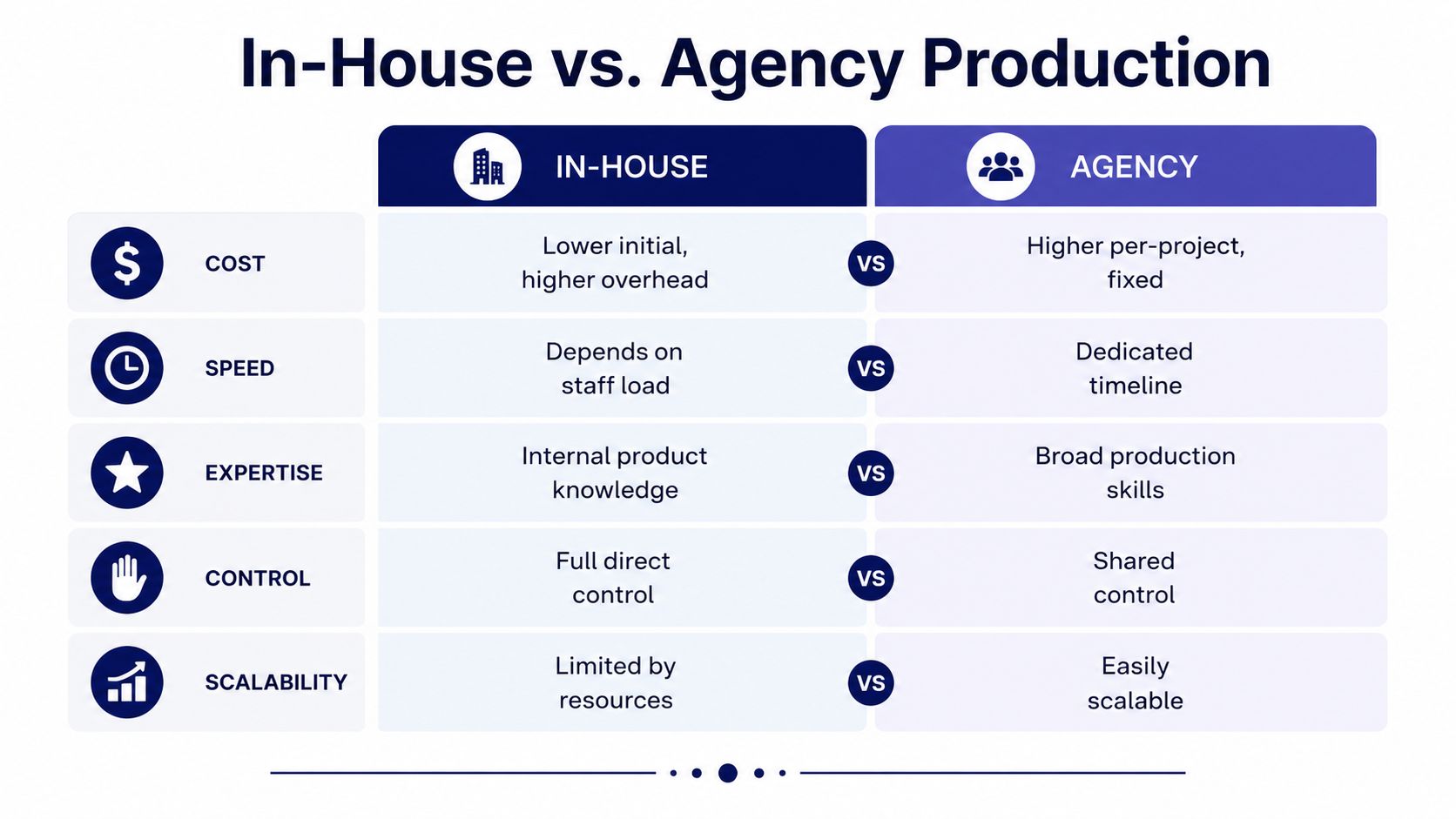
Here's the cleanest way to see it:
- Cost per finished minute. In-house looks cheaper at first, but you absorb staff time, equipment, and editing overhead. Agency work costs more per project, but the price is clearer.
- Turnaround time. In-house depends on who's available. Agencies run on a dedicated timeline.
- Brand consistency. In-house wins if you train the team well. Agencies win if you need repeatable quality right away.
- Internal capability. In-house only works if someone can shoot, edit, and manage the process. Tools don't replace the role.
- Control over messaging. In-house gives you tighter day-to-day control. Agencies still work well if your brief is strong and your approvals are clean.
The rule I use is simple. If you're producing fewer than two demos a quarter, an agency or freelance crew is usually the better investment. If you're publishing monthly content, build an internal shooter-editor role and bring in outside help for flagship launches. That's the point where the system starts to make sense.
Avoid the hybrid trap
Hybrid setups sound efficient and usually become messy. The internal team shoots one batch in a hurry, the agency steps in later with a different style, and the result looks stitched together. Buyers notice that inconsistency even if they can't explain it.
Choose one owner for the demo system. If you split the work, split it cleanly by role, not by improvisation.
Editing Priorities That Build Buyer Trust
Editing is where manufacturing demos either earn trust or lose it. The biggest mistake is polishing the video until it feels more like an ad than a proof-of-work sample. Buyers don't need cinematic motion. They need clarity and confidence.
Cut for skepticism, not style
Open with the problem in the buyer's language. The first 5 seconds should tell the viewer you understand the pain point they're carrying. If the opening sounds generic, they'll assume the rest is generic too.
Pacing matters because attention drops fast. Benchmarks compiled in product-video roundups show that landing pages with video can lift conversions by up to 80 to 86%, and product-page videos can raise add-to-cart behavior by 37 to 144% depending on study and category (conversion impact roundup). That doesn't mean every manufacturing demo will hit those numbers. It does mean the edit has real commercial weight, so every second has to do a job.
Use jump cuts on process footage when needed. They keep the video honest and move the viewer through the sequence without pretending the shop floor is a commercial set. Smooth pans are fine in small doses, but they shouldn't hide the work.
Answer the objections inside the cut
The buyer's three common doubts are usually simple. Does it really run that cycle time? Will it integrate with our line? What happens when something goes wrong? Put the answer to each doubt in the video itself, not in a follow-up call.
- Cycle time doubt. Show the machine doing the work, then show the result.
- Integration doubt. Show where the product fits in the process.
- Failure-risk doubt. Show the fallback, service path, or support point if you can document it.
For editing software choices, I'd rather point you to a tool list that understands practical production constraints than a flashy feature roundup. The software recommendations from Flexwork Podcast Studios are a solid starting point if your team needs a grounded editor stack.
Caption everything that matters. A muted buyer still needs the point, and if a viewer can't tell what changed by the end, the cut isn't finished.
Hosting, Metadata, and On-Page Embedding
A good demo that lives in the wrong place is wasted effort. Discovery, embed strategy, and search metadata should work together as one system, not as separate chores.
Put the video where buyers already look
YouTube is still strong for discovery because industrial buyers search there when they're comparing options. Vimeo is cleaner for controlled embeds, and a self-hosted MP4 gives you the most control on your own site. The right answer depends on whether you care more about reach, brand control, or site performance.
Write the metadata like an industrial searcher would search. Use a title that names the machine, use case, or process. Write a description that states the problem, the proof, and the next step. Tags should stay specific, not fluffy. If you want a deeper SEO framework for the broader site, the manufacturing SEO guide is the right companion piece.
Embed for the buying page, not just the homepage
Place the hero demo above the fold on the product page so it's impossible to miss. Add a longer, more detailed embed on the spec page where a technical buyer is already comparing options. For retargeting, use a stripped-down version that loads quickly and stays focused on one action.
If you're uploading to shoppable platforms, the technical limits matter. Amazon's shoppable video requirements accept MOV or MP4, allow a maximum file size of 5 GB, support resolution up to 1080p, accept 16:9 or 9:16 aspect ratios, and require a duration of 1 to 12 minutes. The policy also prohibits external links, promotional calls to action, unauthorized music or artwork, visible third-party branding, misleading claims, and blurry or low-quality content (Amazon shoppable video requirements).
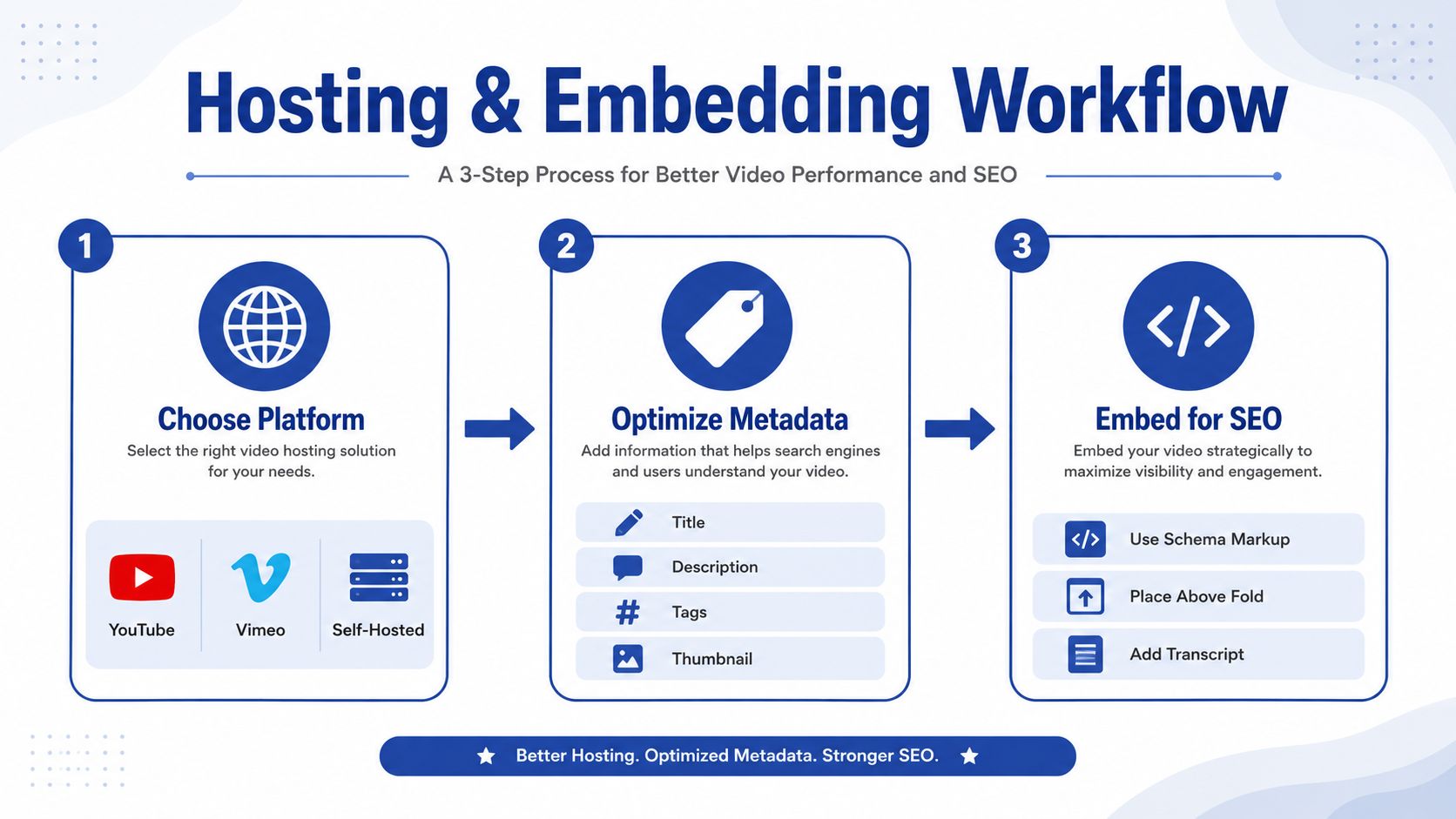
The video is only one piece of the system. If the page doesn't support the claim, the host doesn't support the buyer, and the metadata doesn't match the search intent, the whole asset underperforms. Tighten those pieces together before you publish.
If your current demo videos feel too polished, too vague, or too long, we can help you diagnose the gap and rebuild the system around how industrial buyers buy. Visit Machine Marketing if you want a partner who understands manufacturing audiences, clean messaging, and the difference between a video that looks good and a video that helps sales close.
