
Buying a CRM is popular advice for manufacturers that want better follow-up, cleaner forecasts, and more efficient sales operations. It's also incomplete. CRM and automation only produce revenue improvements when the underlying workflow, ownership model, and data architecture are disciplined first. Otherwise, you're not automating growth. You're making a broken process run faster, while paying for software seats your team may not use.
The practical question isn't which platform has the longest feature list. It's whether your business can define how an inquiry becomes a qualified opportunity, how technical information moves between teams, and which actions should remain under human control. The framework below treats CRM as an operational system, not an expensive address book.
Table of Contents
- Why Most Industrial CRM Deployments Fail
- Mapping the B2B Manufacturing Workflow
- Data Architecture and Automation Prerequisites
- Building Lead Scoring and Routing Logic
- Governing AI Agents and System Autonomy
- Driving Adoption and Measuring Revenue Impact
Why Most Industrial CRM Deployments Fail
A CRM won't repair a sales process that nobody has defined. If sales representatives manage opportunities in spreadsheets, email threads, personal notes, and memory, installing software merely gives those habits a new interface.
Manufacturers often buy a platform because they want better visibility. Then they customize it around the old process. The result is a system with too many fields, unclear stages, duplicate records, and reports that look precise but don't reflect what's happening in the pipeline.
Industry summaries put CRM implementation failure rates between 20% and 70%, while one synthesis found that more than 60% of failures trace to user adoption, poor communication, unclear responsibilities, and insufficient training, rather than software defects. These figures are documented in Huble's CRM change management analysis. The pattern matters because replacing the platform doesn't solve a responsibility or adoption problem.
Treat implementation as process engineering
Before you compare Salesforce, HubSpot, Zoho, or another system, document the process you expect the software to support. Start with the customer journey, then identify the decisions, data, and handoffs at each stage.
For an industrial firm, that usually means answering questions such as:
- Inquiry ownership: Who responds when a request arrives through the website, email, distributor, or trade show?
- Qualification responsibility: Who confirms application, budget, authority, timeline, and technical fit?
- Technical handoff: Which engineer receives drawings, specifications, plant requirements, and production constraints?
- Commercial control: Who approves pricing, lead times, discounts, and non-standard terms?
- Pipeline accountability: What evidence allows a deal to move from one stage to the next?
If the answer is “it depends on the salesperson,” you don't have a repeatable process yet. You have individual workarounds. A structured CRM implementation process should expose those workarounds before configuration begins.
Practical rule: Never automate a step that has no owner, no required input, and no agreed definition of completion.
Why legacy customization causes damage
Customization feels safe because it preserves familiar behavior. In practice, it often embeds the very inefficiencies management hoped to eliminate. A representative who never updates a pipeline stage won't become more consistent because the stage now has a custom label.
Weak adoption also corrupts automation. If activities aren't logged and opportunity fields remain incomplete, routing rules fire incorrectly, reports omit important context, and forecasts become unreliable. The system may be technically operational, but the business still lacks dependable information.
The right success criterion is sustained usage. A deployment is successful when representatives record the activities that matter, managers inspect the same pipeline definitions, and marketing and sales use one agreed handoff process. Go-live is an event. Adoption is an operating discipline.
Mapping the B2B Manufacturing Workflow
Automation rules should follow the actual path of a deal, not the menu structure of a software platform. Map the journey from first inquiry to closed deal on one page before you migrate data or create workflows.
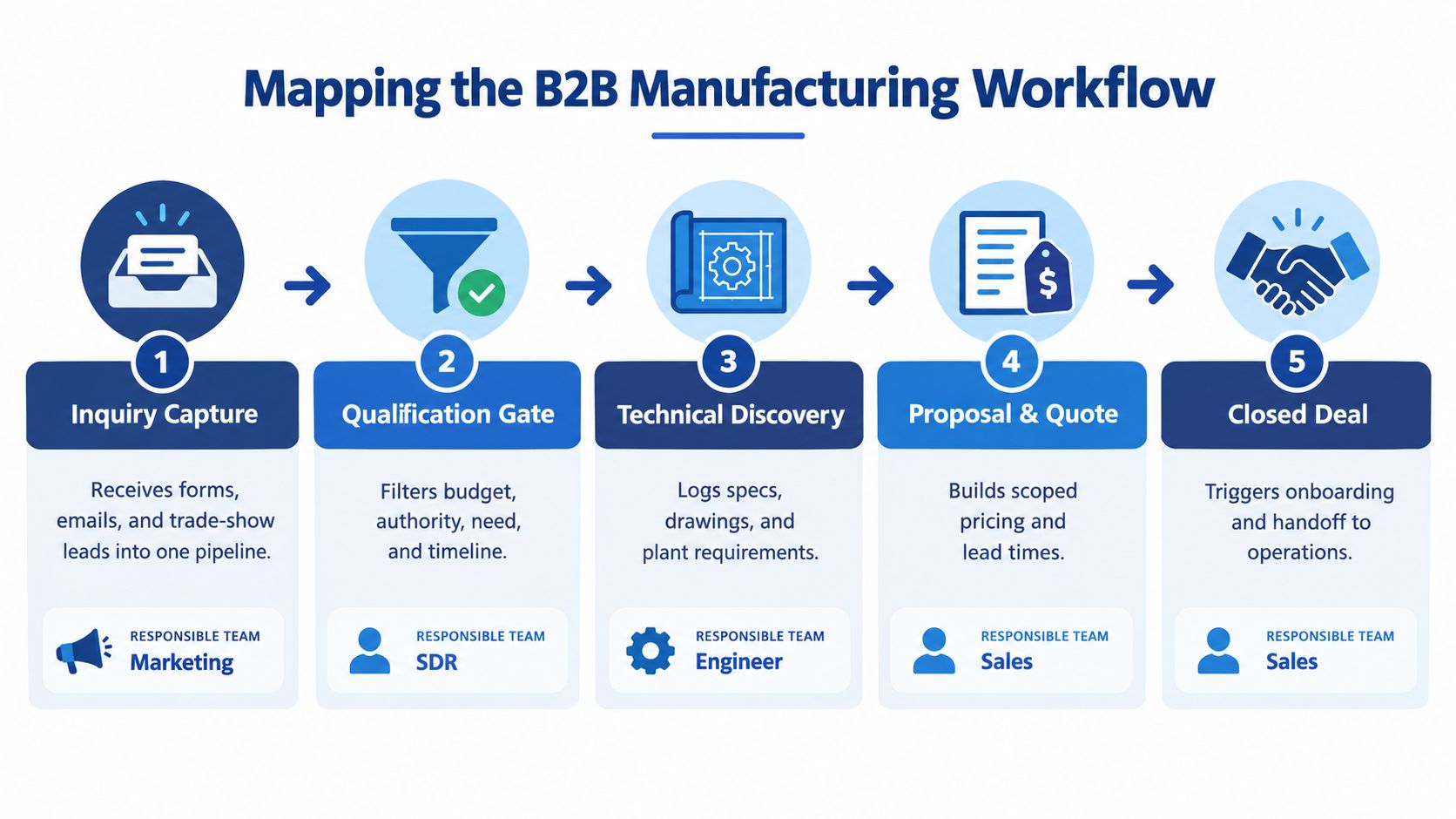
Start with five operational stages
Use a small number of stages that correspond to the decisions your team makes. A manufacturing pipeline might use the following sequence:
- Inquiry capture: Bring web forms, inbound emails, calls, distributor referrals, and event leads into a common record. Record the original source and the product or application mentioned.
- Qualification gate: Confirm whether the account fits your market, whether there's a credible application, and whether the contact has a realistic project or purchase need. Don't treat every form submission as a sales opportunity.
- Technical discovery: Capture equipment requirements, drawings, materials, operating conditions, compliance needs, plant details, and stakeholders. Assign an engineer when the opportunity requires technical evaluation.
- Proposal and quote: Record the agreed scope, pricing assumptions, lead time, quote version, approval status, and next customer commitment. A quote sent without a defined follow-up date isn't a controlled stage.
- Closed deal: Trigger the handoff to operations, project management, purchasing, or customer success. Closed-won should create a clear onboarding checklist, not end the information trail.
Each stage needs an entry condition and an exit condition. “Sales is working on it” isn't an exit condition. “Technical requirements documented, decision process identified, and next meeting scheduled” is much more useful.
Assign ownership before you build alerts
A lead can pass through several teams, but every stage needs one accountable owner. Marketing may own capture, an SDR or sales coordinator may own qualification, an applications engineer may own technical discovery, and an account representative may own the commercial process.
Write the handoff into the CRM:
- Required fields: Define what must be present before a stage can advance.
- Service expectation: Specify when the next owner receives the task and notification.
- Acceptance signal: Require the receiving person to accept or return the record with a reason.
- Escalation path: Identify who reviews stalled or unassigned records.
- Source preservation: Keep the original acquisition source through the opportunity lifecycle.
Integrated lead management remains uncommon. A benchmark found that only 14% of respondents performed seven or more integrated lead management processes, yet those marketers achieved 211% lead management ROI, as reported in the integrated lead management benchmark. The useful lesson isn't to copy a percentage into a forecast. It's to connect capture, qualification, routing, follow-up, and reporting instead of automating each activity in isolation.
For a more detailed framework, use B2B customer journey mapping to document the customer's decisions alongside your internal handoffs. Your CRM architecture should reflect both.
Data Architecture and Automation Prerequisites
Automation is only as dependable as the records it reads. A workflow that routes leads by industry, product line, territory, or project size will fail when those fields are missing, inconsistent, or stored differently across systems.
Manufacturers should resist the temptation to begin with elaborate nurture journeys. Start with the records and tasks that create immediate operational value, then expand after the inputs prove reliable.
Establish the data model first
Define the objects your team needs and the relationship between them. An industrial CRM commonly requires separate but connected records for companies, contacts, inquiries, opportunities, products, quotes, and post-sale work.
Then standardize the fields that control decisions:
- Company identity: Use a consistent account name, website, location, industry, and ownership structure.
- Contact role: Distinguish engineering, operations, procurement, executive, and commercial contacts.
- Application data: Capture equipment type, material, capacity, environment, compliance needs, and project status where relevant.
- Lifecycle state: Separate inquiry, qualified lead, opportunity, customer, inactive account, and disqualified records.
- Commercial details: Store estimated scope, quote status, expected timing, and next action in defined formats.
Set validation rules before migration. Make critical fields required at the point where the team first knows the answer, not after the opportunity has already advanced. Create deduplication rules for company names, domains, email addresses, and contact records. Normalize dropdown values so “OEM,” “Original Equipment Manufacturer,” and “oem” don't become three different segments.
First-party data strategy is particularly relevant when your systems need a durable source of customer and prospect information. The aim is not to collect everything. It's to decide which data your business owns, how it's maintained, and which workflows are allowed to change it.
Automate the narrow work before the complex work
HubSpot's 2026 marketing statistics report that 47% of marketers use automation to make processes more efficient, while 93% use it for administrative tasks and about 92% use it for data analysis and reporting, according to HubSpot's marketing statistics. Those use cases point to a sensible starting sequence.
Automate repetitive, observable tasks first:
- Create a follow-up task when a qualified record enters a stage.
- Route a complete inquiry to the correct territory or product owner.
- Generate meeting notes or documentation for review.
- Notify managers when required information is missing.
- Produce pipeline and activity reports from standardized fields.
Delay full customer journeys until you know the data is trustworthy. If lifecycle stages are wrong, automated emails reach the wrong audience. If duplicate contacts exist, people may receive conflicting messages. If product or application fields are incomplete, scoring logic creates activity without creating useful sales conversations.
Pilot each workflow with a small group. Review whether the trigger fired, whether the right person received the task, whether the data changed as intended, and whether the customer experience remained appropriate. Weekly monitoring is more useful than waiting for a monthly report to reveal that a rule has been misrouting inquiries.
Building Lead Scoring and Routing Logic
Generic lead scoring often rewards the wrong behavior in industrial sales. A prospect who downloads several documents may be researching broadly, while a plant engineer who submits one detailed application request may be much closer to a commercial conversation.
Build scoring around fit, intent, and readiness, then use routing to place the record with someone who can act on its context.
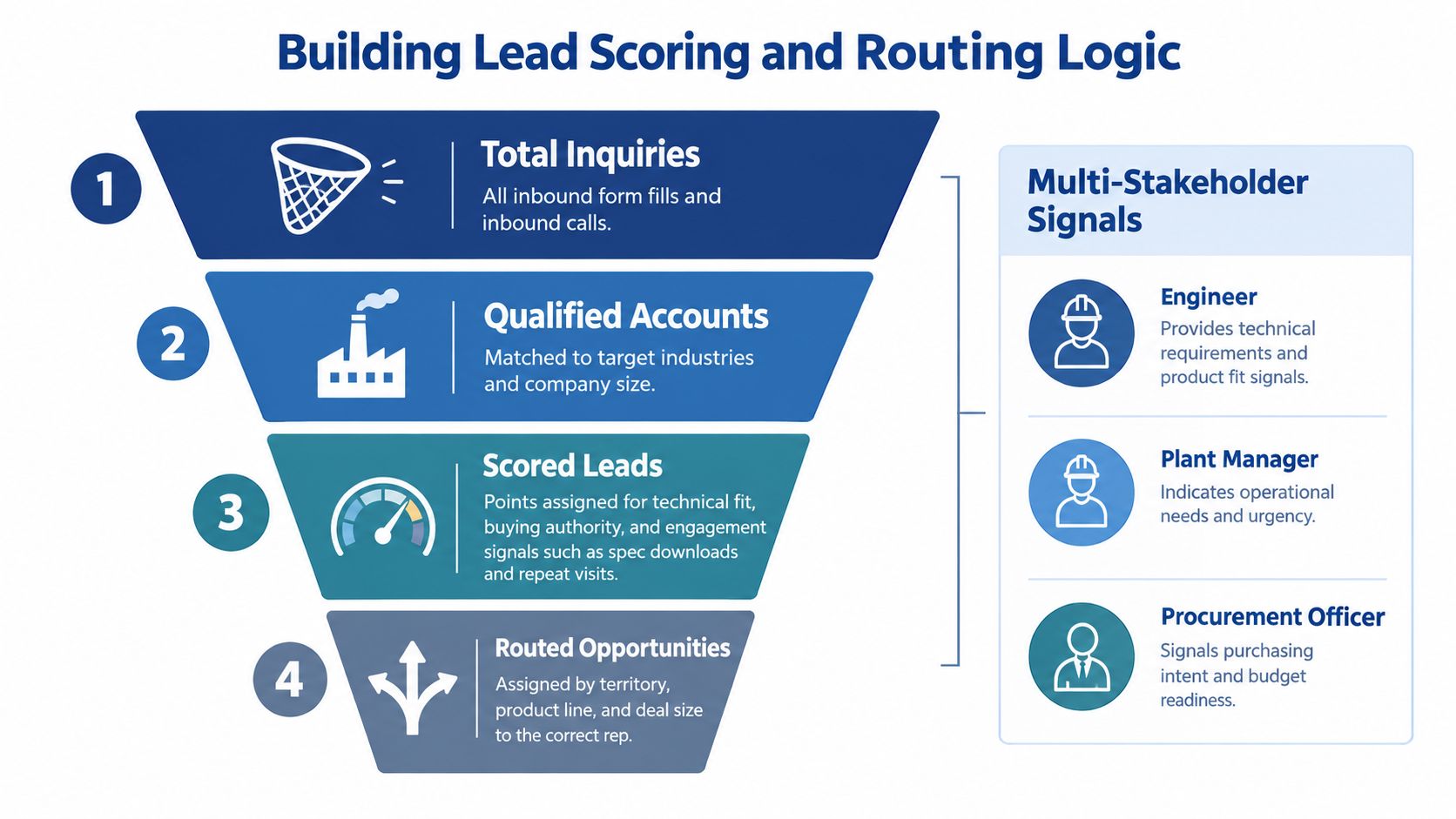
Separate account fit from buying signals
Firmographic data tells you whether an account belongs in your target market. Behavioral and project data tells you whether something is happening now. Keep those dimensions visible instead of blending them into one opaque score.
A practical model can evaluate:
- Target fit: Industry, manufacturing process, geography, company profile, and product compatibility.
- Application relevance: Whether the stated equipment, material, operating condition, or production issue matches your capabilities.
- Buying role: Engineer, plant manager, procurement officer, owner, or another stakeholder.
- Engagement quality: Detailed form completion, repeat visits to technical content, specification downloads, meeting requests, or quote requests.
- Project timing: Active project, future planning, replacement need, maintenance issue, or exploratory research.
Use negative signals too. A request outside your service area, an unsuitable application, an incomplete inquiry, or a student research request should reduce sales priority or follow a different path.
Don't let a score become a substitute for judgment. Define the evidence required for a sales-ready threshold, and review examples with representatives who understand the buying process.
Route by capability, not just geography
Territory routing is useful, but it's insufficient for complex manufacturing. Assign records according to the combination of territory, product line, application, deal scope, and technical complexity.
For example, an inquiry involving a non-standard material may need an applications engineer before a commercial representative can quote it. A repeat customer requesting a familiar component may go directly to the account owner. A distributor lead may require channel review rather than the same sequence used for an end user.
Create explicit routing outcomes:
- Sales follow-up: The record meets fit and readiness conditions.
- Technical review: The application needs engineering input before qualification.
- Nurture: The account fits, but timing or project evidence is weak.
- Disqualification: The request falls outside defined commercial or technical criteria.
- Manual review: The data is incomplete or contradictory.
A CRM can help employees save 5 to 10 hours per week and shorten the average sales cycle by 8 to 14 days, according to Freshworks' CRM statistics. Treat those figures as directional context, not a promise. The operational mechanism is faster triage and fewer forgotten follow-ups, not the score itself.
Use the video below as a discussion prompt with your sales and marketing teams. Ask them which signals indicate real project intent and which merely indicate research activity.
Review routing weekly during the pilot. Track misrouted records, unanswered tasks, returned leads, and opportunities that advanced without the required evidence. Those exceptions will show you where the model needs refinement.
Governing AI Agents and System Autonomy
CRM is moving from a record-keeping tool toward a system of action. Coverage of 2026 CRM trends highlights agentic AI, multi-agent orchestration, and conversational interfaces, but the important implementation question is less exciting and more consequential: what may an agent do without approval?
Give AI autonomy in proportion to the risk of the action. A useful governance model has three levels.
Define the approval boundary
Low-risk actions can usually run automatically. These include summarizing a meeting for review, creating an internal task, suggesting a next step, flagging a stale opportunity, or classifying an inbound inquiry for a human to inspect.
Moderate-risk actions should prepare an output but require approval. Examples include assigning a lead to a representative, changing a lifecycle stage, sending a personalized follow-up, or updating a forecast category. The agent can recommend the action and show the evidence, while a designated person confirms it.
High-risk actions should remain human-controlled. Pricing changes, quote commitments, contract language, customer-facing technical claims, account deletion, and any action that changes financial or legal exposure require explicit authorization.
This structure is more useful than a general rule to “use AI carefully.” It gives operations a permission matrix, an owner for each exception, and an audit trail when the system makes a recommendation.
Teams evaluating orchestrating specialized AI agents should also define how agents share context. One agent might classify an inquiry, another might summarize technical requirements, and a human might approve the routing decision. Without clear boundaries, multi-agent workflows can pass incomplete or unverified information from one action to the next.
Monitor exceptions and control cost
Log every autonomous action, the data it used, the result, and whether a person reversed it. Review failures by category, not just by individual record. If an agent repeatedly misclassifies a product application, the problem may be field design or training data rather than the model.
Pricing also belongs in the governance discussion. CRM licensing is shifting beyond simple seat-based models toward usage- and outcome-based structures, as described in CIO's CRM trends coverage. An agent that creates unnecessary tasks, calls external services excessively, or triggers redundant workflows can increase cost without improving revenue.
Set limits around action volume, escalation rules, data access, and spend. Automation should reduce operational friction, not create a second system that nobody can explain.
Driving Adoption and Measuring Revenue Impact
A configured CRM becomes valuable only when people use it during real work. Training that teaches buttons and menus won't change behavior if representatives still need spreadsheets to understand technical requirements, quotes, or next actions.
Adoption improves when the CRM reflects the workflow the team already agreed to, removes duplicate entry, and gives managers a consistent way to coach opportunities. The system should make the correct behavior easier than the workaround.
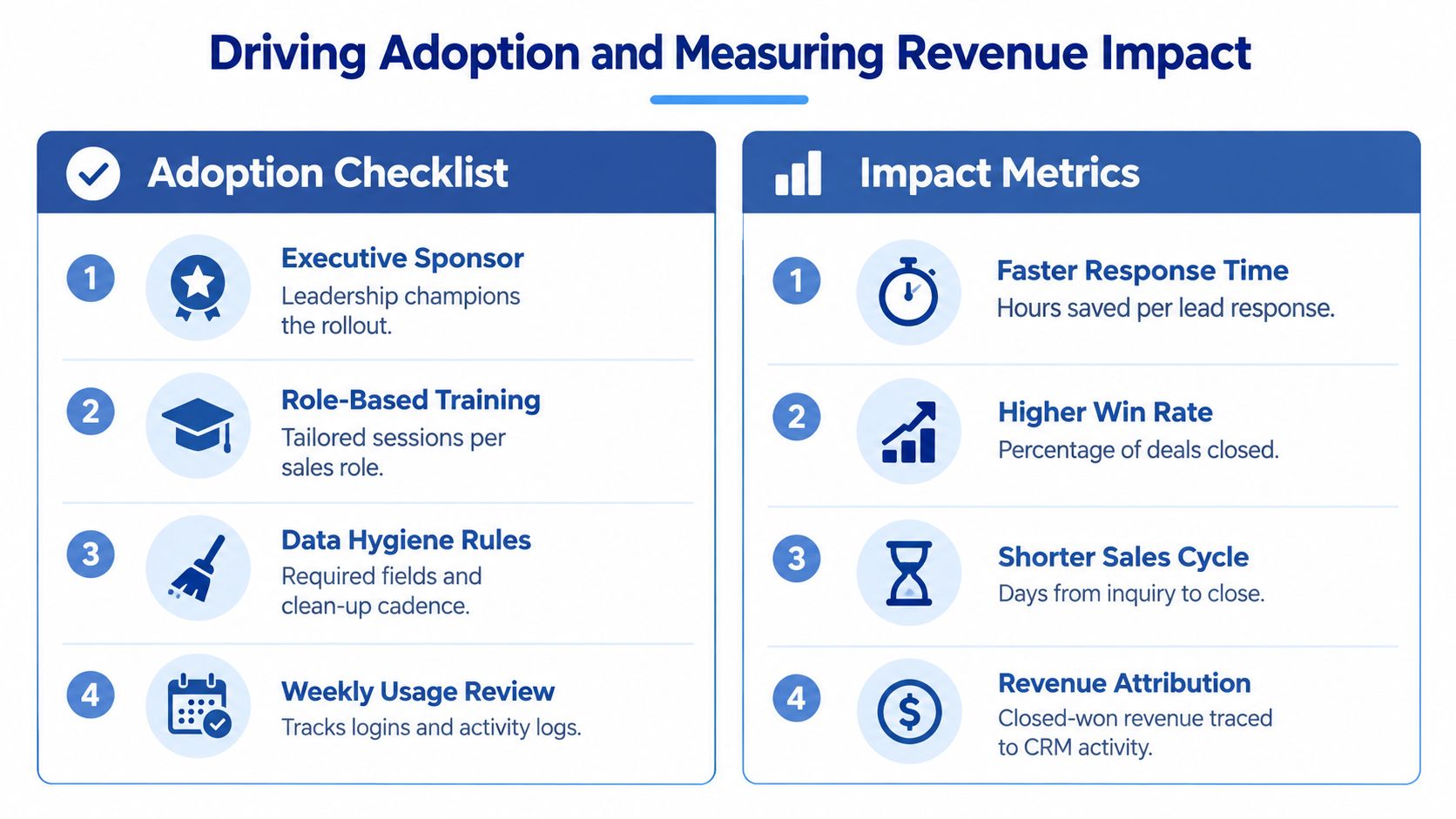
Build habits around operating moments
Train each role on the decisions it makes, not on every feature the platform contains. Marketing needs to know how to capture source and lifecycle data. Sales coordinators need to manage qualification and routing. Engineers need a low-friction way to record technical discovery. Sales leaders need reliable pipeline definitions and exception views.
Use a practical adoption plan:
- Executive sponsor: One leader reinforces that the CRM is the operating record, not an optional reporting tool.
- Role-based training: Use real inquiries, opportunities, quotes, and handoffs from the business.
- Data hygiene rules: Define required fields, duplicate handling, and a recurring cleanup owner.
- Weekly usage review: Inspect activity logging, stage movement, task completion, and exception queues.
Measure behavior before revenue. If representatives aren't updating stages or recording next actions, revenue attribution and forecasting won't be trustworthy. Once usage is stable, connect CRM activity to response time, opportunity progression, win rate, sales-cycle duration, and closed-won revenue.
CRM software can increase sales revenue by up to 29%, sales productivity by up to 34%, and sales forecast accuracy by up to 42%, according to Nutshell's CRM statistics. These are reported upper limits, not guaranteed outcomes. Your own baseline, sales process, market, implementation quality, and adoption level determine whether the investment pays off.
Manufacturers considering AI should also examine broader insights on manufacturing AI, particularly the relationship between modernization, process control, and workforce capability. AI can improve the system, but it can't compensate for undefined stages or unreliable records.
The diagnosis is straightforward. If your team can't agree on ownership, required data, and stage definitions, buy less automation and fix the architecture first. If the workflow is stable and adoption is visible, automate the repetitive steps that remove delay, then expand carefully with approval controls and weekly measurement.
Machine Marketing helps manufacturers diagnose CRM gaps, design practical workflows, configure CRM and automation, and connect marketing activity to measurable pipeline outcomes. Visit Machine Marketing to discuss your current process, data quality, and the next implementation step with a team that understands industrial sales.
